


Introduction
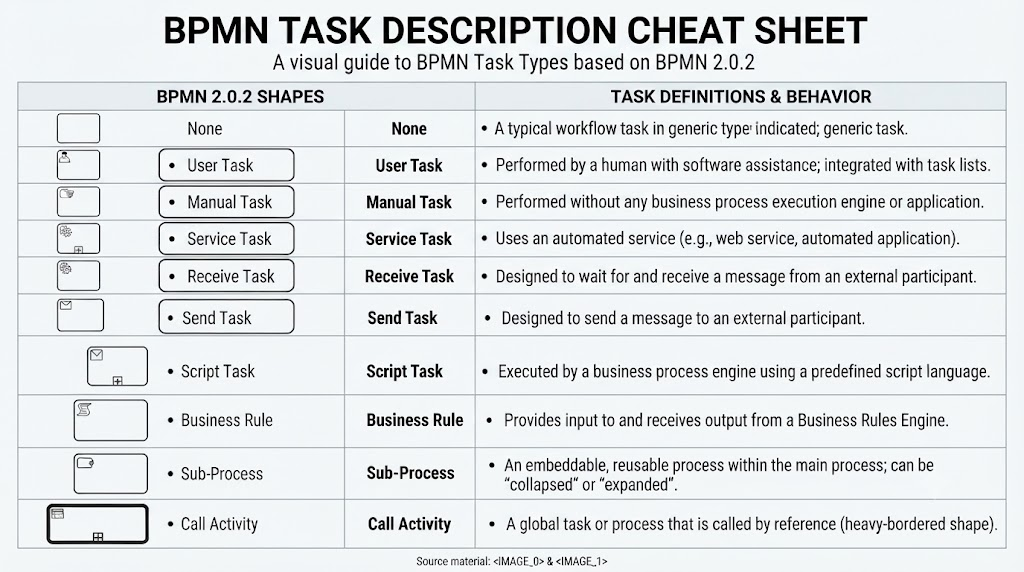
Business Process Model and Notation (BPMN) was developed with a dual purpose: to provide a simple, intuitive notation for creating business process models while maintaining the technical depth necessary to handle complex business requirements. To achieve this balance, BPMN organizes its graphical elements into specific categories, allowing readers to quickly identify basic components while leveraging additional variations to model complex scenarios without cluttering the diagram’s overall look and feel. This guide focuses on the “Task” category, detailing the various shapes and their specific roles in process modeling.
BPMN Task Definitions
Tasks are fundamental building blocks within a BPMN process. While a basic task shape indicates no special type, the notation allows for specific variations to clarify how a task is executed.
BPMN Task Description Example:
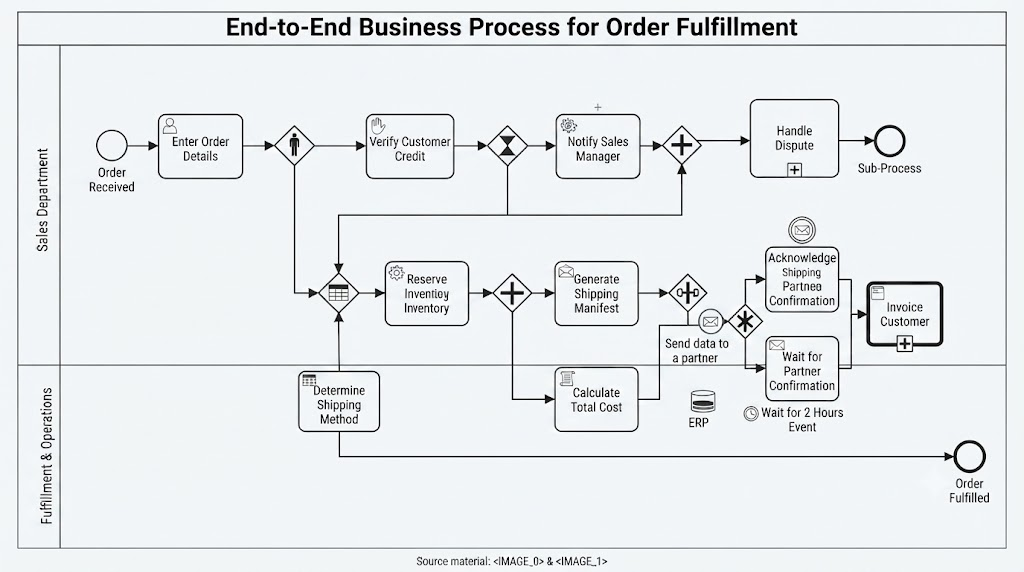
The diagram illustrates a complex process utilizing several specific BPMN task types to denote the nature of the work being performed at each step. These tasks are situated within two primary lanes: Sales Department and Fulfillment & Operations.
Task Elements in the Sales Department Lane
-
User Task (“Enter Order Details”): This task, indicated by the small user icon in the top-left corner of the rectangle, represents a step where a human performer (a sales agent) interacts with a software application to input order information.
-
Manual Task (“Verify Customer Credit”): Indicated by the hand icon, this task is performed by a human without the aid of any automated business process execution engine or application. It is a purely manual check.
-
User Task (“Notify Sales Manager”): Another User Task, this one requires the system to create a task for a sales manager to be notified, likely when a credit verification fails.
-
Sub-Process (“Handle Dispute”): This element, marked with a small plus sign, is a reusable subprocess that is currently displayed in a collapsed state. It represents a more detailed, self-contained process flow (a “Handle Dispute” workflow) that is invoked as part of the main process.
Task Elements in the Fulfillment & Operations Lane
-
Business Rule Task (“Determine Shipping Method”): This task, marked with a small table/grid icon, signifies an automated step that uses a business rules engine to determine the best shipping method based on predefined criteria.
-
Service Task (“Reserve Inventory”): Indicated by the gear icon, this is an automated task where the process engine interacts with an external service (an ERP or inventory system) to reserve the necessary stock.
-
Send Task (“Generate Shipping Manifest”): Marked with a “send” envelope icon, this automated task is designed to send a message—in this case, a shipping manifest—to an external participant, such as a shipping carrier.
-
Script Task (“Calculate Total Cost”): Indicated by the script/scroll icon, this is an automated task where the process engine executes a predefined script to calculate the total cost of the order.
-
Receive Task (“Wait for Partner Confirmation”): Marked with a “receive” envelope icon, this task is designed to pause the process flow until an external message (a confirmation) is received from a partner.
-
Call Activity (“Invoice Customer”): This element, with a thick border and a plus sign, is a global task or process. It references and calls an external, reusable “Invoice Customer” process. This allows the process to invoke a standard invoicing procedure defined elsewhere.
BPMN Task Description Example:
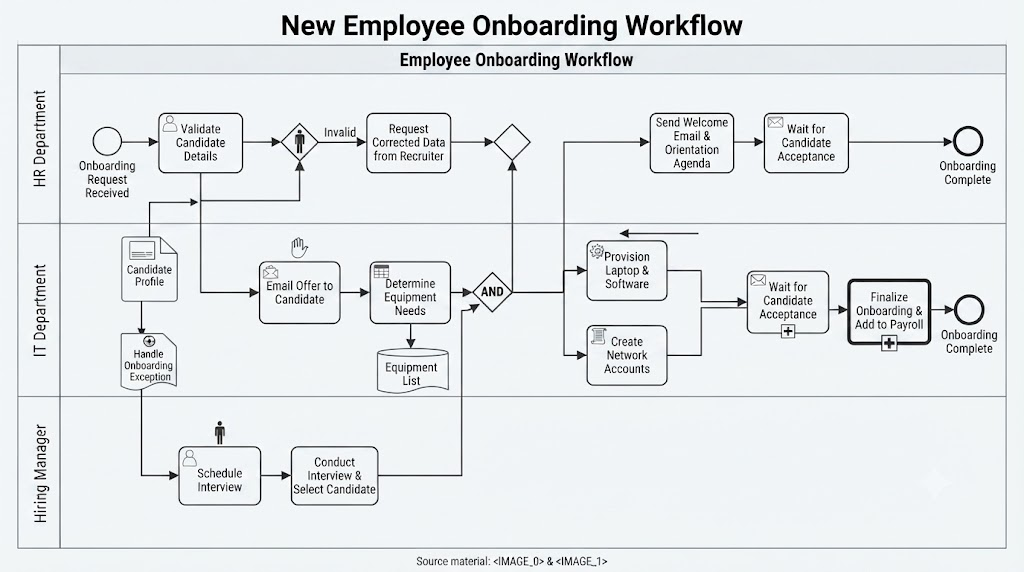
This “New Employee Onboarding Workflow” illustrates how various BPMN task types coordinate cross-departmental activities.
HR Department Lane
-
User Task (“Validate Candidate Details”): This task, identified by the human icon, involves an HR staff member interacting with the system to verify data.
-
User Task (“Request Corrected Data from Recruiter”): An interactive task requiring human intervention to address invalid information.
-
Send Task (“Send Welcome Email & Orientation Agenda”): An automated task configured to send a message to the new employee.
-
Receive Task (“Wait for Candidate Acceptance”): This task pauses the process flow until a response is received from the candidate.
IT Department Lane
-
Manual Task (“Email Offer to Candidate”): A task performed by a human without the assistance of an execution engine.
-
Business Rule Task (“Determine Equipment Needs”): This task uses a business rules mechanism to calculate required equipment based on the candidate’s role.
-
Service Task (“Provision Laptop & Software”): An automated task where the process engine interacts with IT services to deploy hardware and software.
-
Script Task (“Create Network Accounts”): An automated task where the engine executes a script to provision user credentials.
-
Receive Task (“Wait for Candidate Acceptance”): Like the HR version, this waits for external confirmation before proceeding.
-
Sub-Process (“Finalize Onboarding & Add to Payroll”): Represented by the plus sign, this is a collapsed process that handles the multi-step payroll and onboarding completion logic.
Hiring Manager Lane
-
User Task (“Schedule Interview”): An interactive task where the hiring manager coordinates meeting times.
-
User Task (“Conduct Interview & Select Candidate”): A human-driven task involving the evaluation and selection of the applicant.
This workflow demonstrates how effectively BPMN distinguishes between manual efforts, automated system processes, and communication tasks to manage the lifecycle of a new employee.
Summary of the BPMN Task Description Elements
| Task Type | Description |
|---|---|
| None | No special task type is indicated. |
| User Task | A typical workflow task performed by a human, often with software assistance and potential scheduling via a task list manager. |
| Manual Task | A task performed without the aid of any business process execution engine or application. |
| Service Task | A task that utilizes an automated service, such as a web service or an automated application. |
| Receive Task | Designed to wait for a message to arrive from an external participant. |
| Send Task | Designed to send a message to an external participant. |
| Script Task | Executed by a business process engine that interprets a predefined language; the task completes once the script finishes. |
| Business Rule | Provides a mechanism to send input to and receive output from a Business Rules Engine. |
| Sub-Process | An activity that can be “opened up” to display a lower-level process, useful for decomposition and organization. |
| Call Activity | An activity that links to a reusable process or task. |
Conclusion
By utilizing these specific task notations, modelers can effectively communicate the nature, execution method, and automation level of every activity within a business process. This standardized approach ensures that BPMN diagrams remain understandable to stakeholders while providing the necessary detail for technical implementation. Future sections will build upon these basic shapes to illustrate their application in comprehensive, end-to-end business process models.