


New Introduction: The Modern Development Paradox
In today’s hyper-accelerated software development landscape, teams face a seemingly impossible contradiction: stakeholders demand comprehensive architectural documentation while simultaneously expecting two-week sprint cycles and daily deployments. For years, Agile teams have resolved this tension by choosing speed over structure, often leaving critical system knowledge trapped in developers’ minds or scattered across outdated wikis.
But the rise of generative AI is rewriting this trade-off. Visual Paradigm’s AI Assistant represents more than just a productivity tool—it’s a fundamental shift in how we conceptualize the relationship between design and delivery. By transforming natural language into production-ready artifacts, this technology enables teams to maintain architectural rigor without sacrificing Agile velocity.
This guide explores how modern development teams can harness Visual Paradigm’s AI capabilities to create a seamless pipeline from initial concept to deployed software, complete with living documentation that evolves alongside your codebase.
1. The Agile-UML Dilemma (And Why AI Fixes It)
In a traditional Agile setup, teams often skip UML entirely because:
-
Time Cost: Drawing a detailed class diagram takes hours away from the sprint.
-
Decay: The diagram is obsolete by the end of the sprint because the code changed.
-
Skill Gap: Not every developer is a UML syntax expert.
The AI Fix
Visual Paradigm’s AI Assistant removes the “drawing” step. You simply describe what you want to build, and the AI constructs the UML model instantly. The model becomes a living, evolving artifact rather than a static PDF.
2. Phase One: From Prompts to UML (The “Think” Phase)
The first step in the reinvented workflow is leveraging Natural Language Processing (NLP) inside Visual Paradigm.
How It Works:
-
Open Visual Paradigm and launch the AI Assistant (or use the “Generate Diagram from Text” feature).
-
Type a prompt describing your system or user requirement.
-
Example Prompt: “Create a system where a Customer browses products, adds them to a cart, and checks out using a Payment Gateway. The Admin manages inventory.”
-
-
The AI parses the text and automatically generates:
-
A Use Case Diagram (Actors: Customer, Admin; Functions: Browse, Checkout).
-
A Class Diagram (Entities: Customer, Product, Cart, Payment).
-
A Sequence Diagram showing the flow of the checkout process.
-
PlantUML Examples
Here’s what the AI might generate from the prompt above:
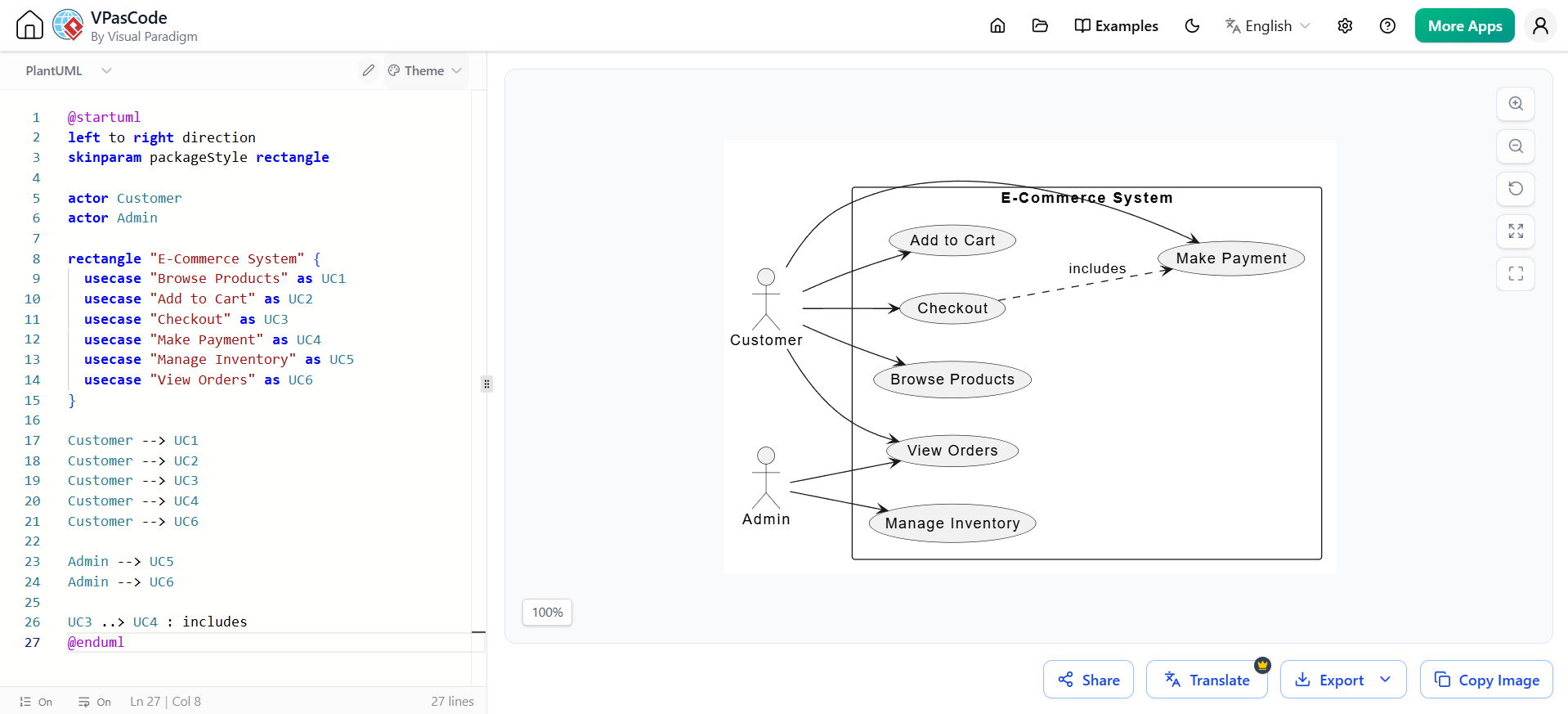
Use Case Diagram
@startuml
left to right direction
skinparam packageStyle rectangle

actor Customer
actor Admin

rectangle "E-Commerce System" {
  usecase "Browse Products" as UC1
  usecase "Add to Cart" as UC2
  usecase "Checkout" as UC3
  usecase "Make Payment" as UC4
  usecase "Manage Inventory" as UC5
  usecase "View Orders" as UC6
}

Customer --> UC1
Customer --> UC2
Customer --> UC3
Customer --> UC4
Customer --> UC6

Admin --> UC5
Admin --> UC6

UC3 ..> UC4 : includes
@enduml
Class Diagram
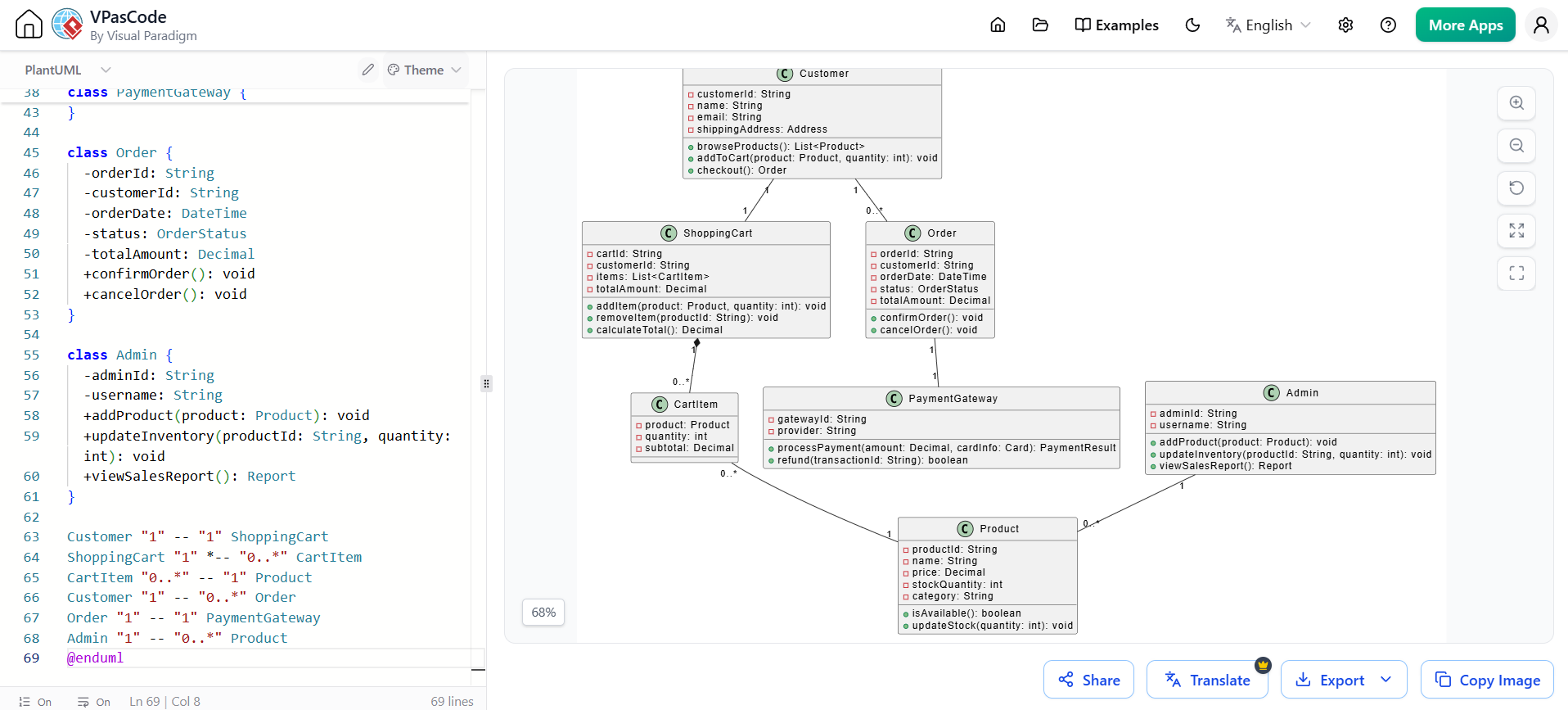
@startuml
class Customer {
  -customerId: String
  -name: String
  -email: String
  -shippingAddress: Address
  +browseProducts(): List<Product>
  +addToCart(product: Product, quantity: int): void
  +checkout(): Order
}

class Product {
  -productId: String
  -name: String
  -price: Decimal
  -stockQuantity: int
  -category: String
  +isAvailable(): boolean
  +updateStock(quantity: int): void
}

class ShoppingCart {
  -cartId: String
  -customerId: String
  -items: List<CartItem>
  -totalAmount: Decimal
  +addItem(product: Product, quantity: int): void
  +removeItem(productId: String): void
  +calculateTotal(): Decimal
}

class CartItem {
  -product: Product
  -quantity: int
  -subtotal: Decimal
}

class PaymentGateway {
  -gatewayId: String
  -provider: String
  +processPayment(amount: Decimal, cardInfo: Card): PaymentResult
  +refund(transactionId: String): boolean
}

class Order {
  -orderId: String
  -customerId: String
  -orderDate: DateTime
  -status: OrderStatus
  -totalAmount: Decimal
  +confirmOrder(): void
  +cancelOrder(): void
}

class Admin {
  -adminId: String
  -username: String
  +addProduct(product: Product): void
  +updateInventory(productId: String, quantity: int): void
  +viewSalesReport(): Report
}

Customer "1" -- "1" ShoppingCart
ShoppingCart "1" *-- "0..*" CartItem
CartItem "0..*" -- "1" Product
Customer "1" -- "0..*" Order
Order "1" -- "1" PaymentGateway
Admin "1" -- "0..*" Product
@enduml
Sequence Diagram
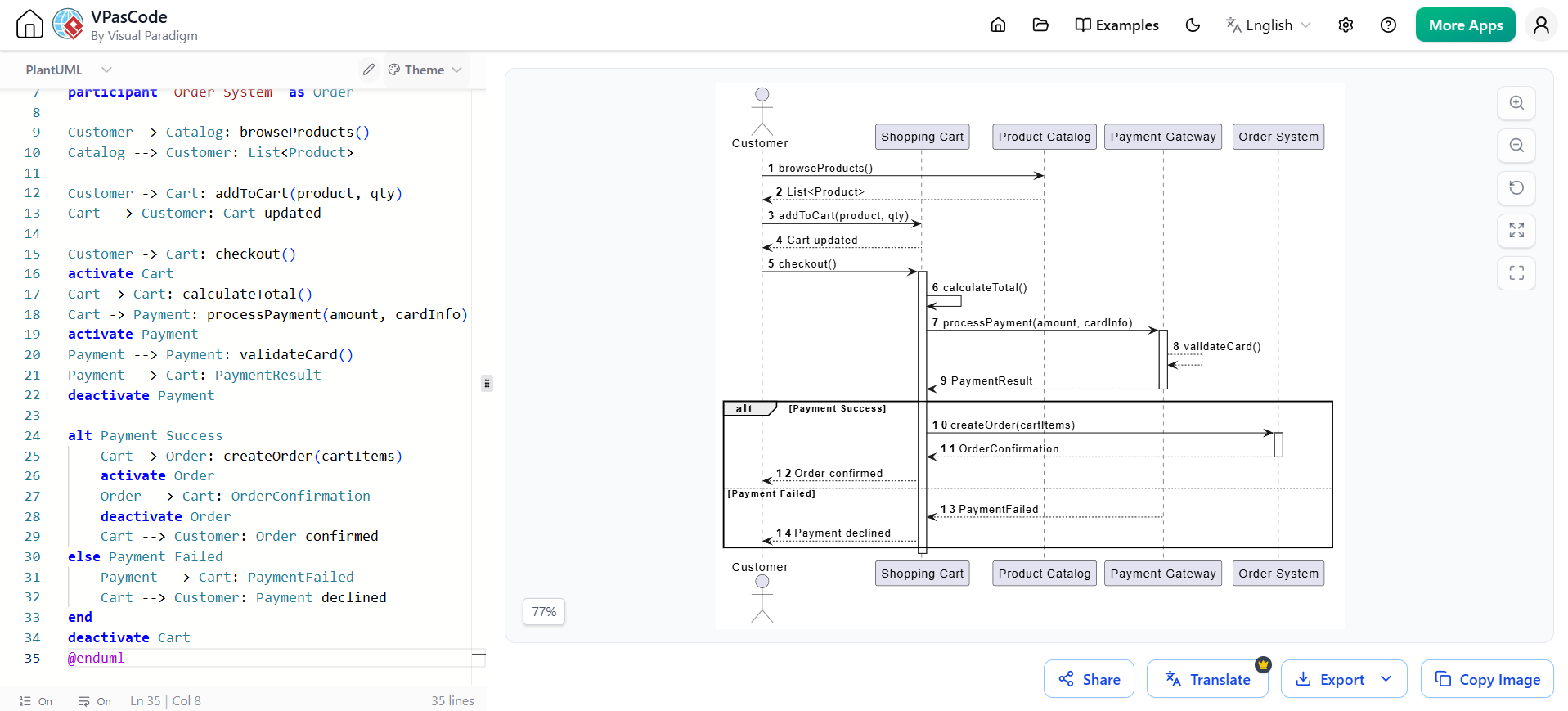
@startuml
autonumber
actor Customer
participant "Shopping Cart" as Cart
participant "Product Catalog" as Catalog
participant "Payment Gateway" as Payment
participant "Order System" as Order

Customer -> Catalog: browseProducts()
Catalog --> Customer: List<Product>

Customer -> Cart: addToCart(product, qty)
Cart --> Customer: Cart updated

Customer -> Cart: checkout()
activate Cart
Cart -> Cart: calculateTotal()
Cart -> Payment: processPayment(amount, cardInfo)
activate Payment
Payment --> Payment: validateCard()
Payment --> Cart: PaymentResult
deactivate Payment

alt Payment Success
    Cart -> Order: createOrder(cartItems)
    activate Order
    Order --> Cart: OrderConfirmation
    deactivate Order
    Cart --> Customer: Order confirmed
else Payment Failed
    Payment --> Cart: PaymentFailed
    Cart --> Customer: Payment declined
end
deactivate Cart
@enduml
Agile Benefit
Product Owners and Scrum Masters—who may not know UML notation—can now contribute to architecture discussions simply by writing user stories in plain English. The AI does the translation.
3. Phase Two: From UML to Agile Artifacts (The “Plan” Phase)
Once the model is generated, Visual Paradigm’s AI doesn’t stop at shapes and lines. It bridges the gap to your Agile backlog.
Generating the Backlog
Using the AI Assistant within the Visual Paradigm Agile module, you can instruct the tool to:
-
Extract User Stories: “Generate Scrum user stories from the Checkout Sequence Diagram.”
-
AI Output: “As a Customer, I want to add items to my cart so that I can purchase them later.”
-
-
Define Acceptance Criteria: The AI automatically drafts technical and business acceptance criteria based on the model constraints.
-
Estimate Effort: Based on the complexity of the generated classes, the AI can suggest relative story points (e.g., Fibonacci scale).
Example: AI-Generated User Stories
From the e-commerce model above, Visual Paradigm’s AI might generate:
Story #1: Product Browsing
As a Customer
I want to browse products by category
So that I can find items of interest quickly

Acceptance Criteria:
- Products are displayed with name, price, and availability
- Filtering by category works correctly
- Pagination handles large product catalogs
Story Points: 5

Story #2: Shopping Cart Management
As a Customer
I want to add/remove items from my cart
So that I can modify my purchase before checkout

Acceptance Criteria:
- Cart persists across browser sessions
- Quantity updates recalculate totals automatically
- Out-of-stock items are flagged
Story Points: 8

Story #3: Payment Processing
As a Customer
I want to securely enter payment information
So that I can complete my purchase

Acceptance Criteria:
- PCI-compliant payment handling
- Multiple payment methods supported
- Transaction confirmation emailed
Story Points: 13
Agile Benefit
Sprint Planning becomes a matter of reviewing AI-generated stories rather than writing them from scratch. The team immediately aligns on what to build because the visual model is right there next to the backlog.
4. Phase Three: From Models to Production (The “Build” Phase)
Agile is about working software. Visual Paradigm closes the loop by turning the AI-generated UML into actual code.
Code Generation & Scaffolding
-
Select your generated Class Diagram.
-
Use Visual Paradigm’s Code Engineering feature (enhanced by AI for cleaner output).
-
Choose your stack (Java Spring, C#, Node.js, etc.).
-
The tool generates the boilerplate: entities, relationships, and API stubs.
Example: Generated Java Spring Boot Code
From the Class Diagram, Visual Paradigm might generate:
// Product.java
@Entity
@Table(name = "products")
@Data
public class Product {
    @Id
    @GeneratedValue(strategy = GenerationType.UUID)
    private String productId;

    private String name;
    private BigDecimal price;
    private Integer stockQuantity;
    private String category;

    public boolean isAvailable() {
        return stockQuantity > 0;
    }

    public void updateStock(int quantity) {
        if (this.stockQuantity + quantity >= 0) {
            this.stockQuantity += quantity;
        } else {
            throw new InsufficientStockException();
        }
    }
}

// ShoppingCart.java
@Entity
@Table(name = "shopping_carts")
@Data
public class ShoppingCart {
    @Id
    @GeneratedValue(strategy = GenerationType.UUID)
    private String cartId;

    @ManyToOne
    @JoinColumn(name = "customer_id")
    private Customer customer;

    @OneToMany(mappedBy = "cart", cascade = CascadeType.ALL)
    private List<CartItem> items = new ArrayList<>();

    public void addItem(Product product, int quantity) {
        CartItem existingItem = items.stream()
            .filter(item -> item.getProduct().getProductId().equals(product.getProductId()))
            .findFirst()
            .orElse(null);

        if (existingItem != null) {
            existingItem.setQuantity(existingItem.getQuantity() + quantity);
        } else {
            CartItem newItem = new CartItem(this, product, quantity);
            items.add(newItem);
        }
    }

    public BigDecimal calculateTotal() {
        return items.stream()
            .map(CartItem::getSubtotal)
            .reduce(BigDecimal.ZERO, BigDecimal::add);
    }
}

// CheckoutController.java
@RestController
@RequestMapping("/api/checkout")
@RequiredArgsConstructor
public class CheckoutController {

    private final PaymentGatewayService paymentGateway;
    private final OrderService orderService;

    @PostMapping
    public ResponseEntity<OrderConfirmation> checkout(
            @RequestBody CheckoutRequest request,
            @AuthenticationPrincipal Customer customer) {

        ShoppingCart cart = getCustomerCart(customer);
        BigDecimal total = cart.calculateTotal();

        PaymentResult payment = paymentGateway.processPayment(
            total,
            request.getPaymentDetails()
        );

        if (payment.isSuccess()) {
            Order order = orderService.createOrder(customer, cart);
            cart.clear();
            return ResponseEntity.ok(new OrderConfirmation(order));
        } else {
            return ResponseEntity.badRequest()
                .body(new OrderConfirmation("Payment failed"));
        }
    }
}
The “Living Model” Advantage
As developers refine the code during the sprint, Visual Paradigm’s round-trip engineering (now smarter with AI diffing) updates the UML diagram. If a developer adds a “Coupon” entity in code, the AI suggests updating the Class Diagram to keep the team in sync.
Agile Benefit
No more “stale documentation.” The UML model acts as a real-time architectural map that grows with the sprint.
5. A Real-World Agile Sprint with Visual Paradigm AI
Scenario: A fintech team has a 2-week sprint to build a “Peer-to-Peer Transfer” feature.
Sprint Timeline
Day 1 (Prompt): The PO types the feature description into VP’s AI Assistant. A Use Case and Sequence diagram appear in minutes.
Prompt: "Build a P2P transfer system where users can send money to contacts,
view transaction history, and receive notifications. Include fraud detection
for transactions over $1000."
Day 2 (Plan): The AI converts the diagrams into 12 user stories. The team grooms the backlog and commits to the sprint.
Day 3-8 (Build): Developers generate Java Spring Boot scaffolding from the UML. They focus purely on business logic, not boilerplate.
Day 9 (Sync): A mid-sprint change requires a new “Fraud Check” step. The PO updates the prompt; the AI modifies the Sequence Diagram; the code is refactored automatically.
Day 10 (Demo): The team presents working software, with the UML diagram serving as the official, up-to-date design doc.
Generated Sequence Diagram for P2P Transfer
@startuml
actor User
participant "Mobile App" as App
participant "Transfer Service" as Transfer
participant "Fraud Detection" as Fraud
participant "Account Service" as Account
participant "Notification" as Notify

User -> App: Initiate transfer(recipient, amount)
App -> Transfer: createTransfer(request)
activate Transfer

Transfer -> Account: validateBalance(sender, amount)
Account --> Transfer: Balance valid

alt amount > 1000
    Transfer -> Fraud: assessRisk(transfer)
    activate Fraud
    Fraud --> Fraud: Check patterns
    Fraud --> Transfer: RiskScore
    deactivate Fraud

    alt RiskScore > THRESHOLD
        Transfer -> Transfer: flagForReview()
        Transfer --> App: Transfer pending review
        return
    end
end

Transfer -> Account: debitAccount(sender, amount)
Account -> Account: creditAccount(recipient, amount)

Transfer -> Notify: sendConfirmation(sender)
Transfer -> Notify: sendNotification(recipient)

Transfer --> App: Transfer complete
deactivate Transfer
App --> User: Show success
@enduml
6. Best Practices for Agile Teams Using VP AI
To get the most out of this reinvented workflow, follow these guidelines:
1. Iterative Prompting
Don’t try to model the whole system at once. Prompt for one user story or epic at a time, just like Agile slicing.
❌ Bad: “Model our entire enterprise resource planning system”
✅ Good: “Model the invoice approval workflow for the finance module”
2. Human-in-the-Loop
Use AI to draft diagrams and stories, but always have a senior dev review the generated UML for technical accuracy.
3. Keep Models Light
Since generation is instant, don’t hoard diagrams. Generate, use for the sprint, and archive if no longer needed.
4. Integrate with CI/CD
Use Visual Paradigm’s API to push AI-generated specs into Jira or Azure DevOps automatically.
5. Version Your Prompts
Treat prompts like code—store them in version control alongside your diagrams so you can trace design decisions.
6. Establish Naming Conventions
Define standards for how AI should name entities, use cases, and relationships to maintain consistency across sprints.
7. New Conclusion: The Future of Architectural Agility
The integration of AI into Visual Paradigm marks a pivotal moment in software development history. For the first time, teams can genuinely achieve what the Agile Manifesto promised but rarely delivered: comprehensive documentation that doesn’t impede progress, architectural clarity that doesn’t require dedicated architects, and living specifications that evolve in lockstep with production code.
Visual Paradigm’s AI Assistant doesn’t merely automate tedious tasks—it fundamentally reimagines the developer experience. By collapsing the traditional barriers between conception, design, planning, and implementation, it enables a new category of “architectural agility” where systems can be both well-designed and rapidly delivered.
The Road Ahead
As we look toward the future, several trends are emerging:
-
Predictive Modeling: AI will soon suggest architectural improvements before you even prompt, identifying potential bottlenecks or security vulnerabilities in generated models.
-
Cross-Team Synchronization: AI will automatically reconcile models across microservices, ensuring consistency in distributed systems without manual coordination.
-
Natural Language Testing: Teams will describe test scenarios in plain English, and AI will generate both the test cases and the necessary model updates to support them.
Your Call to Action
The question is no longer whether AI will transform software development—it’s whether your team will lead or follow. Start small: pick one upcoming sprint, use Visual Paradigm’s AI Assistant to model a single feature, and measure the time saved. Share the results with your team. Iterate. Scale.
The whiteboard has been digitized, the UML diagram has been automated, and the path from prompt to production has never been clearer. The only remaining variable is your willingness to embrace this new paradigm.
Welcome to the future of Agile architecture. Welcome to prompt-driven development.
Appendix: Quick Reference Card
Common Prompts for Visual Paradigm AI
| Goal | Example Prompt |
|---|---|
| Use Case Diagram | “Show all interactions between [Actor] and [System] for [Feature]” |
| Class Diagram | “Model entities and relationships for [Domain] with attributes and methods” |
| Sequence Diagram | “Illustrate the step-by-step flow for [Use Case] including error handling” |
| User Stories | “Generate INVEST-compliant user stories from [Diagram] with acceptance criteria” |
| API Scaffolding | “Generate RESTful endpoints for [Entity] with CRUD operations and validation” |
Recommended Visual Paradigm Ecosystem Integration
- Visual Paradigm Core & AI Assistant → Centralized diagram generation, AI prompt processing, and bidirectional code engineering.
- Visual Paradigm Agile → Native backlog management, sprint planning, and story mapping directly linked to your evolving UML models.
- Visual Paradigm Teamwork Server → Centralized version control and repository management for tracking AI prompts, model iterations, and seamless team collaboration.
- Visual Paradigm Open API → Seamless CI/CD pipeline automation, enabling AI-generated specs and code scaffolding to trigger automated builds and deployments.
- Visual Paradigm Site Publisher → A living documentation hub that automatically generates and publishes web-based, up-to-date project documentation directly from your active models.
About the Author: This guide was created for Agile teams seeking to modernize their development practices through AI-powered tooling. Visual Paradigm continues to evolve its AI capabilities, with regular updates announced at visual-paradigm.com.