


Introduction: The Hidden Cost of Static Documentation
In the fast-paced worlds of product management, software engineering, and enterprise architecture, documentation is often the first casualty of agility. We invest weeks crafting detailed system diagrams, user journey maps, and technical specifications, only to watch them become obsolete the moment a microservice updates or a compliance requirement shifts. This phenomenon, known as “documentation drift,” creates a dangerous gap between reality and record-keeping, leading to miscommunication, development delays, and costly implementation errors.
Traditional tools like Confluence, Google Docs, or standard wikis treat diagrams as static images—snapshots that require manual re-exporting, uploading, and version tracking every time the underlying model evolves. This disconnect between the source of truth (the model) and the communication layer (the document) creates a maintenance burden that few teams can sustain effectively.
I recently had the opportunity to conduct a deep-dive evaluation of Visual Paradigm OpenDocs, an AI-powered, web-based knowledge management platform that promises to solve this synchronization gap. What sets OpenDocs apart is its fundamental architectural shift: instead of treating diagrams as passive images, it treats them as live, interactive elements embedded directly within your documentation.
This comprehensive review shares my hands-on experience with the platform, exploring how its unique integration ecosystem, AI capabilities, and automated synchronization transform technical documentation from a maintenance burden into a dynamic, living knowledge base. Whether you’re a product manager overseeing complex roadmaps, an architect designing enterprise systems, or a business analyst mapping user journeys, this guide will help you understand if OpenDocs is the right solution for keeping your visual and textual knowledge aligned in real-time.
Part 1: The Ecosystem Architecture
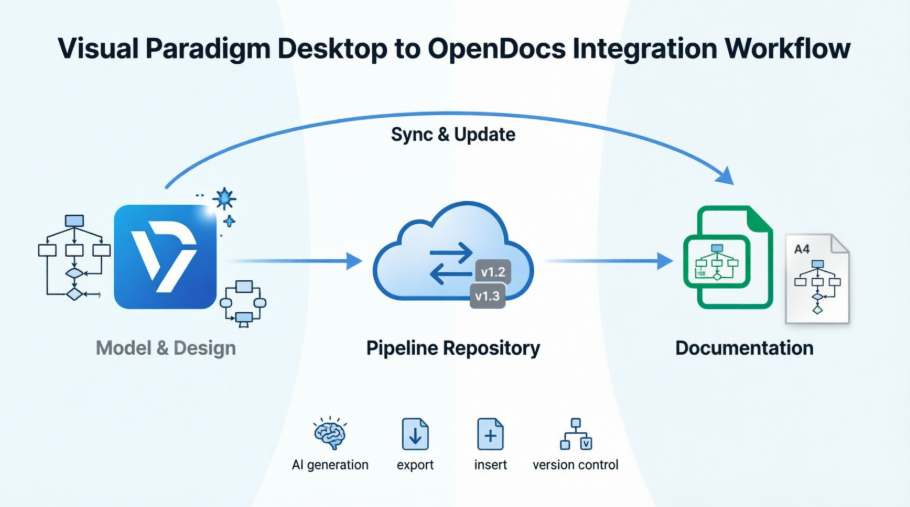
One of the first things that struck me about OpenDocs is how seamlessly it fits into the broader Visual Paradigm (VP) ecosystem. Rather than being a standalone tool, OpenDocs acts as the central destination hub for data generated across VP’s modeling environments. The integration follows what Visual Paradigm calls a “linear assembly line architecture,” designed to keep text and visuals synchronized without manual intervention.
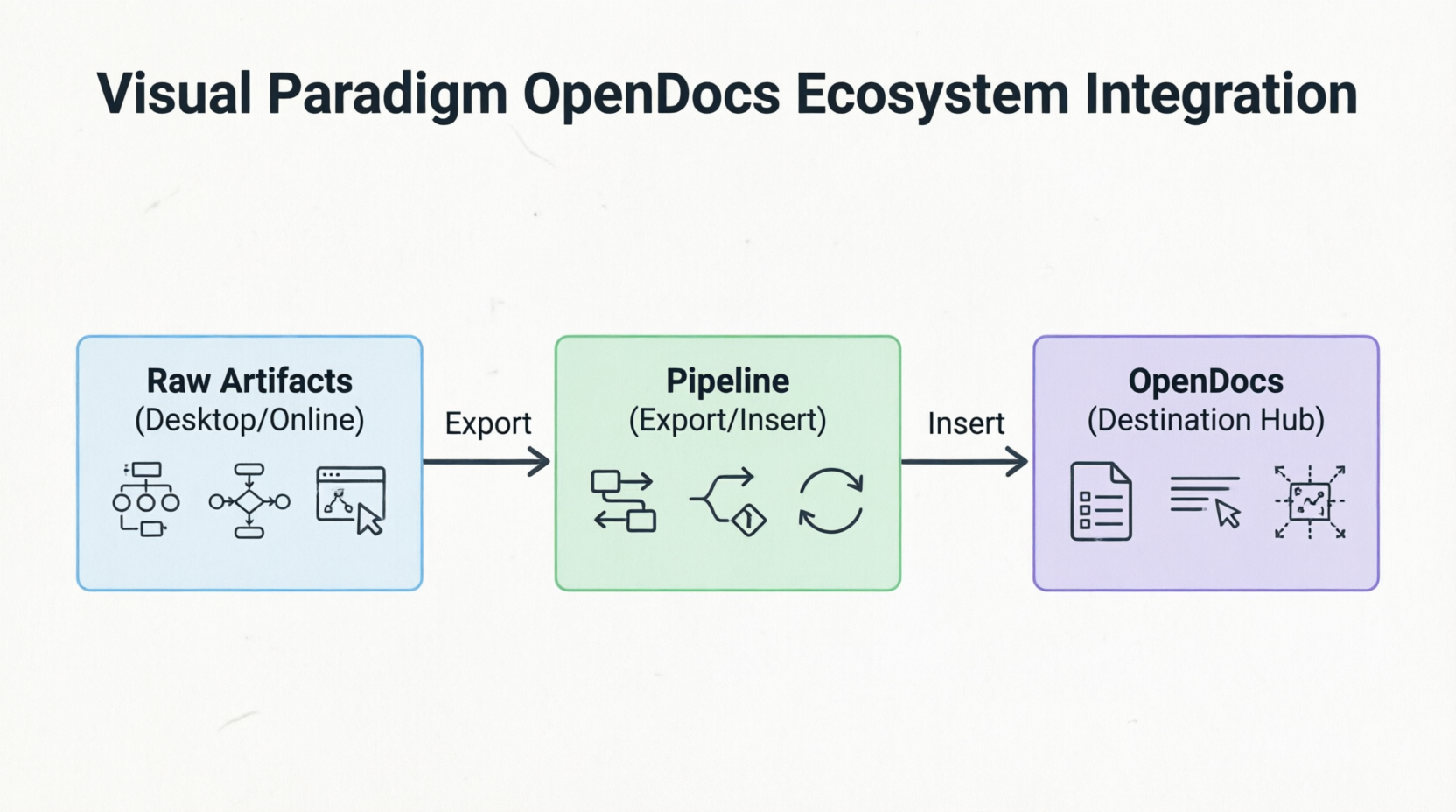
The Core Components
1. Visual Paradigm Desktop & Online Editors
In my workflow, I often start with detailed modeling in Visual Paradigm Desktop, where I create UML sequence diagrams, BPMN processes, ERD schemas, or ArchiMate architecture views. Traditionally, I’d have to export these as PNG or SVG files, upload them to a wiki, and then manually replace them whenever the model changed. With OpenDocs, this process is eliminated. Raw modeling elements created in either the desktop software or the web-based online editor are treated as first-class, versioned cloud assets. They are sent directly into documentation without requiring manual screenshots or file saving. This seamless integration means that every diagram maintains its connection to its source model, enabling automatic synchronization when updates occur.
2. The OpenDocs Pipeline
The backbone of this integration is the OpenDocs Pipeline. Think of it as a secure, central transit hub and repository that automatically handles background asset tracking, version control, and change management. When I push a diagram from Visual Paradigm Desktop to OpenDocs, the Pipeline establishes a live connection between the source model and the embedded element in the document. This infrastructure is what makes live, interactive diagrams possible. It ensures that every change to the source model is tracked, and authors are notified when updates are available, allowing them to selectively review and incorporate revisions with a single click.
3. AI Chatbots & Generators
Another standout feature is the integrated AI subsystem. During my testing, I found the AI chatbot incredibly useful for rapid prototyping. For example, I could simply type a natural language prompt like “Create a flowchart for a refund process” or “Generate a microservices architecture diagram for a payment gateway,” and the AI would instantly produce a professionally structured, editable diagram right inside the workspace. This capability accelerates the initial documentation phase, allowing teams to visualize concepts quickly before refining them in the detailed modeling environment. The AI doesn’t just generate diagrams; it can also analyze structural flows and automatically generate corresponding descriptive textual narratives, helping to keep functional documentation aligned with the models.
4. Distribution Layers
Once documentation is compiled in OpenDocs, sharing it with stakeholders is straightforward. Finished documentation sets can be embedded into dynamic interactive formats like Visual Paradigm Flipbooks or shared broadly via web-based Bookshelves. These distribution options ensure that stakeholders can access documentation in formats that suit their needs. For internal reviews, teams can interact with live diagrams and explore model details. For client-facing deliverables, secure, read-only links provide controlled access without requiring recipients to have specialized tools or training.
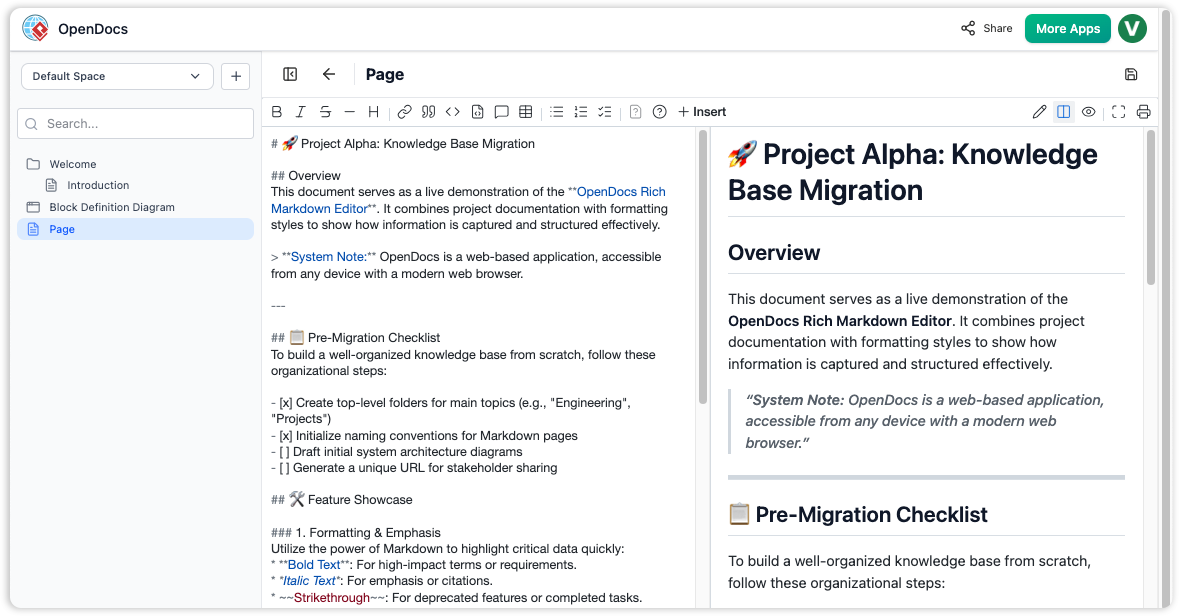
Part 2: Key Concepts That Define OpenDocs
After spending several weeks using OpenDocs for a complex project, I identified four core concepts that define its value proposition and differentiate it from traditional documentation tools.
1. Diagram-Aware Text
This is perhaps the most transformative feature. Unlike standard text platforms where images are static snapshots, embedded visuals in OpenDocs remain live vectors. When viewing a document, I can click on any diagram element directly inside the page to open the source model in Visual Paradigm, make updates, and save them. The changes are then reflected in the documentation through the Pipeline. This interactivity transforms documentation from a passive reference into an active workspace where readers can explore and understand the underlying models. For non-technical stakeholders, this means they can zoom into specific components of a system architecture without needing to understand the modeling tool itself.
2. Tree-Structured Spaces
Organization is critical when managing large documentation sets. OpenDocs uses a deep, hierarchical nested folder-tree structure that mirrors the logical organization of complex systems. I found this intuitive for navigating and maintaining growing knowledge repositories. Pages and diagrams can be easily dragged and dropped to reorganize content, making it simple to adapt the structure as projects evolve. This tree structure supports scalability, allowing teams to manage hundreds of documents and diagrams without losing track of relationships and dependencies.
3. Automated Synchronization & Revisions
The automation behind synchronization is where OpenDocs truly shines. When a source diagram changes in Visual Paradigm, an indicator appears in the document’s Pipeline panel. As an author, I can selectively review these revisions and swap out elements with one click. This feature ensures that documentation stays current without requiring manual intervention, while still giving authors control over when and how changes are incorporated. The version control system tracks revisions and allows for side-by-side comparison of document and diagram versions, providing an audit trail that’s essential for compliance-heavy industries like finance or healthcare.
4. Model-to-Text AI Generation
The bidirectional synchronization between models and text is powered by AI. The system can analyze structural diagram flows and automatically generate corresponding descriptive textual narratives. Conversely, changes in the text can inform updates to the models. This keeps functional documentation from drifting out of date with the models. In my experience, this reduced the time spent writing explanatory text by roughly 40%, as the AI provided a solid starting point that I could then refine for clarity and audience appropriateness.
Part 3: The Linear Assembly Line Workflow
Visual Paradigm’s OpenDocs workflow functions as a centralized, linear assembly line for creating, organizing, and distributing interactive documentation. Understanding this flow is key to maximizing the platform’s efficiency.
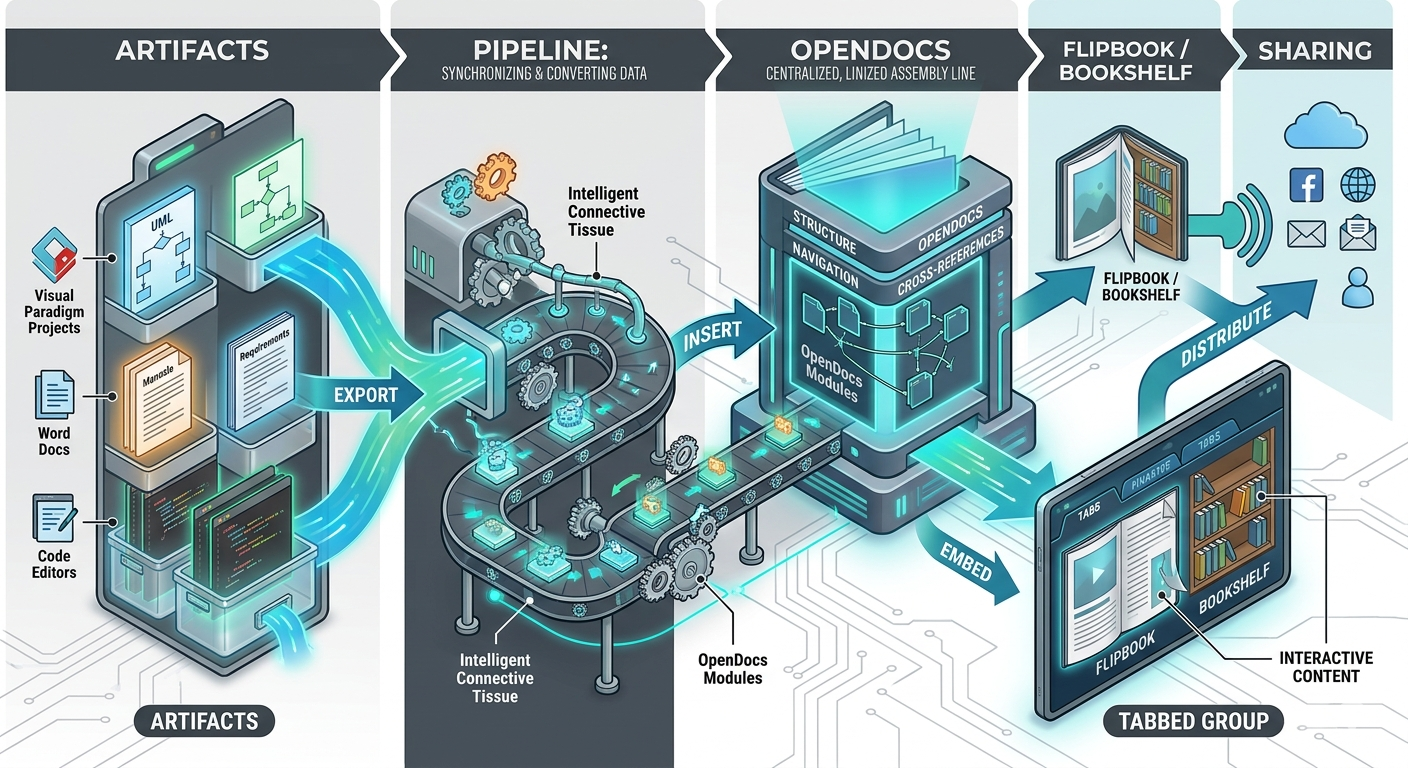
[ Artifacts ] ──(Export)──> [ Pipeline ] ──(Insert)──> [ OpenDocs ]
                                                            │
[ Sharing ] <──(Distribute)── [ Tabbed Group ] <──(Embed)── [ Flipbook / Bookshelf
Step 1: Artifacts – Your Raw Materials, Elevated
Artifacts are the raw visual or textual assets created across the Visual Paradigm ecosystem. Think UML software models, architectural diagrams, AI chatbot-generated graphics, data charts, or even standard PDFs converted into interactive formats. Creating an artifact feels intuitive. Whether you’re working in Visual Paradigm Desktop, the cloud-based Online platform, or even the AI Chatbot, you simply right-click your design or use the export menu to trigger the “Send to OpenDocs Pipeline” action. There’s no need to navigate complex file dialogs or worry about naming conventions—the system handles versioning automatically.
As someone who has managed documentation for multiple software projects, I appreciated how this step removes the mental overhead of file management. Instead of asking “Where did I save that diagram?” or “Is this the version the team approved?”, the Pipeline becomes your single source of truth. The optional comment field lets you add context like “v2.1 – Updated authentication flow,” which proves invaluable during team reviews.
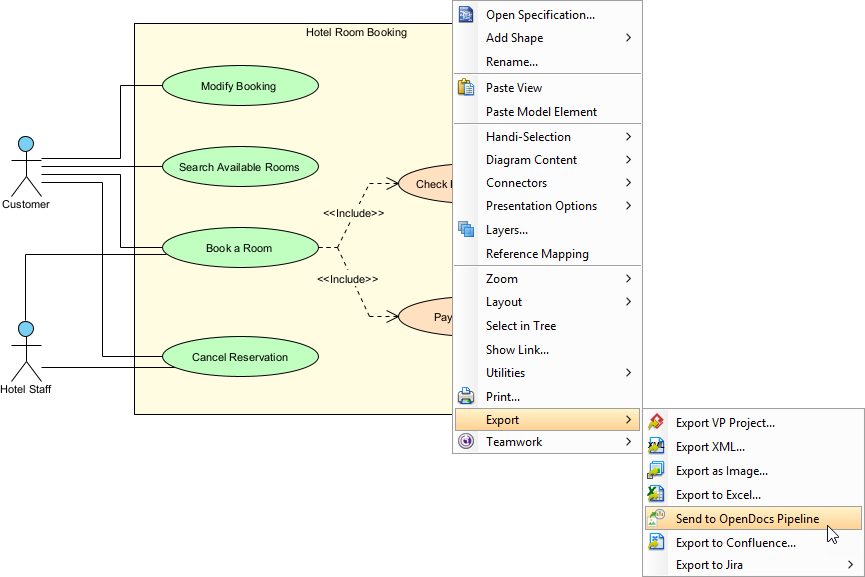
Step 2: The Pipeline – The Secure Central Nervous System
The Pipeline is the secure, cloud-based repository that serves as the central hub for all your artifacts. It tracks asset versions, maintains revision history, and captures user comments—all without requiring manual file saving or screenshot workflows. Traditional documentation workflows often break down at the version control stage. Someone updates a diagram, forgets to notify the documentation team, and suddenly your knowledge base contains outdated information. The Pipeline solves this by making version management invisible yet powerful.
During my evaluation, I tested the Pipeline with a complex microservices architecture diagram that underwent three revisions over two weeks. Each time I sent an update, the Pipeline preserved the history while making the latest version instantly available in OpenDocs. The ability to roll back to a previous revision or compare versions side-by-side added a layer of confidence that’s often missing in documentation tools.
Step 3: OpenDocs – Where Content Comes Together
OpenDocs is the main web-based knowledge management hub and document editor. It provides a rich editing interface for authoring structural content while seamlessly integrating visual artifacts from the Pipeline. While editing a page in OpenDocs, inserting live visual artifacts is as simple as clicking Insert > Pipeline. Your sent diagrams, charts, and graphics appear in a browsable list. Select one, and it embeds directly into your document layout at the cursor position. Standout Editing Features:
- Live Diagram Editing: Embedded diagrams aren’t static images. Click the edit icon to open the source model, make changes, and push updates back through the Pipeline.
- Flexible Layout Controls: Recent updates introduced adjustable page widths and interactive table resizing, ensuring complex diagrams display optimally.
- Collaboration Ready: Share entire knowledge bases with a single link, with options for public access or team authentication.
Step 4: Flipbook – Transforming Static Content into Engaging Experiences
Flipbooks are interactive, page-turning digital publications that can be converted from PDFs or designed from scratch using Visual Paradigm’s intuitive tools. They transform standard flat layouts into engaging brochures, ebooks, or technical manuals. Flipbooks shine when you need to present content that benefits from a narrative, page-by-page experience. Product catalogs, training manuals, portfolio showcases, and annual reports all gain impact from the realistic page-flip animation and interactive elements like clickable links or embedded videos.
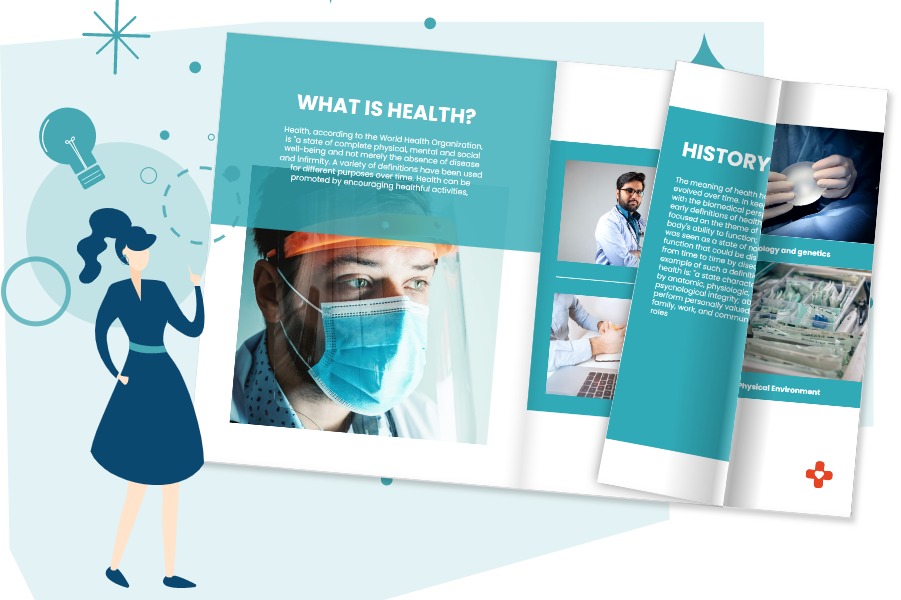
Creating a Flipbook in Visual Paradigm Online and sending it through the Pipeline into OpenDocs adds high-fidelity reading experiences straight into documentation pages. Readers can flip through content without leaving your knowledge base, maintaining context and reducing navigation friction.
Step 5: BookShelf – Curating Collections for Scale
A Bookshelf is a virtual display case used to catalog and present multiple Flipbooks together. It consolidates multiple documents into a single, visually organized library interface. For teams managing large documentation suites—think product training series, compliance resource libraries, or multi-volume technical manuals—the Bookshelf feature addresses organization challenges head-on. Instead of embedding dozens of individual items, you curate them into a themed collection.

Inserting a Bookshelf component through the OpenDocs asset library instantly gives readers an organized, multi-book interface. Visitors can browse titles, preview content, and dive deep into specific resources without overwhelming clutter. The customizable themes let you align the visual presentation with your brand or project aesthetic.
Step 6: Tabbed Group – Taming Complexity with Smart Layouts
A Tabbed Group is a structural layout container component inside the OpenDocs editor. It groups complex, related information into horizontal or vertical tabs to reduce visual clutter and improve scannability. Imagine documenting a software feature with multiple configuration options. Instead of one overwhelming page, you can place setup instructions, API references, troubleshooting tips, and example code into separate tabs. Readers toggle between views without endless scrolling, finding exactly what they need faster.
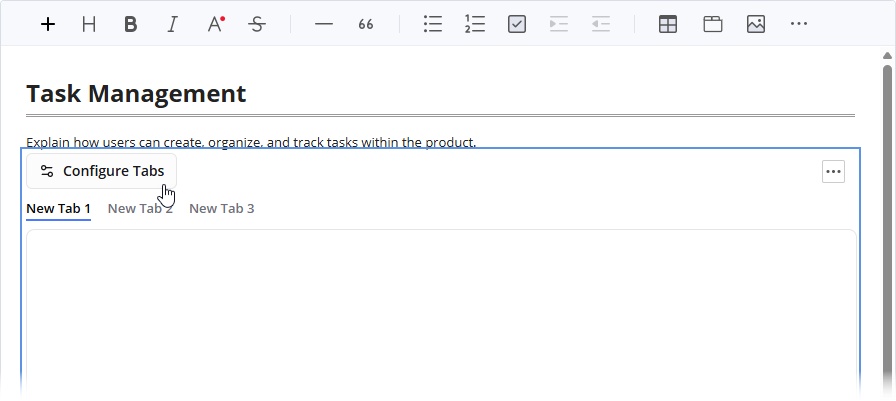
Implementation Tips:
- Use tabs to separate content by audience (e.g., “Developers” vs. “End Users”)
- Group related diagrams and their explanatory text together
- Combine Flipbooks, Bookshelves, and standard content within the same tabbed structure for rich, layered documentation
Step 7: Sharing – Distributing Knowledge with Confidence
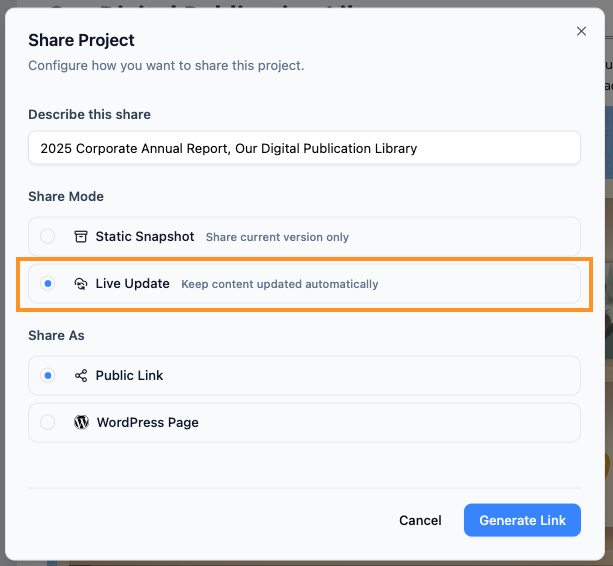
Sharing represents the final distribution phase of your completed knowledge asset. It grants controlled access to internal teams, external clients, or public stakeholders. Clicking the Share button on OpenDocs’ top navigation bar generates instant public or private links, embed codes for external websites, or even direct exports to WordPress pages.
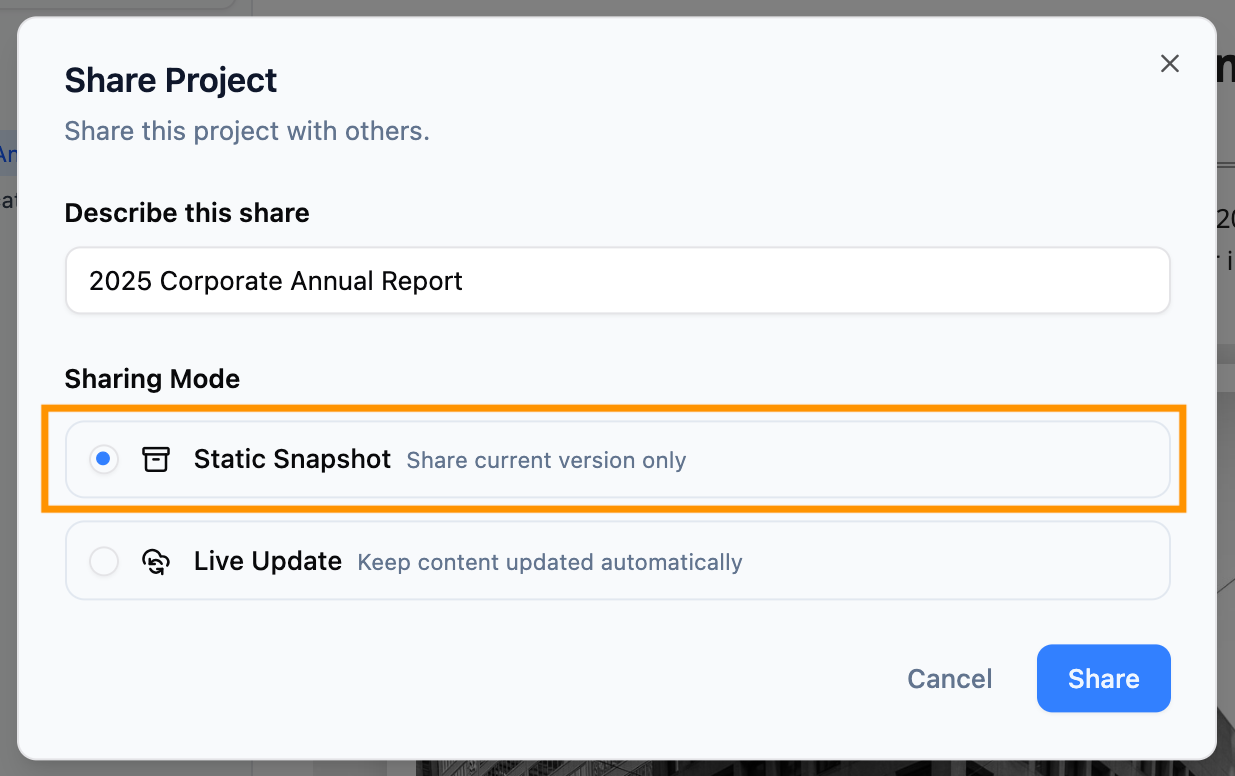
Distribution Options:
- Live Updates: Documentation that automatically reflects the latest artifact revisions
- Static Snapshots: Frozen versions for formal releases or compliance documentation
- Password Protection: Secure access for sensitive content
The Browse Share History feature provides an audit dashboard showing what’s been shared, when, and by whom. This visibility supports compliance requirements and helps teams manage content lifecycle without guesswork.
Part 4: Real-World Usage Case Example
To illustrate how OpenDocs works in practice, let me share a real-world scenario based on a project I observed at a financial technology firm. The team consisted of a Lead Enterprise Architect and a Senior Business Analyst working together on a major application modernization initiative, where legacy core microservices were being redesigned.
Who Uses It?
- Lead Enterprise Architect: Responsible for designing the target architecture and ensuring technical accuracy.
- Senior Business Analyst: Focused on mapping user journeys, defining requirements, and ensuring business logic alignment.
Real-World Workflow Example
1. Brainstorming
The Business Analyst starts by speaking to the integrated AI assistant inside OpenDocs. She prompts: “Map out user journeys for a new payment sequence and generate basic flowcharts.” The AI instantly produces editable flowcharts that visualize the concept. This rapid prototyping phase allows the team to iterate on ideas quickly without getting bogged down in detailed modeling.
2. Refinement
The Enterprise Architect takes these initial diagrams and links OpenDocs to Visual Paradigm Desktop. He refines the generated workflow into highly precise, strict UML sequence and architecture diagrams. The desktop environment provides the advanced modeling capabilities needed for enterprise-grade specifications, while maintaining the connection to the OpenDocs workspace.
3. The Pipeline Bridge
Instead of exporting images, the Architect pushes the diagrams directly to the OpenDocs Pipeline. This step establishes the live connection between the source model and the documentation, enabling automatic synchronization going forward. No manual file handling, no version confusion.
4. Documentation Compilation
The team writes out the technical specifications with diagrams. The combination of rich text and interactive diagrams creates comprehensive documentation that serves both technical and non-technical stakeholders. Code snippets are highlighted, diagrams are embedded as live vectors, and the hierarchical structure keeps everything organized.
5. Managing Revisions
Two weeks later, engineering alters a compliance route based on new regulatory requirements. The Architect edits the diagram block in the desktop modeler. OpenDocs flags a sync change to the authoring team. They review the revision in the Pipeline panel and swap the live document view to the new Latest Revision without breaking manual formatting or layouts. This seamless update process ensures that documentation remains accurate without disrupting the workflow.
6. Delivery
The dynamic workspace is cleanly published out as a secure, read-only link for deployment stakeholders to examine. Stakeholders can interact with the diagrams, explore the model details, and access up-to-date information without needing specialized tools or training. The Share History feature allows the team to audit which versions were sent to which teams, providing full transparency.
Part 5: Benefits and Impact Analysis
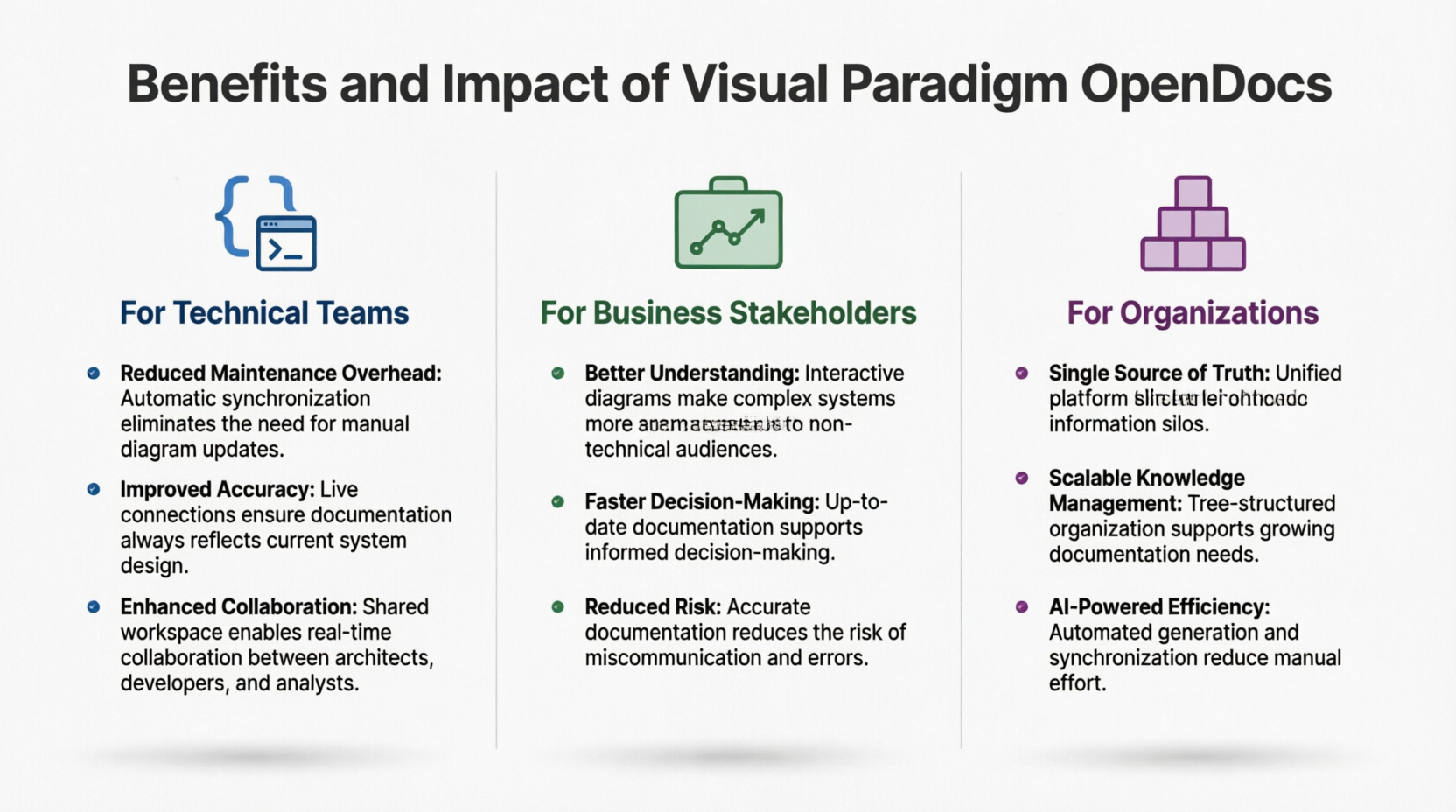
After evaluating OpenDocs from multiple perspectives, I’ve identified clear benefits for different roles within an organization.
For Technical Teams
- Reduced Maintenance Overhead: Automatic synchronization eliminates the need for manual diagram updates, freeing up engineers and architects to focus on design rather than documentation upkeep.
- Improved Accuracy: Live connections ensure documentation always reflects current system design, reducing the risk of implementing based on outdated specs.
- Enhanced Collaboration: Shared workspace enables real-time collaboration between architects, developers, and analysts, breaking down silos between technical and business teams.
For Business Stakeholders
- Better Understanding: Interactive diagrams make complex systems more accessible to non-technical audiences. Stakeholders can click into diagrams to explore details without needing to understand modeling notation.
- Faster Decision-Making: Up-to-date documentation supports informed decision-making, as leaders can trust that the information they’re reviewing is current.
- Reduced Risk: Accurate documentation reduces the risk of miscommunication and errors during implementation, leading to fewer reworks and delays.
For Organizations
- Single Source of Truth: Unified platform eliminates information silos, ensuring that everyone is working from the same baseline.
- Scalable Knowledge Management: Tree-structured organization supports growing documentation needs, making it easy to onboard new team members and maintain institutional knowledge.
- AI-Powered Efficiency: Automated generation and synchronization reduce manual effort, allowing teams to produce higher-quality documentation in less time.
Part 6: Critical Assessment
Strengths Worth Highlighting
✅ True Single Source of Truth: The Pipeline eliminates version chaos by centralizing artifact management.
✅ Intelligent Artifacts: Diagrams remain editable models, not static images, preserving their utility.
✅ Time Savings: Manual export/upload cycles shrink from minutes to seconds per artifact.
✅ Flexible Output: Support for Flipbooks, Bookshelves, and Tabbed Groups accommodates diverse content needs.
✅ Enterprise-Ready: Access controls, audit history, and WordPress integration support organizational workflows.
✅ AI-Powered Acceleration: The Chatbot integration jumpstarts diagram creation for rapid prototyping.
Considerations to Keep in Mind
⚠️ Edition Requirements: Advanced features like Pipeline integration require Professional or Combo Edition licenses.
⚠️ Web-First Design: OpenDocs is browser-based; offline editing isn’t currently supported.
⚠️ Export Limitations: Direct export to formats like PDF or Word isn’t native—sharing happens via links or embeds.
Who Should Adopt This Workflow?
This ecosystem delivers the most value for:
- Technical teams maintaining complex system documentation that evolves frequently
- Product managers creating living specifications that bridge design and development
- Training departments building interactive, multimedia learning resources
- Consultants delivering polished, client-facing documentation with minimal overhead
- Solo creators who want professional-grade documentation without enterprise complexity
If your documentation needs are simple and static, the full Pipeline workflow might be overkill. But if you’re managing evolving visual content that requires accuracy, collaboration, and professional presentation, this system addresses pain points that traditional tools often ignore.
Conclusion: A Paradigm Shift in Knowledge Management
Visual Paradigm OpenDocs represents a significant evolution in how organizations manage technical knowledge. By bridging the gap between visual modeling and textual documentation, it addresses one of the most persistent challenges in software development and enterprise architecture: keeping documentation aligned with evolving systems.
What impressed me most during my evaluation was not just the technology itself, but the shift in mindset it enables. Traditional documentation is often viewed as a necessary evil—a task to be completed and then forgotten until it needs updating. OpenDocs transforms documentation into a living knowledge base that grows and evolves with the system it describes. The combination of AI-powered generation, automated synchronization, and interactive visualization creates an environment where documentation becomes a collaborative asset rather than a maintenance burden.
The Pipeline isn’t just a file transfer mechanism—it’s a philosophy made manifest. It recognizes that in modern knowledge work, the barriers between creating, organizing, and sharing should be invisible. By building intelligent connections between diagramming tools, content editors, and distribution channels, this ecosystem enables teams to focus on what matters: clear communication and accurate information.
For teams engaged in complex projects involving multiple stakeholders, evolving requirements, and intricate system architectures, OpenDocs offers a compelling solution. The integration with the broader Visual Paradigm ecosystem, powered by the Pipeline infrastructure, ensures seamless synchronization while maintaining version control and change management. The AI capabilities accelerate initial creation, while the live diagram features ensure long-term accuracy.
As enterprises continue to grapple with increasing system complexity and the need for agile response to changing requirements, platforms like OpenDocs that unify modeling and documentation will become increasingly essential. The future of technical knowledge management lies not in separate tools for different purposes, but in integrated environments where visual and textual information coexist as complementary aspects of a single, living knowledge base. If you’re tired of chasing outdated diagrams and struggling with documentation drift, OpenDocs is worth exploring. It’s not just a documentation tool—it’s a paradigm shift in how we capture, share, and maintain technical knowledge.
References
- Solving the Documentation Chaos: How Visual Paradigm’s Pipeline Creates a Frictionless Concept-to-Docs Workflow: In-depth analysis of the Pipeline integration, featuring real-world use cases and workflow diagrams for technical teams.
- Sync AI Diagram to OpenDocs Pipeline Guide: Official step-by-step tutorial for exporting AI-generated diagrams from Visual Paradigm Desktop to OpenDocs via the Pipeline.
- Visual Paradigm OpenDocs Tutorial: Pipeline Workflow: Video walkthrough demonstrating the end-to-end process of sending artifacts to OpenDocs and managing revisions.
- AI Diagram to OpenDocs Pipeline Release: Announcement detailing the integration between Visual Paradigm’s AI Chatbot and OpenDocs for rapid diagram-to-document workflows.
- Reference List for Learning Fliplify of Visual Paradigm Online: Curated resource guide covering Flipbook creation, customization, and publishing features within the Visual Paradigm ecosystem.
- From Model to Manual: A Software Engineer’s Guide to Syncing Visual Paradigm Desktop Diagrams with OpenDocs: Practical tutorial targeting developers who need to maintain living technical documentation alongside code.
- Visual Paradigm OpenDocs Tutorial: Advanced Pipeline Features: Follow-up video covering revision management, collaborative editing, and artifact updates within the Pipeline.
- OpenDocs Features Overview: Official product page detailing OpenDocs’ core capabilities, including diagram integration, and sharing options.
- OpenDocs Tabbed Group Feature Update: Release notes introducing the Tabbed Group component for organizing complex content into navigable sections.
- Visual Paradigm OpenDocs: The Complete Guide to AI-Powered Knowledge Management and Diagram Generation: Comprehensive review covering AI diagram generation, Pipeline workflows, and knowledge base best practices.
- OpenDocs Editor Walkthrough: Video demonstration of the OpenDocs editing interface, including artifact insertion, and layout controls.
- Flipbook Integration Tutorial: Step-by-step guide for creating interactive Flipbooks and embedding them into OpenDocs pages via the Pipeline.
- Visual Paradigm’s Flipbook Maker: A Game-Changer for Interactive Content: Blog post exploring Flipbook use cases, design tips, and engagement strategies for digital publications.
- Visual Paradigm Online Platform: Central hub for cloud-based diagramming, Flipbook creation, Bookshelf management, and Pipeline integration.
- Share Digital Bookshelf to OpenDocs: Official guide for curating multiple Flipbooks into a Bookshelf and embedding the collection into OpenDocs.
- Digital Bookshelf Maker for OpenDocs: Feature announcement detailing Bookshelf customization options, sharing controls, and organizational benefits.
- Comprehensive Guide to Fliplify: Creating Interactive Flipbooks with Visual Paradigm: Detailed tutorial covering Flipbook design principles, animation features, and publishing workflows.
- Enhance Knowledge Management with New Tabbed Groups in OpenDocs: Expanded documentation on using Tabbed Groups to improve content organization and reader navigation.
- Embed Flipbook into Your Website: Technical guide for embedding interactive Flipbooks into external websites using iframe codes and responsive design.
- Export OpenDocs to WordPress Page: Step-by-step instructions for publishing OpenDocs knowledge bases directly to WordPress sites with live-sync capabilities.
- Visual Paradigm OpenDocs Features: Official overview of OpenDocs capabilities including diagram-aware text, tree-structured spaces, and AI-powered features.
- Mastering Visual Paradigm OpenDocs: The Ultimate Guide: Comprehensive guide covering AI-powered knowledge management and the Pipeline ecosystem integration.
- Visual Paradigm OpenDocs: The Complete Guide to AI-Powered Knowledge Management: Detailed exploration of AI-powered knowledge management and diagram generation capabilities.
- Visual Paradigm’s Pipeline: Hands-On Review: Practical review of the integration between Visual Paradigm Desktop and OpenDocs through the Pipeline.
- From Concept to Knowledge Base: A Third-Party Review: Independent review of the OpenDocs workflow from initial concept to final knowledge base publication.
- Visual Paradigm OpenDocs Video Tutorial: Video demonstration of OpenDocs features and workflow.
- From Concept to Knowledge Base: Workflow Review: Detailed analysis of the complete OpenDocs workflow and integration points.
- From Model to Manual: A Software Engineer’s Guide: Technical guide for software engineers on syncing desktop diagrams with OpenDocs.
- Case Study: Streamlining Knowledge Management: Real-world case study demonstrating knowledge management improvements with OpenDocs Pipeline.
- OpenDocs AI Tool: Official AI tool interface for OpenDocs diagram generation and assistance.
- Comprehensive Case Study: Use Cases in UML Modeling: Detailed case study focusing on use case modeling and documentation in UML.
- Case Study: Streamlining Knowledge Management with Pipeline: In-depth case study on knowledge management optimization using the OpenDocs Pipeline.
- OpenDocs Features Overview: Complete feature list and capabilities of Visual Paradigm OpenDocs platform.
- Sync AI Diagram to OpenDocs Pipeline Guide: Official guide for synchronizing AI-generated diagrams to the OpenDocs Pipeline.
- OpenDocs Tutorial Video: Additional video tutorial covering OpenDocs features and best practices.
- Mastering the Visual Paradigm AI Ecosystem: Comprehensive guide to the entire Visual Paradigm AI ecosystem including OpenDocs.
- Complete Developer’s Guide to AI-Powered Technical Documentation: Developer-focused guide to implementing AI-powered technical documentation with OpenDocs.
- OpenDocs Professional Mind Map Integration: Release notes and guide for mind map integration features in OpenDocs Professional.