


Introduction
In the rapidly evolving landscape of software architecture and product management, the gap between conceptual design and technical implementation has long been a bottleneck for engineering teams. Traditional diagramming tools often require manual drag-and-drop efforts that are difficult to version control, while code-based solutions can lack visual immediacy. With the release of Visual Paradigm Version 18.1, this dichotomy is resolved through a unified ecosystem that bridges text, visuals, and artificial intelligence.
This guide explores how Version 18.1 transforms the way professionals create, manage, and document system architectures. By integrating a centralized Unified Platform with advanced AI tools like VPasCode, AI Presentation Studio, and AI App Studio, Visual Paradigm offers a seamless pipeline from idea generation to production-ready documentation. Whether you are a Product Manager looking to streamline roadmaps or a Software Architect managing complex microservices, this release provides the tools necessary to maintain clarity and consistency in your technical workflows.
Key Feature Highlights
Version 18.1 is anchored by four major pillars designed to break down platform boundaries and supercharge workflows with production-ready AI tools.
1. Unified Platform: Your Centralized Creative Command Hub
The Unified Platform represents a fundamental shift in how users interact with the Visual Paradigm ecosystem. It is not merely a cosmetic update but a true hub for over 100 integrated apps.
- Centralized App & Data Management: Users can launch any tool instantly from a single dashboard. All saved works across separate applications are viewed in a drive-like environment, eliminating the friction of switching between disparate tools.
- Desktop & Web Synergy: For the first time, Visual Paradigm Desktop users can open the Unified Platform inside an embedded browser. This allows desktop-designed diagrams and cloud app data to coexist flawlessly in one centralized space.
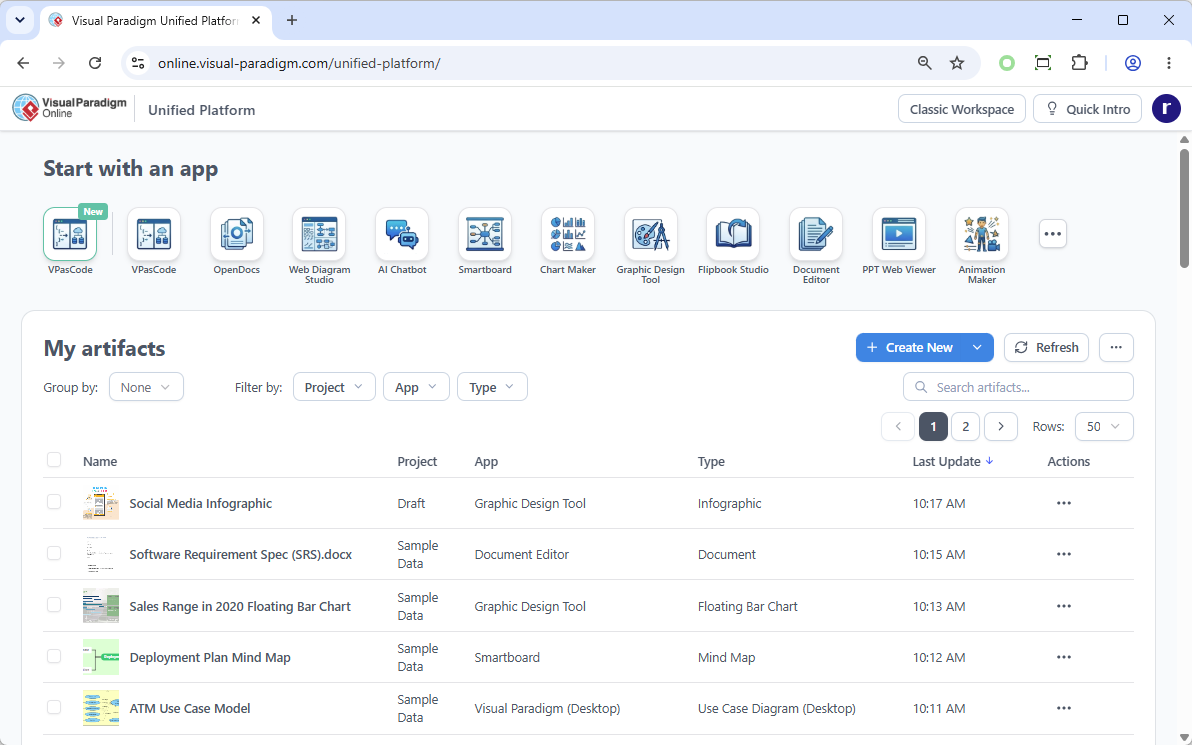
Unified Platform URL: https://online.visual-paradigm.com/unified-platform/
2. VPasCode: Unified Text-to-Diagramming
Building complex, professional diagrams at the speed of thought is now possible with VPasCode. This feature brings a high-performance, real-time code editor and rendering engine directly to your workspace, natively supporting major textual diagramming syntaxes.
- Supported Frameworks: Write natively using PlantUML, Mermaid, or Graphviz to instantly generate dozens of diagram types, including Sequence diagrams, Entity Relationship Diagrams (ERDs), Mind Maps, C4 models, Work Breakdown Structures (WBS), and Flowcharts.
- AI Superpowers: Free tiers include real-time previewing, URL sharing, and SVG/PNG exporting. Premium tiers unlock AI Code Error Fixing and instant AI Language Translation, ensuring your syntax is always correct and accessible.
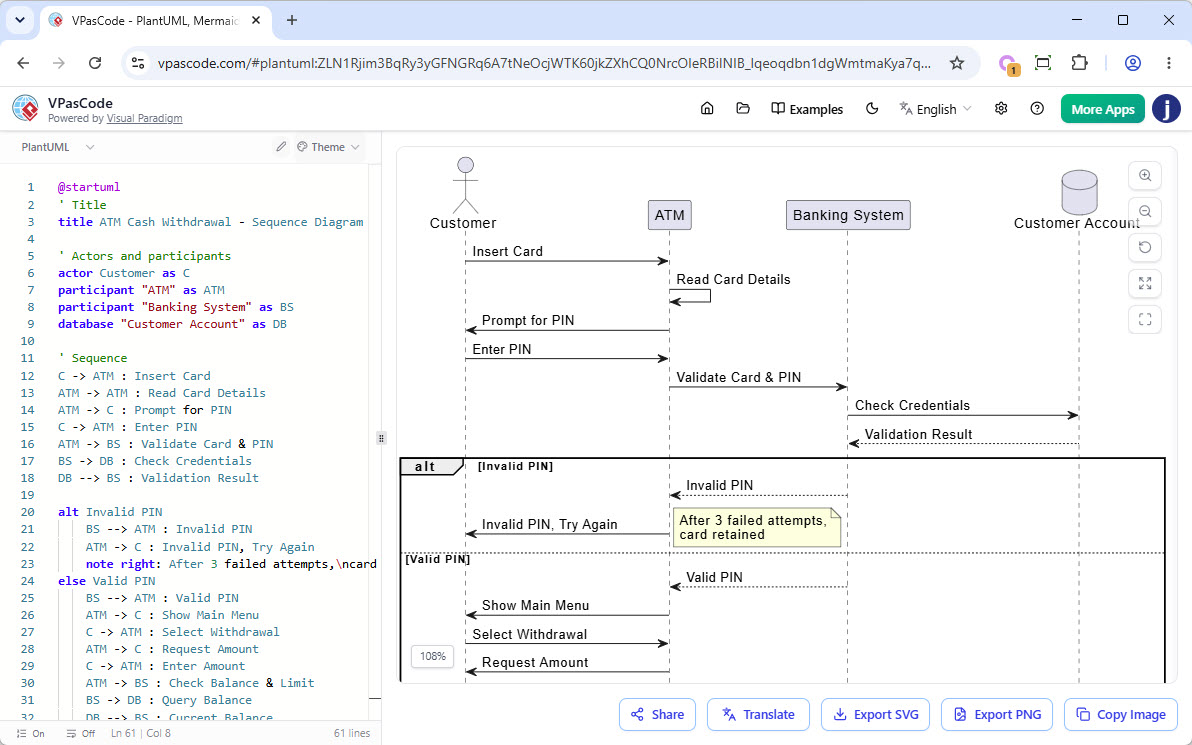
User Review and Feedback: The Power of PlantUML in VPasCode
Users have praised VPasCode for its ability to handle complex logic without the clutter of manual drawing. A common use case involves defining system interactions via PlantUML. For example, a developer can define an ATM cash withdrawal scenario using simple text:
@startuml
actor User
participant "ATM Machine" as ATM
database "Bank Server" as Bank

User -> ATM : Insert Card
ATM -> Bank : Validate Card
Bank --> ATM : Card Valid
ATM --> User : Enter PIN
User -> ATM : Enter PIN
ATM -> Bank : Verify PIN
Bank --> ATM : PIN Correct
ATM --> User : Enter Amount
User -> ATM : Request $100
ATM -> Bank : Check Balance
Bank --> ATM : Balance Sufficient
ATM -> User : Dispense Cash
@enduml
In previous versions, creating this visually would require dragging multiple actors and lifelines. With VPasCode, the diagram renders instantly, and any changes to the logic—such as adding an error state for insufficient funds—can be made by simply adding a few lines of code. This “Diagram-as-Code” approach ensures that diagrams remain synchronized with the actual system logic.
3. AI Presentation Studio: Step-by-Step Cinematic Slide Generation
Most AI presentation tools produce uneditable slide images or flat HTML pages, forcing a complete restart if the output misses the mark. The AI Presentation Studio introduces an interactive, step-by-step workflow that ensures creative control.
- The Iterative Workflow: Input your topic and audience context → Refine the AI outline via a highly visual content editor → Apply professional design themes → Insert dynamic animations from over 60 cinematic transitions.
- Humanless Narration & Avatars: Generate automated text-to-speech scripts utilizing dozens of diverse voice profiles, or upload your own audio. Take it a step further by choosing from over 600 lip-synced AI Avatars, or use AI Face Swap to map your own face onto a professional narrator avatar. Finally, export a polished, standalone MP4 video ready for production.
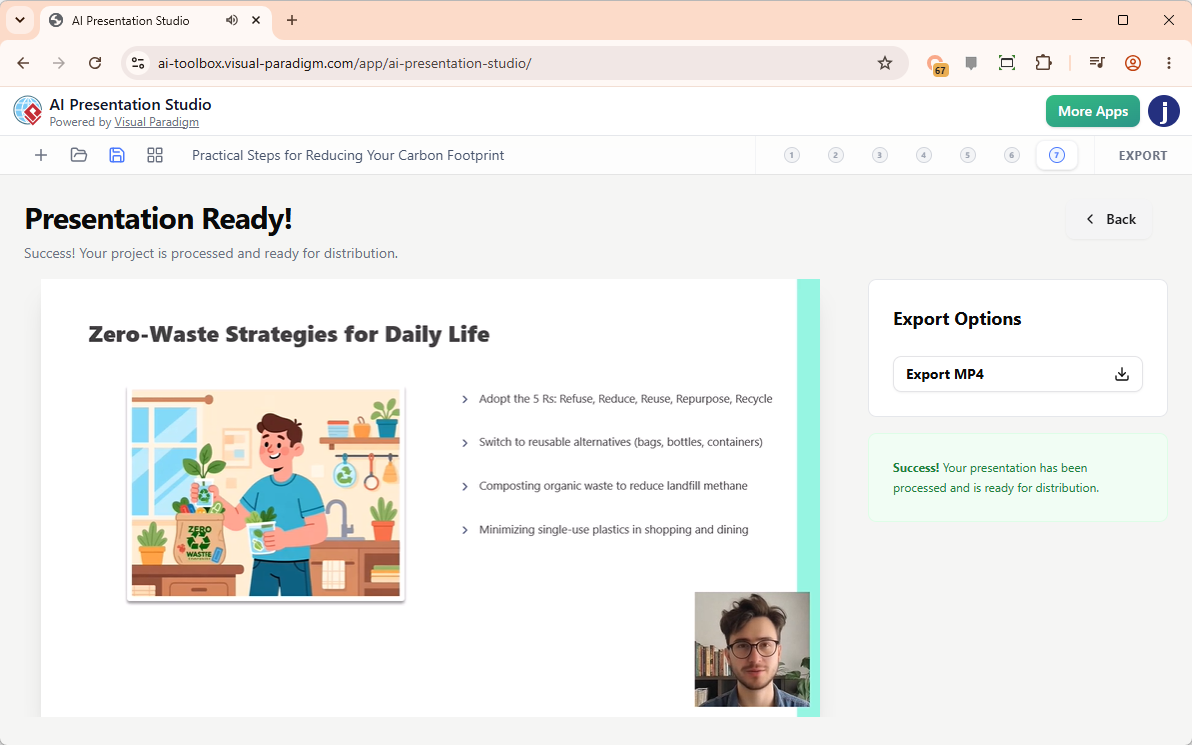
Visit AI Presentation Studio: https://ai-toolbox.visual-paradigm.com/app/ai-presentation-studio/
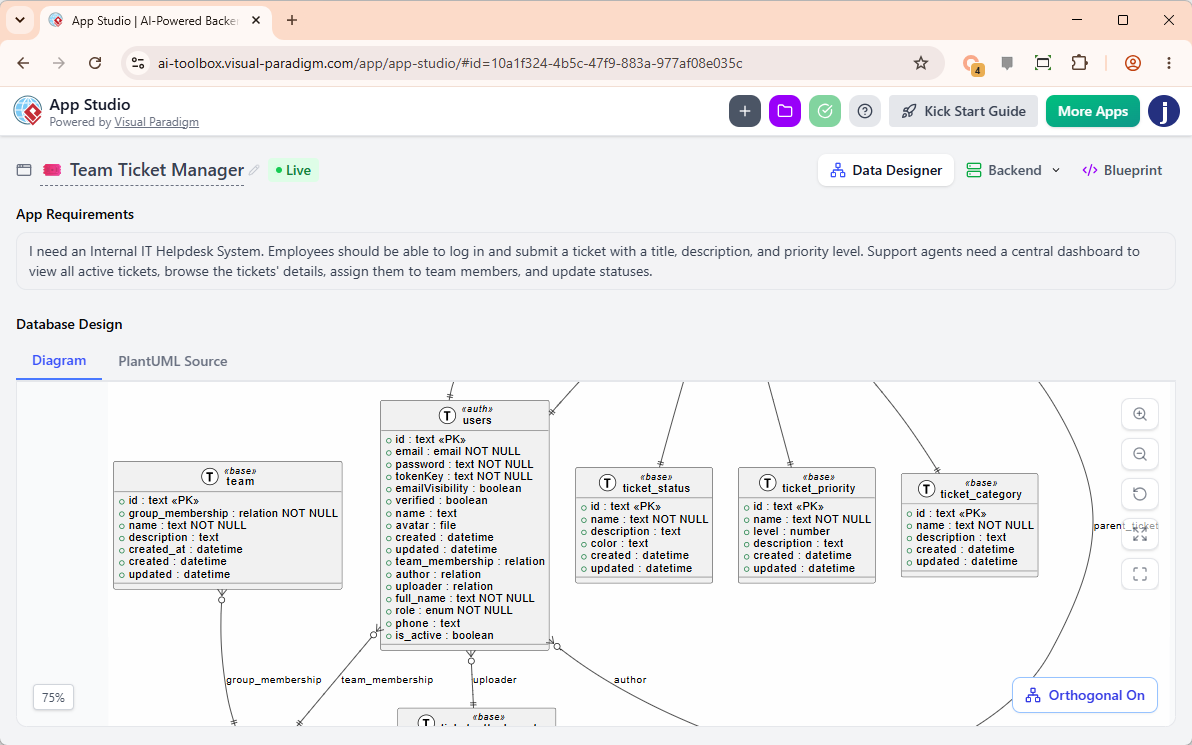
4. AI App Studio: Stable Apps Built Faster with a Data-First Strategy
Building full-stack apps using pure text tools frequently leads to stateless, broken apps because the AI coder tries to guess user data logic. Accessible at ai-toolbox.visual-paradigm.com/app/app-studio/, AI App Studio solves this paradox with a strict, data-driven methodology.
- Blueprint Over Lock-In: Instead of forcing you into a rigid low-code interface, the studio automatically provisions a secure, live cloud backend database for your app via a plain English requirement description or a PlantUML ERD import.
- Master Prompt Generation: App Studio packages your active cloud database infrastructure, endpoints, custom UI themes, frameworks (React, Svelte, Vue, Angular), and styles (Tailwind CSS v4, Bootstrap, Material UI) into a production-ready Master AI Prompt. Paste this prompt into external engines like Google AI Studio to launch a persistent, stable application that won’t break on a browser refresh.
- Mock Data Seeding: Instantly seed your freshly provisioned database with relational mock data so your app is functional right out of the gate.
5. AI VPP Chatbot: Talk to Your Visual Paradigm Project Files
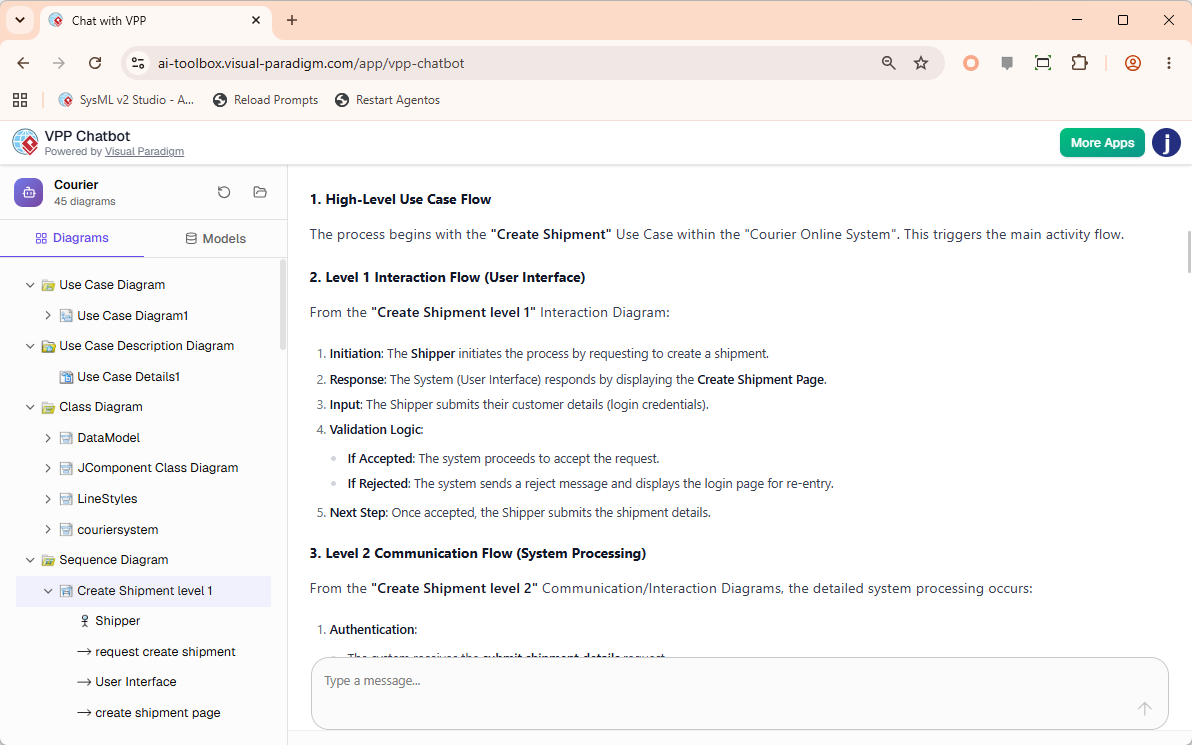
Navigating large, complex models just got significantly easier with the VPP Chatbot. This intelligent AI-powered tool is designed to read, analyze, and answer questions directly from your native Visual Paradigm Project (.vpp) files.
- Interactive Chat Interface: Simply drop your
.vppfile into the app to begin. Your complete diagram structure is neatly populated on the left sidebar for quick reference, while a conversational chatbot interface occupies the right side. - Deep Semantic Analysis: Instead of manually digging through models, you can ask the AI to query your project directly. Request it to list all key use cases, outline the flow of events for specific scenarios, or summarize intricate interaction diagrams into plain, easy-to-read documentation.
Tool URL: https://ai-toolbox.visual-paradigm.com/app/vpp-chatbot
The Three-Tier Ecosystem Structure
The Visual Paradigm AI Diagramming Ecosystem is built on a “Generation, Transit, and Documentation” model. This structure replaces fragmented documentation silos with a seamless pipeline that connects code-based design tools directly to living enterprise workspaces.
[ Generation Tier ]                     [ Transit Tier ]            [ Documentation Tier ]
  - VPasCode (Text/DaC)       ---\
  - AI Chatbot (Natural Lang) ----+-->  [ The Pipeline ]  ------->  [ OpenDocs Workspace ]
  - VP Desktop & Online       ---/    (Central Repository)       (AI Knowledge Platform)
1. The Generation Tier (AI & Diagram as Code)
Developers and architects can build diagrams using text inputs instead of manual drag-and-drop mechanics.
- VPasCode: A browser-based Diagram-as-Code (DaC) playground. It allows users to write structural markup natively using industry-standard formats including Mermaid.js, PlantUML, and Graphviz.
- AI Chatbot & Prompt Engine: Transforms plain, natural language requests (e.g., “Create a sequence diagram for user authentication with OAuth2”) into fully structured visual diagrams. The AI automatically bridges the text-to-diagram gap, exposing a button to “Open in VPasCode” so the raw syntax can be fine-tuned manually.
- AI Syntax Support: The built-in AI includes automated code error-fixing to scan and repair broken syntax errors on the fly.
2. The Transit Tier (The Pipeline)
- The Visual Paradigm Pipeline: Serves as a secure, cloud-based centralized repository.
- Connective Tissue: It functions as the bridge that moves assets out of local files or text editors into documentation dashboards.
- Live Reference Assets: Once a diagram is pushed to the pipeline using the “Send to OpenDocs Pipeline” action, it establishes a live reference asset that retains automated revision tracking.
3. The Documentation Tier (OpenDocs)
- OpenDocs: An AI-powered knowledge management platform specifically tailored for DevOps teams, engineers, and solution architects.
- Dynamic Updates: Instead of dealing with static image exports that immediately fall out of date, users reference the Pipeline live assets directly inside their OpenDocs pages.
- Consistency Maintenance: When a developer updates the underlying code in VPasCode or modifies a model, the visual asset pushes a new revision to the pipeline. OpenDocs highlights the modification, allowing teams to swap to the latest diagram layout with a single click to maintain documentation consistency.
Edition Eligibility & Licensing Matrix
To use these advanced web apps and premium AI extensions, an active software maintenance contract or active subscription is required.
| Feature | Free Capabilities | Premium / AI Elements Included In: |
|---|---|---|
| Unified Platform | Core Hub & Dashboard View | N/A |
| VPasCode | Code Editor, Preview, URL Sharing, SVG/PNG Export |
|
| AI Presentation Studio | N/A |
|
| AI App Studio | N/A |
|
| AI VPP Chatbot | N/A |
|
The Cross-Platform Advantage: Visual Paradigm Desktop Professional Edition (and higher) users with an active software maintenance plan are automatically granted full access to the web apps of VP Online Combo Edition, unlocking all premium AI tools at no additional charge!
How to Upgrade to Version 18.1
Upgrading to this landmark release is simple, though the process depends on your current license status.
Scenario A: You Have an Active Subscription or Maintenance Plan
If your software maintenance or subscription is currently active, you can move to Version 18.1 immediately using automated upgrade tools. Please follow the step-by-step documentation for your specific license type:
- How to upgrade Visual Paradigm (with Subscription License) to New Version
- How to upgrade Visual Paradigm (With Single Seat License) to New Version
Scenario B: Your Software Maintenance Has Lapsed
If you are currently out of maintenance, you will need to renew your plan to gain access to the Version 18.1 installation files and activate the bundled cloud app features.
- Log into your Customer Service Center account to process a renewal and instantly activate your upgrade access.
Core Benefits for Engineering Teams
- Git-friendly Workflows: Because diagram paths originate from plain text markup via VPasCode, the structural definitions can easily reside in standard code repositories for precise versioning and code review diffs.
- Zero-installation Sandbox: The entire engine functions cloud-natively inside standard modern browsers, removing deployment hurdles for distributed engineering teams.
- Elimination of Documentation Decay: Solves the problem of out-of-date system visuals by binding the visual architecture directly to the text-based source files.
Conclusion
Visual Paradigm 18.1 marks a significant leap forward in the integration of AI and traditional modeling tools. By introducing the Unified Platform, VPasCode, and specialized AI studios for presentations and app development, Visual Paradigm has created an ecosystem that respects both the speed of code and the clarity of visuals. The three-tier structure of Generation, Transit, and Documentation ensures that diagrams are not just static artifacts but living components of your development pipeline.
For teams looking to reduce manual overhead, eliminate documentation decay, and leverage the power of AI without sacrificing control, Version 18.1 offers a robust and future-proof solution. As the lifecycle of this version continues, the promise of regular enhancements ensures that your toolkit will remain at the cutting edge of technological innovation.
References
- From Diagram to Documentation: A Beginner’s Guide to the Visual Paradigm Pipeline: A comprehensive introduction to connecting diagramming tools with documentation workflows.
- Visual Paradigm OpenDocs: The Complete Developer’s Guide to AI-Powered Technical Documentation: Detailed insights into using OpenDocs for technical documentation.
- Mastering Visual Paradigm OpenDocs: The Ultimate Guide to AI-Powered Knowledge Management and the Pipeline Ecosystem: Advanced strategies for knowledge management using the Visual Paradigm ecosystem.
- AI Diagram Generation Features: Overview of AI capabilities for generating diagrams from text.
- Comprehensive Guide to VPasCode by Visual Paradigm: In-depth tutorial on using VPasCode for diagram-as-code workflows.
- Seamlessly Connect Diagramming to Documentation: VPasCode Integrates with OpenDocs: Release notes on the integration between VPasCode and OpenDocs.
- VPasCode Features: Official feature list and capabilities of the VPasCode tool.
- How the Visual Paradigm AI Chatbot and VPasCode Function as an Integrated Ecosystem for Diagramming: Explanation of the synergy between AI chatbots and code-based diagramming.
- Mastering VPasCode: The Ultimate Guide to AI-Powered Diagram as Code with Multi-Engine Support: Advanced guide on using multiple engines within VPasCode.
- Sync AI Diagram to OpenDocs Pipeline Guide Video: Video tutorial on syncing diagrams to the OpenDocs pipeline.
- Sync AI Diagram to OpenDocs Pipeline Guide: Step-by-step guide for syncing diagrams.
- Sync AI Diagram to OpenDocs Pipeline Guide (Duplicate): Additional resources on pipeline synchronization.
- From Code to Clarity: A Beginner’s Guide to Seamless Diagramming with VPasCode and OpenDocs: Beginner-friendly overview of the diagramming workflow.
- OpenDocs Features: Official feature list for the OpenDocs platform.
- Visual Paradigm’s Pipeline: Hands-on Review of Visual Paradigm’s Desktop to OpenDocs Integration: Practical review of the integration between desktop tools and OpenDocs.
-
Mastering VPasCode: The Ultimate Guide to AI-Powered Diagram as Code with Multi-Engine Support: Repeated reference for multi-engine support in VPasCode.