


Introduction
In the modern business landscape, understanding how an organization operates is the first and most critical step toward improvement. Business Process Model and Notation (BPMN) serves as the universal visual language for this purpose. As an open standard maintained by the Object Management Group (OMG) and formalized as ISO/IEC 19510, BPMN provides a graphical representation of workflows that bridges the communication gap between business stakeholders, analysts, and technical developers.
This comprehensive guide explores the history, core elements, and practical application of BPMN. Furthermore, it highlights how leveraging specialized tooling like Visual Paradigm can transform static diagrams into dynamic assets for process analysis, simulation, and optimization. Whether you are documenting an “As-is” process or designing a future state, mastering BPMN is essential for operational excellence.
History and Evolution of BPMN
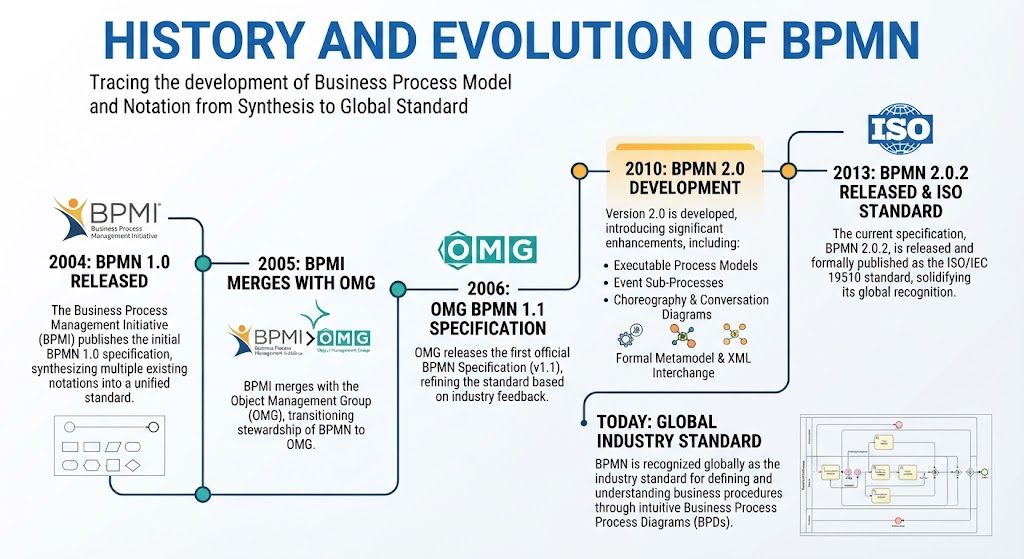
BPMN was derived from the synthesis of multiple business modeling notations to create a unified standard. Originally published by the Business Process Management Initiative (BPMI) in 2004, the notation has evolved significantly:
-
2005: BPMI merged with the OMG.
-
2006: OMG released the first BPMN Specification.
-
2010: Version 2.0 was developed, introducing significant enhancements.
-
2013: The current specification (BPMN 2.0.2) was released and formally published as the ISO/IEC 19510 standard.
Today, BPMN is recognized globally as the industry standard for defining and understanding business procedures through intuitive Business Process Diagrams (BPDs).
Key Concepts and Benefits
BPMN allows organizations to capture processes in a clear, consistent manner. Its primary benefits include:
-
Universal Understanding: Provides a standard notation readily understandable by all stakeholders, from process owners to software architects.
-
Standardization: An industry standard developed by the not-for-profit OMG consortium.
-
Communication Bridge: Eliminates ambiguity between business process design and technical implementation.
-
Simplicity and Power: Easy to learn for basic flows, yet powerful enough to depict complex enterprise logic.
The goal of BPMN is to serve three distinct audiences simultaneously: technical experts responsible for implementation, business analysts who improve processes, and managers who monitor performance.
Overview of BPMN Structure
Any process described with BPMN represents steps (activities) performed sequentially or concurrently according to business rules. Below is an example of a “Place Order online” process typically used in e-commerce:
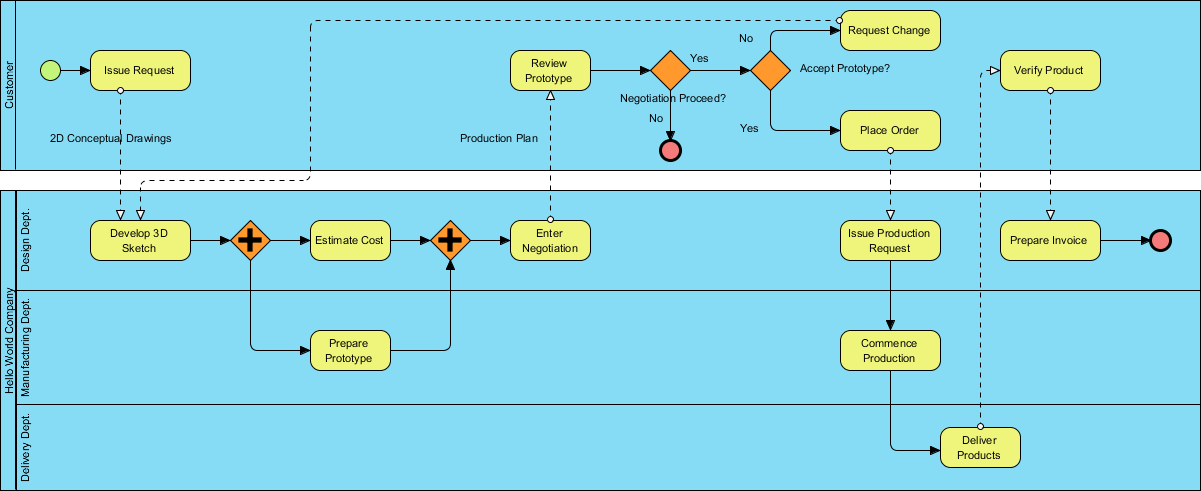
BPMN classifies graphic elements into specific categories to ensure they are easily recognized. These include Swimlanes, Flow Elements, Connecting Objects, Data, and Artifacts.
Swimlanes: Pools and Lanes
Swimlanes are graphical containers representing process participants. They organize activities by role or entity.

There are two types of swimlanes:
-
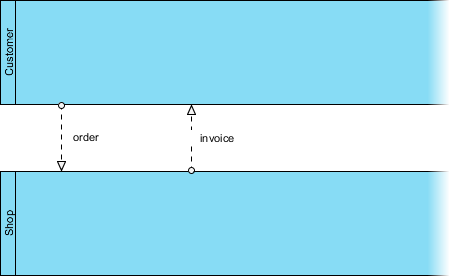
Pools: Represent major participants (e.g., a department, vendor, or customer). A pool may contain flow elements or be a “Blackbox Pool” if the internal workings are irrelevant to the current model.
-
Lanes: Sub-partitions within pools that specify responsibilities (e.g., Department Head vs. General Clerk).
Understanding Blackbox Pools
A blackbox pool models entities external to the process whose internal flow does not impact the modeled scope. For instance, if modeling a chef’s meal preparation, the customer is a blackbox. Conversely, if modeling the customer ordering experience, the chef becomes the blackbox.

Note: While lanes can be nested, avoid using them solely to model organizational hierarchy. Use organization charts for structural reporting and BPMN lanes strictly for process responsibility.
Flow Elements
Flow elements define the behavior of a process. There are three primary kinds:

Activities
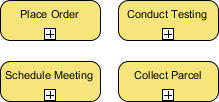
Activities represent work performed. They are depicted as rounded rectangles.
-
Task: Atomic work that cannot be broken down further.
-
Sub-Process: Complex work that can be elaborated into smaller tasks, often linked to a separate detailed BPD.

Events
Events are triggers that influence the process flow, shown as circles.
-
Start Event: Marks the beginning.
-
Intermediate Event: Occurs during execution (e.g., waiting for approval).
-
End Event: Marks completion.

Gateways
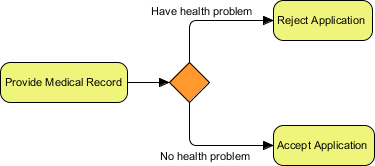
Gateways control flow divergence and convergence based on conditions. They are diamond-shaped.
-
Exclusive Gateway: Only one path is taken based on data conditions.
-
Inclusive Gateway: Multiple paths may be taken if multiple conditions are met.

-
Parallel Gateway: All outgoing flows execute simultaneously without condition checking.

-
Event-Based Gateway: Path is determined by which event occurs first (e.g., receiving a “Yes” or “No” message).

Connecting Objects
Connecting objects link flow elements to form a coherent workflow.

-
Sequence Flow: Solid line with arrow; shows order within the same pool.

-
Message Flow: Dotted line with arrow; shows communication between different pools. Never use sequence flows across pools.
Data and Artifacts
Data objects represent information produced or consumed during execution.

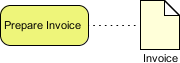
Artifacts provide additional context without affecting flow:
-
Groups: Dotted boxes for visual categorization.

-
Text Annotations: Explanatory notes attached to flow objects.

Practical Example: True Aqua Distilled Water Company
To illustrate these concepts, consider the True Aqua Distilled Water Company, which aims to increase market share by improving its ordering process.

In this process:
-
Customers initiate orders via phone (90%) or email (10%).
-
A Customer Service Assistant checks customer status; new accounts are created if necessary.
-
Orders are forwarded to Logistics every Wednesday.
-
The Logistics Manager assigns workers and prints schedules.
-
Workers deliver water to customers.
This diagram effectively communicates roles, decision points, and the weekly batch processing nature of the delivery workflow.
Creating Effective BPMN Diagrams
Follow this structured approach to build accurate models:
-
Define Your Process: Identify start/end points and key decisions before drawing.
-
Choose a Tool: Select compliant software like Lucidchart, Camunda, or Visual Paradigm.
-
Add Flow Objects: Place events, activities, and gateways logically.
-
Connect Objects: Use sequence flows for internal logic and message flows for cross-pool interaction.
-
Organize with Swimlanes: Clarify responsibilities using pools and lanes.
-
Review and Refine: Validate clarity with stakeholders.
Best Practices:
-
Keep diagrams simple; avoid overcrowding.
-
Adhere strictly to standard notations.
-
Label elements descriptively.
-
Iterate based on stakeholder feedback.
Unlocking Advanced Capabilities with Visual Paradigm
While basic BPMN tools allow for drawing, professional platforms like Visual Paradigm offer advanced features that turn diagrams into actionable business intelligence.

Why Choose Visual Paradigm?
-
Intuitive BPMN 2.0 Modeler: A user-friendly interface suitable for both novices and experts.
-
Process Drill-Down: Seamlessly navigate between high-level processes and detailed sub-process diagrams.

-
Multi-Standard Integration: Map BPMN flows to UML, ERD, wireframes, and other artifacts for holistic architecture.

-
Working Procedure Editor: Combine visual diagrams with textual operational specifications in a single output.
-
As-is and To-be Modeling: Maintain traceability between baseline and target process models during re-engineering efforts.

-
RACI and CRUD Charts: Automatically generate responsibility matrices directly from your process models.

-
Process Animation: Convert static diagrams into animated simulations to visualize flow dynamics for stakeholders.
-
Process Simulation: Analyze resource consumption, costs, bottlenecks, and queue times to validate improvements before implementation.
Conclusion
BPMN is more than just a diagramming standard; it is a vital framework for organizational clarity and efficiency. By providing a common visual language, it ensures that business analysts, developers, and managers remain aligned. When combined with powerful tooling like Visual Paradigm, BPMN transcends documentation to become a platform for simulation, analysis, and continuous improvement. Embracing these standards and tools empowers organizations to optimize their workflows and achieve strategic objectives with confidence.
Recommended Resources: Visual Paradigm
-
Visual Paradigm BPMN Guide: Comprehensive tutorials covering BPMN fundamentals, symbol guides, and best practices for business process modeling.
-
BPMN Software Features Overview: Detailed breakdown of Visual Paradigm’s specific BPMN capabilities including simulation, animation, and code engineering.
-
Creating BPMN Diagrams Tutorial: Step-by-step walkthrough for building professional business process diagrams using the Visual Paradigm editor.
-
BPMN Activity Types Explained: In-depth explanation of task markers, sub-processes, and activity attributes within the Visual Paradigm environment.
-
Orchestration vs Choreography vs Collaboration: Clarifies the differences between BPMN diagram types and when to use each for effective process modeling.