


Introduction
In the complex landscape of modern business operations, the ability to visualize, analyze, and improve workflows is critical. Business Process Model and Notation (BPMN) has emerged as the global standard for business process modeling, providing a graphical notation for specifying business processes in a Business Process Diagram (BPD). Designed to bridge the communication gap between business analysts who define processes and technical developers who implement them, BPMN offers a standardized “flowchart” language that is readily understood by all stakeholders.
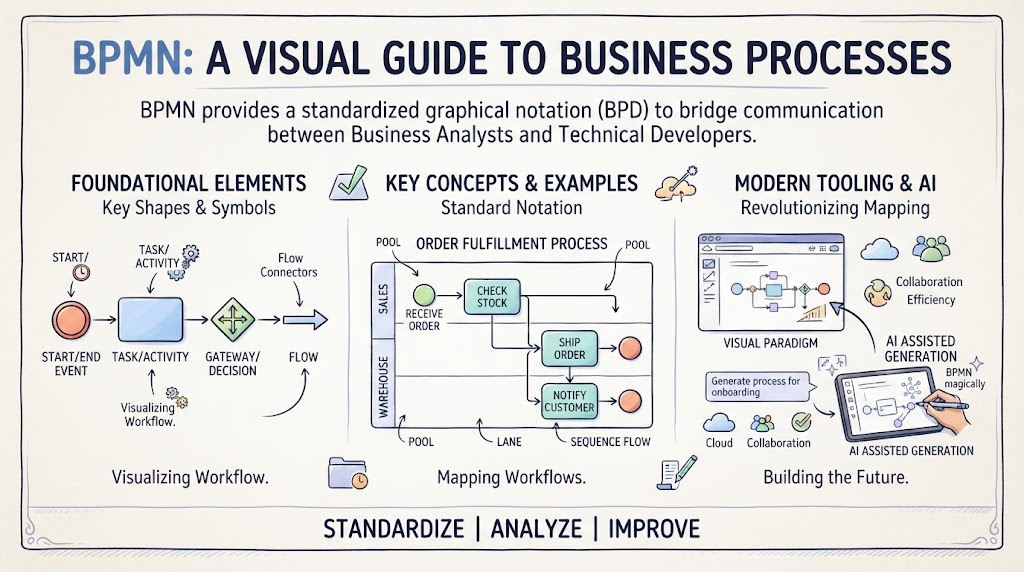
This guide explores the foundational elements of BPMN as illustrated in standard notation charts, delves into key concepts with practical examples, and examines how modern tooling—specifically Visual Paradigm and AI-assisted generation—is revolutionizing the way organizations map their future.
1. The Four Pillars of BPMN Notation
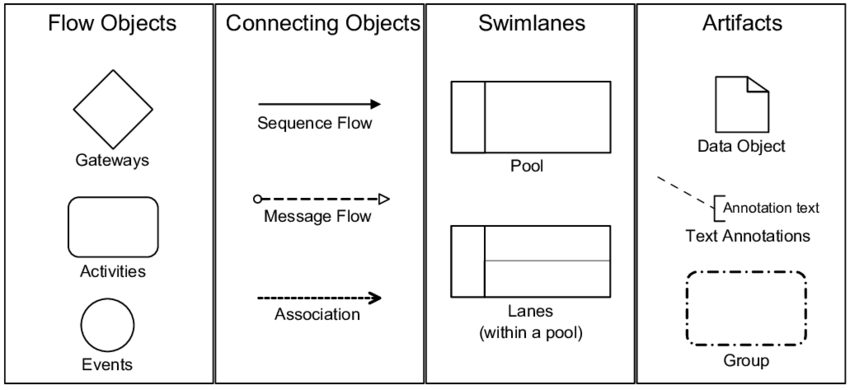
As depicted in the reference diagram, BPMN elements are categorized into four core groups. Understanding these categories is the first step toward mastering process modeling.
Flow Objects
Flow objects are the primary graphical elements used to define the behavior of a business process.
-
Events (Circles): Events represent something that “happens” during the course of a process. They affect the flow of the model and usually have a cause (trigger) or an impact (result). Events are circles with open centers to allow internal markers to differentiate between different triggers or results.
-
Start Event: Indicates where a process begins.
-
Intermediate Event: Occurs between a start and end event.
-
End Event: Indicates where a process ends.
-
-
Activities (Rounded Rectangles): An activity is a generic term for work that a company performs. It can be atomic (a Task) or non-atomic (a Sub-process).
-
Task: A single unit of work (e.g., “Approve Invoice”).
-
Sub-process: A compound activity that can be broken down into finer detail.
-
-
Gateways (Diamonds): Gateways are used to control the divergence and convergence of sequence flows. They determine branching, forking, merging, and joining of paths.
-
Exclusive Gateway: Represents a decision where only one path can be taken.
-
Parallel Gateway: Used to create parallel paths without checking any conditions.
-
Connecting Objects
Connecting objects link flow objects to each other or to other information.
-
Sequence Flow (Solid Arrow): Shows the order in which activities are performed in a process.
-
Message Flow (Dashed Line with Open Circle/Arrow): Shows the flow of messages between two separate process participants (Pools). In BPMN, two pools cannot be connected by a Sequence Flow; they must use a Message Flow.
-
Association (Dotted Line): Used to associate artifacts or text annotations with flow objects.
Swimlanes
Swimlanes are visual mechanisms used to organize and categorize activities.
-
Pool: Represents a participant in a process. A pool acts as a container for a set of activities and cannot be empty.
-
Lane: A sub-partition within a pool. Lanes are used to organize and categorize activities within a pool according to function or role (e.g., “HR Department,” “Manager”).
Artifacts
Artifacts provide additional information about the process but do not directly affect the sequence flow.
-
Data Object: Represents data required or produced by activities.
-
Group: A visual grouping of elements that does not affect the flow.
-
Text Annotation: Explanatory text added to a diagram to provide context.
2. Key Concepts and Real-World Examples
To move beyond theory, it is essential to apply these notations to real-world scenarios.
Concept: The “Happy Path” vs. Exception Handling
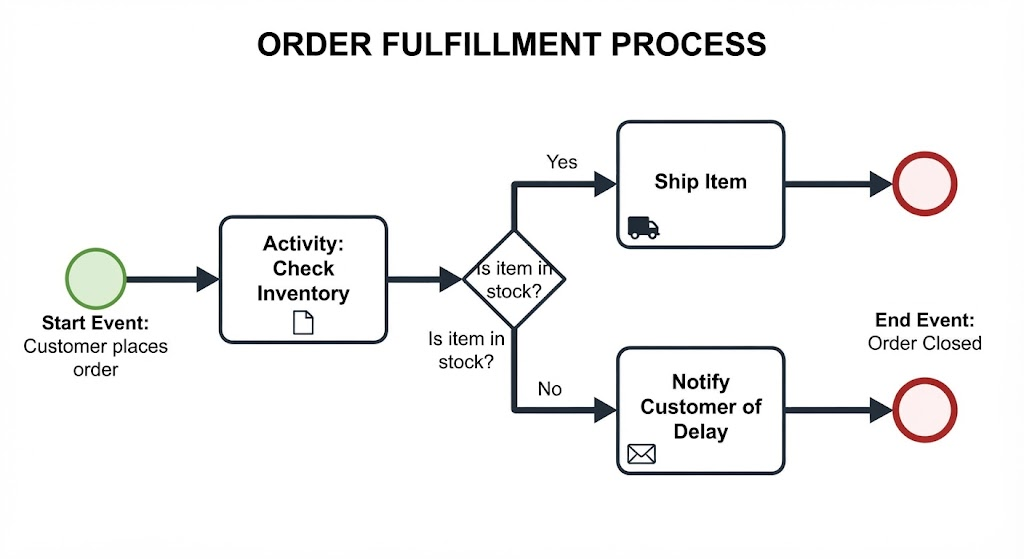
A robust BPMN model accounts for both the ideal scenario (happy path) and exceptions.
-
Example (Order Fulfillment):
-
Start Event: Customer places order.
-
Activity: Check Inventory.
-
Gateway (Exclusive): Is item in stock?
-
Yes: Proceed to “Ship Item.”
-
No: Proceed to “Notify Customer of Delay” (Exception Path).
-
-
End Event: Order Closed.
-
Concept: Pool-to-Pool Communication
BPMN strictly enforces the separation of participants.
-
Example (Procurement):
-
Pool A (Company): Sends a “Purchase Order” via a Message Flow.
-
Pool B (Vendor): Receives the message via a Start Message Event and sends back an “Invoice” via another Message Flow.
-
Note: You cannot draw a solid Sequence Flow line from Pool A to Pool B.
-
Concept: Sub-Processes for Abstraction
To keep diagrams readable (“fitting on one page”), complex tasks should be collapsed into sub-processes.
-
Example: Instead of modeling every step of “Onboard Employee” (creating email, assigning desk, payroll setup) in the main HR diagram, use a single Collapsed Sub-process activity labeled “Onboard Employee.” The details are contained within that element, expandable only when needed.
3. Tooling: Visual Paradigm and AI-Assisted Generation
While pen and paper are good for brainstorming, professional BPMN requires robust tooling that supports the BPMN 2.0 specification, validation, and collaboration.
Visual Paradigm BPMN
Visual Paradigm is a leading platform that supports the full spectrum of business process design.
-
Drag-and-Drop Interface: It features an intuitive editor that allows users to create shapes quickly and accurately, ensuring that notation rules (like connecting pools correctly) are followed .
-
Resource Management: Beyond simple drawing, the tool allows for resource allocation, cost evaluation, and simulation, turning a static diagram into a dynamic model for analysi.
-
Standards Compliance: It ensures that diagrams remain compliant with BPMN 2.0 standards, which is crucial for execution in workflow engines.
AI-Assisted Diagram Generation
The advent of Generative AI has transformed process modeling from a manual drawing task to a natural language processing task.
-
Text-to-Diagram: Modern tools, including Visual Paradigm’s AI features, allow users to input a narrative description (e.g., “Create a process for expense approval involving a manager and finance”) and instantly generate a structured BPMN diagram.
-
Speed and Iteration: AI BPMN generators can turn business requirements into draft process diagrams within seconds, saving hours of manual layout work .
-
Refinement: The AI provides the “first draft,” handling the placement of gateways and swimlanes, which the human analyst can then refine. This approach combines the speed of AI with the critical thinking of a human expert .
Conclusion
BPMN remains the lingua franca of business process management because of its unique ability to be simple enough for business stakeholders yet precise enough for technical implementation. By mastering the four pillars—Flow Objects, Connecting Objects, Swimlanes, and Artifacts—organizations can gain unprecedented visibility into their operations.
However, the future of BPMN lies not just in knowing the notation, but in leveraging the right tools. Platforms like Visual Paradigm provide the rigorous environment needed for professional modeling, while AI-assisted generation removes the barrier to entry, allowing teams to focus on optimizing the process rather than just drawing it. As businesses continue to evolve, the combination of standardized notation and intelligent automation will be key to driving efficiency and agility.