


Introduction
Business Process Model and Notation (BPMN) serves as the universal language for business process management, bridging the critical gap between business stakeholders and technical implementers. Originally developed by the Business Process Management Initiative and now maintained by the Object Management Group (OMG), BPMN provides a standardized graphical notation that is intuitive for business users yet precise enough to represent complex execution semantics. Since the release of version 2.0 in 2011, which introduced formal execution semantics and was later ratified as ISO 19510, BPMN has become the de facto standard for specifying business processes in a Business Process Diagram (BPD).
For organizations leveraging Visual Paradigm, mastering BPMN goes beyond simple drawing; it involves utilizing a powerful modeling environment that supports the full spectrum of BPMN 2.0.2 specifications. This guide explores the core concepts, structural elements, and practical applications of BPMN, specifically tailored for users of Visual Paradigm. By understanding these fundamentals within the context of this dedicated tooling, modelers can create diagrams that are not only visually clear but also technically executable and compliant with international standards.
Key Concepts of BPMN
BPMN is designed to support business process management for both technical and non-technical users. Its primary objective is to provide a notation that is readily understandable by all business stakeholders, including analysts, developers, and managers, thereby facilitating a common language and reducing communication gaps.
Scope and Boundaries
It is essential to understand what BPMN covers and what it excludes. BPMN is strictly constrained to concepts applicable to business processes. It is not a data flow diagram, nor does it model organizational structures or functional breakdowns. While it depicts the flow of messages and associates data artifacts with activities, its focus remains squarely on the sequence and logic of business activities.
The Four Basic Element Categories
BPMN models are constructed from a limited set of graphical elements organized into four categories. Visual Paradigm provides dedicated palettes for each, ensuring compliance with the standard.
-
Flow Objects: Events, Activities, and Gateways.
-
Connecting Objects: Sequence Flow, Message Flow, and Association.
-
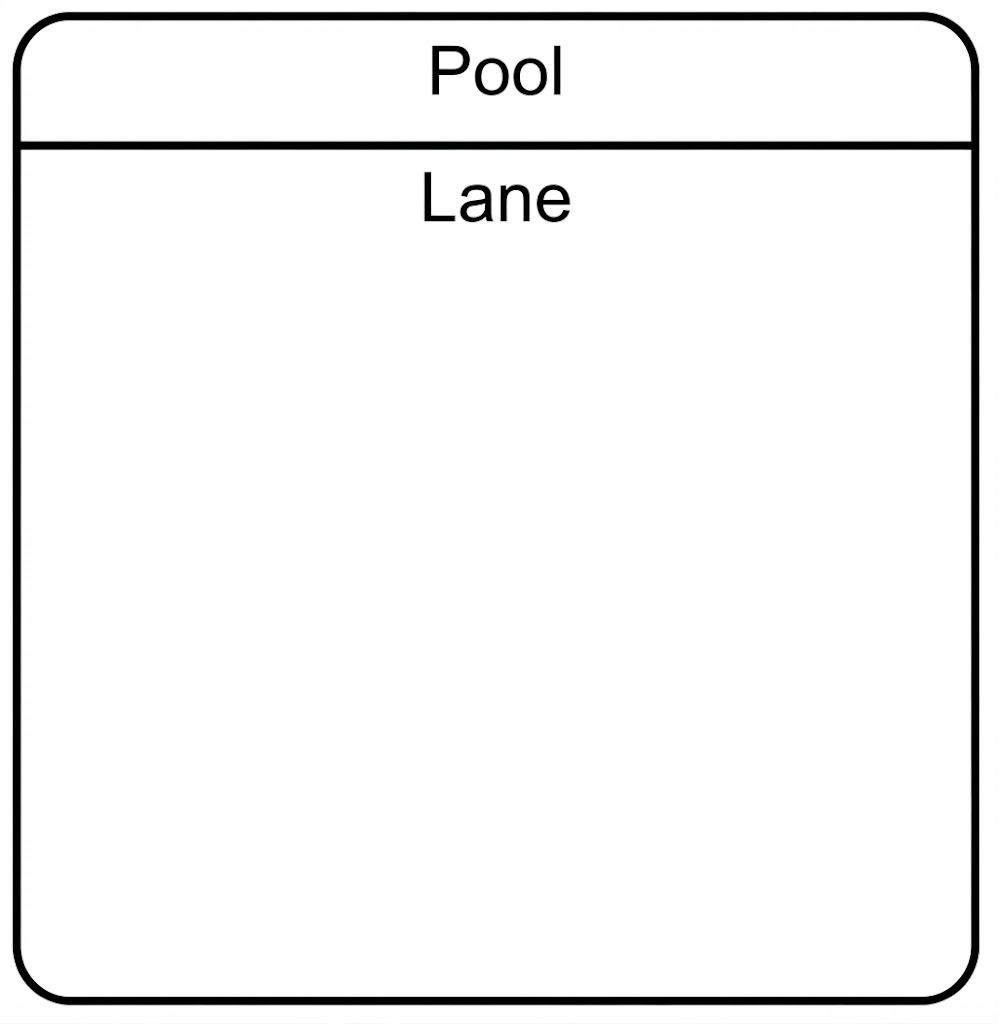
Swimlanes: Pools and Lanes.
-
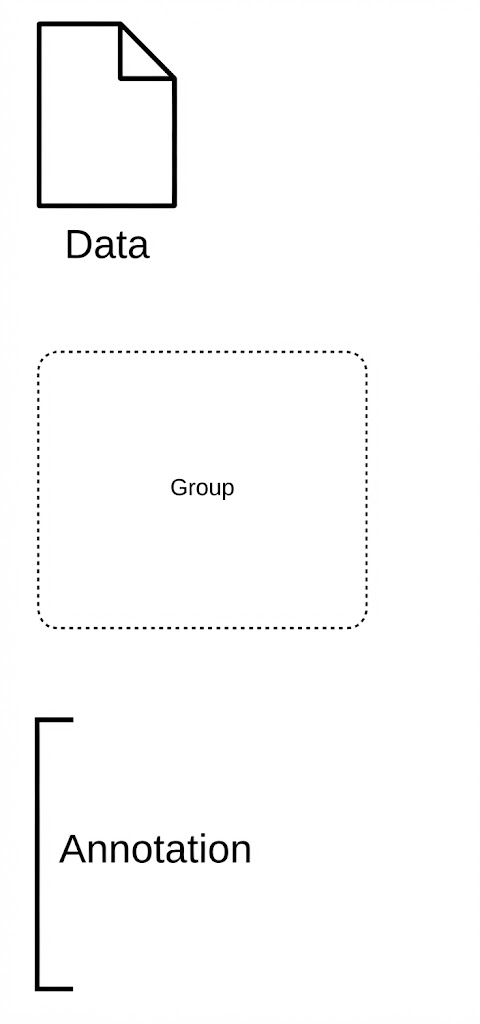
Artifacts: Data Objects, Groups, and Annotations.
Execution Semantics and Interchange
A defining feature of BPMN 2.0 and later versions is the inclusion of execution semantics. This allows diagrams created in Visual Paradigm to be mapped directly to execution languages like BPEL or used for simulation and analysis. The standard defines a metamodel and an XML-based interchange format, ensuring that models are portable and semantically consistent across different platforms.
Core Elements and Visual Paradigm Implementation
Flow Objects
Flow objects are the primary descriptors of business behavior.
Events
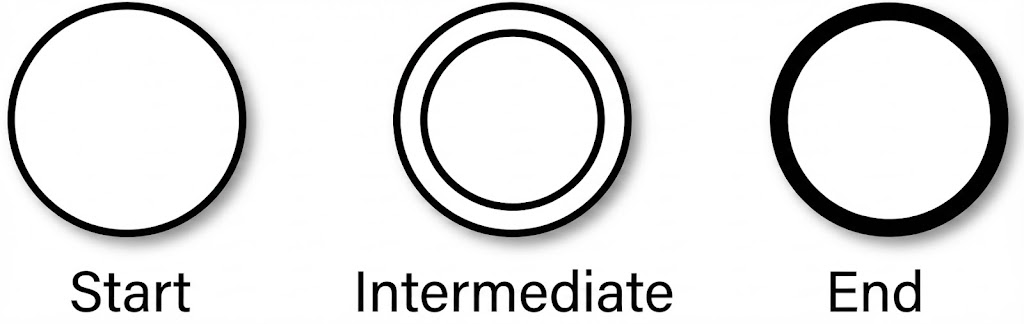
An event represents something that happens during the course of a process. In Visual Paradigm, events are easily distinguished by their border thickness and internal icons.
-
Start Event: Acts as a process trigger. Indicated by a single narrow border. Always “catching” (open icon).
-
Intermediate Event: Represents occurrences between start and end. Indicated by a double border. Can be “catching” or “throwing.”
-
End Event: Represents the result of a process. Indicated by a single thick/bold border. Always “throwing” (solid icon).

Activities
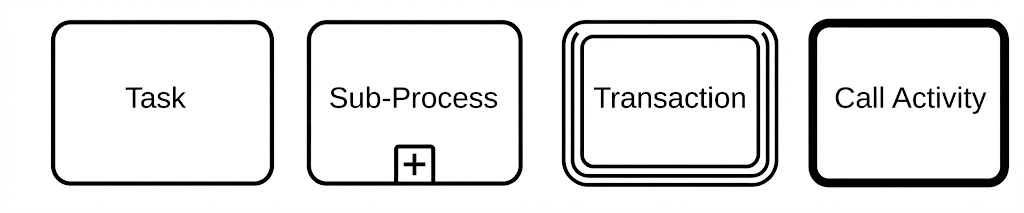
Activities describe work performed. They are represented by rounded-corner rectangles.
-
Task: An atomic activity representing a single unit of work.
-
Sub-process: A compound activity that hides or reveals detail. Collapsed sub-processes show a plus sign; expanded ones reveal internal flow objects.
-
Transaction: A specialized sub-process where all contained activities must succeed or be compensated as a whole. Distinguished by a double border.
-
Call Activity: Reuses a global process or task. Distinguished by a bolded border.
Gateways
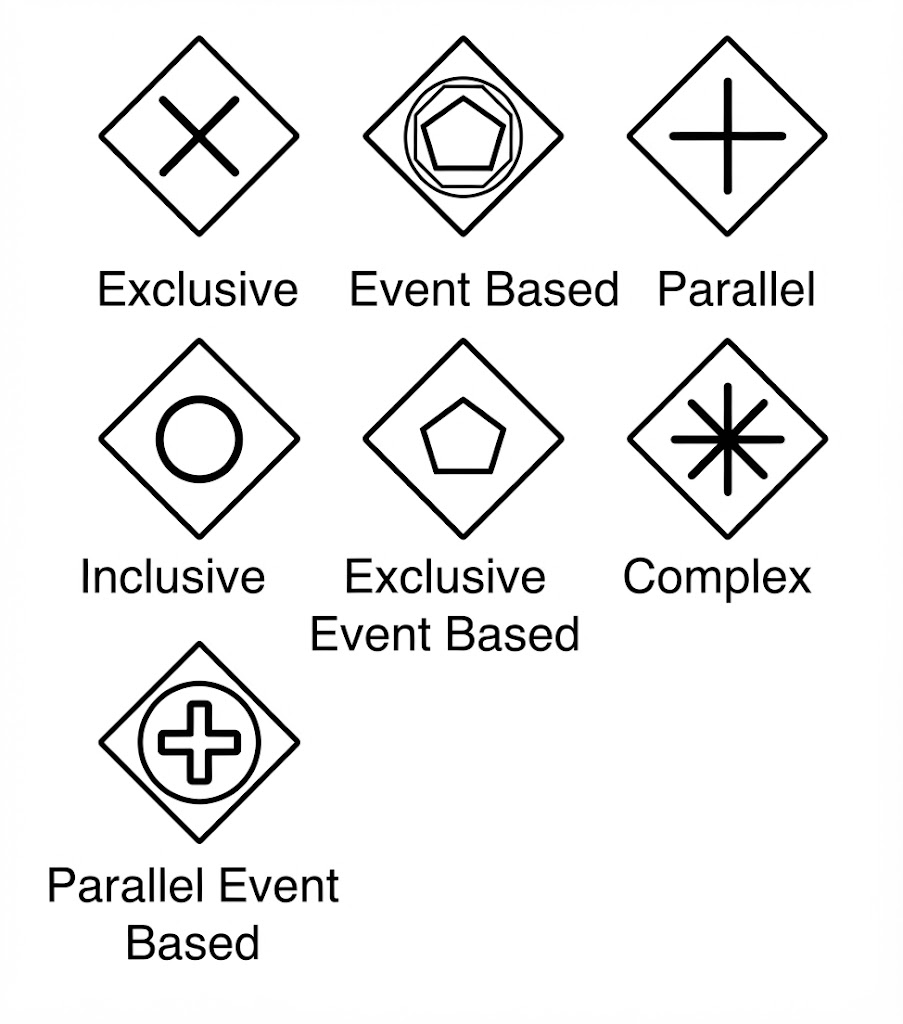
Gateways control the divergence and convergence of paths. Represented by diamonds.
-
Exclusive (XOR): Creates alternative flows where only one path is taken.
-
Parallel (AND): Creates concurrent paths without condition evaluation.
-
Inclusive (OR): Evaluates all conditions; multiple paths may be active simultaneously.
-
Event-Based: Path determination relies on evaluated events rather than data conditions.
-
Complex: Models sophisticated synchronization behaviors.
Connecting Objects
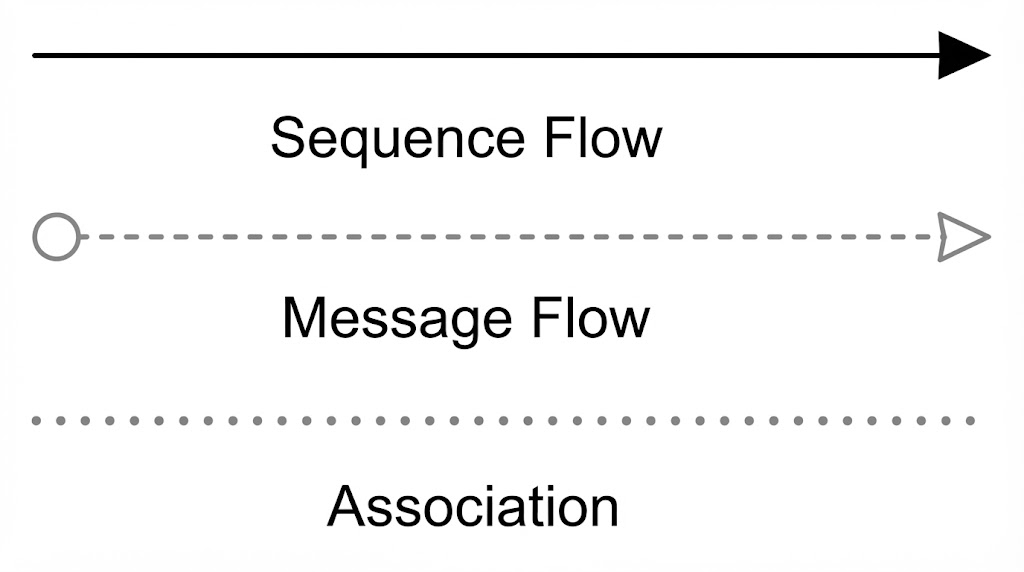
Connecting objects link flow objects to define process logic and interactions.
-
Sequence Flow: Solid line with arrowhead. Shows execution order. May include conditional (diamond) or default (slash) markers.
-
Message Flow: Dashed line with open circle and open arrowhead. Depicts message exchange across organizational boundaries (between pools). Never connects objects within the same pool.
-
Association: Dotted line. Links artifacts or text to flow objects. Directionality indicates input, output, or read/update status.
Swimlanes and Artifacts
Swimlanes
Swimlanes organize activities based on cross-functional flowcharting principles.
-
Pool: Represents a major participant (e.g., an organization). Can be open (showing lanes) or collapsed (black box).
-
Lane: Sub-partition within a pool representing a specific role, function, or department.
Artifacts
Artifacts provide supplementary information without affecting process flow.
-
Data Object: Indicates data required or produced.
-
Group: Visually clusters related elements (dashed rounded rectangle).
-
Annotation: Provides explanatory text for the reader.
Examples of Business Process Diagrams
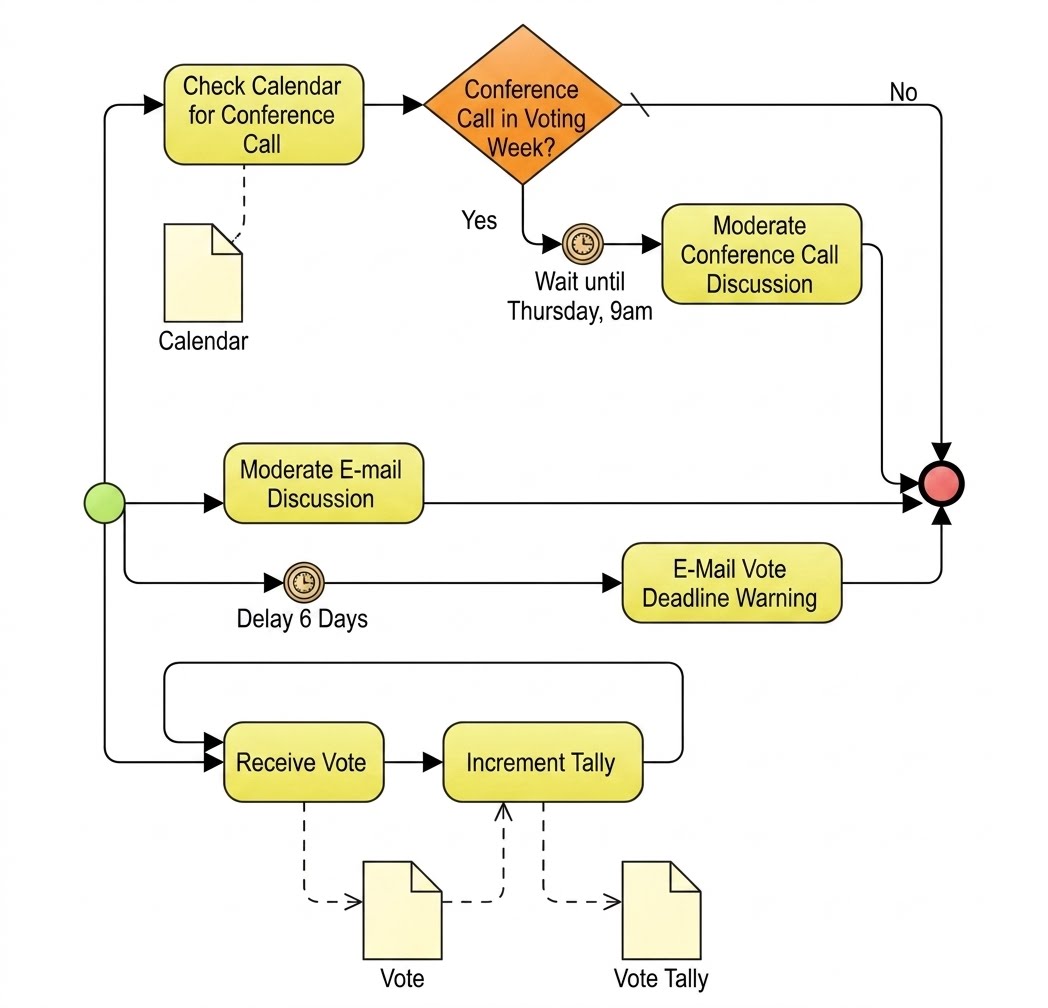
Understanding theoretical elements is best reinforced through practical examples. Below are standard BPMN diagrams illustrating different process patterns. When recreating these in Visual Paradigm, utilize the validation features to ensure structural correctness.
Discussion Cycle
This example demonstrates iterative feedback loops and decision gateways within a collaborative context.
E-mail Voting Process
Illustrates message flows between participants and timer events for deadline management.
Collect Votes
Demonstrates parallel processing and aggregation of results using inclusive or parallel gateways.
BPMN Sub-Models and Modeling Strategy
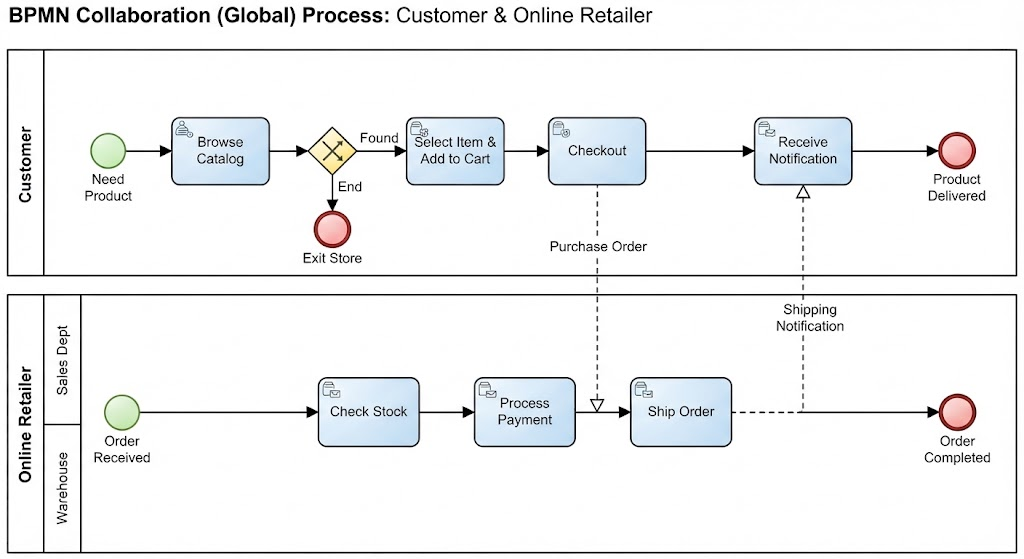
Visual Paradigm supports the three fundamental sub-model types defined in the BPMN specification. Choosing the correct sub-model is crucial for diagram clarity.
-
Private (Internal) Business Processes: Contained within a single pool. Sequence flows do not cross pool boundaries. Represents internal workflow.
-
Abstract (Public) Processes: Shows only the external interface of a private process. Internal details are hidden. Defines message exchange sequences with external entities.
-
Collaboration (Global) Processes: Depicts interactions between two or more business entities. Often modeled using multiple pools connected by message flows, or lanes within a collaboration pool.
Best Practice: Avoid combining too many sub-model types in a single diagram. If a diagram includes three or more private processes with extensive message flows, consider decomposing it into separate, focused diagrams linked via Call Activities or global tasks. Visual Paradigm’s project structure facilitates this decomposition while maintaining traceability.
Certification and Professional Development
Proficiency in BPMN is increasingly validated through professional certifications. While mastering the notation in Visual Paradigm provides practical skills, formal recognition enhances credibility.
-
OMG OCEB (Certified Expert in BPM): The official certification from the standard body. Covers five levels from Fundamental to Advanced (Business and Technical tracks), with heavy emphasis on BPMN 2.x.
-
CBPA/CBPP: Offered by the ABPMP, these validate broader BPM expertise alongside modeling skills.
Training programs that integrate Visual Paradigm with BPMN 2.0 theory are particularly valuable, as they combine standard knowledge with tool-specific proficiency in simulation, code generation, and model validation.
Conclusion
Business Process Model and Notation is more than a diagramming standard; it is a comprehensive framework for capturing, analyzing, and executing business logic. With its rich set of flow objects, connecting elements, and organizational constructs, BPMN enables precise communication across business and IT domains. By leveraging Visual Paradigm, practitioners can transcend static documentation to create dynamic, validated, and executable process models. Whether modeling simple internal workflows or complex multi-party collaborations, adherence to BPMN 2.0.2 standards within a robust tooling environment ensures that business process models remain accurate, maintainable, and aligned with organizational objectives. As the discipline evolves, continuous learning through certification and advanced tool mastery will remain essential for effective business process management.
Recommended Resources: Visual Paradigm
- BPMN 2.0 Tutorial with Visual Paradigm: A step-by-step beginner’s guide to creating compliant BPMN diagrams using Visual Paradigm’s interface and validation tools.
- Visual Paradigm BPMN 2.0 Tool Features: Overview of advanced capabilities including simulation, BPEL export, and model-to-code generation specific to the platform.
- BPMN Certification Training with Visual Paradigm: Information on official training courses that combine OMG OCEB certification preparation with hands-on Visual Paradigm workshops.
- Creating Executable Business Processes in Visual Paradigm: Technical article explaining how to leverage BPMN 2.0 execution semantics within Visual Paradigm for process automation and analysis.
- BPMN vs UML Activity Diagrams in Visual Paradigm: Comparative guide helping modelers choose the appropriate notation and utilize conversion features within the tool.