


Introduction
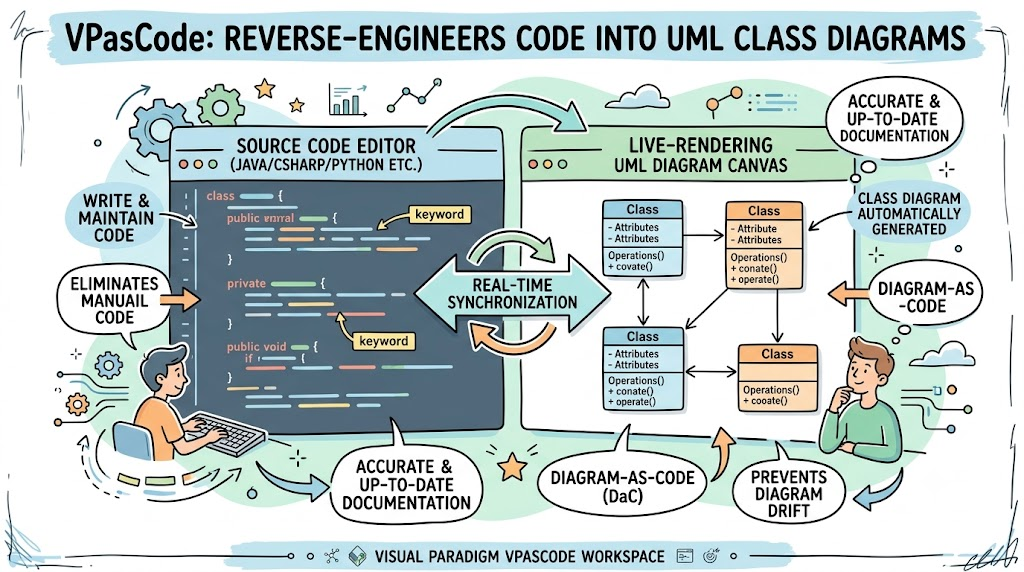
In modern software development, maintaining accurate and up-to-date architectural documentation is a persistent challenge. Traditional diagramming tools require developers to manually draw shapes, arrows, and blocks, leading to outdated diagrams that drift from the actual codebase. VPasCode by Visual Paradigm solves this problem as an online, browser-based Diagram-as-Code (DaC) workspace. It automatically reverse-engineers actual programming source code into UML Class Diagrams in real time. By featuring a split-screen viewport—with a code editor on the left and a live-rendering diagram canvas on the right—VPasCode eliminates tedious manual drawing, ensuring your visual documentation is always perfectly synchronized with your code.
Supported Programming Languages
Unlike traditional tools that only accept structural domain-specific scripting languages (like PlantUML or Mermaid), VPasCode features automatic code detection and natively parses application code across 15 distinct programming languages:
-
Object-Oriented Languages: Java, C#, C++, Kotlin, Swift, Scala
-
Scripting & Web Languages: TypeScript, Python, PHP, Ruby
-
Systems Programming: Go, Rust, C, Zig
-
Functional Ecosystems: Elixir
Key Concepts of VPasCode Code Visualization
When you drop or paste a source code file into the workspace, VPasCode parses the language’s specific syntax rules and maps them directly onto standard UML 2.5 graphical notations.
-
Class Notation Compartments: Visualized items are broken down into standard multi-tier rectangles. The top compartment shows the object or struct name, the middle lists variables (attributes), and the bottom exposes functions (operations).
-
Visibility Mapping: Access modifiers are instantly converted into UML prefix symbols:
+for public,-for private, and#for protected. -
Structural Associations: Code directives like pointer arrays, nested blocks, or custom data types are transformed into relational connector lines.
-
Inheritance & Implementation: Extended classes map to generalization arrows (solid lines with hollow triangles), while implemented interfaces create realization paths (dashed lines with hollow triangles).
-
Zero Configuration: A native engine auto-picks the exact parser required for the code context without forcing you to toggle drop-downs manually.
Code-to-Diagram Examples
1. TypeScript Object Hierarchy
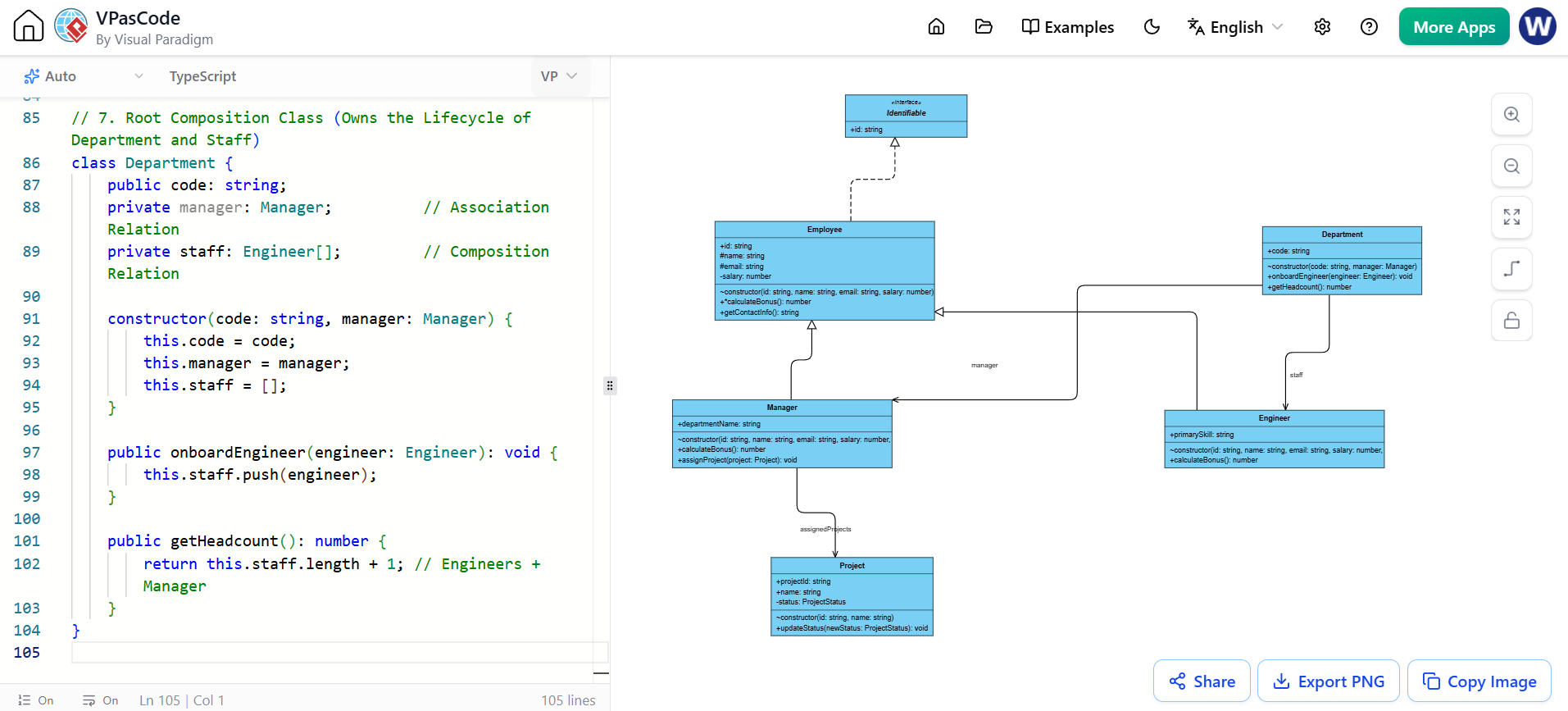
When you paste an object-oriented TypeScript snippet containing abstract classes and interfaces, the VPasCode TypeScript Renderer generates explicit specialization arrows.
Source Code Input:
// 1. Core Interface
interface Identifiable {
    id: string;
}

// 2. Enum for Structured Data Type
enum ProjectStatus {
    PLANNING = "PLANNING",
    ACTIVE = "ACTIVE",
    COMPLETED = "COMPLETED"
}

// 3. Leaf Class (Associated Object)
class Project {
    public projectId: string;
    public name: string;
    private status: ProjectStatus;

    constructor(id: string, name: string) {
        this.projectId = id;
        this.name = name;
        this.status = ProjectStatus.PLANNING;
    }

    public updateStatus(newStatus: ProjectStatus): void {
        this.status = newStatus;
    }
}

// 4. Abstract Base Class
abstract class Employee implements Identifiable {
    public id: string;
    protected name: string;
    protected email: string;
    private salary: number;

    constructor(id: string, name: string, email: string, salary: number) {
        this.id = id;
        this.name = name;
        this.email = email;
        this.salary = salary;
    }

    public abstract calculateBonus(): number;

    public getContactInfo(): string {
        return `${this.name} <${this.email}>`;
    }
}

// 5. Concrete Class: Manager (Aggregates Projects)
class Manager extends Employee {
    public departmentName: string;
    private assignedProjects: Project[]; // Aggregation Relation

    constructor(id: string, name: string, email: string, salary: number, dept: string) {
        super(id, name, email, salary);
        this.departmentName = dept;
        this.assignedProjects = [];
    }

    public calculateBonus(): number {
        return 5000 + (this.assignedProjects.length * 1000);
    }

    public assignProject(project: Project): void {
        this.assignedProjects.push(project);
    }
}

// 6. Concrete Class: Engineer (Directly Implements Abstract Methods)
class Engineer extends Employee {
    public primarySkill: string;

    constructor(id: string, name: string, email: string, salary: number, skill: string) {
        super(id, name, email, salary);
        this.primarySkill = skill;
    }

    public calculateBonus(): number {
        return 2500;
    }
}

// 7. Root Composition Class (Owns the Lifecycle of Department and Staff)
class Department {
    public code: string;
    private manager: Manager;          // Association Relation
    private staff: Engineer[];         // Composition Relation

    constructor(code: string, manager: Manager) {
        this.code = code;
        this.manager = manager;
        this.staff = [];
    }

    public onboardEngineer(engineer: Engineer): void {
        this.staff.push(engineer);
    }

    public getHeadcount(): number {
        return this.staff.length + 1; // Engineers + Manager
    }
}
2. C Struct Relationships
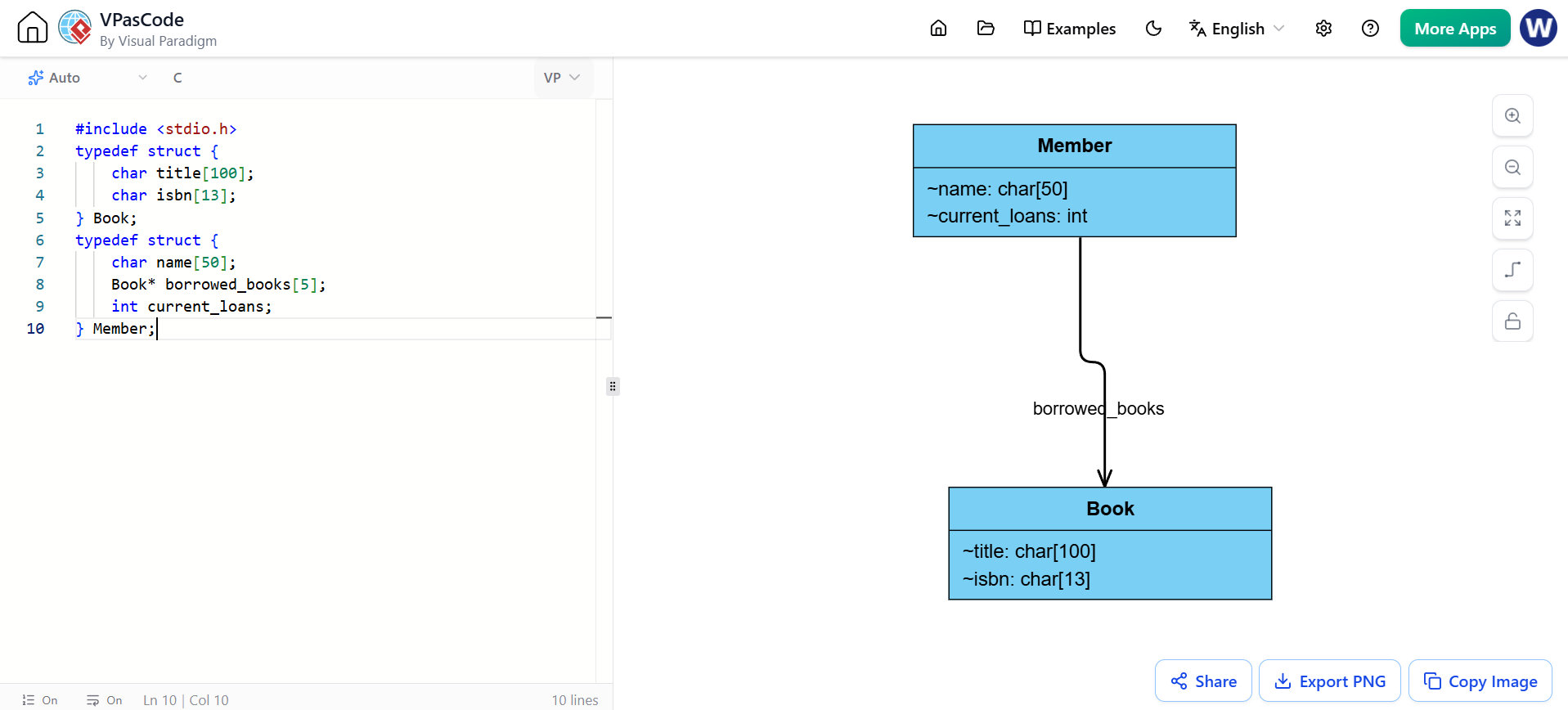
For non-OOP languages like C, the VPasCode C Parser translates data structures, arrays, and pointer blocks into structural associations.
Source Code Input:
#include <stdio.h>
typedef struct {
    char title[100];
    char isbn[13];
} Book;
typedef struct {
    char name[50];
    Book* borrowed_books[5];
    int current_loans;
} Member;
3. JSON Data Structure Visualization
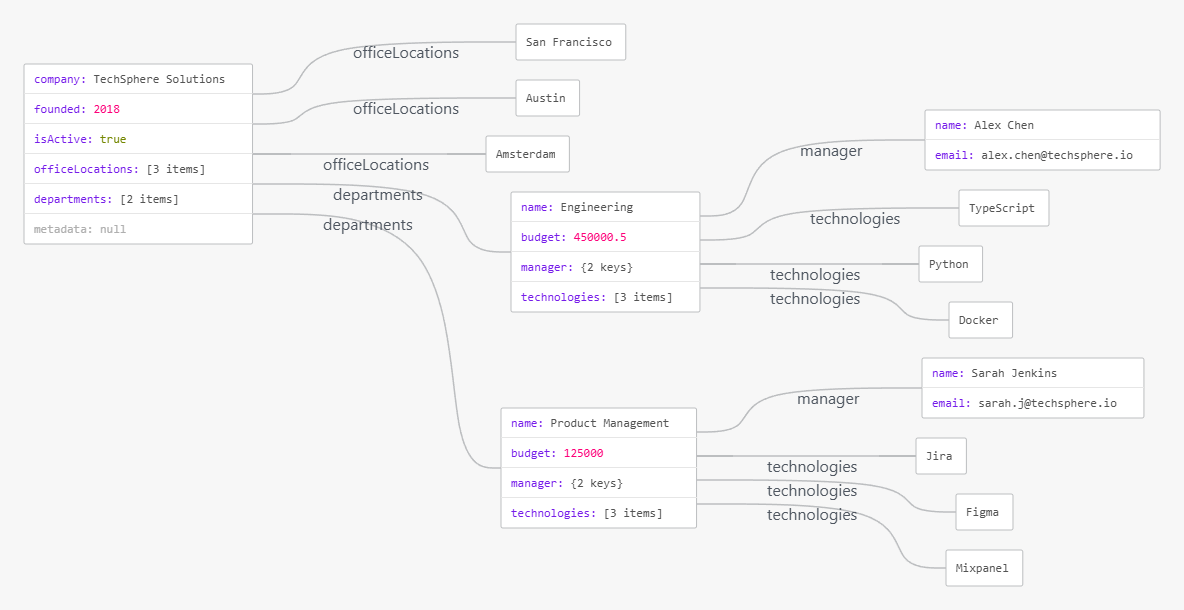
VPasCode’s robust parsing capabilities also extend to structured data formats. When you input a complex JSON object, the engine can map nested objects to composition relationships and arrays to multiplicity indicators, generating a clear data model hierarchy.
Source Code Input:
{
  "company": "TechSphere Solutions",
  "founded": 2018,
  "isActive": true,
  "officeLocations": ["San Francisco", "Austin", "Amsterdam"],
  "departments": [
    {
      "name": "Engineering",
      "budget": 450000.50,
      "manager": {
        "name": "Alex Chen",
        "email": "[email protected]"
      },
      "technologies": ["TypeScript", "Python", "Docker"]
    },
    {
      "name": "Product Management",
      "budget": 125000.00,
      "manager": {
        "name": "Sarah Jenkins",
        "email": "[email protected]"
      },
      "technologies": ["Jira", "Figma", "Mixpanel"]
    }
  ],
  "metadata": null
}
Step-by-Step Workflow Guide
[ Paste/Drag Source Code ] ──> [ Auto-Syntax Parse ] ──> [ Live Interactive Canvas ] ──> [ Export/OpenDocs ]
-
Access the Editor: Open your browser and navigate to the online VPasCode Workspace.
-
Import Code: You can either copy-paste raw application code directly into the left panel or drag and drop a source file (e.g.,
.java,.ts,.rs,.c) from your local file system directly into the window. -
Real-Time Render: Watch the right pane compile and redraw the UML boxes instantly as you modify code logic or expand parameters.
-
Fix Syntax (Optional): If you accidentally copy a broken fragment, click the premium “Fix by AI” button to automatically patch the code syntax and see a clear git-style code diff.
-
Publish & Export: Once satisfied, export your live model into vectors (SVG), share the interactive playground URL, or push it straight into your team’s centralized workspace via the Visual Paradigm OpenDocs Integration.
Ready to Test the Workflow?
If you would like to test this workflow, tell me:
-
What programming language is your current project built in?
-
Which specific class relationships (e.g., composition, inheritance, or dependency) do you need help mapping?
I can draft a fully tailored code architecture snippet ready for you to paste straight into VPasCode.
Conclusion
VPasCode represents a significant leap forward in bridging the gap between raw code and visual documentation. By supporting 15 diverse programming languages and structured data formats, it empowers developers, architects, and product managers to maintain living, breathing diagrams that evolve alongside the codebase. With its zero-configuration setup, real-time rendering, and seamless export options, VPasCode eliminates the friction of manual diagramming, allowing teams to focus on what truly matters: building great software.
Reference List
- VPasCode Java Code to UML Class Diagram: Reverse-engineer Java source code into UML class diagrams.
- Comprehensive Guide to VPasCode: Complete overview of VPasCode features and workflows.
- Visualize C++ Code as UML Class Diagram: Parse C++ code into standard UML notations.
- VPasCode Supports TOML Visualization: Extended support for TOML file visualization and parsing.
- Visualize Scala Code UML Class Diagram: Generate UML diagrams directly from Scala code.
- Visualize Elixir Code as UML Class Diagrams: Map Elixir functional ecosystem code to UML.
- TypeScript to UML Class Diagram Generator: Real-time TypeScript parsing and UML generation.
- Visualize Swift Code UML Class Diagram: iOS and macOS Swift code visualization.
- From Prompt to Production: Beginner’s guide to AI-enhanced UML and Diagram as Code.
- UML Class Diagram Reference: Standard UML 2.5 graphical notations reference.
- Mastering UML Class Diagrams: Practical user guide for Visual Paradigm.
- UML Tutorials: GitHub tutorial on UML class diagrams.
- UML Classes and Objects: Academic textbook resource on UML.
- UML Class Diagrams Study Guide: Static system modeling and relationships.
- Visualize C Code UML Class Diagram: Translate C structs and pointers to UML associations.
- UML Diagram from Code: Automated UML generation from source code.
- Class Diagram: Wikipedia overview of UML class diagrams.
- Visualize Rust Code UML Diagram as Code: Rust language support in VPasCode.
- From Code to Clarity: Beginner’s guide to seamless diagramming with VPasCode and OpenDocs.
- VPasCode Features: Official feature overview of the VPasCode workspace.
- VPasCode C# to UML Class Diagram Update: Enhancements for C# code visualization.