

Problem descriptions (also called problem statements) are foundational artifacts in systems engineering, software requirements analysis, and modern AI-assisted design. Traditionally, they help analysts extract use cases, map business processes, identify domain classes, and build structural models. Today, the same carefully crafted text serves as high-quality prompts for AI tools that generate UML diagrams, BPMN processes, class models, sequence diagrams, and more.
A well-written problem description turns vague stakeholder conversations into a shared, analyzable foundation. Poor ones lead to missed requirements, ambiguous models, and AI outputs that require heavy correction. This guide covers key concepts, practical guidelines, tips and tricks, concrete examples for different purposes, and specific tooling support in Visual Paradigm.
Key Concepts
A problem description is a structured natural-language narrative that captures:
-
The business or system context and current situation.
-
Stakeholders (actors/roles) and their goals or pain points.
-
The core problem, opportunity, or need.
-
Desired outcomes, constraints, scope, and boundaries.
-
Key domain concepts, processes, rules, and data (often as nouns and verbs that later become classes, attributes, operations, use cases, or activities).
It differs from a pure requirements list (“The system shall…”) or a solution description. It focuses on the problem space so that analysts or AI can derive the solution space (use cases, processes, classes, etc.).
In requirements engineering it supports:
-
Use-case identification (goals of actors).
-
Business-process modeling (workflows and activities).
-
Conceptual/class modeling (nouns → classes, relationships, attributes).
-
Traceability from needs to models.
For AI prompting, the same text becomes the input that drives generation of diagrams and models. Quality of output correlates strongly with clarity, completeness, and structured detail in the description.
Guidelines for Writing Strong Problem Descriptions
Follow these principles regardless of the intended use:
-
Start with context and scope — Who, what domain, current state, and system boundary.
-
Focus on the problem, not the solution — Describe needs, pains, and goals; avoid prescribing technology or design.
-
Identify actors/roles and goals explicitly — Name people, systems, or external entities and what they need to achieve.
-
Use concrete nouns and action verbs — These become candidate classes, attributes, use cases, and activities.
-
Include flows, rules, constraints, and exceptions — Happy paths, alternatives, preconditions, postconditions, business rules, and non-functional concerns where relevant.
-
Keep it readable and structured — Short paragraphs or bulleted sections; consistent terminology; glossary for domain terms.
-
Make it complete but concise — Cover the essential scenarios without unnecessary implementation detail.
-
Ensure verifiability — A good description lets you later check whether derived models or AI outputs correctly address the stated problem.
-
Iterate with stakeholders — Validate language and coverage.
For AI prompting specifically:
-
Be explicit about the desired output type (e.g., “Generate a UML use-case diagram…”, “Produce a class diagram with attributes and relationships…”).
-
Provide structured cues: list actors, main scenarios, key entities, relationships, multiplicities if known.
-
Include style or notation preferences (UML 2.x, BPMN, color coding, etc.).
-
Supply examples or constraints (“Avoid over-generalization”, “Show include/extend relationships”).
-
Iterate: refine the description based on the first AI output.
Common pitfalls to avoid:
-
Vague language (“users can manage stuff efficiently”).
-
Mixing problem and solution.
-
Missing actors or alternative flows.
-
Inconsistent terminology.
-
Overly long unstructured prose that buries key concepts.
Tips and Tricks
-
Extract candidate elements while writing: underline nouns (potential classes/entities) and verbs (potential operations/use cases/activities).
-
Use the classic “As a [role], I need to [goal] so that [benefit]” pattern inside the narrative for clarity.
-
Separate concerns: one section for functional goals, another for data/entities, another for process flows or constraints.
-
For class modeling, emphasize relationships, multiplicities, and key attributes early.
-
For process modeling, describe sequences, decisions, parallel paths, and hand-offs.
-
Test the description by asking: “Could an analyst or AI derive a coherent set of use cases / a class diagram / a process model from this alone?”
-
Maintain a living version: update the description as understanding deepens; keep it as the single source of truth for subsequent models.
-
When using AI, start broad then add targeted refinements (“Add multiplicities and roles”, “Expand the exception flows”, “Generate both use-case and class diagrams from the same description”).
Examples for Different Usage Cases
1. Identifying Use Cases
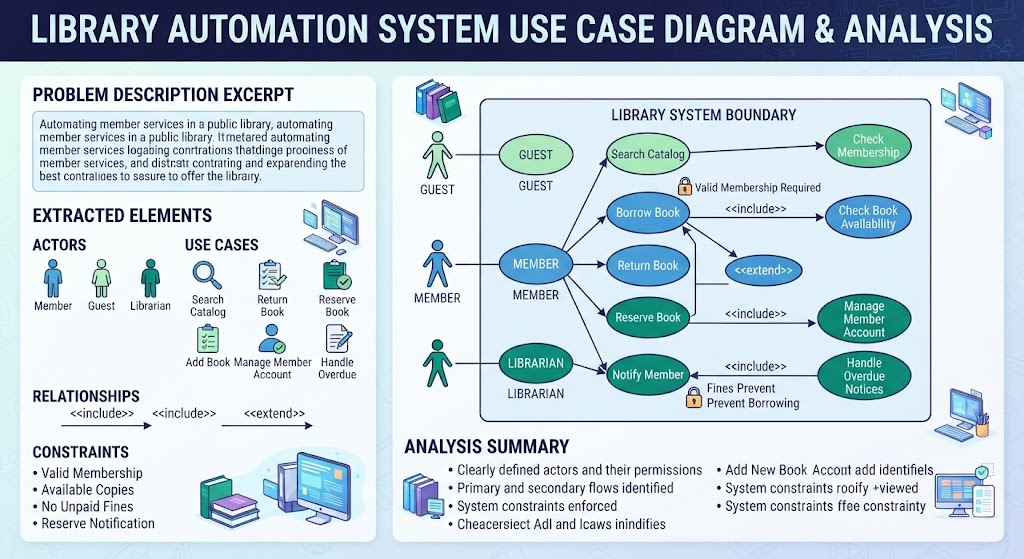
Problem Description Excerpt (Library System)
“A public library wants to automate member services. Members (registered borrowers) and guests can search the catalog. Registered members can borrow books, return books, and reserve books that are currently on loan. Librarians add new books to the collection, manage member accounts (register, update, deactivate), and handle overdue notices. Guests may only browse. Borrowing requires a valid membership and available copies; reservations notify the member when the book becomes available. The system must prevent borrowing when the member has unpaid fines.”
From this text an analyst (or AI) can extract actors (Member, Guest, Librarian) and use cases (Search Catalog, Borrow Book, Return Book, Reserve Book, Add Book, Manage Member Account, Handle Overdue), plus include/extend relationships and constraints.
2. Business Process Modeling
Problem Description Excerpt (Order Fulfillment)
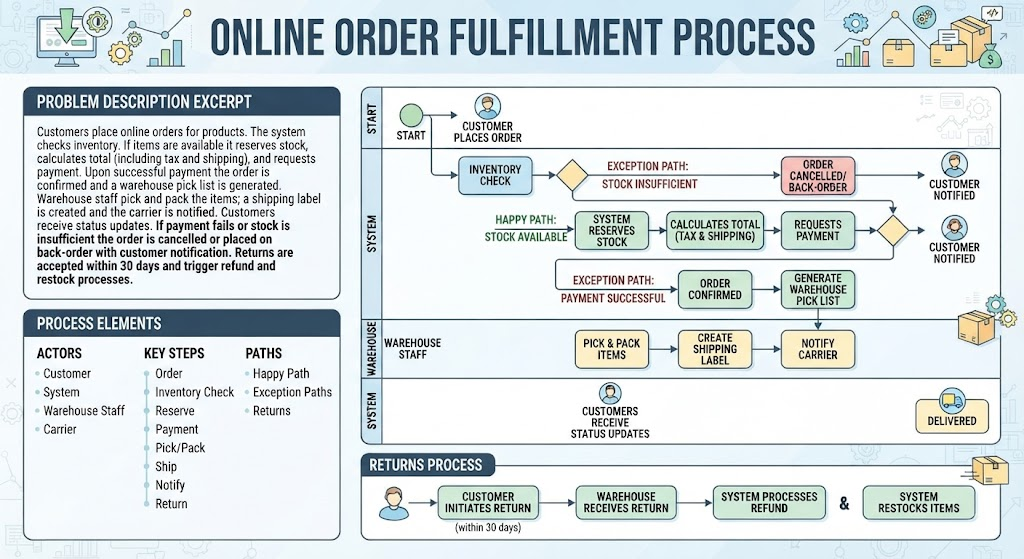
“Customers place online orders for products. The system checks inventory. If items are available it reserves stock, calculates total (including tax and shipping), and requests payment. Upon successful payment the order is confirmed and a warehouse pick list is generated. Warehouse staff pick and pack the items; a shipping label is created and the carrier is notified. Customers receive status updates. If payment fails or stock is insufficient the order is cancelled or placed on back-order with customer notification. Returns are accepted within 30 days and trigger refund and restock processes.”
This narrative directly supports BPMN or UML activity diagrams showing the main happy path, decision points, and exception paths.
3. Class / Domain Modeling
Problem Description Excerpt (Online Bookstore)
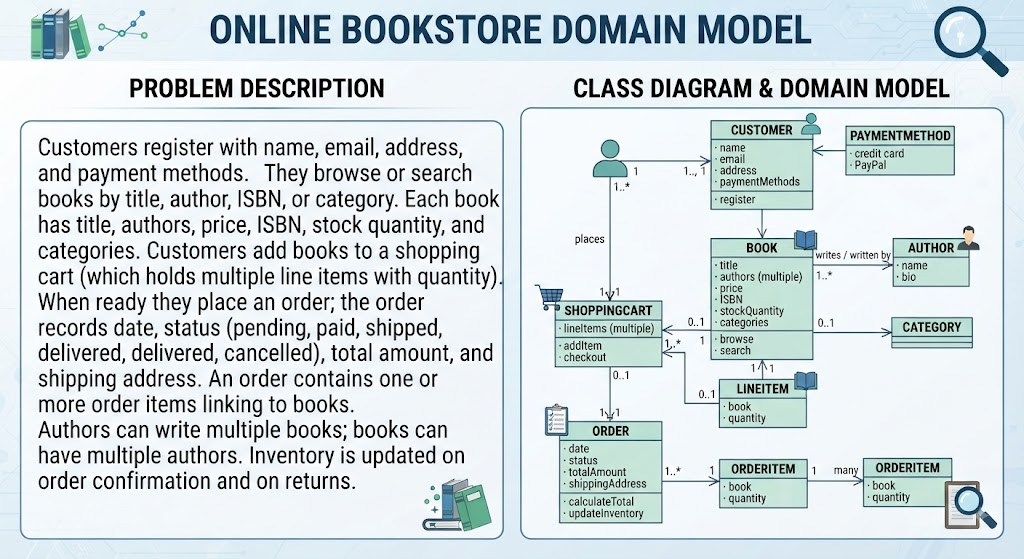
“Customers register with name, email, address, and payment methods. They browse or search books by title, author, ISBN, or category. Each book has title, authors, price, ISBN, stock quantity, and categories. Customers add books to a shopping cart (which holds multiple line items with quantity). When ready they place an order; the order records date, status (pending, paid, shipped, delivered, cancelled), total amount, and shipping address. An order contains one or more order items linking to books. Authors can write multiple books; books can have multiple authors. Inventory is updated on order confirmation and on returns.”
Nouns become classes (Customer, Book, Author, ShoppingCart, Order, OrderItem, Category, PaymentMethod). Verbs and relationships yield associations, multiplicities, and operations (addItem, calculateTotal, updateStock).
4. AI Prompt for Generating Diagrams
Combine the above style into a prompt:
“Using the following problem description, generate a UML use-case diagram and a corresponding conceptual class diagram.
[Paste full structured problem description]
Actors: …
Key scenarios: …
Important entities and relationships: …
Show include and extend where appropriate. For the class diagram include key attributes, operations, and multiplicities. Use standard UML notation.”
The richer and more structured the description, the higher the quality and completeness of the generated diagrams.
Tooling: Visual Paradigm
Visual Paradigm provides dedicated support for turning problem descriptions into models, making it especially powerful for the techniques described above.
-
Textual Analysis / Problem Statement Editor: Paste or import a problem description. The tool highlights candidate terms. Users can mark text segments as candidate classes, actors, use cases, or other model elements. Candidates are collected in a list and can be dragged onto diagrams. This is the classic bridge from natural language to UML models.
-
AI-Powered Features: Visual Paradigm’s AI ecosystem includes tools that generate or refine problem descriptions, identify candidate classes from text, produce class diagrams, use-case diagrams, sequence diagrams, and more directly from a textual description or high-level prompt. Examples include AI Textual Analysis, AI-Assisted UML Class Diagram Generator, AI Use Case Diagram tools, and problem-description generators that expand short phrases into fuller narratives.
-
Workflow Integration: Start with a problem description → Textual Analysis / AI identification of candidates → generate or refine use-case diagrams → derive class diagrams (or ERDs) from the same source → produce sequence or activity diagrams for specific use cases. The tool maintains model consistency and supports further refinement.
-
Practical Tips in Visual Paradigm:
-
Keep the problem description in the dedicated editor so it remains linked to the project.
-
Use AI generation for a rapid first draft, then apply manual Textual Analysis or editing for precision.
-
Leverage the ability to convert identified terms into model elements on-the-fly and generate diagrams automatically.
-
Combine with use-case description editors and glossary features for complete traceability.
-
These capabilities make Visual Paradigm particularly effective for both traditional analysis (manual extraction and modeling) and modern AI-assisted workflows (prompt → diagram in seconds, followed by human refinement).
Conclusion
A high-quality problem description is one of the highest-leverage artifacts in systems and software development. It anchors traditional requirements work—driving identification of use cases, business processes, and class structures—and simultaneously serves as the essential prompt for AI tools that generate diagrams and models. By focusing on context, actors, goals, concrete domain language, flows, and constraints while avoiding premature solution design, you create a clear, shared foundation that reduces ambiguity, improves model quality, and accelerates both human analysis and AI generation.
Master the guidelines and practice with the examples provided. Start simple, iterate with stakeholders, and leverage tooling such as Visual Paradigm’s Textual Analysis and AI features to turn words into living models. The result is faster, more accurate, and more maintainable system specifications—whether produced by classic engineering methods or modern AI-assisted pipelines.