
The problem description is the bedrock upon which successful software systems are built. It bridges the gap between raw stakeholder needs and a tangible technical solution, ensuring that the final product solves the right problems. This practice, deeply rooted in traditional software engineering methodologies, is now more relevant than ever. In the age of AI, a well-crafted problem description is the key to unlocking powerful capabilities for generating diagrams, writing code, and documenting complex systems with unprecedented speed.
This guide will explore the foundational importance of problem descriptions, explain how to write them for various use cases, and demonstrate how modern tools can amplify their value.
1. Introduction: Why the Problem Description Matters
In object-oriented software engineering, the journey from concept to code begins not with a line of code, but with a formal problem description. This process is central to methodologies like Object-Oriented Software Engineering (OOSE), which defines system requirements through use cases derived directly from the problem statement . A well-defined problem description acts as the single source of truth, aligning stakeholders, business analysts, and developers from the very start.
The discipline of writing a strong problem description is now a powerful technique for AI prompting. Instead of simply asking an AI to “draw a diagram,” a detailed problem description provides the necessary context to generate accurate, relevant, and complex deliverables like UML diagrams, process flows, and architectural models. In essence, you are not just giving the AI a task; you are giving it the blueprint for your project, and the blueprint is the problem description.
2. Key Concepts of a Problem Description
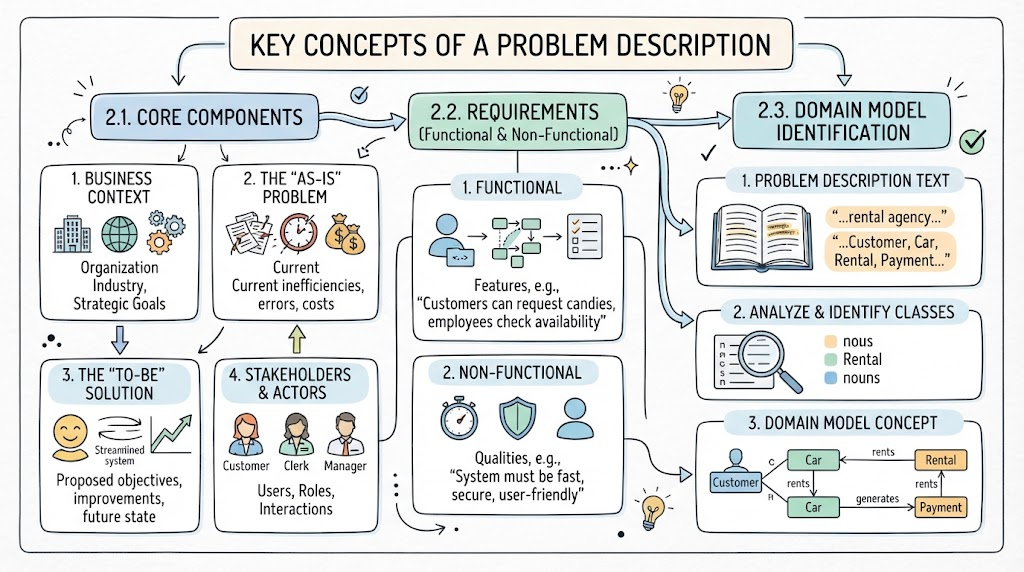
A comprehensive problem description is more than just a sentence or two. It should provide a holistic view of the system and its environment. Key concepts to include are:
2.1. Core Components
-
Business Context: Who is the organization? What industry are they in? What are their strategic goals? .
-
The “As-Is” Problem: What is currently wrong? What processes are inefficient, costly, or prone to error? This section justifies the need for a new system. For instance, “Current project communication is inconsistent, relying on emails, phone calls, and meetings that often fail to include all necessary parties” .
-
The “To-Be” Solution: What is the proposed system expected to achieve? What are its primary objectives?
-
Stakeholders and Actors: Who are the users of the system, and what are their roles? A system for a rental agency will have customers, clerks, and managers as actors . For a more complex system, this list might include Requestors, Design Engineers, Administrators, and Guests .
2.2. Functional and Non-Functional Requirements
While a problem description sets the stage, it often seeds the requirements that follow. It should hint at the key features. For example, in a candy store scenario, the description might mention, “Customers can request candies, and employees check availability,” which is a clear functional requirement .
2.3. From Description to Domain Model
A key skill is to analyze the problem description to identify the classes (objects) for the system. A classic technique is to look for noun phrases in the description to find candidate classes . For example, from a description of a car rental agency, you would identify Customer, Car, Rental, and Payment as potential classes . Their relationships and attributes start to form the Domain Model, which is a conceptual model of the problem space.
3. Examples of Problem Descriptions
Here are examples for different types of projects.
Example 1: Software System Development (Candy Store Point of Sale)
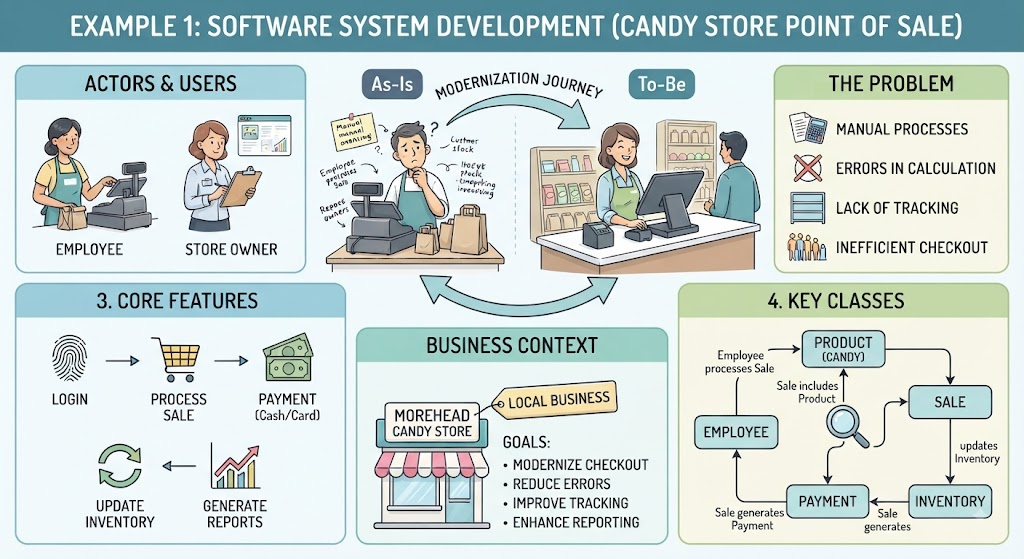
Morehead Candy Store, a small, local business, seeks to modernize its checkout process. Currently, employees manually ring up candy purchases, which is prone to errors and lacks inventory tracking. The new system must allow an employee to quickly log in, process a sale by selecting items from a catalog, and accept cash or card payments. The system should automatically update the inventory count after each sale. The store owner requires a simple dashboard to view daily sales reports and monitor low-stock items.
This description clearly identifies:
-
Actors: Employee, Store Owner.
-
Core Features: Login, Process Sale, Payment, Update Inventory, Generate Reports.
-
Key Classes: Employee,
Product(Candy),Sale,Payment,Inventory. -
Problem: Manual processes and lack of tracking.
Example 2: Business Process Analysis (Project Management Communication)
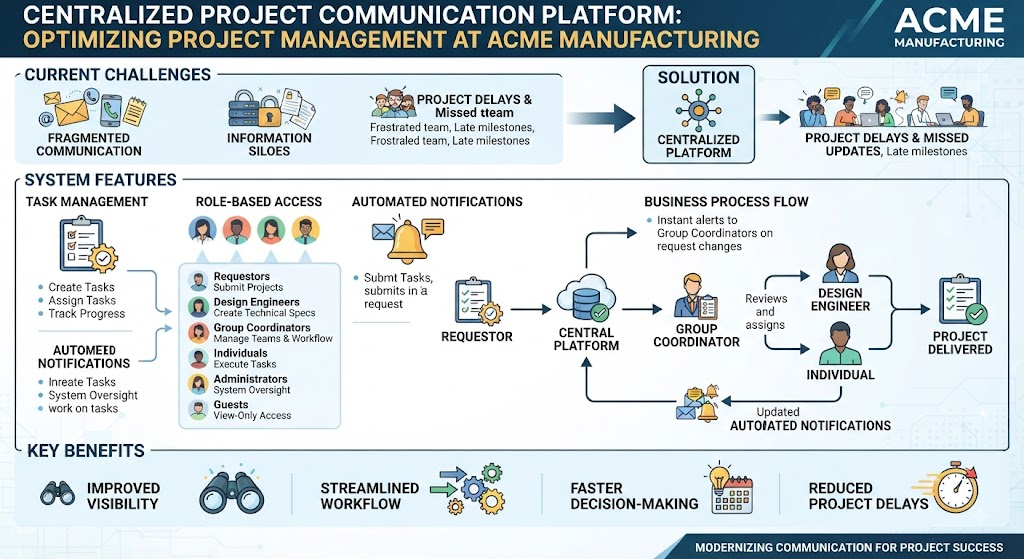
A mid-sized manufacturing company is suffering from project delays due to inconsistent and fragmented communication. Information is siloed in emails, phone calls, and meetings, which often leads to missed updates for key stakeholders. The goal is to implement a centralized project communication platform. The system should allow project coordinators to create, assign, and track tasks. It will feature six user roles: Requestors, Design Engineers, Group Coordinators, Individuals, Administrators, and Guests, each with specific permissions for viewing and managing project data. A key feature is the automated notification system, prompting users to send messages to group coordinators upon any change to a request .
This description is rich for deriving requirements and business process diagrams.
Example 3: Enterprise Architecture (E-commerce Order Management)
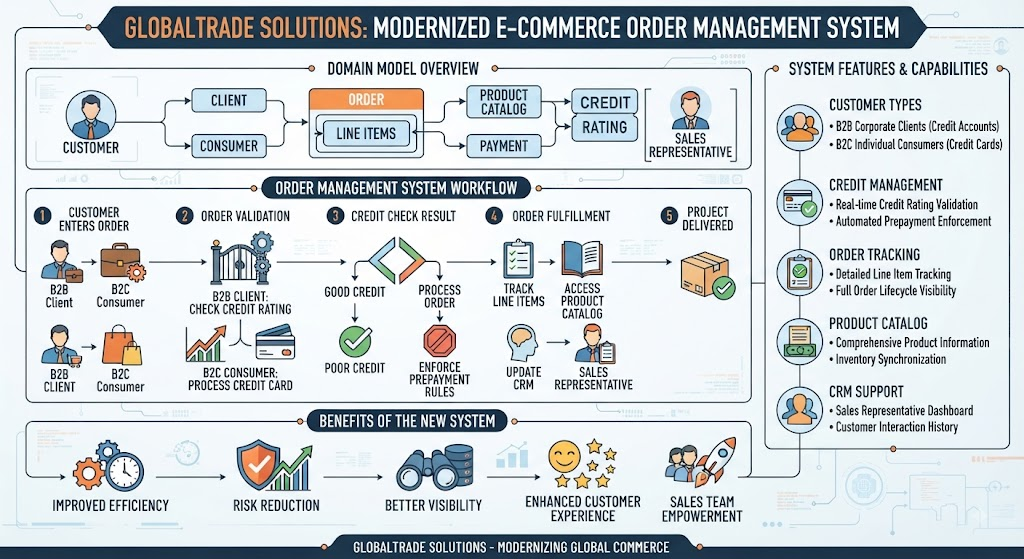
GlobalTrade Solutions, a B2B and B2C distribution company, needs to replace its legacy order management system. The new system must handle two distinct customer types: corporate clients with credit accounts and individual consumers using credit cards. It must validate credit ratings before processing corporate orders and enforce prepayment rules for customers with poor credit. The system must track individual line items for each order, maintain a product catalog, and support customer relationship management through sales representatives .
This description is ideal for creating a robust domain model and enterprise-level UML diagrams.
4. Tips and Tricks for Crafting Effective Descriptions
Writing a good problem description is a skill. Here are some guidelines:
-
Focus on the Problem, Not the Solution: The description should explain why a system is needed, not how it will be built. Avoid dictating specific technologies.
-
Be Specific but Not Overly Technical: Use language that is clear to a business stakeholder. For example, “prepayment rules for customers with poor credit” is better than “a database trigger that checks a credit boolean flag.”
-
Involve All Stakeholders: The best descriptions come from collaboration between business owners, users, and technical teams to ensure all perspectives are captured.
-
Identify Actors and Roles Clearly: A clear list of users and their goals is the most direct link to creating use case and class diagrams .
-
State Assumptions: The real world is messy. Explicitly state what you are assuming to be true, such as “The system will not handle returns for this first release.”
-
Iterate and Refine: A problem description is a living document. Use it to generate diagrams, identify missing information, and then refine the description .
5. Tooling: Visual Paradigm for Problem Descriptions
Visual Paradigm (VP) is a leading UML modeling and software development tool that has integrated AI capabilities to revolutionize how we work with problem descriptions. It offers several features that directly aid in the creation and application of problem descriptions:
5.1. The “Problem Description Generator”
Perhaps the most direct tool, the “Problem Description Generator” is a powerful feature that guides users through creating professional, structured problem descriptions .
Key Features:
-
Structured Templates: The tool provides a variety of templates categorized by project type, including Software System Development, Business Process Analysis, SWOT/PEST Analysis, and Enterprise Architecture. This ensures you don’t start from a blank page and are guided to include all necessary sections .
-
Intelligent Parameterization: Instead of just filling in a text box, you edit specific parameters (like “Organization Name,” “Industry,” “Current Problem”). This ensures a consistent and high-quality output by preventing vague or irrelevant content .
-
Live Preview: As you edit, a real-time preview of the full problem description updates instantly, similar to a mail merge. This immediate feedback makes the process highly intuitive .
-
Domain-Specific Examples: You can select a business domain (e.g., Healthcare, Finance, Manufacturing), and the form will populate with examples tailored to that industry. This helps overcome writer’s block and ensures the language is contextually relevant .
-
AI Validation & Optimization: This is the key differentiator. After you’ve filled in the parameters, you can click “Review with AI”. The AI will check your input for issues like incorrect formatting or irrelevant content. It then optimizes the description, correcting grammar, enhancing clarity, and ensuring your input fits seamlessly into the template. This significantly raises the quality and professionalism of the output .
5.2. From Description to Diagram with AI Copilot
While the generator crafts the description, Visual Paradigm’s broader AI capabilities allow you to use that description to create diagrams. You can provide the AI Copilot with the problem description as a prompt and ask it to generate a UML class diagram, sequence diagram, or other models .
By using the polished, structured problem description from the generator as your prompt, you provide the AI with rich, contextual, and correct information, leading to far more accurate and useful diagrams. In essence, Visual Paradigm provides a seamless workflow from problem definition to AI-powered system modeling.
6. Conclusion
The problem description is the most critical artifact in any system development project. It is the foundation upon which all requirements, diagrams, and code are built. Its importance has only grown in the age of AI, where a well-crafted description is the secret ingredient to generating high-quality, accurate, and useful AI-driven models and documentation.
By mastering the art of writing clear, structured, and comprehensive problem descriptions, and by leveraging tools like Visual Paradigm’s Problem Description Generator, you can dramatically improve project outcomes, ensure stakeholder alignment, and unlock the full potential of AI to accelerate your development processes. The skill of describing a problem is no longer just a prelude to design; it is the design itself.