


Introduction
YAML (YAML Ain’t Markup Language) has become the de facto standard for configuration files, cloud deployment manifests, and data serialization across modern software development. While designed to be human-readable, deeply nested YAML code—such as Kubernetes manifests, CI/CD pipelines, or Docker Compose files—can quickly become overwhelming to parse manually. Misplaced indentation or hidden dependencies often lead to costly deployment errors and wasted debugging time.
To solve this, Visual Paradigm has enhanced its diagram-as-code platform, VPasCode, with native YAML visualization capabilities. Whether you are searching for a seamless free YAML editor or a powerful online YAML diagram tool to transform structured configuration data into actionable visual charts, VPasCode delivers an interactive, real-time workspace designed to streamline your development workflow.
What is VPasCode?
VPasCode is Visual Paradigm’s unified diagram-as-code platform built to bridge the gap between text-based definitions and visual architecture. It empowers developers, software architects, and technical writers to author diagrams instantly using their favorite text-to-diagram domain languages and structured data formats.
Instead of juggling multiple isolated tools, VPasCode brings together popular scripting languages (such as PlantUML, Mermaid, and Graphviz), database languages (SQL), programming languages (Java, TypeScript, Go, Python, and more), and structured data formats (JSON, XML, TOML, CSV, and now YAML) under one lightning-fast, web-based editor. With instant code-to-diagram rendering, multi-language automatic format detection, and AI-assisted tooling, VPasCode offers the ultimate developer-first diagramming environment.
Key Features of the Online YAML Diagram Tool
Working with complex configurations requires seeing how components relate to one another. VPasCode operates with an intuitive split-screen workflow: edit your YAML syntax on the left pane, and instantly watch your interactive diagram render on the right pane.
The platform includes a suite of capabilities designed to make configuration inspection effortless:
-
Bi-Directional Code & Visual Highlighting: Click on any shape or node within the rendered diagram, and the editor automatically jumps to and highlights the exact corresponding lines of YAML code on the left.
-
One-Click Code Formatting: Clean up messy or improperly indented code instantly with a built-in pretty-format feature.
-
Multiple Visual Themes: Customize your diagram’s look and feel with a variety of built-in color palettes and themes tailored for technical presentations.
-
Instant High-Res Exports: Export your visualized structure directly as standard PNG raster images or fully scalable SVG vector graphics for seamless inclusion in documentation.
-
Quick Clipboard Copying: Copy generated diagram images straight to your clipboard for rapid sharing in Slack, Microsoft Teams, or email threads.
-
Zero-Login Hyperlink Sharing: Share lightweight, stateful hyperlinks that encode your diagram directly into the URL, allowing teammates to view and edit your diagram without needing to create an account.
See It in Action: Kubernetes Manifest Visualization Example
To demonstrate how simple it is to turn raw infrastructure configurations into clear visual models using this free YAML editor, consider the following Kubernetes Deployment and Service manifest. This configuration defines a scalable web application with resource limits, environment variables, and a load-balanced service:

apiVersion: apps/v1
kind: Deployment
metadata:
  name: web-app-deployment
  labels:
    app: web-app
spec:
  replicas: 3
  selector:
    matchLabels:
      app: web-app
  template:
    metadata:
      labels:
        app: web-app
    spec:
      containers:
      - name: web-container
        image: nginx:1.25-alpine
        ports:
        - containerPort: 80
        env:
        - name: ENVIRONMENT
          value: "production"
        resources:
          limits:
            memory: "256Mi"
            cpu: "500m"
---
apiVersion: v1
kind: Service
metadata:
  name: web-app-service
spec:
  selector:
    app: web-app
  ports:
    - protocol: TCP
      port: 80
      targetPort: 80
  type: LoadBalancer
Instead of manually parsing indented key-value pairs, you can load this exact structure inside VPasCode to inspect service dependencies, resource allocations, and network routing visually in seconds.
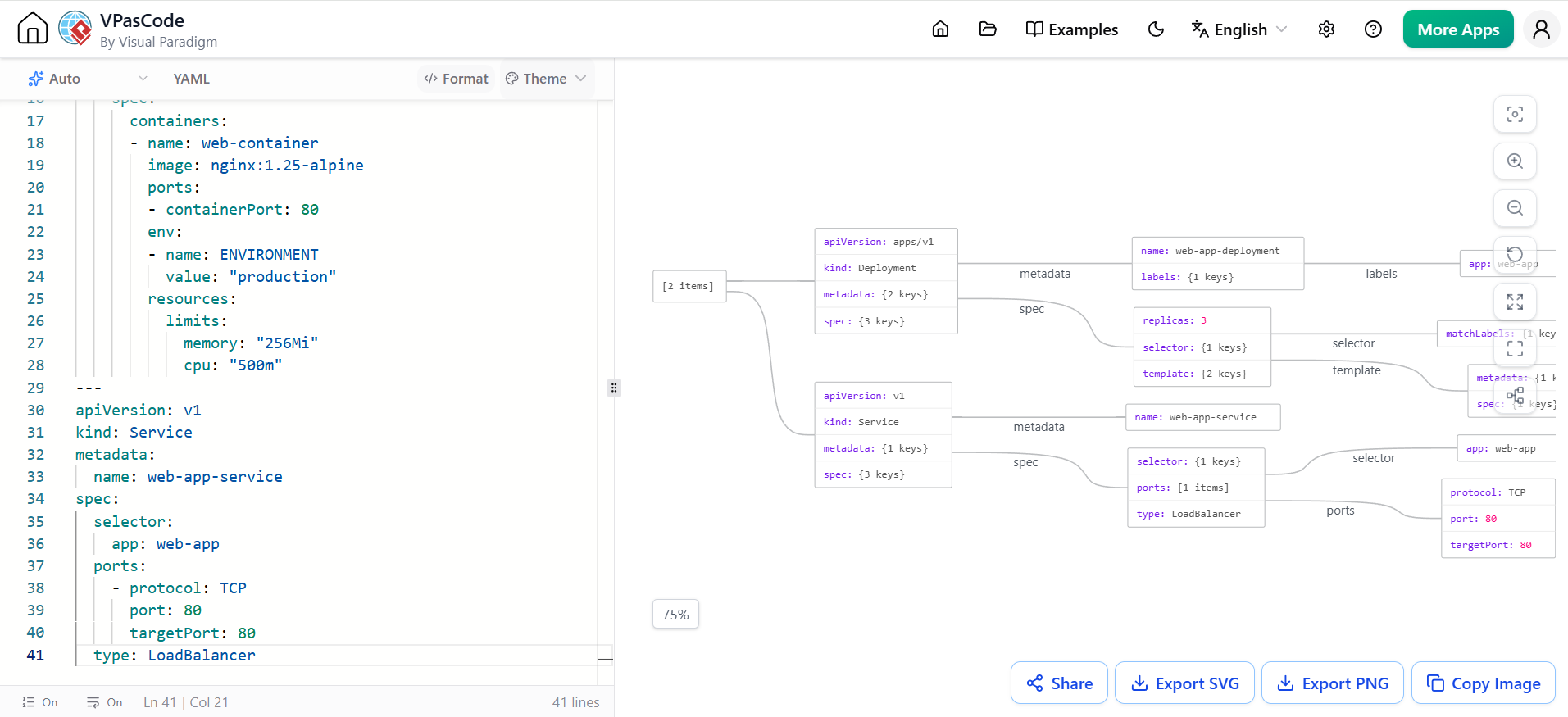
Visualizing complex structured data instantly with VPasCode’s split-screen editor.
Industry-Unique Capabilities Powered by Visual Paradigm
Beyond being a versatile free YAML editor, VPasCode offers intelligent features designed to solve everyday developer pain points:
-
AI Code Error Fixing: Stuck on a subtle indentation syntax error or invalid tag? Click “Fix by AI” to resolve syntax issues automatically. VPasCode even provides a side-by-side diff explanation so you learn how to prevent the error next time.
-
Native AI Diagram Translation: Working with global teams? Translate diagram element text natively across multiple languages with a single click without breaking the underlying code structure.
-
Automatic Language & Format Detection: Paste raw snippet text directly into the canvas—VPasCode automatically identifies whether it is YAML, JSON, PlantUML, or SQL, rendering the target diagram instantly.
-
Seamless Visual Paradigm OpenDocs Integration: Connect your diagrams directly to Visual Paradigm OpenDocs to keep enterprise software documentation synchronized and up to date.
Conclusion
Core features including live rendering, visual editing, image export, and URL sharing are 100% free to use directly in your browser. Advanced AI assistance and translation features are accessible to Visual Paradigm Online Combo Edition subscribers and Visual Paradigm Desktop Professional Edition users with active maintenance.
Experience the simplicity of this interactive online YAML diagram tool today and streamline how you build, review, and document your structured data. By transforming dense configuration files into intuitive visual models, VPasCode empowers teams to collaborate more effectively and deploy with confidence.
Reference List
-
Introducing VPasCode: The Ultimate Unified Text-to-Diagram Platform: Announces the launch of VPasCode as a unified diagram-as-code platform supporting multiple languages and structured data formats.
-
Seamlessly Connect Diagramming to Documentation: VPasCode Integrates with OpenDocs: Details the integration between VPasCode and Visual Paradigm OpenDocs for synchronized enterprise documentation.
-
Mastering Modern UML: A Beginner’s Guide to Diagram-as-Code and AI-Driven Design: Explores the evolution of code-based diagramming and how AI-driven design enhances visual modeling workflows.