


My Journey as a New Enterprise Architect
Hi, I’m Warren. If you’re reading this, you’ve probably just been handed a mandate to “set up Enterprise Architecture” at your company, or you’re staring at the massive TOGAF Standard, 10th Edition, wondering where to even begin.
I’ve been in product management for over seven years, working with complex systems from cloud infrastructure to user-facing apps. When my organization decided to formalize our Enterprise Architecture (EA) practice, I was tasked with leading the charge. I had a background in Agile and Scrum, but TOGAF felt like a different language entirely.
Here is the story of how I went from overwhelmed to empowered, and how you can use TOGAF 10 not as a rigid rulebook, but as a flexible toolkit for your new EA team.
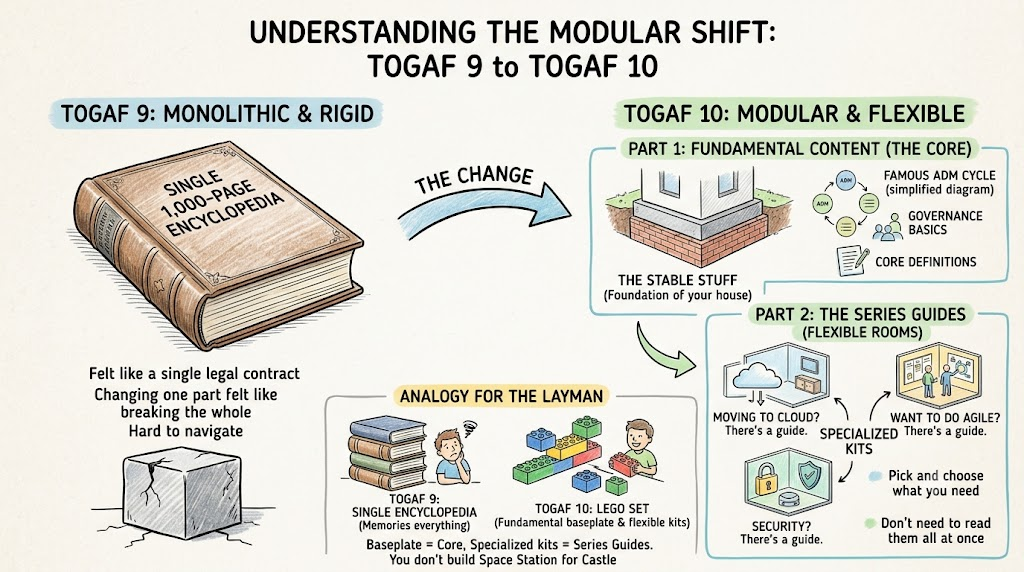
Part 1: The “Aha!” Moment – Understanding the Modular Shift
When I first opened TOGAF 9, it felt like reading a legal contract written in stone. It was monolithic. If you wanted to change one part, you felt like you were breaking the whole structure.
TOGAF 10 changed everything by splitting into two parts:
-
The Fundamental Content (The Core): This is the stable stuff. The principles that don’t change much. Think of this as the foundation of your house. It includes the famous ADM (Architecture Development Method) cycle, governance basics, and core definitions.
-
The Series Guides (The Flexible Rooms): This is where the magic happens for modern teams. These are modular, topic-specific guides that you can pick and choose. Want to do Agile? There’s a guide. Moving to Cloud? There’s a guide. Security? There’s a guide. You don’t need to read them all at once.
Analogy for the Layman:
Imagine TOGAF 9 was a single, 1,000-page encyclopedia that you had to memorize.
TOGAF 10 is like a Lego set. The “Fundamental Content” is the baseplate and the standard bricks. The “Series Guides” are the specialized kits (Space Station, Castle, Race Car) that you snap on when you need them. You don’t build the Space Station if you’re building a Castle.
Part 2: My Journey – Building an EA Team from Scratch
Month 1: The Paralysis of Choice
My team consisted of three people: myself, a senior developer, and a business analyst. We were asked to create an “Enterprise Architecture.” I tried to apply the full ADM cycle from Phase A to Phase H immediately. We spent weeks documenting things nobody read. We were stuck in “analysis paralysis.”
The Mistake: I treated TOGAF as a waterfall project. We tried to document everything upfront before writing a single line of code or making a decision.
Month 3: Embracing the Modular Approach
I discovered the TOGAF Series Guides. Specifically, the guide on “Agile Enterprise Architecture.” This was a game-changer. It told me: “You don’t need to do all phases at once. You can iterate.”
We shifted our approach:
-
Instead of a 6-month architecture plan, we created a Minimum Viable Architecture (MVA) for our next quarter’s initiative.
-
We used the ADM Cycle, but we only went deep into the phases relevant to our current sprint goals.
Month 6: Integrating Modern Tech
Our company was moving to microservices. I pulled out the “Microservices Architecture” Series Guide. It didn’t tell us how to code microservices, but it gave us the governance framework to decide which services should be shared, how to handle data consistency, and how to manage API contracts.
Part 3: Practical Examples – How to Use TOGAF 10 for Your New Team
Here are concrete examples of how my team applied TOGAF 10 concepts to real-world problems.
Example 1: The “Cloud Migration” Chaos
Problem: Our marketing team wanted to move their customer data platform to AWS. The security team said “No,” because they didn’t understand the architecture. The dev team said “Yes,” because it was faster.
TOGAF 10 Solution:
-
Used the “Cloud Architecture” Series Guide: We didn’t start from scratch. The guide provided a checklist for cloud readiness.
-
Applied the ADM Phase B (Business Architecture): We mapped out why marketing needed this. Was it for speed? Cost? Analytics?
-
Applied Phase C (Information Systems Architecture): We defined the data flows.
-
Embedded Security (Security by Design): Instead of security being a gatekeeper at the end, we used the Security Series Guide to integrate risk assessment into Phase A (Architecture Vision). We identified risks before we chose the vendor.
Result: We created a shared understanding. Security wasn’t blocking; they were partnering. The migration happened in 3 months instead of 9.
Example 2: The “Agile vs. Architecture” Conflict
Problem: Our product teams were running 2-week sprints. They felt EA was slowing them down with heavy documentation.
TOGAF 10 Solution:
-
Adopted “Minimum Viable Architecture (MVA)”: From the Agile EA Series Guide, we learned that architecture doesn’t have to be complete. It just needs to be good enough for the next increment.
-
Fluid Transitions: Instead of rigid phase gates, we held weekly “Architecture Syncs” where we reviewed decisions made in the last sprint and adjusted the roadmap for the next.
-
Digital-First Repository: We stopped using Word documents. We used a wiki (like Confluence) linked to our Jira tickets. This aligned with TOGAF 10’s emphasis on a Dynamic Governance Repository.
Result: Product teams saw EA as enablers, not blockers. We reduced documentation time by 70% while increasing architectural compliance.
Example 3: The “Silos” Problem
Problem: The finance system and the HR system didn’t talk to each other. Data was duplicated, causing errors in payroll.
TOGAF 10 Solution:
-
Used the TOGAF Enterprise Metamodel: This helped us define the entities (Employee, Salary, Department) and their relationships across both systems.
-
Phase E (Opportunities and Solutions): We identified that building an API layer between Finance and HR was the best solution, rather than replacing either system.
-
Governance Framework: We established a cross-functional architecture board (with reps from Finance, HR, and IT) to oversee the API design. This used the Dynamic Governance concept from TOGAF 10.
Result: Payroll errors dropped by 95%. The API became a reusable asset for other departments.
Part 4: Key Takeaways for Your New EA Team
If you’re starting out, here is my advice, distilled from my experience:
-
Start Small, Think Modular: Don’t try to implement all of TOGAF. Pick one pain point (e.g., cloud migration, security, agile integration) and use the relevant Series Guide.
-
Embrace Iteration: TOGAF 10 is designed for fluid transitions. You don’t need to finish Phase A before starting Phase B. You can loop back. Treat architecture as a continuous flow, not a linear project.
-
Security is Everyone’s Job: Use the Security by Design principle. Integrate security checks into every phase of the ADM, not just at the end.
-
Go Digital: Use a digital repository. TOGAF 10 emphasizes easy access and searchability. If your architecture isn’t easily searchable and linkable to your work items (Jira, Azure DevOps), it’s dead documentation.
-
Focus on Value, Not Documentation: The goal of EA is to enable business outcomes. Ask yourself: “Does this architectural decision help us deliver value faster, safer, or cheaper?” If not, rethink it.
Conclusion: An Evolution, Not a Revolution
TOGAF 10 didn’t change the fact that Enterprise Architecture is hard. But it changed how we approach it. It gave me the flexibility to blend my Agile background with structured architectural thinking.
For my team, TOGAF 10 became less of a standard and more of a conversation starter. It gave us a common language to discuss trade-offs, risks, and opportunities.
If you’re feeling overwhelmed, remember: You don’t need to build the entire Lego castle today. Just start with the baseplate..
References
-
How AI Integrates with the TOGAF Guide-Through Workflow: Explains how AI is embedded into the TOGAF ADM Guide-Through to generate artifacts like ArchiMate diagrams, radar charts, and roadmaps from plain-language descriptions.
-
Transforming Enterprise Architecture: A Case Study on AI-Enhanced TOGAF ADM Implementation with Visual Paradigm: Presents a case study of a financial services firm that improved architecture delivery speed and stakeholder alignment using AI-powered TOGAF ADM tools.
-
What is TOGAF®? Understanding the Open Group Architecture Framework: Offers a foundational overview of TOGAF, its four architecture domains, the Architecture Development Method (ADM), and new features in the TOGAF 10th Edition.
-
Streamline Your Enterprise Architecture with Visual Paradigm’s TOGAF ADM Tools: Details features like the visual process navigator, ArchiMate tools, radar charts, incremental building block development, and seamless deliverable generation.
-
From Static Blueprints to Agile Intelligence: A Beginner’s Guide to TOGAF, ArchiMate, and AI-Driven Enterprise Architecture: A beginner-focused guide on combining TOGAF ADM with ArchiMate modeling and leveraging AI to accelerate architectural workflows.
-
AI-Powered TOGAF ADM Guide-Through (2026 Update): An overview page for the 2026 update of the AI-powered TOGAF ADM Guide-Through, detailing AI’s role across various ADM phases from Preliminary to Migration Planning.
-
What is TOGAF®? Understanding the Open Group Architecture Framework: A Spanish-language introduction to TOGAF describing its history, fundamental goals, four architectural domains, and the ADM’s structured approach.
-
Simplify Enterprise Architecture with TOGAF ADM and Visual Paradigm: Explains how Visual Paradigm’s TOGAF ADM feature provides a structured, collaborative environment for managing all phases of architecture development.
-
Transforming Enterprise Architecture: A Case Study on AI-Enhanced TOGAF ADM Implementation with Visual Paradigm: Spanish translation of the case study on implementing AI-enhanced TOGAF ADM, detailing the methodology, benefits, and key success factors.
-
Comprehensive Guide to TOGAF Architecture Content and Visual Paradigm Integration: Outlines the TOGAF Architecture Content framework and practical steps for integrating Visual Paradigm to automate deliverables and enhance collaboration across all ADM phases.