
Introduction
Business Process Model and Notation (BPMN) 2.0 is the global standard for visualizing business processes. While basic flowcharts can map simple tasks, complex organizational workflows require a richer vocabulary to handle parallel activities, conditional logic, and cross-organizational communication.
This guide explores an Integrated New Book Order Process, a classic example of end-to-end fulfillment orchestration. By analyzing this specific model, we will demonstrate how to effectively utilize Pools, Lanes, Gateways, and Message Flows to create a diagram that is not only visually clear but technically executable. This model serves as a blueprint for retailers managing the intersection of sales data entry, financial risk assessment, inventory logistics, and external vendor coordination.
Key Concepts and Applied Examples
The “New Book Order” diagram utilizes all eight basic BPMN constructs. Below is a detailed breakdown of these concepts with specific examples drawn from the process model.
1. Pools and Lanes: Defining Scope and Responsibility
Pools and lanes provide the structural skeleton of a BPMN diagram, defining who does what.
-
Pool (Process Container): Represents a major participant in the process. In our example, there are two distinct pools:
-
Book Order Process Pool: The internal system handling the order lifecycle.
-
Inventory Management Pool: An external entity (likely a third-party logistics provider or warehouse) responsible solely for physical fulfillment.
-
-
Lane (Role/Department): Subdivides a pool to show internal responsibility. The Book Order Pool is split into:
-
Sales Lane: Responsible for customer interaction and data integrity (“Enter Customer Details”).
-
Processing Lane: Responsible for backend validation, finance, and orchestration (“Check Credit,” “Authorize Payment,” “Wait for Confirmation”).
-
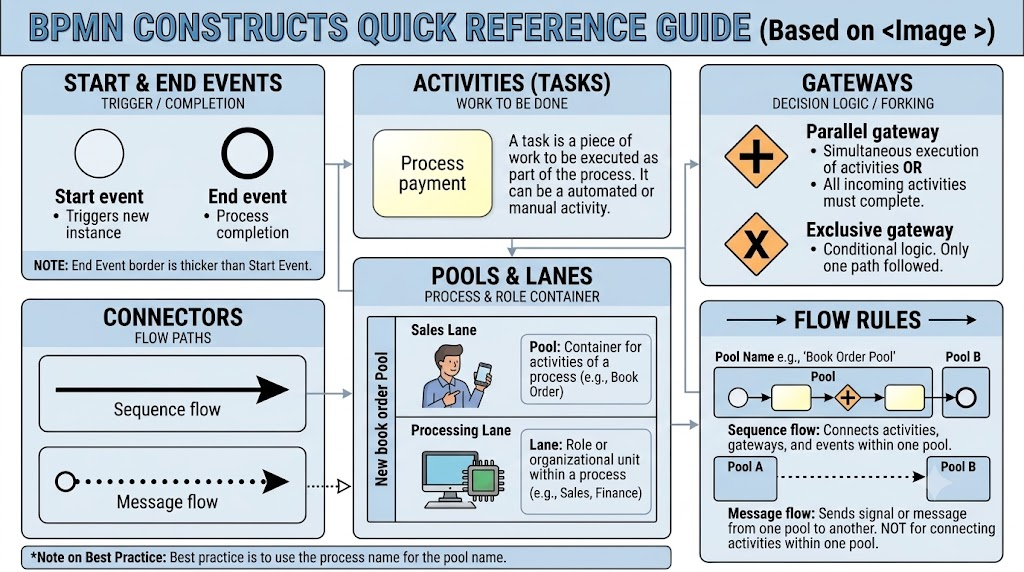
Best Practice: As noted in the Quick Reference Guide, always name the Pool after the process itself (e.g., “Book Order Pool”) rather than the organization name, to maintain focus on the workflow rather than the org chart.
2. Events: Triggers and Outcomes
Events represent something that happens during a process. They are categorized by their position in the flow.
-
Start Event (Thin Circle): The trigger that initiates the process instance.
-
Example: “Start Order” in the Sales Lane. This could be triggered by a web form submission or a POS entry.
-
-
End Event (Thick Circle): The conclusion of the process path.
-
Example: “Order Complete” at the far right of the Processing Lane. This signifies that the book has been shipped and confirmed, closing the loop.
-
3. Activities (Tasks): The Work Units
Tasks are the atomic units of work within the process. In this model, tasks are primarily manual or system-based user tasks.
-
Standard Task: A rounded rectangle representing a single unit of work.
-
Examples:
-
“Enter Customer Details”: Manual data entry by a sales agent.
-
“Check Credit”: Automated or manual verification of customer solvency.
-
“Authorize Payment”: Financial transaction processing.
-
“Ship Book”: Physical fulfillment task performed by the external Inventory Management pool.
-
“Wait for Confirmation”: A critical receive-task that pauses the process until an external signal arrives.
-
-
4. Gateways: Controlling Flow Logic
Gateways dictate how the process flows—whether it splits, merges, or makes decisions. The Book Order process uses two distinct types:
Exclusive Gateway (XOR – Diamond with ‘X’)
Used for conditional branching where only one path can be taken.
-
Application: “Order Complete?” Decision Point.
-
Path Yes: Data is valid; flow proceeds to credit check.
-
Path No: Data is invalid; flow loops back to “Enter Customer Details.”
-
-
Key Characteristic: Mutually exclusive paths. You cannot go down both “Yes” and “No” simultaneously.
Parallel Gateway (AND – Diamond with ‘+’)
Used for concurrent execution where all paths must be active.
-
Application 1 (Split): After “Check Credit,” the process forks into two simultaneous streams:
-
Authorize Payment (Financial stream)
-
Check Inventory Level (Logistics stream)
-
-
Application 2 (Merge/Rejoin): The second Parallel Gateway waits for both payment authorization AND inventory confirmation to complete before allowing the process to proceed to “Wait for Confirmation.”
-
Key Characteristic: Synchronization. The process cannot advance past the merge gateway until every incoming branch has finished.
5. Connectors and Message Flows: Cross-Pool Communication
While Sequence Flows (solid arrows) connect elements within a pool, Message Flows (dashed arrows) connect elements between pools. This is crucial for modeling B2B interactions.
-
Outbound Message Flow: From the internal Processing Lane to the Inventory Management Pool.
-
Label: “Send Shipment Order”
-
Function: Transmits the pick-list/shipping instruction to the external warehouse.
-
-
Inbound Message Flow: From the Inventory Management Pool back to the internal Processing Lane.
-
Label: “Shipment Confirmation”
-
Function: Acts as the trigger that unblocks the “Wait for Confirmation” task. Without this dashed line, the internal process would hang indefinitely.
-
Critical Rule: Never use a Message Flow to connect two activities within the same pool. Use Sequence Flow for internal connections and Message Flow strictly for inter-pool communication.
BPMN Notation Summary
Conclusion
The Integrated New Book Order Process demonstrates the power of BPMN 2.0 to model complex, multi-party business scenarios. By correctly implementing Parallel Gateways, the model ensures that financial and logistical checks happen simultaneously, reducing cycle time. By utilizing Message Flows, it accurately represents the handoff between internal systems and external partners without implying direct control over the external entity’s internal processes.
For practitioners looking to implement models of this complexity, Visual Paradigm is a highly recommended tooling solution. Visual Paradigm offers robust support for BPMN 2.0 standards, including intelligent connectors that automatically distinguish between sequence and message flows, drag-and-drop lane management, and simulation capabilities to test gateway logic before deployment. Whether you are modeling simple approvals or complex supply chain orchestrations, leveraging dedicated BPMN software ensures your diagrams remain compliant, readable, and actionable.