
Introduction
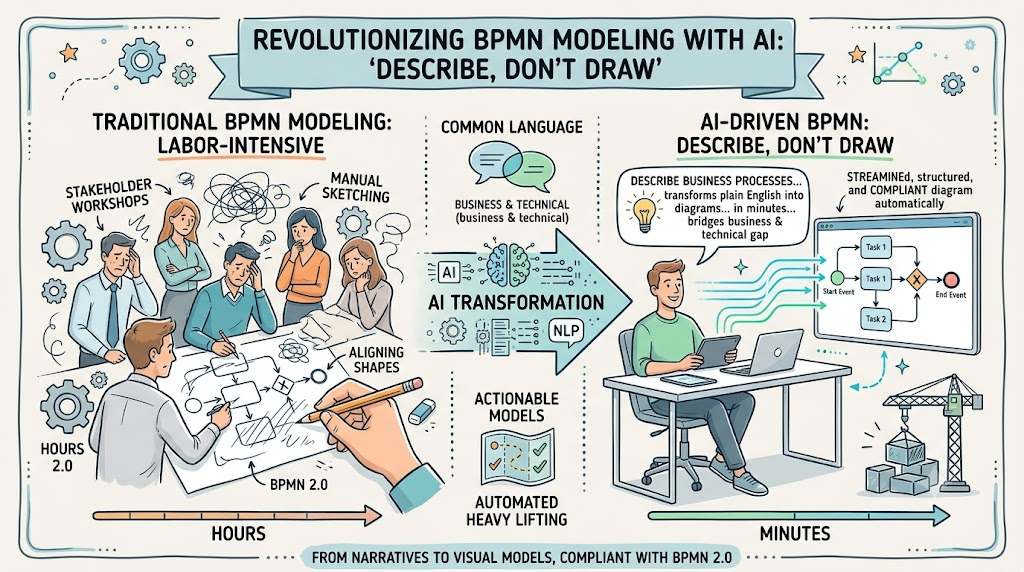
Business Process Model and Notation (BPMN) has long been the gold standard for visualizing business processes. It provides a common language that bridges the gap between business stakeholders, who understand the “what” and “why,” and technical teams, who handle the “how.” However, traditional BPMN modeling has always been labor-intensive. It requires skilled analysts to conduct lengthy workshops, manually sketch flows, and meticulously align shapes to standards like BPMN 2.0.
The emergence of AI-driven tools is fundamentally changing this landscape through a methodology known as “Describe, Don’t Draw.” This approach leverages natural language processing to transform plain English problem descriptions into structured, compliant process diagrams. By automating the heavy lifting of diagram creation, organizations can move from conceptual narratives to actionable visual models in minutes rather than hours. This guide explores how this transformation works, its key concepts, and practical examples of how AI is reshaping BPMN modeling.
Key Concepts of AI-Driven BPMN Transformation
1. Natural Language Input: The Starting Point
The process begins not with a blank canvas, but with a narrative. Instead of dragging and dropping shapes, users describe a business problem or process in plain English. This lowers the barrier to entry, allowing subject matter experts who may not be BPMN-certified to contribute directly to the modeling process.
Example:
Traditional Approach: An analyst spends two hours interviewing a warehouse manager, taking notes, and then another three hours translating those notes into a draft diagram.
“Describe, Don’t Draw” Approach: The warehouse manager types: “When a customer places an order, the system checks inventory. If items are available, we pack and ship them. If not, we notify the customer and cancel the order.”
2. Structured Story Generation: AI as the Analyst
Once the natural language input is provided, the AI acts as an expert business analyst. It parses the narrative to identify:
-
Actors/Stakeholders: Who is involved? (e.g., Customer, System, Warehouse Staff)
-
Events: What triggers the process? (e.g., Order Placed)
-
Activities: What actions are taken? (e.g., Check Inventory, Pack Items)
-
Gateways: Where are the decision points? (e.g., Is inventory available?)
The AI generates a structured problem statement and a sequential interaction story, ensuring logical consistency and completeness before any visual element is created.
Example:
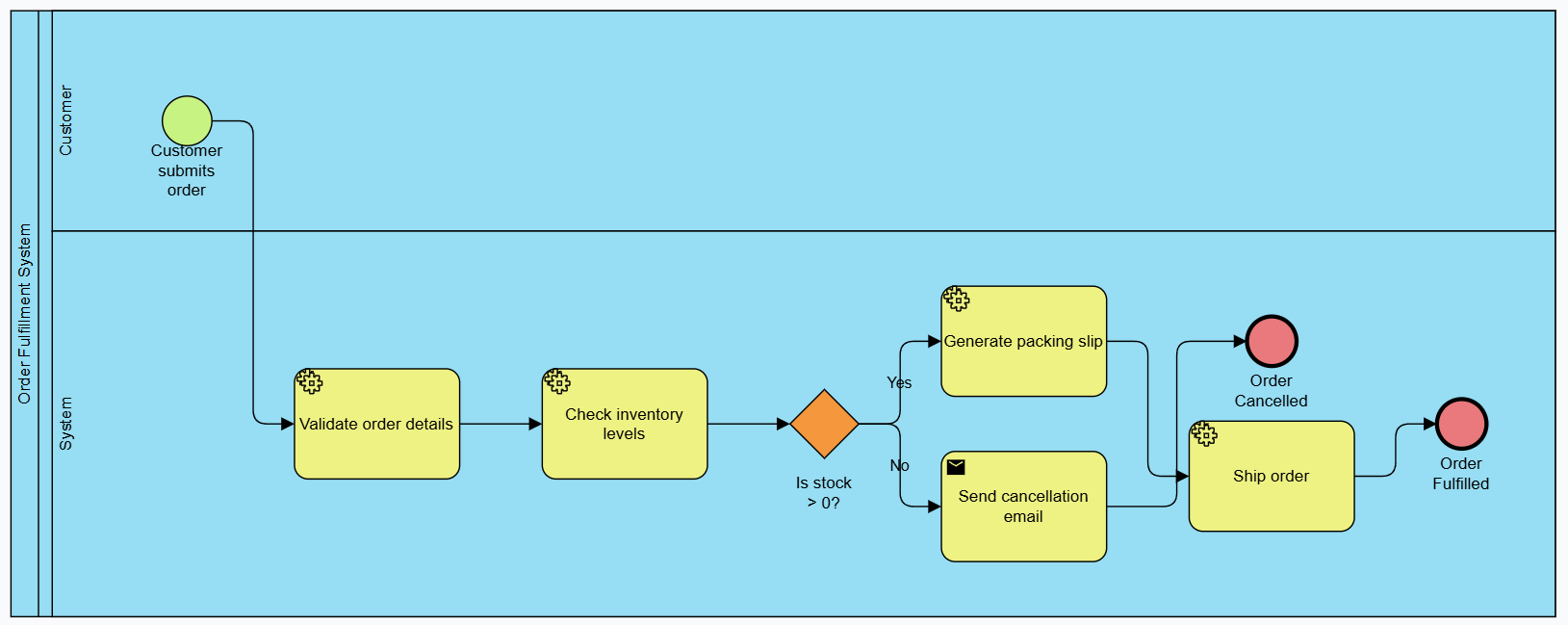
From the warehouse narrative above, the AI might generate:
-
Start Event: Customer submits order.
-
Task: System validates order details.
-
Task: System checks inventory levels.
-
Exclusive Gateway: Is stock > 0?
-
Yes: Task: Generate packing slip → Task: Ship order → End Event: Order Fulfilled.
-
No: Task: Send cancellation email → End Event: Order Cancelled.
-
3. Instant Visualization: Automated Diagramming
The structured story is automatically translated into a standardized diagram. For BPMN, this means generating a BPMN 2.0 compliant layout. The AI selects the correct symbols (tasks, gateways, events) and arranges them logically, eliminating the manual effort of alignment and formatting.
Key Output Types:
-
Stakeholder Interaction Diagrams: High-level views showing who interacts with whom.
-
Detailed BPMN 2.0 Diagrams: Full process flows with swimlanes, data objects, and message flows.
Example:
Within seconds, the AI produces a visual BPMN diagram with:
-
A pool for “Customer” and a pool for “Warehouse System.”
-
Properly connected sequence flows.
-
Standard BPMN symbols for tasks (rounded rectangles) and gateways (diamonds).
4. Refinement and Analysis: Beyond Drawing
AI doesn’t just draw; it analyzes. Once the diagram is generated, the tool can suggest improvements, identify bottlenecks, and recommend metrics.
Advanced Outputs:
-
KPI Suggestions: The AI might recommend tracking “Order Fulfillment Time” or “Cancellation Rate” based on the process steps.
-
Risk Assessment: Identifying single points of failure (e.g., “Manual inventory check is a bottleneck”).
-
Implementation Plans: Generating step-by-step guides for deploying the process.
-
Other Models: Some tools can also generate UML class diagrams or Entity-Relationship Diagrams (ERDs) from the same narrative, providing a holistic view of both process and data.
Practical Examples
Example 1: Employee Onboarding Process
Natural Language Input:
“When HR hires a new employee, they create a profile in the system. IT is notified to set up email and laptop access. The manager assigns initial training modules. Once training is complete, the employee is marked as active.”
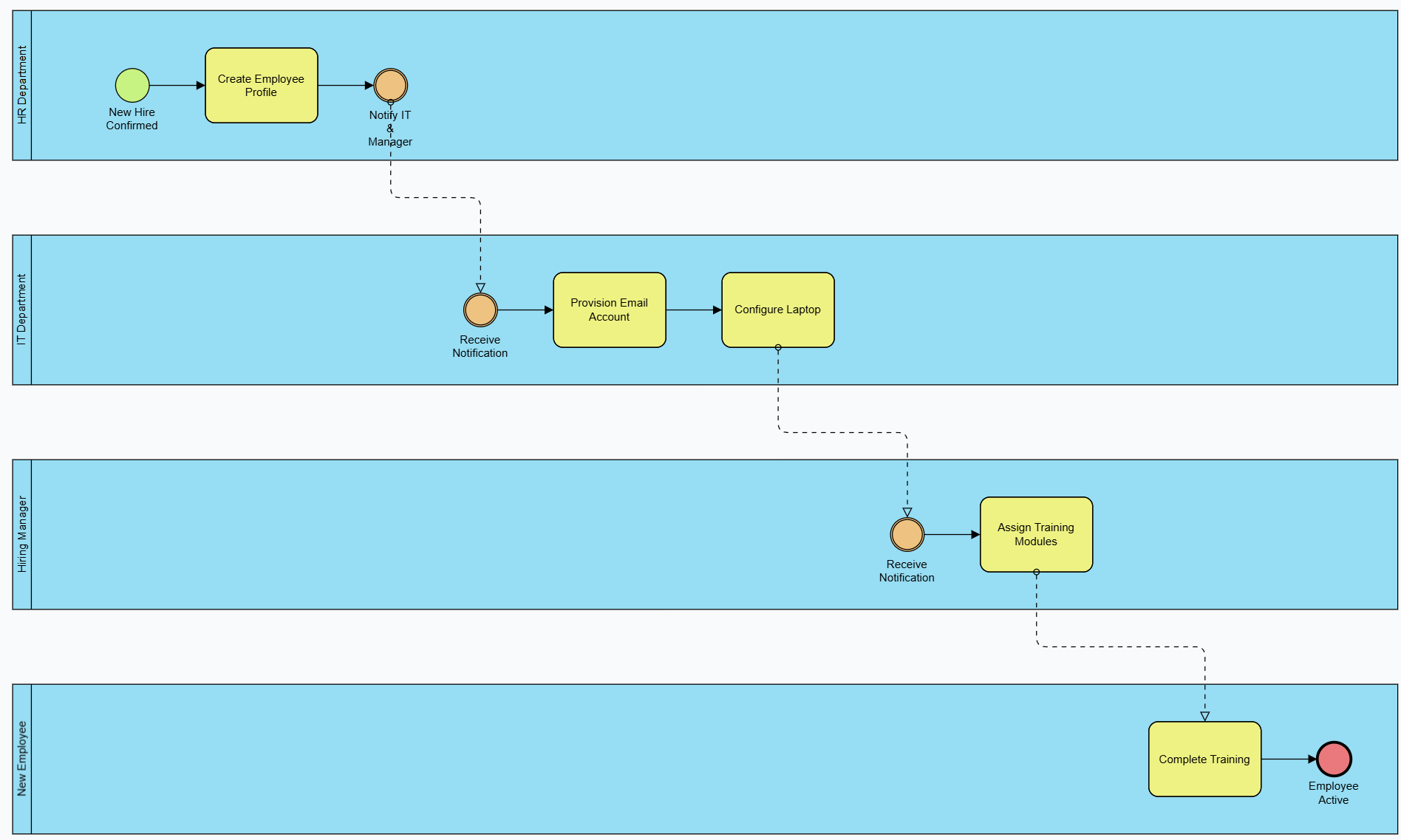
AI-Generated BPMN Structure:
-
Pool: HR Department
-
Start Event: New Hire Confirmed
-
Task: Create Employee Profile
-
Message Flow: Notify IT & Manager
-
-
Pool: IT Department
-
Task: Provision Email Account
-
Task: Configure Laptop
-
-
Pool: Hiring Manager
-
Task: Assign Training Modules
-
-
Pool: New Employee
-
Task: Complete Training
-
End Event: Employee Active
-
KPI Suggestion: “Time to Productivity” (from hire date to ‘Employee Active’ event).
Example 2: Loan Approval Workflow
Natural Language Input:
“A customer applies for a loan. The system runs a credit check. If the score is above 700, it’s auto-approved. If between 500-700, a loan officer reviews it. Below 500, it’s rejected. Approved loans go to disbursement.”
-
Start Event: Loan Application Submitted
-
Task: Run Credit Check
-
Exclusive Gateway: Credit Score?
-
Path 1 (>700): Task: Auto-Approve → Task: Disburse Funds → End Event: Loan Approved
-
Path 2 (500-700): Task: Manual Review by Officer → Exclusive Gateway: Officer Decision?
-
Approve: Task: Disburse Funds → End Event: Loan Approved
-
Reject: End Event: Loan Rejected
-
-
Path 3 (<500): End Event: Loan Rejected
-
Risk Assessment: “Manual review path may cause delays; consider SLA timers for officer response.”
Example 3: Customer Support Ticket Resolution
Natural Language Input:
“A customer submits a support ticket. The system categorizes it as Technical or Billing. Technical tickets go to Level 1 Support. If unresolved in 24 hours, escalate to Level 2. Billing tickets go directly to Finance. Once resolved, close the ticket and survey the customer.”
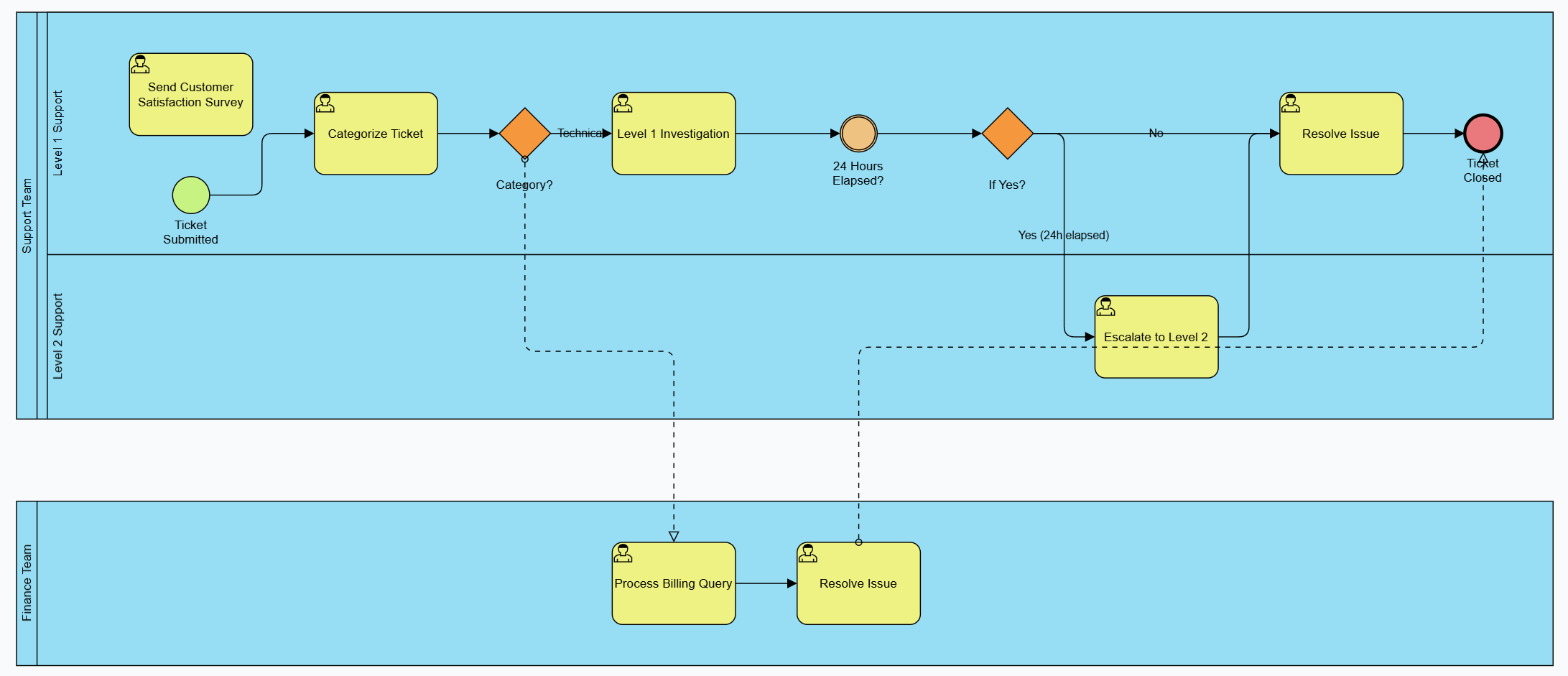
AI-Generated BPMN Structure:
-
Start Event: Ticket Submitted
-
Task: Categorize Ticket
-
Exclusive Gateway: Category?
-
Technical: Pool: Support Team
-
Task: Level 1 Investigation
-
Timer Event: 24 Hours Elapsed?
-
Yes: Task: Escalate to Level 2
-
No: Continue Level 1
-
-
Task: Resolve Issue
-
-
Billing: Pool: Finance Team
-
Task: Process Billing Query
-
Task: Resolve Issue
-
-
-
End Event: Ticket Closed
-
Task: Send Customer Satisfaction Survey
KPI Suggestion: “First Contact Resolution Rate” and “Average Handling Time by Category.”
Benefits of the “Describe, Don’t Draw” Approach
-
Speed and Efficiency: Reduces modeling time from hours to minutes. Rapid prototyping allows for quicker feedback loops.
-
Standards Compliance: Ensures all diagrams adhere to BPMN 2.0, making them universally understandable and reducing errors from manual drawing.
-
Democratization of Modeling: Allows non-technical stakeholders to contribute directly to process design without needing to learn complex diagramming tools.
-
Strategic Focus: Frees analysts from the mechanics of drawing, allowing them to focus on optimizing logic, identifying inefficiencies, and iterating on process improvements.
-
Consistency: AI applies consistent naming conventions and structural rules, reducing variability across different models and analysts.
Conclusion
The “Describe, Don’t Draw” methodology represents a significant leap forward in business process management. By leveraging AI to translate natural language into structured BPMN 2.0 diagrams, organizations can accelerate their digital transformation efforts, improve collaboration between business and IT, and ensure higher quality process models.
While the AI handles the initial creation and structuring, tools like Visual Paradigm play a crucial role in the refinement and professionalization of these models. Visual Paradigm’s Intelligent BPM and Analysis Suite exemplifies this next-generation approach, offering not just automated diagram generation but also advanced analysis, KPI tracking, and seamless integration with other enterprise architecture tools. As AI continues to evolve, the synergy between human strategic insight and automated modeling precision will become the cornerstone of efficient business process design.