



Software design moves fast, but spending hours manually dragging boxes and connecting arrows in traditional drawing tools slows development teams down. Thanks to recent advancements in artificial intelligence, engineering teams can now generate complex Unified Modeling Language (UML) diagrams directly from natural language prompts, source code, or system specifications.
Whether you need a quick sequence diagram for a technical meeting or an enterprise-grade modeling ecosystem, choosing the right tool is essential. In this guide, we review and compare the 4 best AI UML diagram generators available in 2026 to help you choose the best tool for your workflow.
What is an AI UML Diagram Generator?
An AI UML diagram generator is a software tool that uses artificial intelligence—such as Large Language Models (LLMs)—to convert unstructured text descriptions or code into structured visual diagrams. Instead of manually drawing shapes, developers can describe a system feature in plain English (e.g., “Create a sequence diagram for an OAuth2 login flow”), and the tool automatically creates the diagram using formal UML standards.
Key Features to Look for in AI UML Tools
- Accuracy & UML Compliance: The tool should correctly render standard UML relationships like inheritance, realization, dependency, and aggregation.
- Conversational Editing: The ability to ask follow-up questions or request quick iterations via a chatbot interface.
- Diagram Variety: Support for structural diagrams (Class, Component, Deployment) and behavioral diagrams (Sequence, Activity, State, Use Case).
- Ecosystem Integration: How easily generated diagrams can be imported into full-scale architecture platforms or exported to dynamic code.
1. Visual Paradigm
Visual Paradigm stands out as the most comprehensive platform on this list. Unlike standalone text-to-diagram scripts that only generate basic static images, Visual Paradigm integrates generative AI directly into a complete software design and modeling ecosystem.
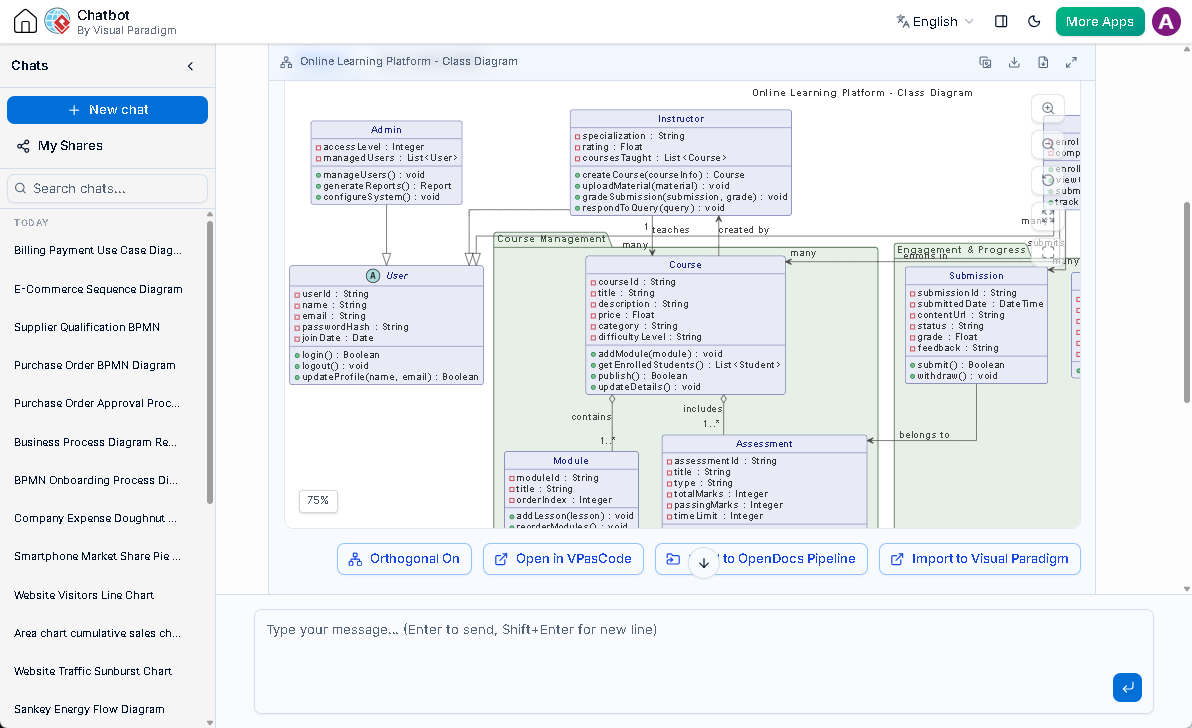
Its web-based AI Diagramming Chatbot allows teams to brainstorm, analyze requirements, and generate diagrams conversationally. From there, users can edit diagrams using code syntax (VPasCode) or transition directly into the Visual Paradigm Desktop application for advanced enterprise architecture, model traceability, and code engineering.
Key Strengths
- Supports all official UML 2.x diagram types alongside BPMN, ArchiMate, and ERDs.
- Conversational AI interface that helps refine models step-by-step.
- Seamless transition from rapid AI sketches to full-lifecycle modeling software.
- Includes built-in team collaboration, version control, and automated project documentation.
If you need more than simple quick sketches, explore how Visual Paradigm’s AI UML diagram generator bridges the gap between rapid conversational ideation and full-scale software architecture.
2. PlantUML (with AI Extensions)
PlantUML has long been a favorite among developer teams who prefer writing diagrams as code. By connecting PlantUML syntax generators to modern LLM APIs, developers can prompt AI to output PlantUML script that renders into visual models.
Key Strengths
- Open-source and highly flexible for developers comfortable with markup syntax.
- Strong developer community and widespread IDE plugin support (VS Code, JetBrains).
- Ideal for lightweight documentation embedded directly in Git repositories.
3. Mermaid.live + AI Prompts
Similar to PlantUML, Mermaid.js uses Markdown-inspired text definitions to generate diagrams dynamically. Many modern AI chat assistants natively output Mermaid code, making it an easy option for web developers.
Key Strengths
- Native rendering support in GitHub, GitLab, and Notion.
- Simple text-based syntax that is easy for AI models to generate accurately.
- Lightweight and accessible directly from web browsers.
4. Draw.io (Diagrams.net) with AI Plugins
Draw.io remains one of the most popular free online diagramming tools. Through third-party plugins and AI integrations, users can import text-generated diagram scripts directly onto the free visual canvas.
Key Strengths
- 100% free to use with no account mandatory.
- Integrates directly with Google Drive, OneDrive, and local file storage.
- Highly customizable manual drawing tools.
Summary Comparison Table
| Tool | Primary Focus | AI Generation Method | Best For |
|---|---|---|---|
| Visual Paradigm | Full Modeling Ecosystem | Conversational Chatbot & AI Modeling | Software Architects & Enterprise Teams |
| PlantUML | Diagram-as-Code | Script Prompts / LLM Plugins | Backend Developers & Git Workflows |
| Mermaid.live | Markdown Diagramming | Text/Markdown Prompts | Documentation in GitHub/Notion |
| Draw.io | Free Drawing Canvas | Plugin-assisted AI Imports | Quick Free Sketches & Offline Use |
Which AI UML Tool Should You Choose?
The right choice depends on your software project’s scale and requirements:
- If you only need a quick, simple diagram to paste into a Markdown file, lightweight text-to-code tools like Mermaid or PlantUML are quick options.
- If you are designing complex software systems where diagrams need to evolve into actionable specifications, database schemas, or complete project documentation, an integrated platform like Visual Paradigm delivers the depth and structural rigor required for professional engineering.
Related posts:
 From Business Process to Software Design: A Unified Workflow Guide
 Exploring Visual Paradigm Deployment Diagram Tools for Modern System Architecture
 AI Textual Analysis Tool: See How It Actually Works (No Magic, Just Results)
 Beginner’s Guide to Communication Diagrams: Create UML Models with AI Tools