

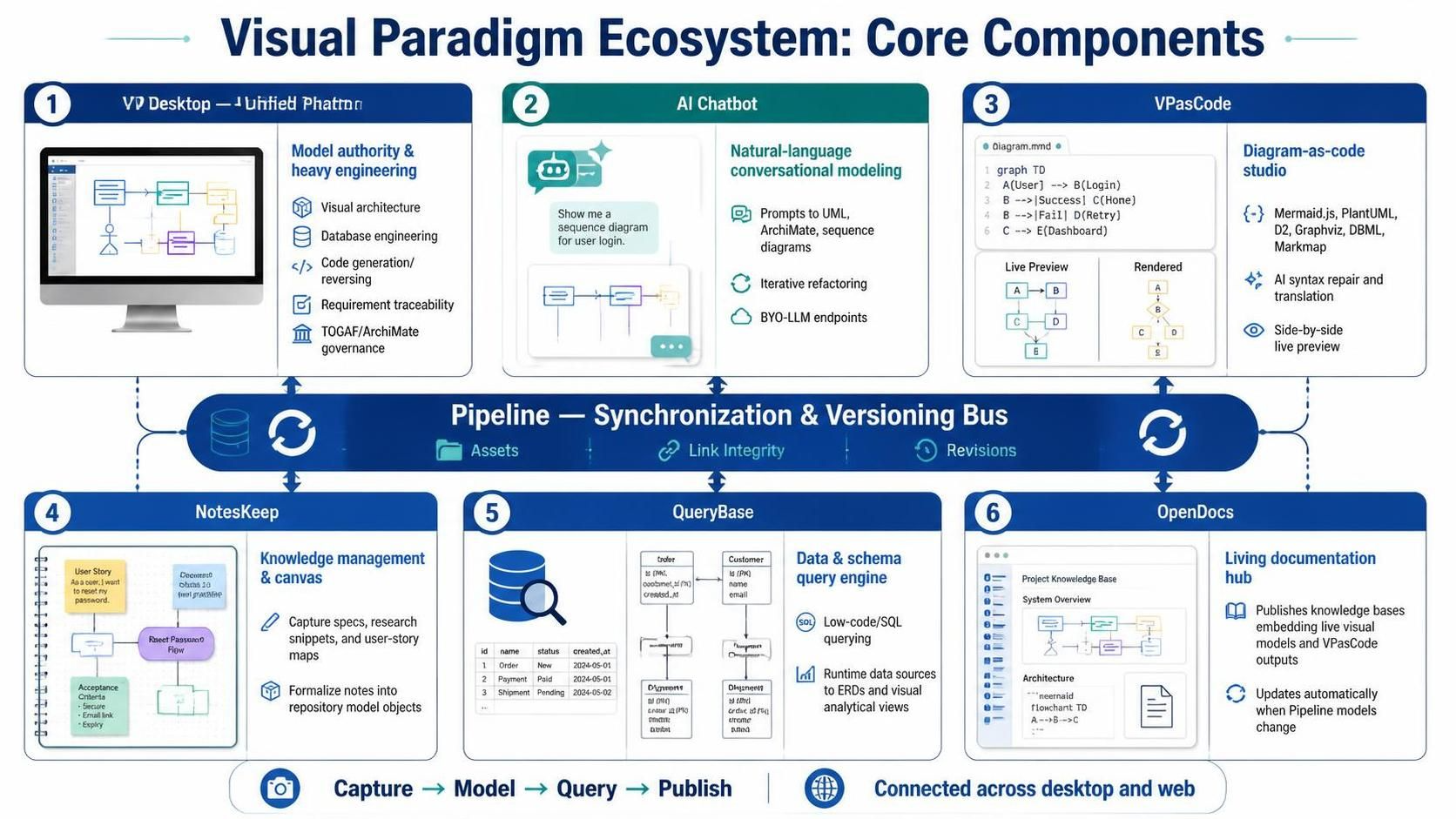
Visual Paradigm (VP) Desktop remains an enterprise-grade standard for modeling and software architecture, known for its deep support of formal notations (UML 2.x, SysML, BPMN 2.0, TOGAF ADM, ArchiMate, DFD, and ERD).
In recent updates, Visual Paradigm evolved beyond desktop modeling into a hybrid, AI-native ecosystem. By pairing VP Desktop’s engine with cloud-connected productivity components, it bridges natural language ideation, code-first text definitions, data-driven querying, and live corporate documentation.
Ecosystem Core Components Breakdown
| Component | Primary Role & Functionality |
|---|---|
| VP Desktop / Unified Platform (Cloud) | Model Authority & Heavy Engineering. Full-featured desktop environment for visual architecture, DB engineering, code generation/reversing, requirement traceability, and enterprise architecture framework governance (TOGAF/ArchiMate). |
| AI Chatbot | Natural Language Conversational Modeling. Transforms high-level prompts into complete visual diagrams across UML, ArchiMate, and sequence flows. Supports iterative refactoring (“Add MFA to authentication flow”) and Bring Your Own LLM (BYO-LLM) endpoints. |
| VPasCode | Diagram-as-Code Studio. Browser/lightweight text-based editor supporting Mermaid.js, PlantUML, D2, Graphviz, DBML, and Markmap. Includes AI error-fixing for broken syntax, translation, and side-by-side live preview. |
| NotesKeep | Knowledge Management & Canvas. Personal/team scratchpad and visual notebook to capture unstructured specs, research snippets, and user story maps before formalizing them into repository model objects. |
| QueryBase | Data & Schema Query Engine. Low-code/SQL query builder and visual database schema executor that maps runtime data sources directly to ERDs and visual analytical views. |
| Pipeline | The Synchronization & Versioning Bus. The underlying cloud transport layer that manages visual assets, retains link integrity between textual definitions and visual models, and controls version revisions across desktop and web tools. |
| OpenDocs | Living Documentation Hub. Multi-format knowledge base publisher that embeds live visual models and VPasCode outputs. When underlying models update via Pipeline, OpenDocs documents update automatically. |
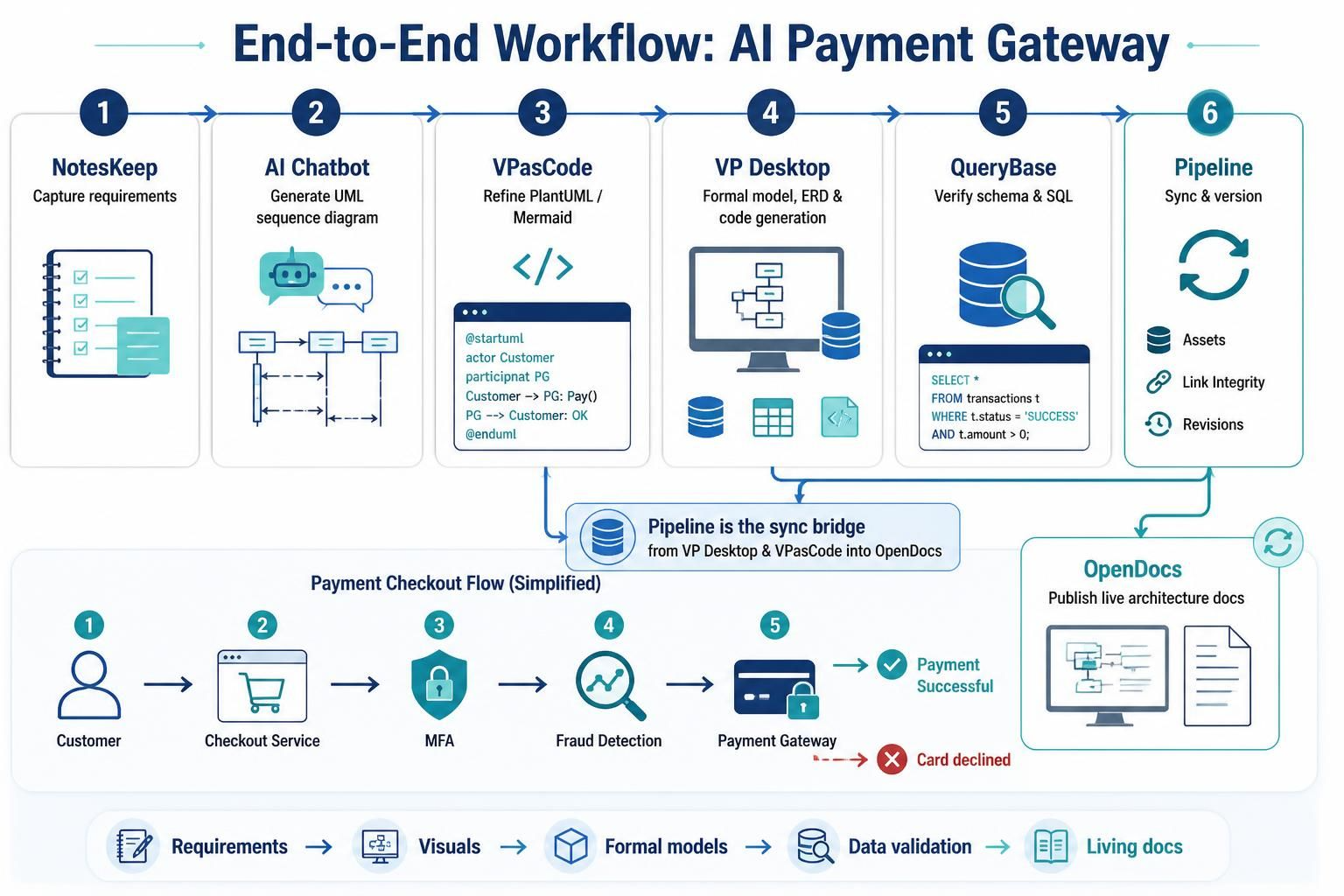
Example End-to-End Workflow: Architecting an AI Payment Gateway
Here is how a single system initiative flows through VP’s ecosystem, moving smoothly from informal notes to a formal, production-ready system architecture and living documentation set.
Step 1: Capture Requirements in NotesKeep
Start by jotting down raw business requirements, stakeholder feedback, and compliance mandates inside NotesKeep.
-
Action: Draft the high-level logic for an e-commerce order processing flow with multi-factor authentication (MFA) and fraud analysis.
Step 2: Bootstrap Visuals with AI Chatbot
Instead of dragging shapes manually onto a blank canvas, pass the unstructured text from NotesKeep straight into the AI Chatbot.
-
Prompt:
"Create a UML Sequence Diagram for a checkout service integrating a 3rd-party Payment Gateway, MFA, and Fraud Detection service." -
Outcome: The AI generates the initial sequence flow instantly. You refine it conversationally:
"Add an alternative path to handle credit card decline events."
Step 3: Text-Based Refinement in VPasCode
Export the layout from the AI Chatbot straight into VPasCode as a PlantUML or Mermaid script to tune the fine-grained logic.
-
Action: Modify participant aliases, clean up message arrows, and adjust color themes.
-
AI Assistance: If you misconfigure a loop syntax, click Fix by AI in VPasCode to auto-correct the code block and preview the rendered diagram instantly.
Step 4: Enterprise Modeling & Synchronization in VP Desktop
Push the checked diagram definition via Pipeline into Visual Paradigm Desktop.
-
Action: VP Desktop parses the incoming sequence diagram into formal repository objects (Classes, Operations, Interfaces).
-
Modeling: Map the sequence participants to concrete Java/C# classes, perform ERD database design, check TOGAF ADM alignment, and run automatic code generation.
Step 5: Data Inspection with QueryBase
Open QueryBase to validate the relational database structures generated from your ERD in VP Desktop.
-
Action: Test sample SQL queries against the staging database schema, checking relationships between
Transactions,Users, andAuditLogsto verify high-throughput performance.
Step 6: Publish & Sync via Pipeline to OpenDocs
Commit the finalized models to the central repository via Pipeline and link them inside OpenDocs.
-
Outcome: Your team gets a sleek, web-based architectural specification document containing rich text, embedded live diagrams, and API mappings.
-
Living Sync: If the underlying database schema or sequence diagram is edited later in VP Desktop or VPasCode, Pipeline notifies OpenDocs to refresh the embedded visual elements—keeping software documentation from going out-of-date.
Key Takeaway
Visual Paradigm Desktop is no longer an isolated offline drawing tool; it serves as the heavy engineering engine inside a broader, synchronized cloud platform. The ecosystem allows architects to start with low-friction text and AI conversational prompts, scale up to formal model governance in Desktop, and publish auto-updating living documentation for the rest of the organization.
