
Architecting the Future: VP Unified Platform & AI Ecosystem
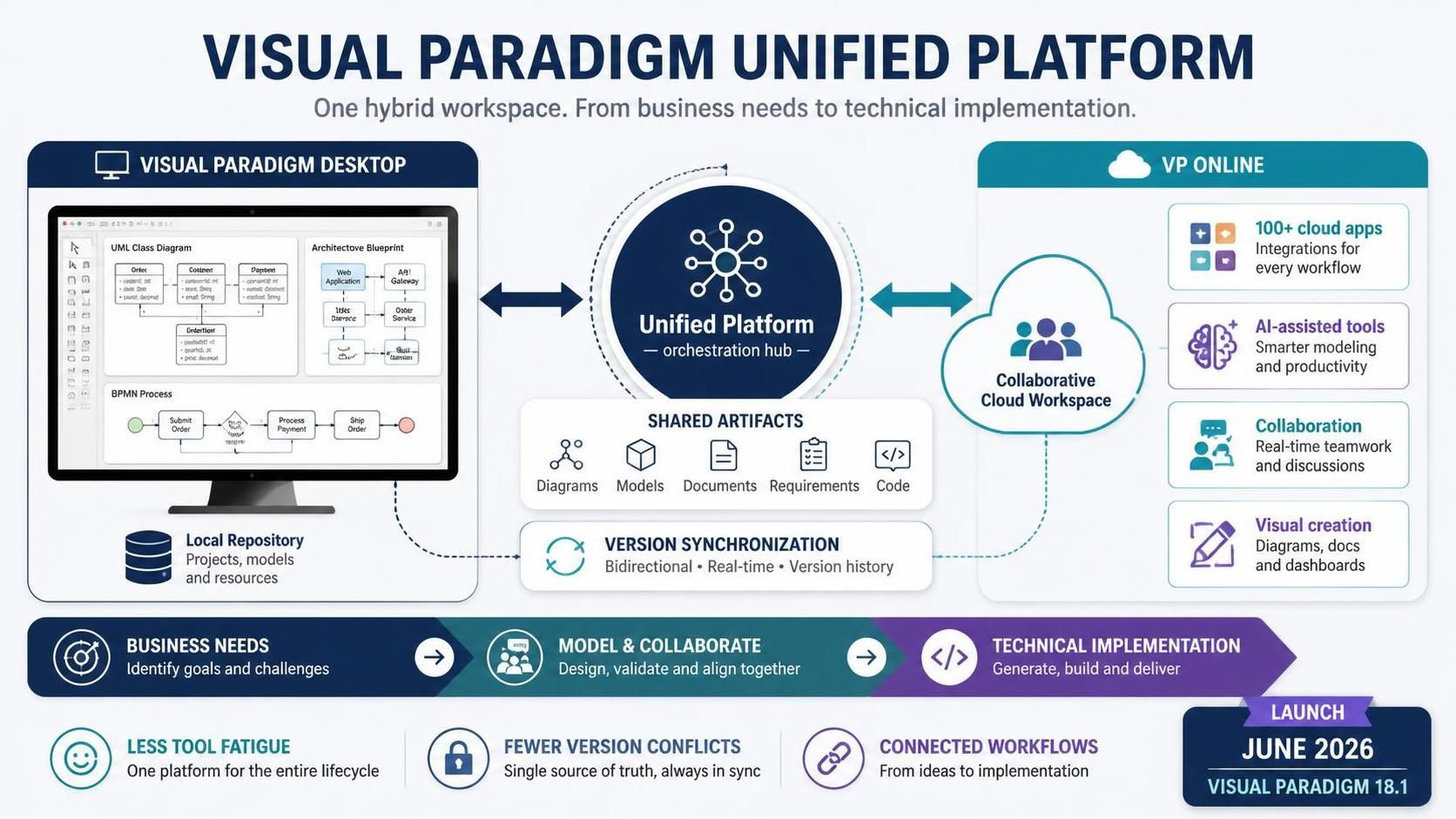
In the rapidly evolving landscape of software architecture and business process management, teams frequently face a critical bottleneck: tool fragmentation. Historically, architects have been forced to juggle between robust desktop modeling tools for deep technical diagrams and agile cloud-based applications for quick collaboration. This disconnect often leads to “tool fatigue,” version control nightmares, and fragmented workflows that hinder the seamless transition from business needs to technical implementation.
The Visual Paradigm Unified Platform, launched in June 2026 alongside Visual Paradigm 18.1, emerges as a transformative solution to this challenge. Acting as a central workspace and orchestration hub, it bridges the gap between the powerful Visual Paradigm Desktop and the collaborative Visual Paradigm Online (VP Online). By unifying over 100 cloud-based applications, AI-assisted tools, and deep desktop modeling repositories into a single hybrid workflow, the platform offers a cohesive environment where artifacts, apps, and creation processes are seamlessly integrated.
The Ecosystem Architecture: Bridging Local and Cloud
The core innovation of the Unified Platform lies in its hybrid architecture. It does not merely synchronize files; it orchestrates a continuous workflow between the heavy-lifting power of the desktop client and the accessibility of the cloud.
1. Visual Paradigm Desktop (The Engine)
At the heart of the ecosystem is the Desktop environment, which serves as the repository for high-fidelity modeling. As depicted in the architecture, the desktop is not an isolated silo but a connected node. It hosts:
- UML Class Diagrams: For detailed object-oriented design.
- Architectural Blueprints: High-level system structure visualizations.
- BPMN Processes: Complex business logic and workflow definitions.
Crucially, the desktop client maintains a Local Repository for projects, models, and resources. This ensures that sensitive data can be processed locally while remaining ready for immediate cloud synchronization.
2. VP Online (The Collaborative Hub)
On the other side of the bridge is VP Online. This environment is designed for agility and reach. It supports over 100 cloud apps, including integrations for every workflow stage. It transforms the platform into a Collaborative Cloud Workspace where:
- AI-assisted tools provide smarter modeling and productivity boosts.
- Real-time collaboration allows for instant teamwork and discussions.
- Visual creation tools allow for the generation of diagrams, docs, and dashboards directly in the browser.
3. The Unified Platform (The Orchestration Hub)
Connecting these two distinct environments is the Unified Platform, acting as the central nervous system. It manages the flow of data through three critical mechanisms:
- Shared Artifacts: The platform treats diagrams, models, documents, requirements, and code as first-class citizens. They are stored in a unified manner, ensuring that a change in a requirement document is immediately visible in the associated UML diagram.
- Version Synchronization: The system employs bidirectional, real-time synchronization. This eliminates the “version conflict” problem common in distributed teams. Changes made in the cloud are pushed to the desktop, and updates from the desktop are committed to the cloud.
The Three Core Pillars of Workflow
The Unified Platform is built around three central objectives designed to eliminate workflow fragmentation and enhance user efficiency. These pillars ensure that whether you are a business analyst defining high-level processes or a software architect detailing complex system interactions, your work remains connected.
Pillar 1: Centralized Artifact Hub
Operational Purpose: To provide a single, drive-like space that organizes all saved work in one unified dashboard.
This eliminates the need to search across disparate local and cloud storage systems. The Unified Drive feature natively syncs local desktop models—including UML, BPMN, and SysML diagrams—with web-based designs. This ensures that changes made in the robust desktop environment are immediately reflected in the cloud, and vice versa, maintaining a single source of truth for all project artifacts.
Pillar 2: Centralized App Access
Operational Purpose: To serve as an instant entry point for launching any existing or future application within the Visual Paradigm ecosystem.
Instead of navigating through different toolbars or web portals, the App Launcher provides direct access to over 100 specialized applications. Whether you need an Agile planning tool, a wireframing suite, or a Gantt chart generator, this centralized access point allows teams to switch contexts effortlessly without losing their place in the broader project lifecycle.
Pillar 3: Seamless Creation Workflow
Operational Purpose: To provide a revamped interface that allows users to instantly spin up new project components from any tool.
This pillar reduces the friction associated with starting new tasks. By integrating the creation process across the desktop and online environments, the platform ensures that the transition from “Business Needs” (Identify goals and challenges) to “Model & Collaborate” (Design, validate and align together) and finally to “Technical Implementation” (Generate, build and deliver) is fluid and uninterrupted.
Visualizing the Unified Workflow
Understanding the architecture is one thing, but applying it to a real-world scenario requires visualizing how data flows. Below is a conceptual representation of the Unified Platform’s architecture using Mermaid syntax, illustrating the bidirectional nature of the synchronization and the central role of the orchestration hub.
flowchart TD
    subgraph Desktop_Environment["Visual Paradigm Desktop"]
        LocalRepo[Local Repository]
        UML[Class Diagrams]
        BPMN[BPMN Processes]
    end

    subgraph Cloud_Environment["VP Online"]
        Apps[100+ Cloud Apps]
        AI[AI-Assisted Tools]
        Collab[Collaborative Workspace]
    end

    subgraph Unified_Hub["Unified Platform (Orchestration Hub)"]
        Sync[Version Synchronization]
        Drive[Unified Drive]
    end

    Desktop_Environment <==>|Bidirectional Sync| Unified_Hub
    Cloud_Environment <==>|Real-time Data| Unified_Hub

    Unified_Hub -->|Shared Artifacts| Drive
    Unified_Hub -->|Orchestration| Sync

    style Unified_Hub fill:#1a2b4a,stroke:#333,stroke-width:2px,color:#fff
    style Desktop_Environment fill:#f9f9f9,stroke:#333,stroke-width:2px
style Cloud_Environment fill:#e1f5fe,stroke:#0277bd,stroke-width:2pxConclusion
The Visual Paradigm Unified Platform represents a significant leap forward in systems engineering and business analysis tools. By addressing the pain points of tool fatigue and version conflicts, it enables organizations to maintain a single source of truth across their entire development lifecycle. Whether you are generating code from UML models in the desktop or collaborating on requirements in the cloud, the Unified Platform ensures that your workflow is not just connected, but intelligent and seamless.