
Unified Modeling Ecosystem: Streamlined Discovery with VPasCode and VP Unified Platform
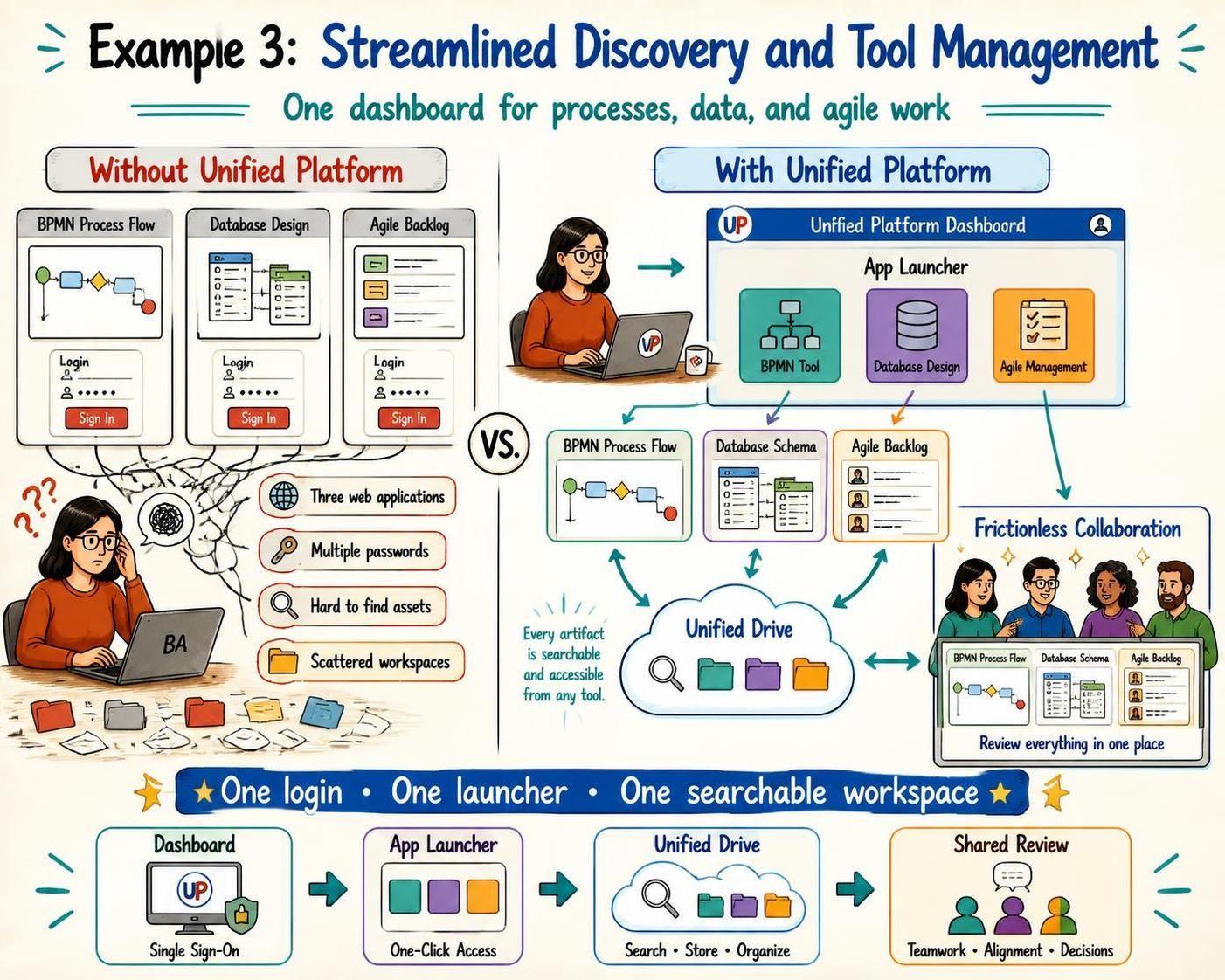
In the modern landscape of systems engineering and business analysis, the greatest bottleneck is often not a lack of tools, but a fragmentation of them. This tutorial explores the architectural shift from siloed workflows to a Unified Platform, analyzing how a centralized dashboard, app launcher, and cloud drive can revolutionize the way teams manage processes, data, and agile requirements.
The Problem: The Cost of Tool Silos
Traditionally, a Business Analyst (BA) operates in a fragmented environment. To fulfill their role effectively, they must juggle disparate systems that do not communicate with one another. Let’s break down the “Without Unified Platform” scenario to understand the architectural friction.
The Fragmented Workflow
- BPMN Process Flow: The analyst creates a business process diagram using a specific tool. This requires a login to the BPMN application.
- Database Design: To model the data structure, they switch to a second web application. This requires a different login and interface.
- Agile Backlog: Finally, they manage user stories in a third project management tool, requiring yet another authentication.
This approach creates a “spaghetti” workflow. The analyst suffers from Context Switching—the cognitive penalty of jumping between different mental models. Furthermore, assets become scattered across different servers, making discovery difficult and collaboration inefficient.
The Solution: A Unified Ecosystem
The Unified Platform architecture solves these problems by introducing a central orchestration layer. This is not just a collection of tools, but a cohesive system where data, access, and collaboration are integrated.
1. The Centralized Dashboard (Single Sign-On)
The foundation of the new architecture is the Unified Platform Dashboard. This serves as the entry point for the user.
- Single Sign-On (SSO): The user logs in once. The system authenticates the user and grants access to all authorized modules (BPMN, Database, Agile).
- Unified Interface: Instead of a new login screen for every task, the dashboard presents a unified view of the workspace.
2. The App Launcher (Contextual Access)
Once authenticated, the user utilizes the App Launcher. This is a centralized navigation hub that provides instant access to specific modeling environments.
- Modular Design: The launcher displays icons for the BPMN Tool, Database Design app, and Agile Management tool.
- Seamless Transition: Clicking an icon launches the specific tool within the same session, eliminating the need to re-authenticate or manage multiple browser tabs.
3. The Unified Drive (Data Persistence)
The most critical architectural component is the Unified Drive. In the old model, files were stored locally or in siloed databases. In the Unified Platform, all artifacts are stored in a centralized, cloud-based repository.
Key Benefits of the Unified Drive:
- Searchable & Accessible: Every artifact (process flow, schema, user story) is indexed in the cloud. The analyst can search for a specific file from any tool.
- Interoperability: A BPMN diagram created in the process tool can be viewed or referenced in the Agile tool without needing to export/import files manually.
- Single Source of Truth: There is only one version of the document, preventing confusion caused by scattered versions.
The Outcome: Frictionless Collaboration
By integrating these components, the platform transforms the workflow from a solitary struggle into a collaborative ecosystem.
Real-Time Alignment
With all artifacts residing in the Unified Drive, stakeholders can review the entire project scope in one place. A stakeholder doesn’t need to ask, “Where is the database schema?” or “Can you send me the latest process flow?” because the system provides a Shared Review environment.
Summary of Architectural Shifts
| Feature | Legacy Architecture | Unified Platform Architecture |
|---|---|---|
| Access | Multiple logins, scattered portals | Single Sign-On (SSO) via Dashboard |
| Navigability | Hard to find assets | Centralized App Launcher |
| Data Storage | Local drives, siloed databases | Unified Drive (Cloud-based) |
| Collaboration | Manual file sharing | Frictionless, real-time review |
Ultimately, adopting a unified ecosystem like Visual Paradigm is no longer just a convenience—it is a strategic necessity for organizations demanding agility and alignment. By bridging the gap between technical modeling and agile management, teams can focus on what matters most: solving problems efficiently.