
UML Communication Diagrams with VPasCode: Visualizing System Interactions
In the world of software architecture, understanding how system components talk to each other is just as critical as knowing what they do. While Sequence Diagrams are famous for showing the timeline of events, there is another powerful diagram type that focuses on the network of collaborators: the Communication Diagram (formerly known as Collaboration Diagram).
Using Visual Paradigm’s VPasCode, you can generate these complex structural diagrams directly from text. This tutorial explores how to model a classic “Online Order” scenario, utilizing the specific syntax of object links to visualize the flow of control and data between your system’s services.
What is a Communication Diagram?
A Communication Diagram is a type of interaction diagram in UML. It emphasizes the structural organization of the objects or components that participate in the interaction, rather than the strict time sequence. Think of it as a “social network map” for your software components.
Key characteristics include:
- Object-Centric: It highlights the objects (like
WebStore,OrderService) and their relationships. - Message Numbering: Since time isn’t the primary axis (as it is in sequence diagrams), the order of interactions is indicated by numbered labels on the links (e.g.,
1,1.1,1.2). - Collaboration Focus: It is best used when the network of participants is more important than the exact timeline of operations.
Modeling the “Online Order” Flow
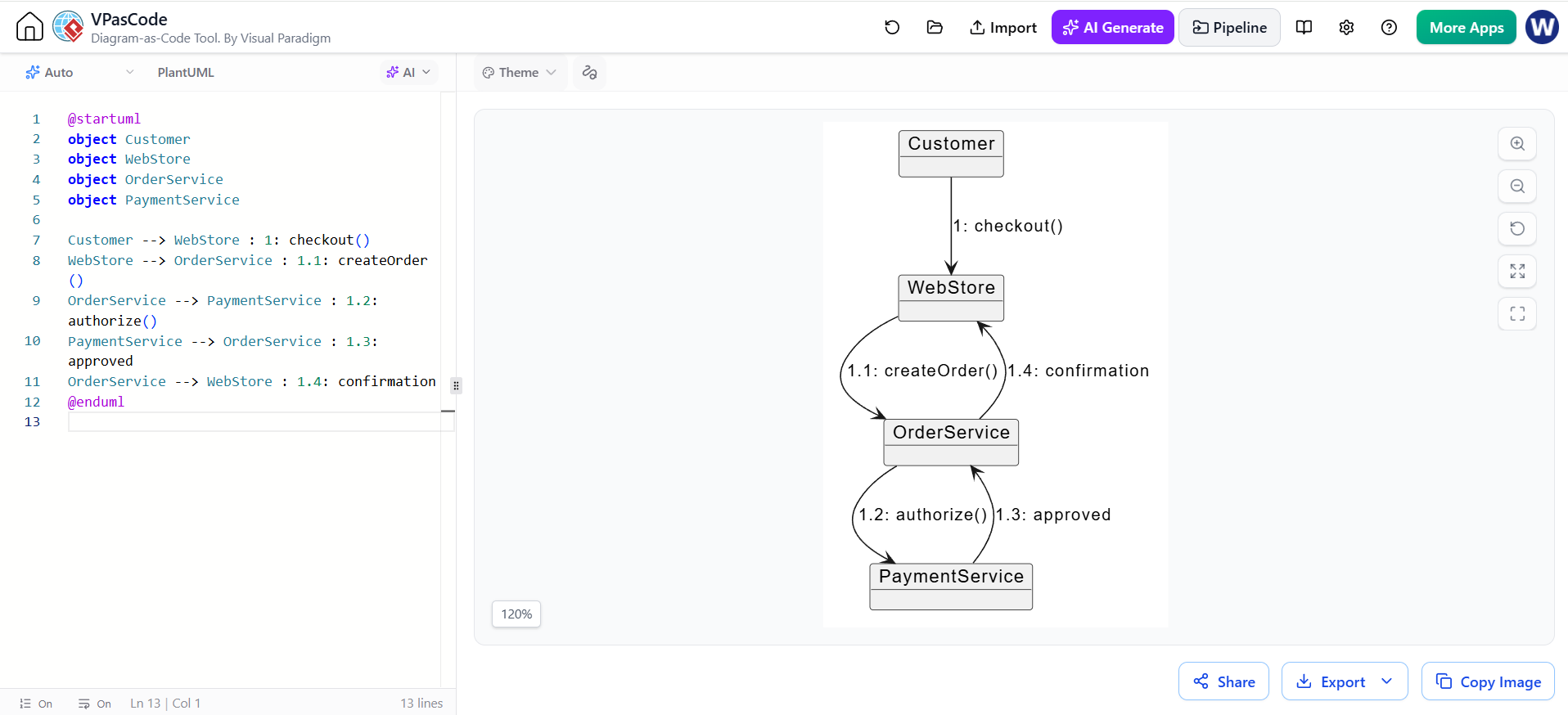
In this example, we are modeling a process where a Customer initiates a checkout, which triggers a chain of events involving a WebStore, an OrderService, and a PaymentService.
Using VPasCode, we define the objects and then draw the “links” between them. In the standard UML set, PlantUML does not have a dedicated Communication Diagram renderer; however, VPasCode allows us to use an Object Link Sketch to achieve this specific visual output.
The VPasCode Syntax
The syntax relies on defining objects first, followed by directional arrows (-->) that represent the links. Crucially, the message text is prefixed with a number to establish the interaction order.
@startuml object
object Customer
object WebStore
object OrderService
object PaymentService

Customer --> WebStore : 1: checkout()
WebStore --> OrderService : 1.1: createOrder()
OrderService --> PaymentService : 1.2: authorize()
PaymentService --> OrderService : 1.3: approved
OrderService --> WebStore : 1.4: confirmation
@enduml
Step-by-Step Breakdown of the Code
1. Defining the Participants
We begin by declaring the object instances. This creates the nodes that will appear in your diagram. In a real-world scenario, these represent specific classes or microservices within your architecture.
object Customer
object WebStore
object OrderService
object PaymentService
2. Establishing the Sequence (The Numbers)
The most critical part of this diagram is the numbering system used in the message labels. This tells the renderer how to order the interactions.
- 1: The root interaction. The Customer initiates the process.
- 1.1: A sub-step of 1. The WebStore delegates the order creation.
- 1.2: A sub-step of 1.1. The OrderService requests payment authorization.
- 1.3: A sub-step of 1.2. The PaymentService returns the result.
- 1.4: A sibling step of 1.1/1.2/1.3. The OrderService reports back to the WebStore.
3. Drawing the Links
VPasCode renders these lines as curves connecting the objects, creating a “web” of interaction. The arrow direction indicates the flow of data.
OrderService --> PaymentService : 1.2: authorize()In the diagram, you will notice the lines curve to avoid overlapping, visually grouping the WebStore, OrderService, and PaymentService together to show they are tightly coupled in this specific transaction.
Why Use VPasCode for This?
While you could draw this diagram manually in a GUI tool, using VPasCode offers distinct advantages for system architects:
- Version Control: Your diagram definition is text. You can commit changes to your architecture models in Git, seeing exactly which service added a new link or changed a message.
- Rapid Prototyping: Adding a new service (e.g.,
InventoryService) is as simple as typing a new line of code rather than dragging and dropping shapes. - Clarity: It forces you to explicitly define the order of operations (the numbers), preventing ambiguity in complex flows.
Conclusion
The Communication Diagram is a vital tool for understanding the collaboration between your system’s components. By leveraging VPasCode to render these diagrams, you ensure your documentation stays up-to-date with your codebase. The next time you need to explain how a PaymentService talks to an OrderService, try sketching it out with text first.