
From Purpose to Delivery: Unified Platform Architecture with VP Unified Platform
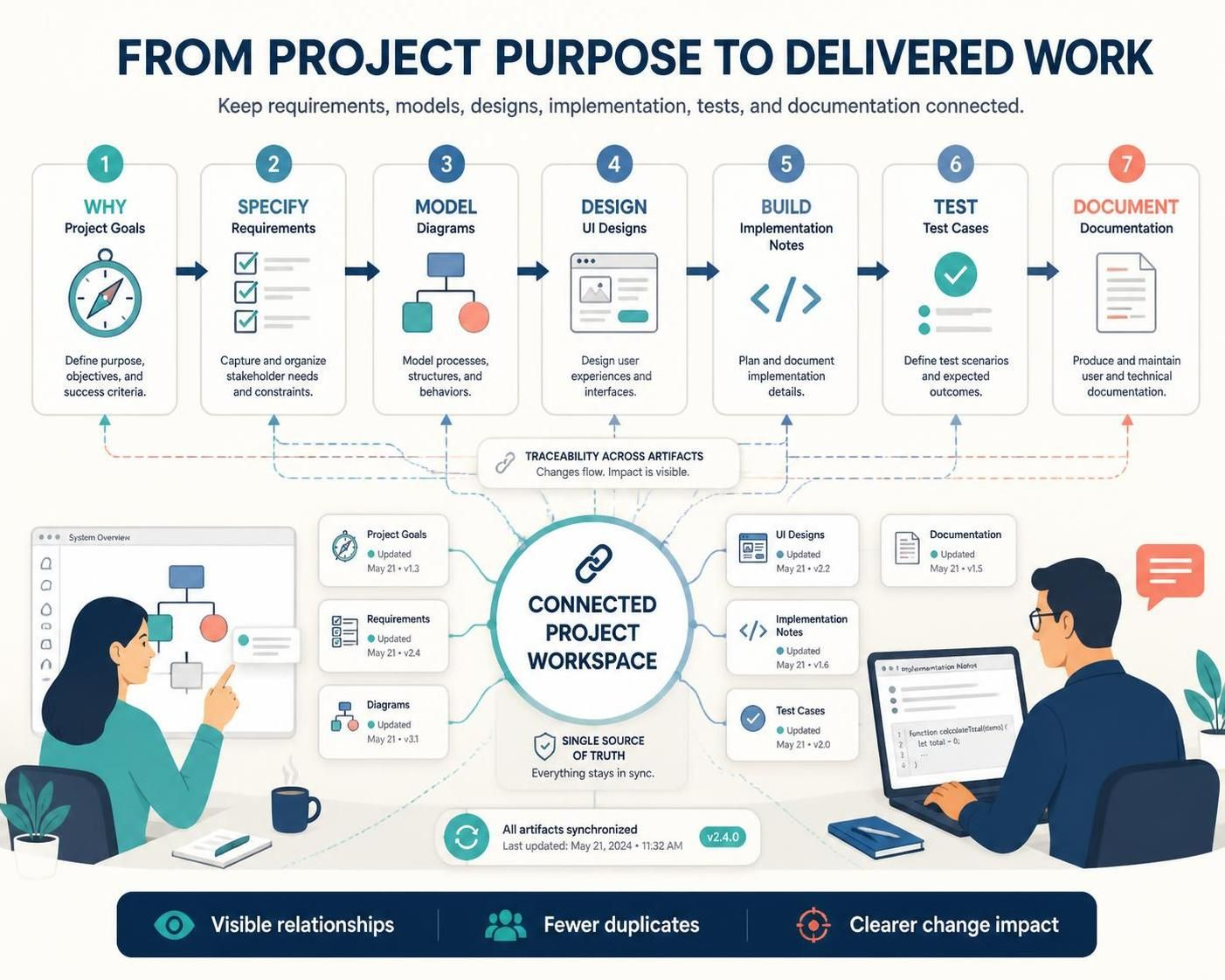
In modern software development, the most significant risk to project success is often not technical debt, but fragmented communication. When requirements, diagrams, designs, and documentation live in silos, teams inevitably lose momentum. The solution lies in a Unified Platform architecture, which integrates the entire software lifecycle into a single, connected workspace. This tutorial explores the “From Project Purpose to Delivered Work” workflow, demonstrating how to maintain a Single Source of Truth (SSOT) and ensure that changes ripple effectively through your project artifacts.
The Core Philosophy: Traceability Across Artifacts
The central concept of the Visual Paradigm Unified Platform is to eliminate the “version of truth” debate. In traditional workflows, a requirement might be updated in a spreadsheet, while the diagram remains static, and the code is written based on an old version. The Unified Platform changes this paradigm by creating Traceability Across Artifacts.
This architecture ensures that:
- Visibility: You can see how a high-level goal impacts a specific line of code.
- Impact Analysis: When a requirement changes, the system helps you identify exactly which diagrams and tests are affected.
- Synchronization: A single workspace keeps all data points updated simultaneously.
Step-by-Step: The 7-Phase Lifecycle
The platform structures the development process into seven distinct but interconnected phases. Let’s break down how to apply these concepts in practice.
Phase 1: Why (Project Goals)
Every project begins with the “Why.” This phase involves defining the purpose, objectives, and success criteria. Instead of a vague document, these goals are treated as traceable artifacts that anchor the entire project.
Phase 2: Specify (Requirements)
Once the goals are set, you capture and organize stakeholder needs. This involves defining constraints and functional requirements. In a unified workspace, these requirements are directly linked to the goals defined in Phase 1.
Phase 3: Model (Diagrams)
Here, we translate abstract requirements into visual models. Whether using BPMN for processes or UML for system structure, these diagrams are not just illustrations; they are executable specifications that drive the rest of the project.
Phase 4: Design (UI Designs)
With the logic modeled, we focus on the user experience. This phase covers the design of interfaces and user flows, ensuring that the visual design aligns with the functional logic established in the modeling phase.
Phase 5: Build (Implementation Notes)
Now the team moves to implementation. This phase involves creating implementation notes and generating code. Crucially, in a unified platform, the code structure is often derived directly from the models, ensuring the build phase stays true to the original design.
Phase 6: Test (Test Cases)
Verification happens here. Test cases are defined to ensure the implementation meets the expected outcomes. These test cases are linked back to the requirements and the specific models they validate, closing the loop on quality assurance.
Phase 7: Document (Documentation)
Finally, the project produces and maintains user and technical documentation. Because the source data is centralized, documentation is generated automatically from the current state of the project, ensuring it is never outdated.
Technical Architecture: The Connected Workspace
At the heart of this system is the Connected Project Workspace. This acts as the hub where all specific artifacts converge. The architecture relies on a metadata layer that tracks the version history and synchronization status of every element.
The diagram below illustrates the logical flow of data within the platform, from the initial goals to the final code implementation.
graph TD
    subgraph Goals["Phase 1: Project Goals"]
        G[Define Purpose & Objectives]
    end

    subgraph Requirements["Phase 2: Specify Requirements"]
        R[Capture Stakeholder Needs]
    end

    subgraph Models["Phase 3: Model Diagrams"]
        M[Model Processes & Structures]
    end

    subgraph Design["Phase 4: UI Designs"]
        D[Design User Interfaces]
    end

    subgraph Build["Phase 5: Implementation"]
        C[Generate Code & Notes]
    end

    subgraph Test["Phase 6: Test Cases"]
        T[Define Scenarios]
    end

    subgraph Docs["Phase 7: Documentation"]
        Doc[Produce Manuals]
    end

    G ==> R
    R ==> M
    M ==> D
    D ==> C
    C ==> T
    T ==> Doc

    style G fill:#e1f5fe,stroke:#01579b
    style R fill:#e1f5fe,stroke:#01579b
    style M fill:#e1f5fe,stroke:#01579b
    style D fill:#e1f5fe,stroke:#01579b
    style C fill:#e1f5fe,stroke:#01579b
    style T fill:#e1f5fe,stroke:#01579b
    style Doc fill:#e1f5fe,stroke:#01579b
In a practical environment, this flow is bidirectional. If a change is detected in the Build phase (e.g., a constraint is hit during coding), it can trigger a review in the Model phase, maintaining the integrity of the system.
Key Benefits of the Unified Approach
- Visible Relationships: You can trace a bug in the code back to the specific requirement and the designer who approved the UI.
- Fewer Duplicates: No more copying data between Excel, Word, and Jira. One entry point for all information.
- Clearer Change Impact: When a requirement changes, the system highlights the specific diagrams and test cases that need updating.
Conclusion
Moving from project purpose to delivered work is not a linear sprint but a synchronized dance of artifacts. The Unified Platform provides the stage and the choreography, ensuring that the “Why” remains connected to the “What” and the “How.” By adopting this architecture, teams can stop worrying about version control and start focusing on building the right solution.