
MVC Booking Flow: Mastering Sequence Diagrams in UML
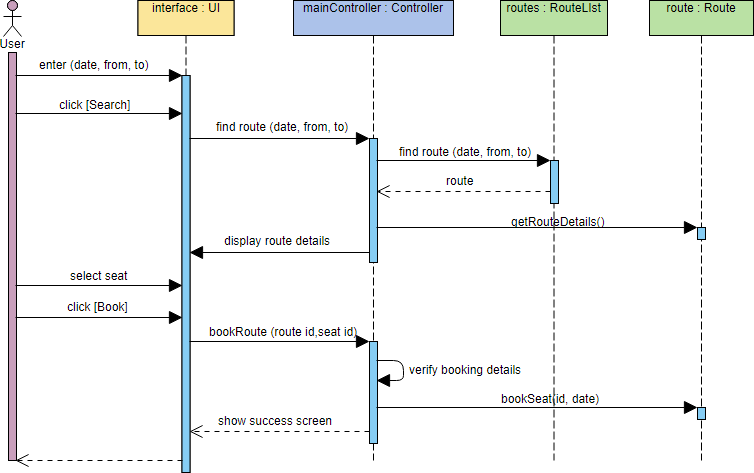
Welcome to this comprehensive tutorial on system architecture and modeling. In this guide, we will deconstruct a classic MVC (Model-View-Controller) sequence diagram. This diagram illustrates the dynamic interactions between a user and the system’s internal components during a critical business operation: booking a route.
Understanding the MVC Architecture
The Model-View-Controller (MVC) pattern is a fundamental architectural design pattern used primarily for implementing user interfaces. It separates an application into three main logical components: the Model, the View, and the Controller. This separation allows for greater code reusability, maintainability, and scalability.
In the diagram provided, we can see these components represented as distinct objects interacting over time:
- The Actor (User): The initiator of the process, representing the human or external system interacting with the software.
- Boundary Object (‘interface’ / UI): This represents the View. It is the visual interface that captures user input (like entering dates or clicking buttons) and presents data back to the user.
- Controller Object (‘mainController’): This is the Controller. It acts as the brain of the operation, receiving input from the View, processing it, and deciding which Model objects to call.
- Entity Objects (‘routes’ & ‘route’): These represent the Model. They contain the core business logic and data structures, such as the list of available routes and the specific details of a single route.
Step-by-Step Interaction Analysis
Let’s walk through the sequence of events depicted in the diagram to understand how a booking request flows through the system.
1. Input and Search Phase
The process begins when the User interacts with the interface. The user enters search criteria—specifically the date, departure location, and destination. Upon clicking the [Search] button, the UI sends a request to the mainController.
The controller then initiates a search for the requested information. It sends a find route (date, from, to) message to the routes object (a list of all available routes). The routes object processes this and returns a route object (the specific result) back to the controller.
2. Display and Selection Phase
Once the controller receives the route data, it needs to present this to the user. It sends a display route details message back to the interface. The UI then renders the information, allowing the user to select a specific seat and click [Book].
3. Booking and Confirmation Phase
This is the most critical part of the transaction. When the user clicks [Book], the interface notifies the mainController with the specific bookRoute (route id, seat id) request.
The controller performs a crucial internal step: it sends a message to itself (verify booking details) to ensure the booking data is valid and the seat is available. If valid, the controller sends the bookSeat (id, date) command to the specific route entity object to update the database or state.
Finally, the controller receives confirmation and sends a show success screen message to the interface, completing the user journey.
Visualizing the Flow
The vertical lines (lifelines) represent the existence of the objects, while the horizontal arrows represent messages. Notice the blue rectangular bars on the lifelines; these indicate the activation period, showing exactly when an object is actively performing a task.
actor User
boundary "interface : UI" as ui
controller "mainController : Controller" as ctrl
entity "routes : RouteList" as routes
entity "route : Route" as route

User -> ui: enter (date, from, to)
User -> ui: click [Search]
ui -> ctrl: find route (date, from, to)
ctrl -> routes: find route (date, from, to)
routes --> ctrl: route
ctrl -> ui: display route details

User -> ui: select seat
User -> ui: click [Book]
ui -> ctrl: bookRoute (route id, seat id)

ctrl -> ctrl: verify booking details
ctrl -> route: bookSeat (id, date)
route --> ctrl: show success screen
ctrl --> ui: show success screen
Why Model with Visual Paradigm?
Creating these diagrams manually can be error-prone and time-consuming. Using professional tooling like Visual Paradigm allows you to generate these sequence diagrams visually. It ensures that your syntax is correct and helps you visualize the lifecycle of objects without writing lines of code.
By mastering these diagrams, you gain the ability to communicate complex system behaviors to stakeholders, developers, and testers effectively. Whether you are designing a simple web app or a complex enterprise system, the sequence diagram is your roadmap for interaction.