
Modernize Flowcharts with Visual Paradigm, VPasCode, and AI
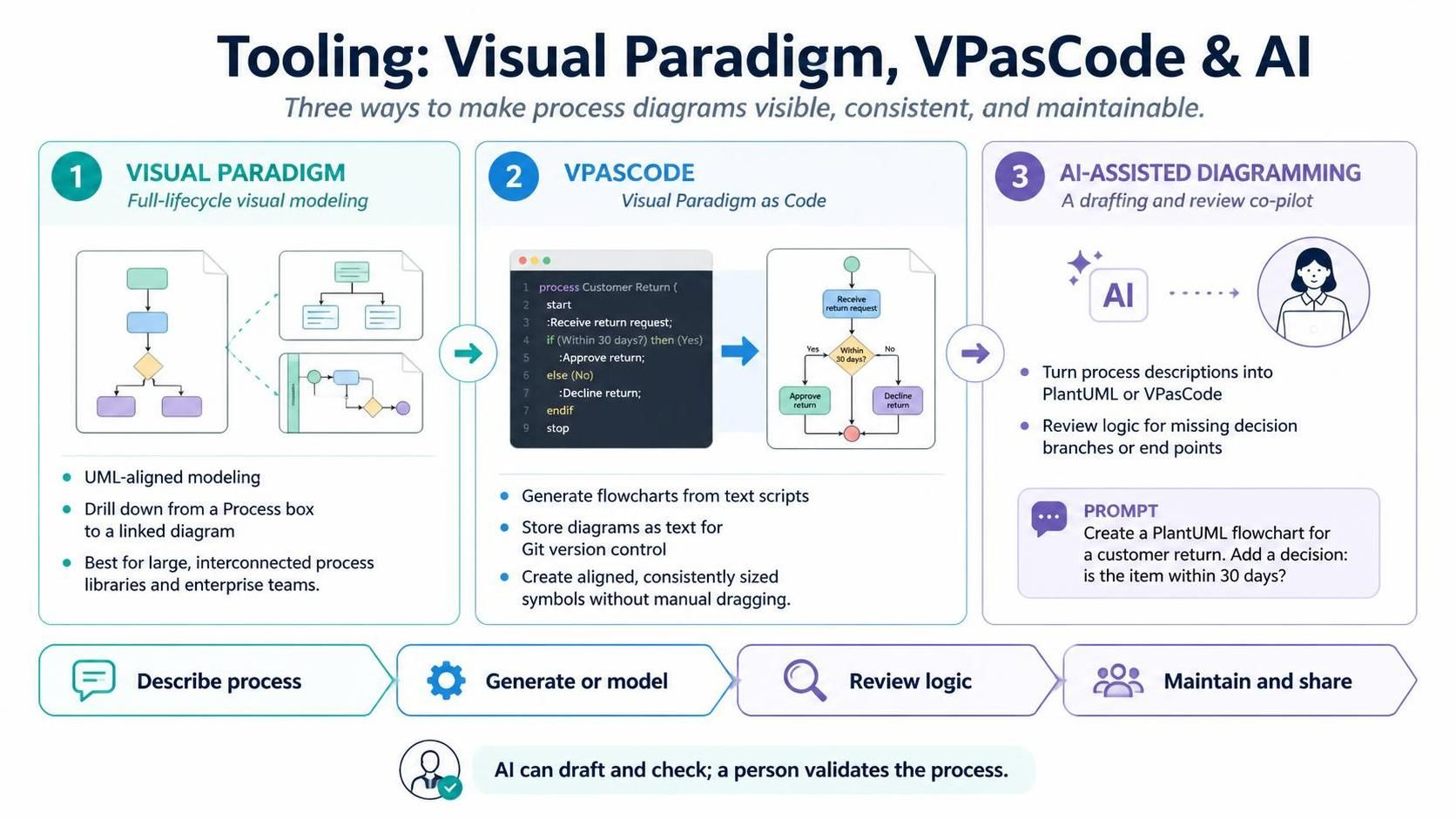
In the rapidly evolving landscape of software development and business analysis, the traditional method of drawing diagrams by dragging and dropping shapes is becoming less efficient. The modern approach relies on consistency, maintainability, and automation. As illustrated in the provided context, the industry is shifting towards a triad of powerful technologies: Visual Paradigm for enterprise-grade modeling, VPasCode for text-based generation, and AI for intelligent drafting and review.
This tutorial breaks down how to leverage these three distinct tools to create robust, version-controlled, and logically sound process diagrams.
1. Visual Paradigm: The Foundation of Enterprise Modeling
Visual Paradigm serves as the bedrock for this workflow. It is not merely a drawing tool; it is a full-lifecycle modeling environment designed for enterprise architects and business analysts. Its primary strength lies in its ability to handle complexity without sacrificing clarity.
Key Features for Process Diagramming
- Strict UML Adherence: Visual Paradigm ensures that your diagrams strictly adhere to UML (Unified Modeling Language) standards. This means the symbols you use (diamonds for decisions, rounded rectangles for processes) are industry-standard and universally understood.
- Drill-Down Capabilities: One of the most critical features for large-scale systems is the ability to “drill down.” In a high-level architecture, a single box labeled “Customer Return Process” might represent thousands of steps. Visual Paradigm allows you to link this single box to a completely different, detailed diagram containing the specific logic for that sub-process.
- Interconnected Libraries: For enterprise teams, maintaining a library of interconnected processes is vital. This tool allows you to maintain these large networks of diagrams, ensuring that a change in one area is reflected logically across the system.
2. VPasCode: The Shift to Model-as-Code
The most significant leap in efficiency comes from VPasCode (Visual Paradigm as Code). This plugin bridges the gap between the visual nature of diagrams and the text-based nature of software development. It allows you to generate flowcharts automatically from text scripts.
Why Use VPasCode?
When you define a process in text, you unlock capabilities that visual editors struggle with:
- Version Control (Git): Diagrams are often the “lost child” of version control. Because VPasCode stores your diagrams as text files, you can commit them to Git alongside your source code. You can track changes, view diffs, and revert to previous versions of a diagram just like you would with a .java or .py file.
- Speed and Automation: Imagine defining a complex process with 50 decision points. In a visual editor, this takes hours of dragging and connecting lines. In VPasCode, you can write the logic in a script and generate the diagram instantly.
- Perfect Consistency: Manual diagramming often results in misaligned shapes and varying font sizes. VPasCode ensures that every symbol is perfectly aligned, sized, and styled according to your project’s style guide automatically.
Example: Generating a Process from Text
Instead of drawing a flowchart, you write a script. Here is an example of how a simple “Customer Return” process is defined in VPasCode:
process Customer Return {
  start
  :Receive return request;
  if (Within 30 days?) then (Yes)
    :Approve return;
  else (No)
    :Decline return;
  endif
  stop
}
This simple text block renders into a professional flowchart with diamonds for the decision and rectangles for the actions, automatically handling the connections.
3. AI-Assisted Diagramming: The Intelligent Co-Pilot
The final piece of the puzzle is AI-Assisted Diagramming. Modern AI tools act as a “co-pilot” for your modeling efforts. They do not replace the analyst but rather accelerate the drafting and validation phases.
Capabilities of AI in Modeling
- Text-to-Diagram: You can paste a paragraph of text describing a business rule or process, and ask the AI to generate the corresponding PlantUML or VPasCode. This transforms unstructured text into structured, visual logic instantly.
- Logic Checking and Validation: One of the most common errors in flowcharting is missing a “Decision” branch (e.g., what happens if the user clicks “Cancel” or if the input is null?). You can ask an AI to review your logic to ensure all paths lead to a valid “End” point or a logical termination.
Practical Application
Imagine you have a business requirement document. You can feed this into an AI and ask for a diagram. For example:
"Act as a Business Analyst. Create a PlantUML flowchart for a customer return process. Include a decision on whether the item is within 30 days."The AI will then generate the VPasCode syntax shown in the previous section, allowing you to copy-paste it directly into your editor.
Summary: The Modern Workflow
By integrating these tools, you create a seamless workflow that moves from description to maintenance:
- Describe Process: Use natural language or AI to draft the initial logic.
- Generate or Model: Convert that text into VPasCode or a Visual Paradigm diagram.
- Review Logic: Use AI to validate that all paths are sound and no branches are missing.
- Maintain and Share: Store the text-based model in Git, ensuring your diagrams are always up-to-date with your code.
Ultimately, this approach ensures that your diagrams are not just static pictures, but living, breathing documentation that evolves with your system.