
Mastering UML Sequence Diagrams in Visual Paradigm: Lifelines, Frames, and Control Logic
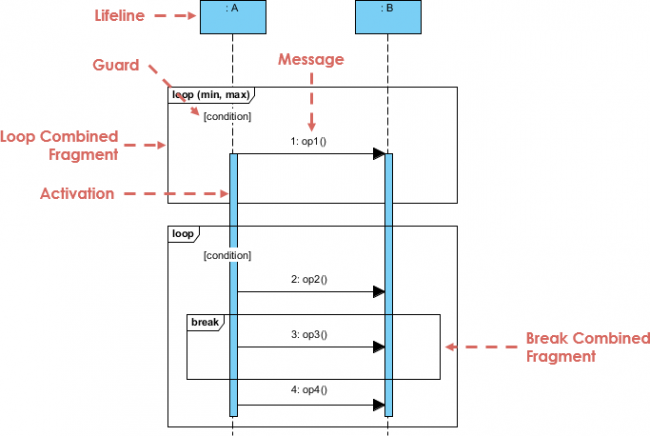
Sequence diagrams are the backbone of understanding system interactions. They provide a dynamic view of the system architecture by illustrating how objects communicate over time. In this comprehensive tutorial, we will deconstruct the anatomy of a sequence diagram using Visual Paradigm, focusing on the critical elements that turn a static list of objects into a complex, interactive flow of data.
By the end of this guide, you will understand how to construct robust models that include lifelines, activation bars, and sophisticated control logic using combined fragments like loops and breaks.
1. The Foundation: Lifelines and Activation
The diagram begins with the participants in your system. In the Visual Paradigm interface, these are represented as rectangles at the top of the canvas.
- Lifeline: The vertical dashed line extending downwards from the participant represents the existence of that object over time. In the diagram above, you can see two lifelines labeled :A and :B.
- Activation (Focus of Control): The solid blue rectangles on the lifelines indicate when an object is actively performing an action or waiting for a response. This is crucial for visualizing the “thinking” or “processing” time of an object.
2. Interaction: Messages and Guards
Once the lifelines are established, we define the interactions. Visual Paradigm allows you to draw messages as horizontal arrows connecting the lifelines.
However, real-world systems rarely follow a simple linear path. They require conditional logic. This is where the Guard comes in.
Note on Syntax: A guard condition is written in square brackets
[condition]. In Visual Paradigm, you can add this by double-clicking the message or selecting the “Guard” property in the context menu.
As shown in the diagram, the message 1: op1() is preceded by a guard [condition]. This means the operation op1 will only execute if the specified condition evaluates to true.
3. Advanced Control Logic: Combined Fragments
One of the most powerful features of UML modeling in Visual Paradigm is the ability to encapsulate logic blocks using Combined Fragments. These are the large rectangular frames that surround parts of the diagram.
Understanding the Loop Frame
When a process needs to repeat, you do not simply draw the message multiple times. Instead, you use a Loop combined fragment.
- The frame is labeled with the operator
loopin the top-left corner. - You can define constraints for the loop, such as
(min, max), to specify the number of iterations allowed. - Any message inside this box, such as
2: op2(), will be executed repeatedly based on the loop logic.
Nested Logic: The Break Operator
Complex systems often require the ability to exit a loop early. Visual Paradigm supports nested combined fragments to handle this.
Inside the main loop frame, we see a smaller frame labeled break. This Break Combined Fragment wraps a specific sequence of operations (like 3: op3()). If the condition for the break is met, the system exits the outer loop immediately and jumps to the code following the loop frame, skipping the remaining iterations.
4. Constructing the Diagram in Visual Paradigm
To replicate the structure shown in this tutorial, follow these steps within the Visual Paradigm tool:
- Create Lifelines: Drag and drop two Class nodes or Actors onto the diagram canvas.
- Add Messages: Use the “Message” tool to draw arrows between the lifelines. Rename them to
op1,op2, etc. - Insert Combined Fragments: Right-click on the diagram background or the diagram pane. Select Add Combined Fragment.
- Configure Operators:
- Set the Operator to
loopfor the outer frame. - Set the Operator to
breakfor the inner frame.
- Set the Operator to
- Group Operations: Drag the messages (e.g.,
3: op3()) inside the break frame. Visual Paradigm will automatically resize the frame to fit the content.
By mastering these elements—Lifelines, Activation, Guards, and Combined Fragments—you can create high-fidelity sequence diagrams that accurately reflect the complexity of modern software architecture.