
Mastering UML Component Diagrams in Visual Paradigm: The Jukebox System
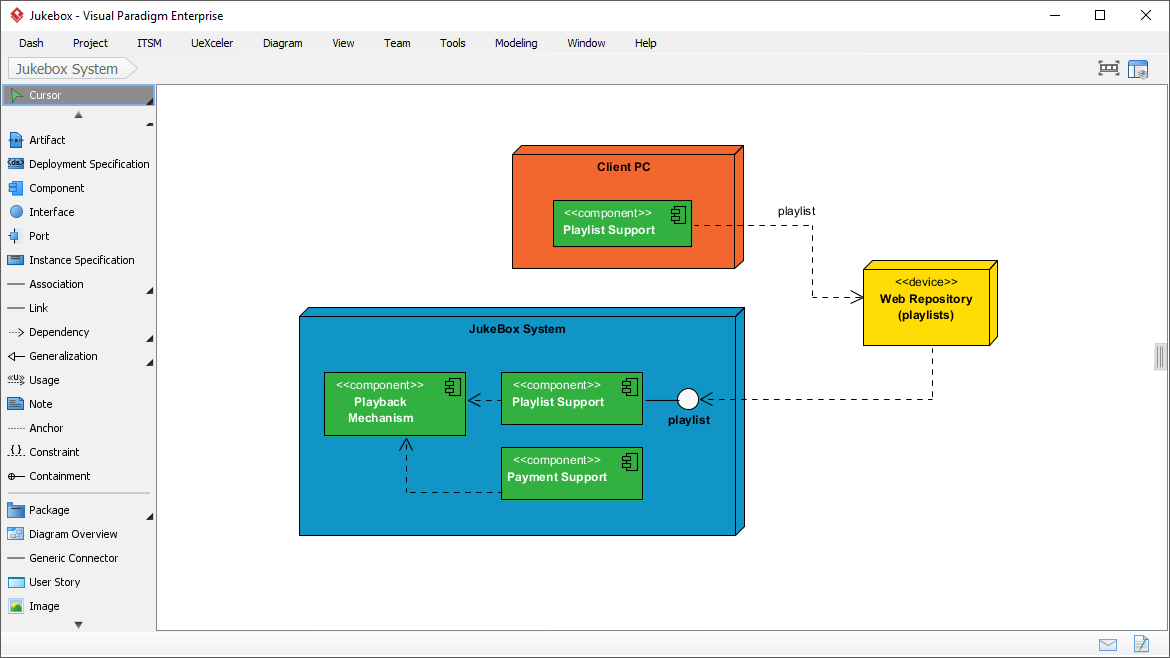
Understanding how complex software systems are constructed requires a clear view of their internal structure. In the world of UML (Unified Modeling Language), the Component Diagram is the primary tool for visualizing the architectural building blocks of a system and their relationships. Using tools like Visual Paradigm, architects can map out the logic that powers applications, such as the JukeBox System depicted in the provided screenshot.
This tutorial will deconstruct the specific component diagram shown in the image, breaking down the relationships between the Client PC, the JukeBox System, and the external Web Repository. We will explore the role of components, interfaces, and dependencies to understand how this digital music system is architected.
The Role of Components in System Design
At the heart of this diagram are the green rectangular blocks labeled with the stereotype <<component>>. In UML, a component represents a modular, replaceable part of a system. Unlike a class, which describes data and behavior, a component represents a deployable unit of software.
In the JukeBox System (the large blue box), we see three distinct components that handle specific responsibilities:
- Playback Mechanism: This component is responsible for the core logic of playing audio files. It likely handles decoding streams, volume control, and hardware interaction.
- Playlist Support: This component manages the user’s library. It handles the creation, editing, and retrieval of song lists.
- Payment Support: This component handles transactions, suggesting that the jukebox might be a commercial service requiring credit card processing or digital currency verification.
These components are encapsulated within the JukeBox System node, indicating that they are internal implementation details of the system’s core.
Interfaces: The Contract Between Components
One of the most critical concepts in this diagram is the use of interfaces. Notice the small white circle attached to the right side of the Playlist Support component. This is known as a Lollipop symbol.
In UML Component Diagrams, the lollipop represents a Provided Interface. It signifies that the component “provides” a specific service to the outside world. Here, the Playlist Support component provides a service labeled “playlist”. This means that any other part of the system or external device can interact with the playlist data by adhering to the rules defined by this interface.
Connecting to the Client PC
The diagram shows a dashed line connecting the “playlist” interface to a component on the Client PC (the orange box). This line represents a Dependency relationship. It indicates that the Playlist Support component on the Client PC relies on the actual playlist interface provided by the JukeBox System to function correctly.
This separation is vital for scalable architecture. It allows the Client PC to request playlist data without needing to know the internal code of the JukeBox System. The Client simply consumes the “playlist” service.
External Dependencies and Data Sources
Every software system exists within a larger ecosystem. This diagram highlights an external dependency on a Web Repository (playlists), represented by the yellow device box.
The relationship here is depicted via a dashed line connecting the Web Repository to the JukeBox System (specifically near the Playlist Support interface). This implies that the JukeBox System does not store all playlist data locally; instead, it fetches or syncs data from a remote web server. This is a common pattern in cloud-based applications where the “source of truth” for user data is a centralized database accessible via the web.
Visualizing the Architecture with Diagram Code
To replicate this architecture or define it formally in a text-based modeling tool, you would typically use a markup language like PlantUML. Below is the logical representation of the diagram shown in the Visual Paradigm screenshot.
@startuml
title Jukebox System Component Diagram

package "JukeBox System" {
  component "Playback Mechanism" as PM
  component "Playlist Support" as PS
  component "Payment Support" as Pay
}

component "Playlist Support" as ClientPS {
  note: Runs on Client PC
}

device "Web Repository (playlists)" as WebRepo

' Relationships inside the JukeBox System
PS ..> PM : manages
Pay ..> PS : triggers

' Provided Interface (Lollipop)
PS .. (playlist)

' Dependencies
ClientPS ..> (playlist) : consumes
(WebRepo) ..> (playlist) : stores

@enduml
Best Practices for Component Diagrams
When modeling systems like the JukeBox, keep these architectural principles in mind:
- High Cohesion, Low Coupling: The components in the diagram are separated by concern (Playback vs. Payment vs. Playlist). This makes the system easier to maintain. If you need to change the payment processor, you only touch the Payment Support component.
- Explicit Interfaces: Always define what a component offers (like the “playlist” lollipop) and what it requires. This prevents “spaghetti code” where components are hard-wired together.
- Deployment Context: Distinguish between what runs on the client (the orange box) and the server (the blue box). This helps developers understand where to deploy their code.
By mastering these diagrams, you bridge the gap between abstract requirements and concrete software implementation, ensuring that your system architecture is robust, scalable, and well-understood.