
Mastering Reusable Sub-Processes in BPMN: A Visual Paradigm Guide
In the complex world of Business Process Management, one of the most significant challenges is maintaining consistency across an organization’s various workflows. Imagine a scenario where your company needs to notify a customer, but this action is required in three different processes: New Product Launch, Branch Office Opening, and Employee Onboarding. Without a structured approach, you might find yourself manually drawing the same notification steps in three separate diagrams. If the email template changes next month, you would have to hunt down and update three different files, inevitably leading to missed updates and data inconsistencies.
This is where Reusable Sub-Processes shine. They act as the “master copy” of a process, allowing you to define a sequence of tasks once and reference it anywhere in your BPMN models. This tutorial explores the architecture of reusable sub-processes, how to visualize them using the “Call Activity” element, and how to leverage Visual Paradigm to ensure your process models remain scalable and error-free.
What is a Reusable Sub-Process?
A reusable sub-process is not just a graphical shortcut; it is a centralized reference to a standalone, pre-defined process. In BPMN (Business Process Model and Notation), this is technically represented by a Call Activity. When you place a Call Activity in a diagram, you are essentially saying, “At this specific point, invoke the process named ‘Customer Notification’.”
Unlike a standard sub-process, which is a collection of tasks embedded within a parent diagram, a reusable sub-process exists as an independent entity. This independence is what drives its power. It allows you to maintain a high-level overview of your major business initiatives (like launching a product) without cluttering the view with the granular details of every single notification step.
The Architecture of Reusability
The system architecture of a reusable sub-process relies on the principle of separation of concerns. You have two distinct views:
- The Caller (Parent Process): This is the high-level diagram (e.g., “New Product Launch”). It contains the Call Activity, which acts as a placeholder. It knows when to trigger the sub-process but doesn’t necessarily care about the internal mechanics of how it works.
- The Delegate (Child Process): This is the standalone diagram (e.g., “Standard Customer Notification”). It contains the actual logic, tasks, and decision gateways. It is designed to be executed independently.
When a modeler updates the “Delegate,” the “Caller” automatically reflects the new logic. This ensures that every department using the notification process is always on the same page.
Visualizing the Concept
Visual Paradigm provides intuitive markers to distinguish between standard processes and reusable references. In your modeling environment, you will see a distinct visual cue for these elements.
Identifying the Call Activity
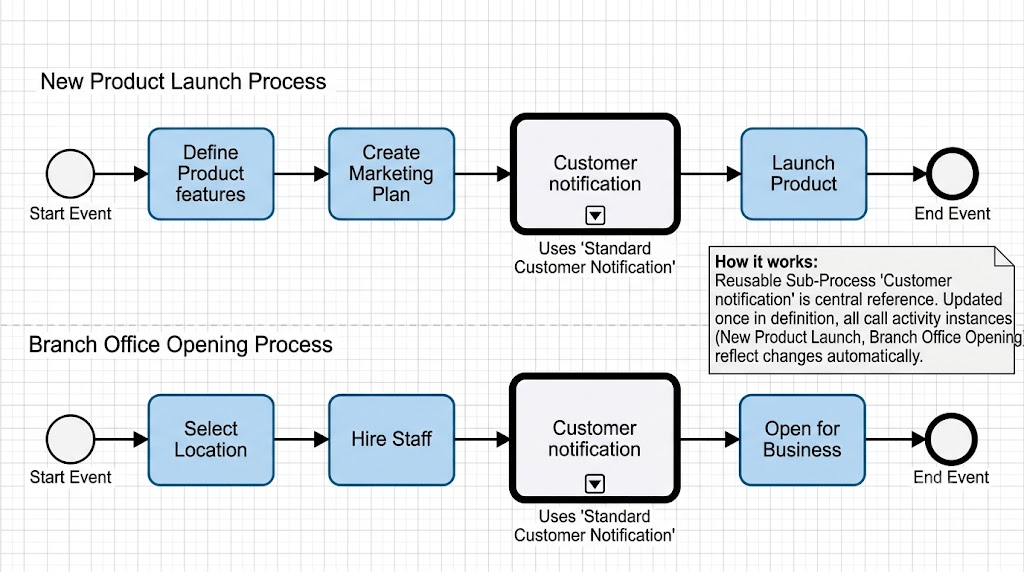
In the diagram, a Call Activity is visually represented as a standard task or sub-process, but with a specific Call Sub-Process icon (often a downward-pointing arrow or a specific icon overlay) and a thick border. This thick border is the industry standard signal that the content inside is “collapsed” and linked to an external definition.
Visual Context: Imagine two separate process flows: New Product Launch and Branch Office Opening. Both flows contain a box labeled “Customer notification” with a thick border and a small “Call” icon. This signifies that both processes are calling the exact same external definition.
By clicking on this element in Visual Paradigm, you can instantly navigate to the detailed “Customer Notification” diagram to view or edit the internal steps.
Implementing Reusability in Visual Paradigm
To implement this architecture using Visual Paradigm with AI assistance, follow these logical steps to create a robust, reusable model.
- Create the Master Process: First, design your reusable logic. In this case, create a new BPMN diagram named Standard Customer Notification. Add your start event, the tasks (e.g., “Send Email,” “Send SMS,” “Log Record”), and your end event.
- Define the Interface: Ensure that any data required by the notification process (like “Customer ID” or “Product Name”) is defined as a Process Variable or Input parameter. This allows the parent process to pass data into the sub-process.
- Call the Process: Navigate to your New Product Launch diagram. Drag a Call Activity element from the palette onto the canvas. Rename it to “Customer Notification.”
- Link to the Definition: Double-click the Call Activity. In the properties panel, select “Create New” or “Select Existing.” Choose the Standard Customer Notification diagram you created in step 1. Visual Paradigm will now treat this box as a reference to that external file.
Once linked, any change made to the Standard Customer Notification diagram (such as adding a new “Push Notification” step) will immediately appear in the New Product Launch diagram. The model is dynamic and synchronized.
Specialized Sub-Process Types
While Reusable Sub-Processes are the backbone of standardization, BPMN offers specialized types for unique scenarios like exceptions and transactions. Understanding these distinctions is vital for accurate modeling.
Event Sub-Processes
Standard sub-processes run sequentially. However, an Event Sub-Process is triggered by a specific event, such as a message arrival or a timer. It is visually marked by a dashed border. It is often used for handling exceptions (e.g., “If an error occurs, trigger this sub-process to log it”).
Transaction Sub-Processes
For critical operations where “all-or-nothing” logic is required, use a Transaction sub-process. It is marked by a double-line border. If any step within this transaction fails, the entire transaction is rolled back, and compensation events are triggered to undo previous actions.
Ad-Hoc Sub-Processes
When tasks must be completed but have no strict order, use an Ad-Hoc sub-process. It is marked by a tilde (~) symbol. This allows for flexible, non-linear execution paths where the performer decides the order of tasks based on real-time conditions.
Conclusion
Sub-processes are the unsung heroes of effective BPMN modeling. They provide the crucial bridge between high-level strategic overviews and low-level operational details. By mastering the use of Reusable Sub-Processes, you enforce organizational consistency and drastically reduce maintenance overhead. Furthermore, by understanding specialized types like Event, Transaction, and Ad-Hoc sub-processes, you equip yourself to model even the most complex, exception-driven, and flexible real-world business scenarios.
Ultimately, a well-structured use of sub-processes transforms a chaotic flowchart into a professional, scalable, and easily maintainable business process model.