
Mastering Professional Diagram Styling with VPasCode and Visual Paradigm Themes
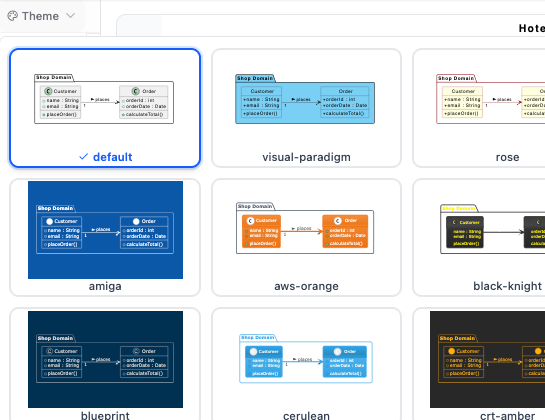
In the realm of technical documentation and software architecture, the visual presentation of your diagrams is just as critical as the logic they represent. A messy diagram can obscure complex logic, while a polished, professional layout can make your architecture instantly understandable to stakeholders. This tutorial explores how the VPasCode Tool—an extension for Visual Paradigm—revolutionizes the way we handle diagram aesthetics by integrating a powerful, theme-based styling engine directly into your workflow.
The Problem with Manual Styling
Traditionally, creating a high-quality Class Diagram or Sequence Diagram required a significant amount of manual effort. Engineers often had to write specific code blocks at the top of their scripts to define colors, fonts, and borders. This approach had three major downsides:
- High Maintenance: If you wanted to change the color scheme, you had to edit code manually.
- Learning Curve: Users needed to memorize specific syntax or look up documentation for every style they wanted to apply.
- Fragmented Aesthetics: It was difficult to ensure that every diagram in a project looked consistent.
The Solution: Seamless Theme Selection
The VPasCode Tool addresses these challenges by introducing a Seamless Theme Selection UI. This feature shifts the paradigm from “coding styles” to “selecting styles.” Instead of writing code to define a background color or a border radius, you simply click a button in the editor interface.
How the Workflow Works
The process is designed for speed and simplicity:
- Select a Style: Open the theme selector in the VPasCode editor. You are presented with a hand-picked list of industry-standard aesthetics.
- One-Click Application: Click on a theme (such as “Visual Paradigm” or “Rose”).
- Automatic Injection: The tool instantly injects the necessary syntax into your script. You do not see the code being written; you simply see the result.
- Instant Preview: The diagram updates immediately, allowing you to toggle between looks to find the perfect fit for your audience.
Industry Standard Themes: Visual Paradigm & IBM Rational Rose
One of the most powerful features of the VPasCode Tool is its ability to replicate the look and feel of established enterprise modeling tools. This is essential for maintaining consistency in professional environments.
The Visual Paradigm Theme
The Visual Paradigm Theme brings a sleek, modern look to your diagrams. It is characterized by:
- Sleek Blue Headers: The class boxes feature a distinct, professional blue header that clearly separates the class name from attributes and methods.
- Modern Geometry: Clean lines and subtle shadows that make the diagram pop against a white background.
- Consistency: Ensures that your diagrams look exactly like the native output of the Visual Paradigm suite.
The IBM Rational Rose Theme
For projects that require a more classic or legacy appearance, the tool offers the IBM Rational Rose Theme. This style mirrors the industry-standard modeling designs used by veteran developers for decades. It features:
- Classic Light Yellow Aesthetic: A warm, familiar background color that is easy on the eyes for long reading sessions.
- Traditional Borders: A style that mimics the original Rational Rose interface, ensuring that diagrams are recognizable to teams familiar with older modeling standards.
Why Styling Matters for Documentation
Styling is not merely about “making it pretty.” It is about Readability and Cognitive Load. When a diagram uses a standard theme, the human brain can instantly recognize the structure of the diagram (e.g., “This box is a class,” “This line is a relationship”). By removing the visual noise of custom, ad-hoc styling, you allow your readers to focus entirely on the architecture.
Conclusion
By leveraging the built-in Theme Selection UI of the VPasCode Tool, you eliminate the friction of manual coding. Whether you need the professional sheen of the Visual Paradigm theme or the classic feel of IBM Rational Rose, your diagrams are just one click away from perfection.