
Mastering Database Design with AI Chatbots: ER Modeling via VPasCode
Designing a robust database is the backbone of any scalable web application. Before writing a single line of SQL, architects must visualize how data entities relate to one another. This tutorial explores the fundamental concepts of Entity Relationship (ER) modeling using a modern, code-first approach. We will dissect a classic Content Management System (CMS) schema—consisting of Users, Posts, and Comments—to understand how to translate logical requirements into a physical data model.
Understanding the Core Entities
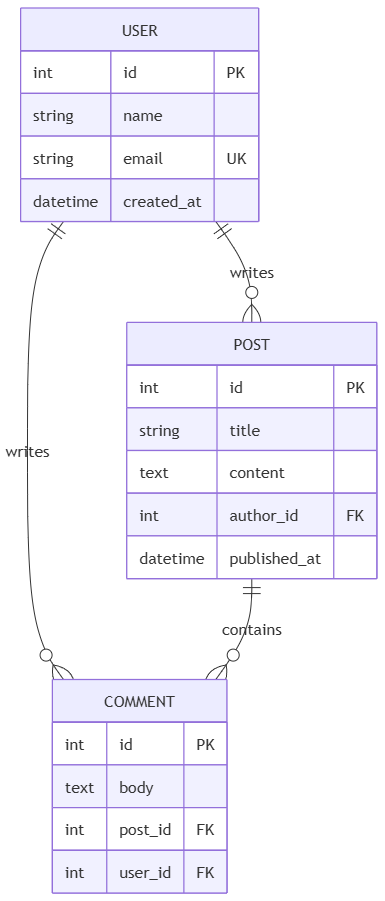
In the diagram we are analyzing, three primary tables drive the system’s functionality. Each table represents an entity in the real world, storing specific attributes and relationships.
1. The USER Entity
The USER table acts as the foundation of the system, managing authentication and authorship. It defines who can interact with the application. Key attributes include:
id(PK): The Primary Key. This unique integer identifies every user in the system.email(UK): A Unique Key. This ensures no two users can register with the same email address, which is crucial for security and login logic.createdat(datetime): A timestamp used for auditing and sorting user accounts chronologically.
2. The POST Entity
The POST table represents the content created by users. It functions as the “content store” for the application. Its structure includes:
authorid(FK): A Foreign Key linking back to theUSERtable. This establishes ownership of the post.publishedat(datetime): Crucial for displaying content in reverse chronological order (newest first) on a feed.
3. The COMMENT Entity
The COMMENT table handles user interactions on specific content. It is a “linking” entity that connects a user to a specific post. It contains:
postid(FK): Links the comment to the specificPOSTit belongs to.user_id(FK): Links the comment back to theUSERwho wrote it.
Decoding Relationships and Cardinality
The power of an ER diagram lies in the lines connecting these tables. These lines represent relationships and define cardinality—how many instances of one entity relate to another.
The “Writes” Relationship (User to Post)
The diagram shows a relationship labeled writes between USER and POST. The notation uses a double bar on the User side (mandatory) and a crow’s foot with a circle on the Post side (optional).
This translates to a One-to-Many relationship: One user can write many posts, but a post must have exactly one author. If a user deletes their account, the posts might be orphaned or deleted depending on the cascading rules defined in the code.
The “Contains” Relationship (Post to Comment)
The contains relationship connects POST and COMMENT. This is also a One-to-Many relationship: One post can contain many comments, but a specific comment belongs to only one post.
Implementing ER Models with Mermaid
Modern documentation tools like VPasCode allow developers to define database schemas using text. This “Diagram as Code” approach ensures that the visual representation is always in sync with the actual database schema. If you change a column name in your SQL migration, you simply update the Mermaid code, and the diagram regenerates.
Below is the exact Mermaid syntax used to generate the schema visualization discussed above:
erDiagram
    USER {
        int id PK
        string name
        string email UK
        datetime created_at
    }
    POST {
        int id PK
        string title
        text content
        int author_id FK
        datetime published_at
    }
    COMMENT {
        int id PK
        text body
        int post_id FK
        int user_id FK
    }
    USER ||--o{ POST : "writes"
    USER ||--o{ COMMENT : "writes"
    POST ||--o{ COMMENT : "contains"
Key Syntax Explained
||--o{: This is a shorthand for a One-to-Many relationship. The||represents the “One” (mandatory) side, and theo{represents the “Many” (optional) side.PK,FK,UK: These suffixes help visualizers render the diagram correctly, indicating Primary Keys, Foreign Keys, and Unique Keys respectively.