
Mastering Order Processing with VP AI Ecosystem and AI Chatbots
In the realm of software architecture and business process modeling, few workflows are as critical—and as complex—as an Order Processing System. Whether you are designing a simple e-commerce checkout or a robust enterprise fulfillment engine, the logic must be precise, fault-tolerant, and clearly documented.
This tutorial explores a real-world example of an Order Processing Workflow generated via an AI-powered diagramming tool. We will dissect the architecture, understand the logic flow, and learn how to implement this system using modern “Model-as-Code” practices.
1. Understanding the Architecture: Swimlanes and Collaboration
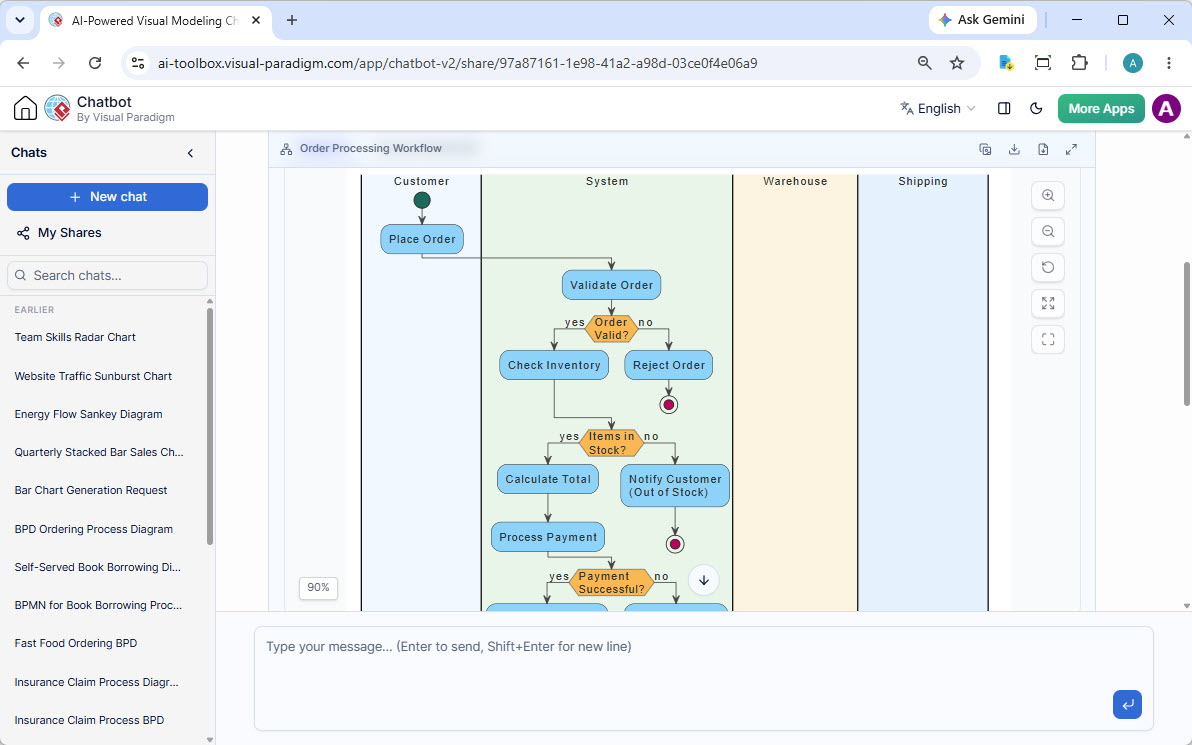
The diagram provided is a classic UML Activity Diagram that utilizes Swimlanes (also known as Pools and Lanes). Swimlanes are essential for clarifying responsibility. They separate the logic of who performs an action from what the action actually is.
Looking at the structure, we identify four distinct domains:
- Customer (External Actor): The initiator of the process. This lane contains the start event and the primary trigger: Place Order.
- System (Core Logic): The green lane represents the backend application logic. This is where validation, calculations, and state changes occur.
- Warehouse (Inventory Management): Although currently passive in this specific view, this lane represents the physical goods management system.
- Shipping (Logistics): The final destination for the goods, handling the delivery logistics.
2. Step-by-Step Logic Flow Analysis
Let us trace the execution path from the moment a user interacts with the interface to the final transactional state.
The Initiation Phase
The process begins with the Customer performing the action Place Order. The flow token moves immediately into the System swimlane, triggering the first critical check: Validate Order.
The Validation Gate
The system performs a logical check: Order Valid?. This is a decision node (a diamond shape) that splits the flow into two paths:
- Yes Path: Proceeds to inventory checks.
- No Path: Redirects to Reject Order. If the order contains invalid data (e.g., missing fields, blocked items), the process terminates.
The Inventory Check
If the order is valid, the system queries the inventory state at the Items in Stock? decision node. This logic ensures we do not oversell products.
- Yes (In Stock): The system calculates the financials (Calculate Total) and moves to Process Payment.
- No (Out of Stock): The system triggers a notification (Notify Customer) and terminates the transaction.
Payment and Termination
The final logic gate checks if the Payment Successful?. A failure here would typically loop back to a payment retry state, while a success would pass control to the Warehouse and Shipping lanes (not fully visible but implied by the downward flow) to fulfill the order.
3. Implementation: VPasCode and Model-as-Code
Modern engineering teams are moving away from manual drag-and-drop diagramming in favor of VPasCode (Visual Paradigm as Code). This allows developers to define UML diagrams using text, enabling version control, CI/CD integration, and automated generation.
Below is the structural representation of how the Order Processing workflow might be defined in a VPasCode syntax.
@startuml
title Order Processing Workflow

partition "Customer" as C {
  start
  :Place Order;
}

partition "System" as S {
  :Validate Order;
  if (Order Valid?) then (yes)
    partition "Warehouse" as W {
      :Check Inventory;
    }
    if (Items in Stock?) then (yes)
      :Calculate Total;
      :Process Payment;
      if (Payment Successful?) then (yes)
        partition "Shipping" as Sh {
          :Ship Items;
        }
        stop
      else (no)
        stop
      endif
    else (no)
      :Notify Customer (Out of Stock);
      stop
    endif
  else (no)
    :Reject Order;
    stop
  endif
}
@enduml
4. Iterative Model Derivation
One of the most powerful features of AI-assisted modeling is Iterative Model Derivation. In the screenshot context, once the activity diagram is generated, the system can be prompted to create related diagrams to ensure full coverage of the system requirements.
For instance, if you ask the AI to “Generate a Sequence Diagram for the Payment Process,” it will:
- Identify the Process Payment node in the Activity Diagram.
- Generate a vertical timeline of interactions between the User Interface, Payment Gateway, and Bank API.
- Ensure the sequence aligns perfectly with the activity flow logic.
Conclusion
The Order Processing Workflow is a perfect example of how AI can accelerate the transition from ideation to diagram. By describing the requirements in natural language, the AI handles the syntax and layout complexity, allowing architects to focus on the business logic: validation, inventory management, and payment processing.
Whether you are using the chatbot interface for rapid brainstorming or exporting the model to VPasCode for your repository, the goal remains the same: seamless ecosystem integration and clear, shareable documentation.