
The Architect’s Toolkit: Mastering UML, SysML, ERD, BPMN, and DFD with Visual Paradigm
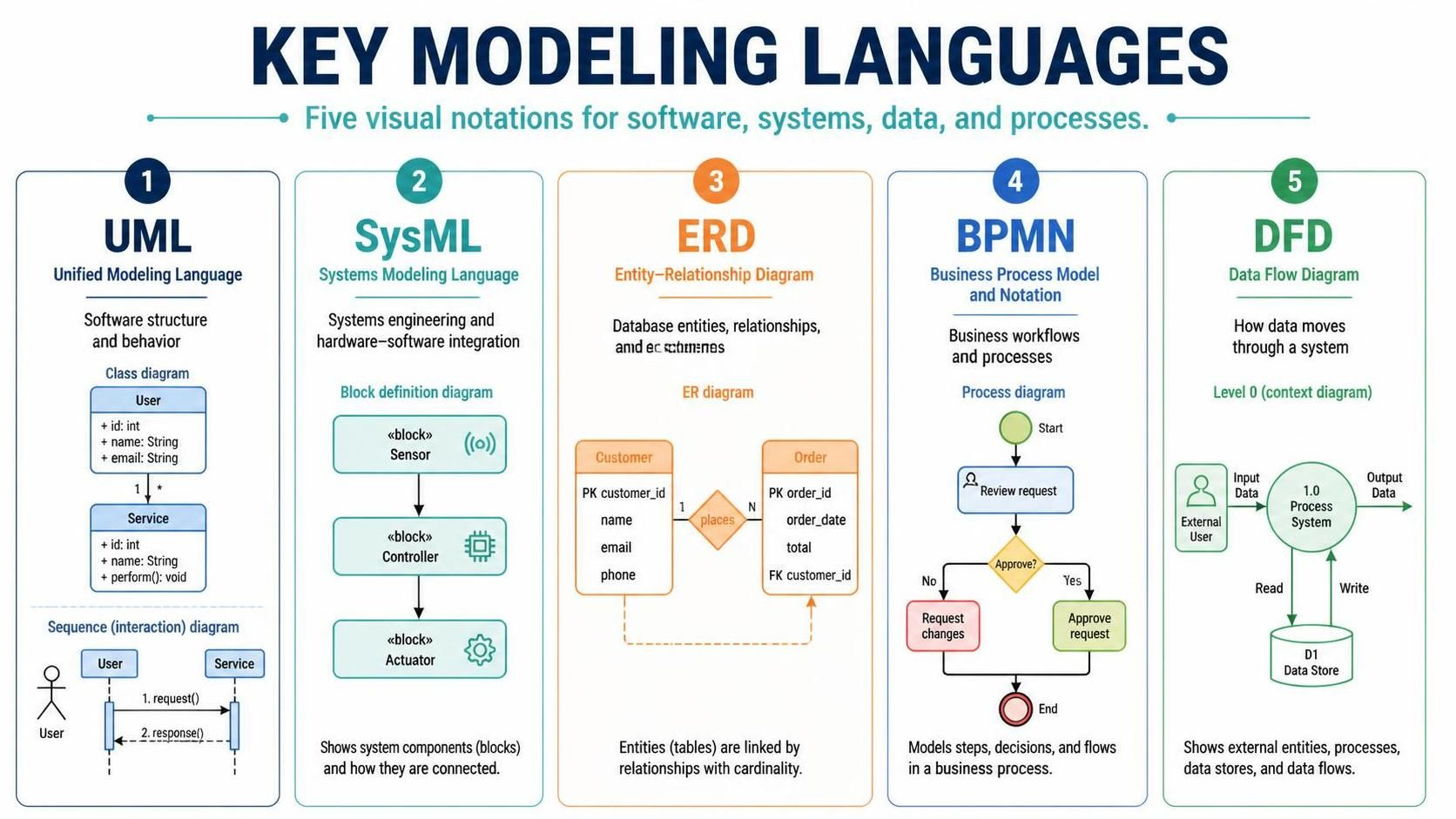
In the complex landscape of software engineering and systems design, visual communication is not just a luxury—it is a necessity. To build robust systems, engineers must translate abstract requirements into concrete blueprints. This tutorial explores the five foundational modeling languages that serve as the industry standard for defining structure, behavior, data, and processes.
Whether you are designing a database schema, mapping a business workflow, or integrating hardware with software, selecting the right modeling language is the first step toward architectural success.
1. UML: The Universal Blueprint for Software
Unified Modeling Language (UML) is the most widely recognized standard for visualizing the design of a system. It acts as a universal language for software engineers, allowing them to specify, construct, document, and visualize software-intensive systems.
UML focuses on two primary aspects of software structure:
- Structural Diagrams: These describe the static aspects of the system. For example, the Class Diagram shown in the reference material visualizes the “User” and “Service” classes. It details their attributes (like
id: int,name: String) and methods (likeperform(): void), along with the relationships between them. - Behavioral Diagrams: These describe the dynamic aspects. The Sequence Diagram illustrates the interaction over time. In our example, it depicts a timeline where a User initiates a
request(), and the Service responds with aresponse().
Why Use UML?
UML is the industry standard because it is language-agnostic. It allows architects to design the system logic before a single line of code is written, ensuring that the logic holds up before implementation begins.
2. SysML: Bridging Hardware and Software
While UML is powerful for pure software, Systems Modeling Language (SysML) extends these capabilities to handle complex systems engineering challenges. SysML is particularly crucial for hardware-software integration, where the behavior of code must perfectly synchronize with physical components.
The diagram highlights the Block Definition Diagram (BDD), which is central to SysML. Unlike UML classes, SysML blocks represent physical or functional system components. The image shows a progression from a Sensor (hardware input) to a Controller (processing logic) and finally to an Actuator (hardware output). This creates a clear chain of command for cyber-physical systems.
3. ERD: The Foundation of Data Integrity
Software is only as good as the data it stores. The Entity-Relationship Diagram (ERD) is the gold standard for database design. It provides a visual schema of how data entities relate to one another, ensuring data integrity before the database is physically built.
An ERD is composed of three key elements:
- Entities: Represented by rectangles (e.g., Customer, Order), these map to database tables.
- Attributes: The specific data points within entities, such as
email,order_date, ortotal. - Relationships: The diamonds connecting entities. The diagram shows a “places” relationship between Customer and Order. The cardinality markers (1 and N) define the rules of data entry: One customer can place many orders, but a specific order is placed by exactly one customer.
4. BPMN: Visualizing Business Logic
Not every process involves code. Business Process Model and Notation (BPMN) is a standard for documenting business workflows. It bridges the gap between business analysts and IT developers by providing a notation that is understandable to both parties.
The Process Diagram in the reference illustrates a decision flow:
- Start Event: The process begins with a “Review request.”
- Gateway: The diamond shape labeled “Approve?” represents a decision point. The system must evaluate the request.
- Paths: Depending on the decision, the flow splits. A “No” path leads to a “Request changes” task, while a “Yes” path leads to “Approve request.”
- End Event: The red circle signifies the termination of the process.
5. DFD: Tracing Data Movement
Finally, to understand how information actually travels through a system, engineers use Data Flow Diagrams (DFD). The diagram provided is a Level 0 (Context Diagram), which offers a high-level overview of the system boundaries.
A DFD is defined by four components:
- External Entities: Sources or destinations of data (e.g., the External User).
- Process: A transformation of data (e.g., the 1.0 Process System). This is often represented as a circle or rounded rectangle.
- Data Store: Where data is saved (e.g., D1 Data Store).
- Data Flow: The arrows showing the direction of information, labeled with what is being moved (e.g., Input Data, Output Data, Read, Write).
DFDs are essential for identifying bottlenecks in data processing and ensuring that every piece of data entering a system is accounted for.
Conclusion
By mastering these five languages—UML, SysML, ERD, BPMN, and DFD—you gain a comprehensive toolkit for the entire software development lifecycle. Whether you are visualizing the static structure of a class, the dynamic flow of a business decision, or the physical integration of a sensor, the right diagram clarifies the complex.