


Introduction: Breaking Free from the “One-Shot” AI Trap
As someone who has tested countless AI presentation generators, I’ve grown accustomed to the same frustrating loop: you type a prompt, the AI spits out a rigid, uneditable deck of flat images or clunky HTML layouts, and if you dislike a single slide, you are forced to regenerate the entire thing and start from scratch. It feels less like a creative tool and more like a slot machine.
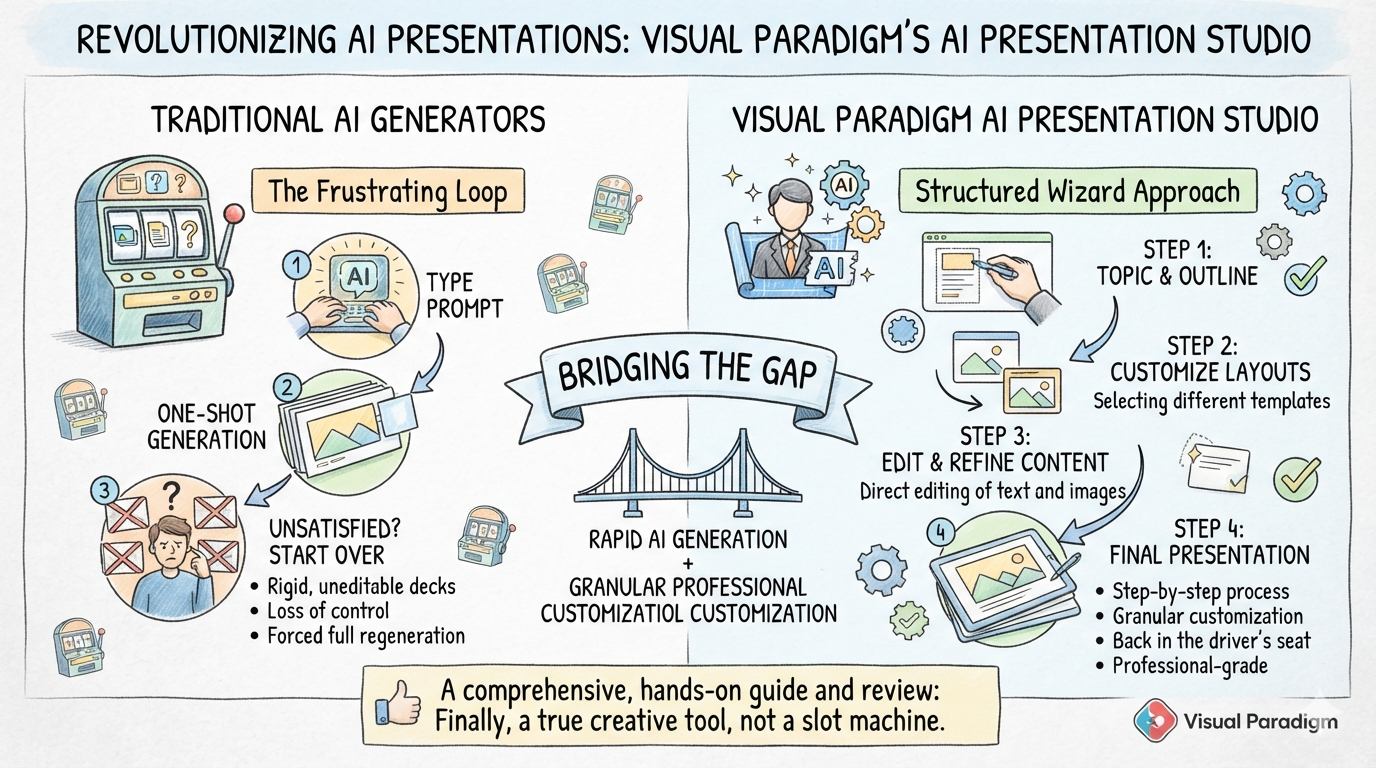
That is exactly why Visual Paradigm’s newly released AI Presentation Studio caught my attention. This groundbreaking web application completely flips the script. Instead of a black-box “one-shot” generation, it introduces a structured, step-by-step wizard that puts you back in the driver’s seat. After spending time putting it through its paces, I can confidently say it bridges the gap between rapid AI generation and granular, professional-grade customization. Here is my comprehensive, hands-on guide and review of the platform.
The Core Experience: A Guided, Step-by-Step Wizard
The most refreshing aspect of AI Presentation Studio is its workflow. It treats presentation creation as a collaborative process between you and the AI, rather than a single automated dump of content.
When you first open the web application, you are greeted by a clean interface asking for your presentation topic, target audience, preferred length, and language. Within seconds, the AI constructs a structured outline and assigns dynamic visual layouts to your slides.
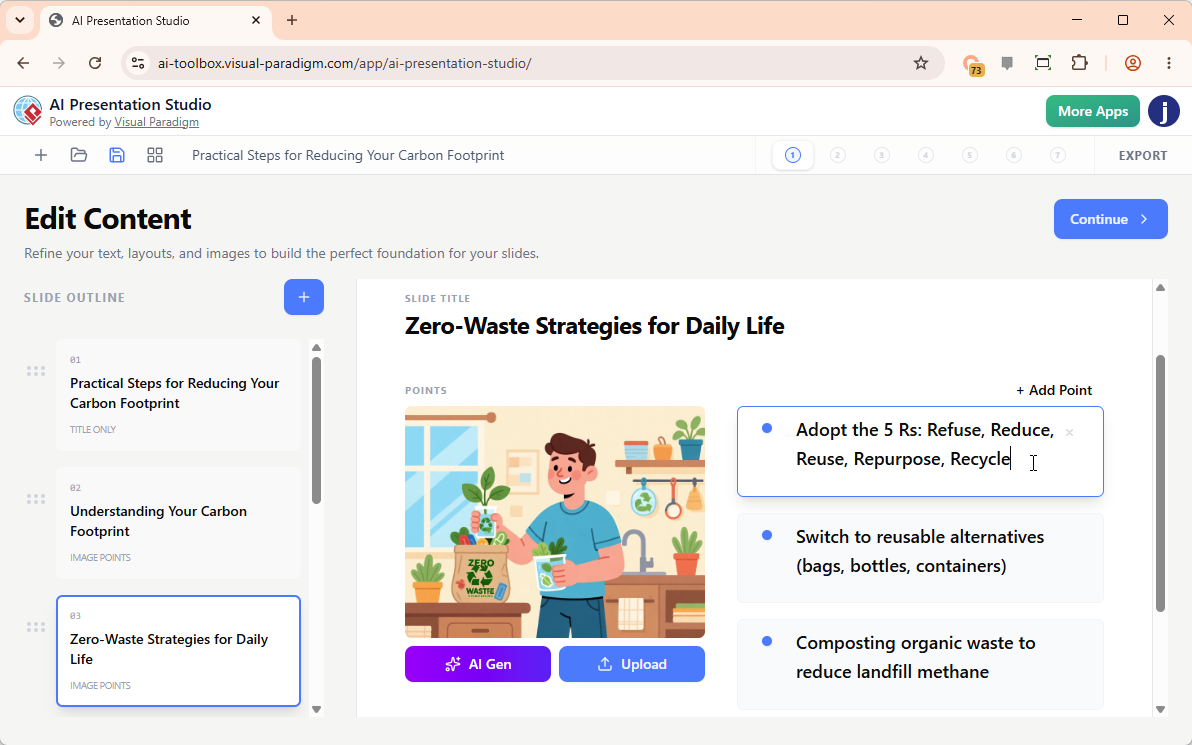
Unlike traditional tools, the real-time visual slide editor allows you to edit text directly, add or remove slides, and swap layouts instantly. If you want to incorporate custom graphics, you can upload files, paste directly from your clipboard, or even generate brand-new images using the built-in AI image generator. This level of control eliminates the friction of content creation, allowing you to refine specific details without rebuilding the whole deck.
Deep Dive into Key Features
1. Dynamic Themes & 60+ Cinematic Transitions
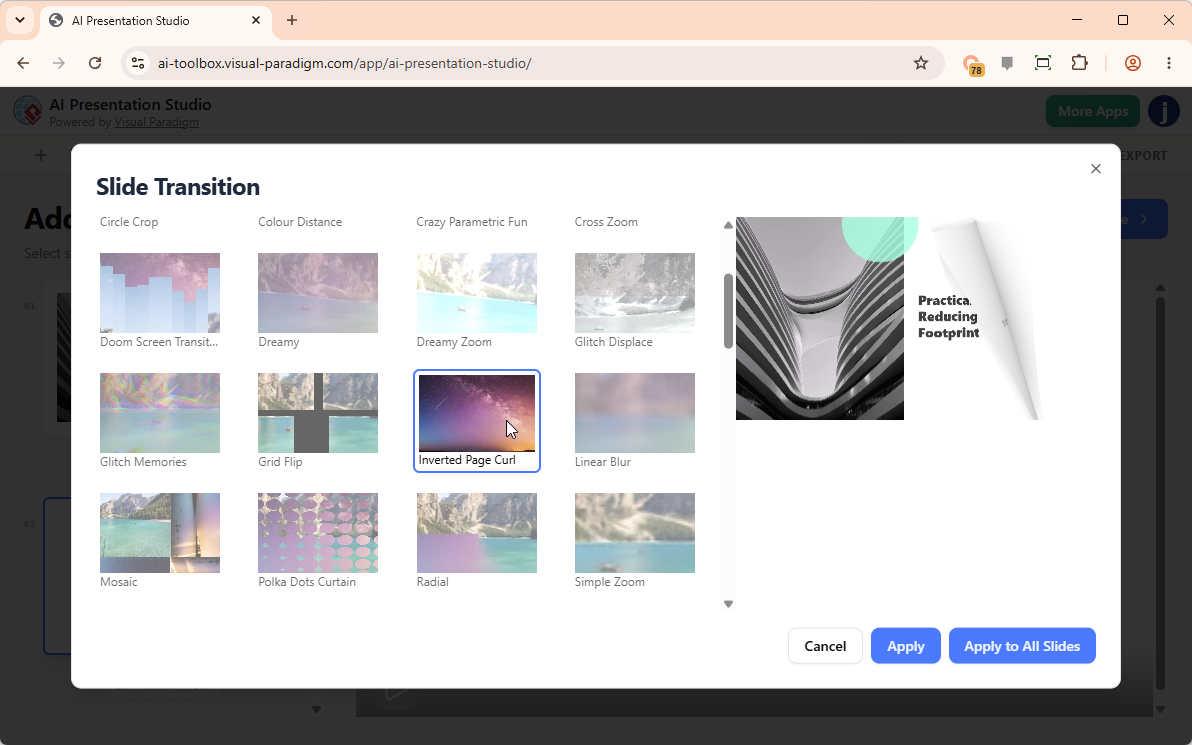
A presentation is only as good as its delivery. The studio offers a robust library of professional presentation themes. What impressed me most was the ability to preview how these themes look in action via built-in video previews before committing. You can bring your deck to life with over 60 high-quality transition effects—including page flipping, blur, bounce, wave, zoom, swirl, and wind. These can be applied individually to specific slides or instantly across the entire deck for a cohesive, cinematic feel.
2. Advanced Scripting & Multi-Category Voiceovers
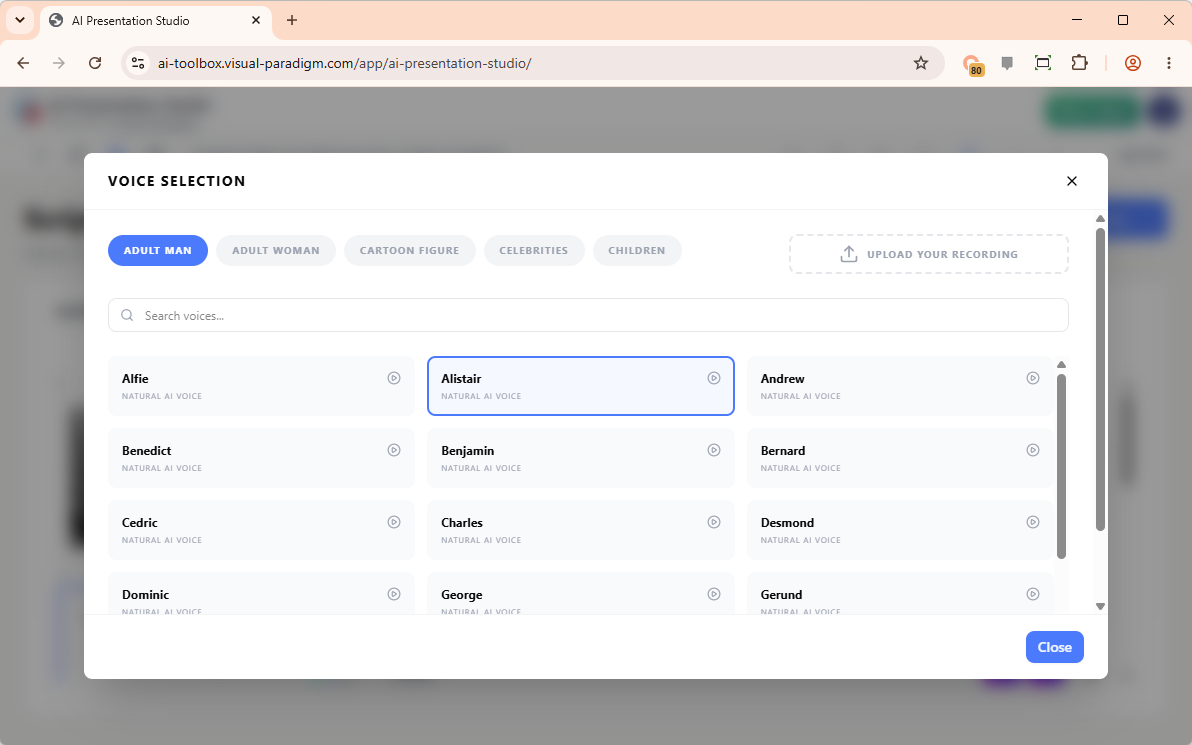
Narration can make or break a video presentation. AI Presentation Studio allows you to prepare professional, slide-by-slide narration with remarkable flexibility. You can type scripts manually, upload your own pre-recorded voice files, or let the AI generate the script for individual slides or the entire deck.
The Text-to-Speech (TTS) engine is particularly impressive, offering hundreds of high-quality speakers categorized by men, women, children, cartoon figures, and even celebrities. This makes it easy to find the perfect tonal match for your specific audience.
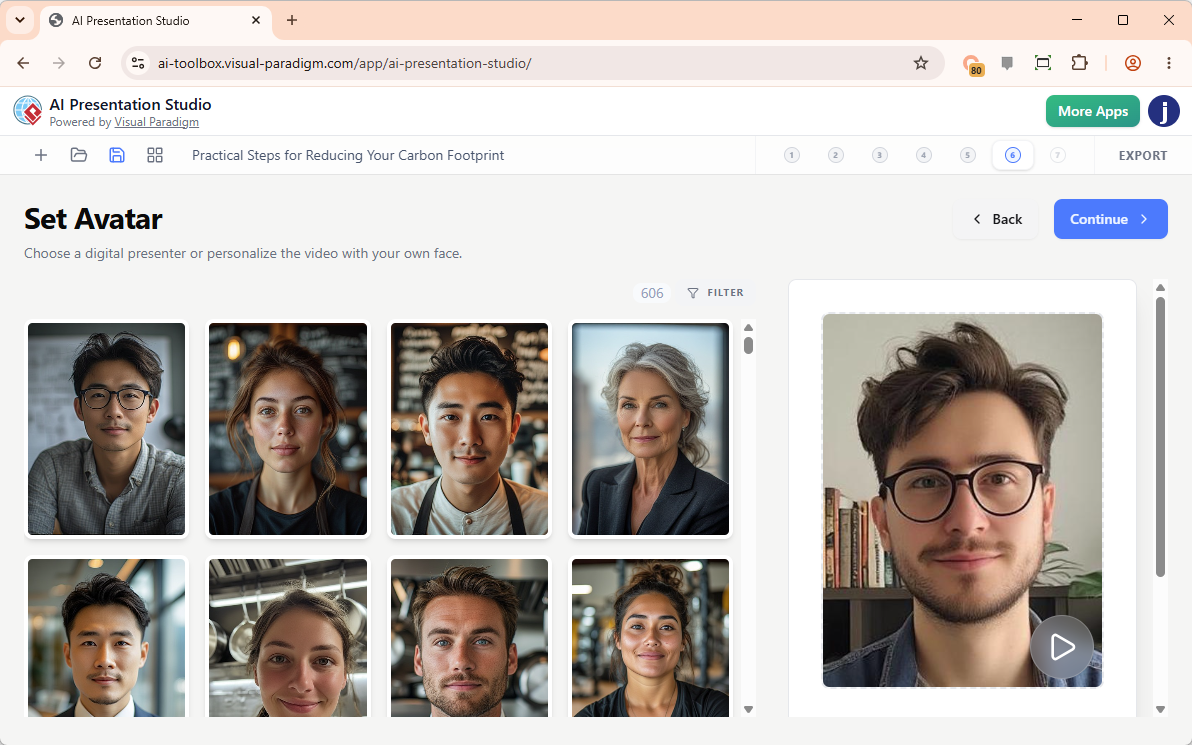
3. 600+ Hyper-Realistic AI Avatars with Face Swap
This is where the tool truly separates itself from the competition. You can add a realistic, lip-synced talking head avatar that speaks your script with human-like expressions. The library features over 600 avatars tailored to various professional roles, such as business executives, doctors, professors, chefs, and corporate trainers.
For a highly personalized touch, the innovative AI Face Swap feature allows you to upload your own photo and seamlessly map your face onto a professional avatar uniform. It is a game-changer for creators who want to be the “presenter” without having to set up lighting, cameras, and a teleprompter.
4. Seamless Compilation & High-Quality MP4 Export
Once your content, transitions, voiceover, and avatar are finalized, the platform handles the heavy lifting. It compiles every element into a high-definition MP4 video file. The export process is fast, resulting in a crisp, production-ready video that you can immediately share with colleagues, publish on social media, or upload directly to YouTube.
My Step-by-Step Workflow: How I Used It
To give you a practical sense of the user experience, here is the exact workflow I followed to create a polished video presentation:
-
Step 1: Input Topic and Tone
I opened the AI Presentation Studio web app and typed a natural language prompt describing my topic. I also selected the specific tone of voice required to ensure the AI’s output matched my brand’s personality. -
Step 2: Generate Core Layout Text
I allowed the AI to construct the initial structured outline. It automatically built a foundational baseline flow, complete with a Title slide, key data points, and a concluding “Thank You” slide. -
Step 3: Customize Slide Content & Visual Layouts
I selected individual slides from the generated workspace to manually edit details. I rewrote text blocks inline to refine specific data points, altered the physical layout to add side images, and chose an automated presenter avatar theme to serve as the visual narrator. -
Step 4: Configure Audio Scripts and Narrators
I fine-tuned the synthesized narrator voices and timing settings. I customized the audio script paired with each specific slide to ensure the messaging was perfectly aligned with the visual cues. -
Step 5: Preview and Export
Using the built-in player, I watched an interactive preview of the completed video project to check timing and transitions. Satisfied with the result, I clicked export and downloaded a clean, high-quality MP4 video file to my device in a matter of minutes.
Conclusion: The Final Verdict
Visual Paradigm’s AI Presentation Studio is a breath of fresh air in a market saturated with rigid, one-size-fits-all AI generators. By combining the speed of artificial intelligence with the granular control of a traditional editing suite, it empowers users to create truly professional, engaging video presentations without the traditional production overhead.
Whether you are a marketer looking to create engaging social media content, an educator building interactive lessons, or a corporate trainer needing consistent, high-quality onboarding videos, this tool delivers. The step-by-step wizard, coupled with hyper-realistic avatars and cinematic transitions, makes it one of the most versatile and user-friendly AI presentation builders available today.
If you are tired of fighting with uneditable AI slides, it is highly recommended to give this platform a try. You can start using the application directly through the AI Presentation Studio Web App.
References
-
Introducing AI Presentation Studio: The Ultimate Step-by-Step AI Video Presentation Builder: Announces the release of the AI Presentation Studio, highlighting its step-by-step wizard, interactive editing, and AI avatar features.
-
Introducing Visual Paradigm 18.1: A New Era of Unified Ecosystems and AI-Driven Innovation: A comprehensive hands-on review of Visual Paradigm 18.1, detailing the Unified Platform, AI Presentation Studio, AI App Studio, and AI VPP Chatbot.
-
AI Presentation Studio: Official feature overview of the AI Presentation Studio, covering AI content generation, dynamic themes, realistic voiceovers, and talking avatar presenters.
-
AI Tools for Content & Visual: Explores Visual Paradigm’s AI-powered visual tools for generating infographics, charts, diagrams, and documentation from natural language prompts.