


Introduction: The Evolution of Business Process Modeling
As someone who has spent years wrestling with business process modeling tools, I’ve experienced the full spectrum of frustration and satisfaction that comes with documenting workflows. The blank canvas staring back at you, the painstaking drag-and-drop of every single element, the constant second-guessing about whether you’ve correctly applied BPMN 2.0 standards—it’s a process that can drain hours from your day.
This is where Visual Paradigm enters the picture. Having used various BPMN tools over the years, I was genuinely curious when I heard about their integrated AI capabilities. The promise of transforming natural language descriptions into fully-formed, standards-compliant BPMN diagrams sounded almost too good to be true. After putting it through its paces, I can say with confidence that this tool represents a genuine leap forward in how business analysts and process architects can approach their work.
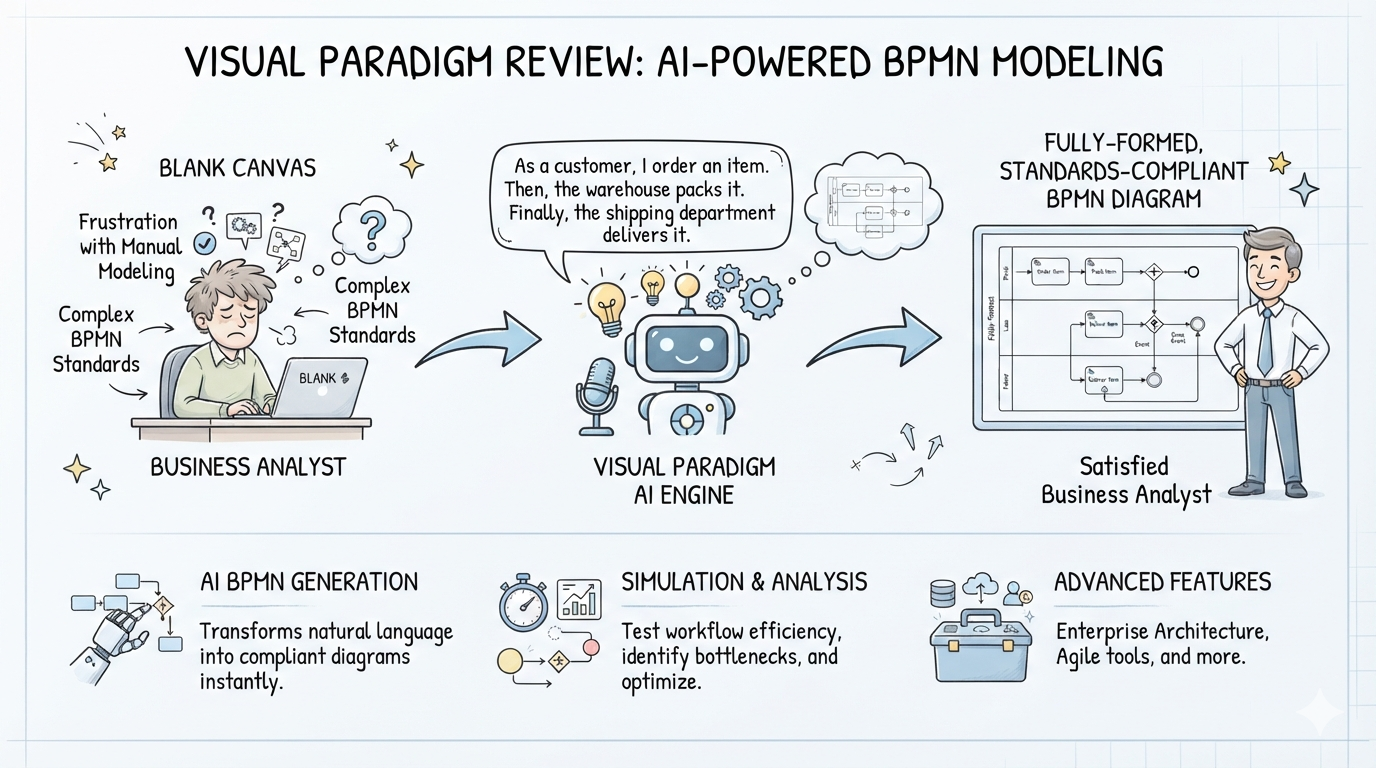
In this comprehensive review, I’ll walk through my experience with Visual Paradigm’s BPMN tooling, from the AI-powered generation features to the advanced simulation and analysis capabilities that make this platform stand out from the competition.
Getting Started: First Impressions
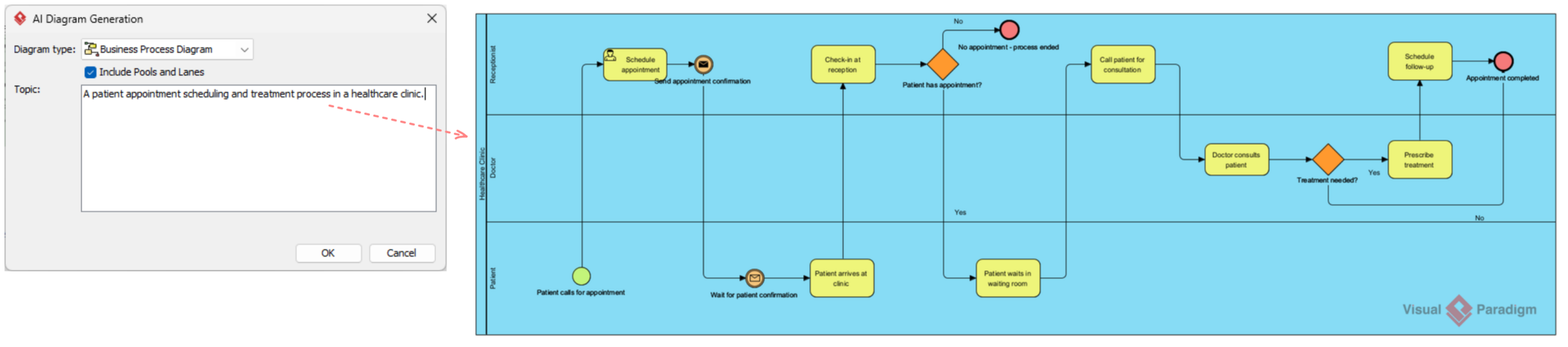
The first thing that struck me was how accessible the AI generation feature is. Unlike some tools that bury their advanced features behind complex menus, Visual Paradigm puts the AI functionality front and center. From the main menu, selecting Tools > AI Diagram Generation opens a straightforward dialog box that walks you through the process.
The interface asks for three key inputs:
-
Diagram Type: Select “Business Process Diagram” from the dropdown
-
Participants: Optionally check “Include Pools and Lanes” to automatically organize by roles or departments
-
Process Description: Enter a detailed description of your workflow in plain English
I tested this with a moderately complex scenario: “A patient appointment scheduling and treatment process in a healthcare clinic.” Within seconds, the AI generated a complete diagram with properly structured pools for the patient, receptionist, and doctor, complete with sequence flows, decision gateways, and events.
Core BPMN 2.0 Support: The Foundation
Before diving deeper into the AI features, it’s worth examining the foundation upon which everything is built. Visual Paradigm provides comprehensive support for the OMG BPMN 2.0 specification, which is essential for anyone creating professional business process models.
Swimlanes and Pools
The platform handles organizational boundaries exceptionally well. Pools represent entire participants or organizations, while lanes within pools can represent specific roles or departments. What I particularly appreciate is how the AI generator automatically structures these when you enable the “Include Pools and Lanes” option—saving what would otherwise be tedious manual setup.
Flow Objects: The Full Palette
Visual Paradigm gives you access to the complete BPMN element palette:
-
Events: Start events (including message, timer, and signal triggers), intermediate events for handling exceptions or delays, and end events for process termination
-
Activities: User tasks, service tasks, script tasks, manual tasks, and sub-processes
-
Gateways: Exclusive (XOR), parallel (AND), and inclusive (OR) decision points
Connecting Objects
The smart routing of sequence flows within pools and message flows between pools makes the diagrams look professional without requiring manual path adjustments. The Resource Catalog feature—a context menu that appears when you drag from an existing shape—makes it incredibly intuitive to build out flows by suggesting logical next elements.
The AI Experience: Beyond Simple Generation
Text-to-Diagram Generation
The headline feature is, without question, the AI-powered diagram generation. But what impressed me most is that this isn’t a one-and-done gimmick. The output is a fully editable native Visual Paradigm diagram, not just a static image file.
This means you can:
-
Edit elements, relationships, layout, or properties after generation
-
Add more details manually
-
Export as images (PNG, SVG), PDF, or incorporate into reports
-
Generate code or documentation where applicable
Intelligent Refinement
What sets this apart from simpler AI tools is the ability to refine diagrams interactively. You can take a basic AI-generated flow and expand it into detailed models with complex gateways and events. The AI understands BPMN 2.0 semantics, ensuring that your diagrams remain compliant even as you extend them.
Process Performance Statistics
One feature I found particularly valuable for analysis work is the ability to track metrics directly within your maps. Visual Paradigm allows you to attach summary reports on process costs, estimated processing hours, and message counts. This transforms the diagram from a static representation into a dynamic analysis tool for identifying operational bottlenecks.
Advanced Modeling Features
Process Drill-Down
The hierarchical sub-process capability deserves special mention. Complex workflows can be nested into compact sub-process elements that users can smoothly collapse or expand inline. This is invaluable when presenting to different audiences—executives want high-level views, while implementation teams need granular detail.
I found the drill-down functionality particularly useful. You can open up a sub-process to model lower-level flows in separate diagrams, providing deeper visualization without cluttering the main diagram.
Multi-Notation Mapping


Another standout feature is the ability to map process components against other modeling layers. Visual Paradigm integrates seamlessly with UML shapes, ERD database entities, wireframes, and enterprise architecture models. This cross-standard integration breaks down silos between different disciplines, enabling truly collaborative business solutions.
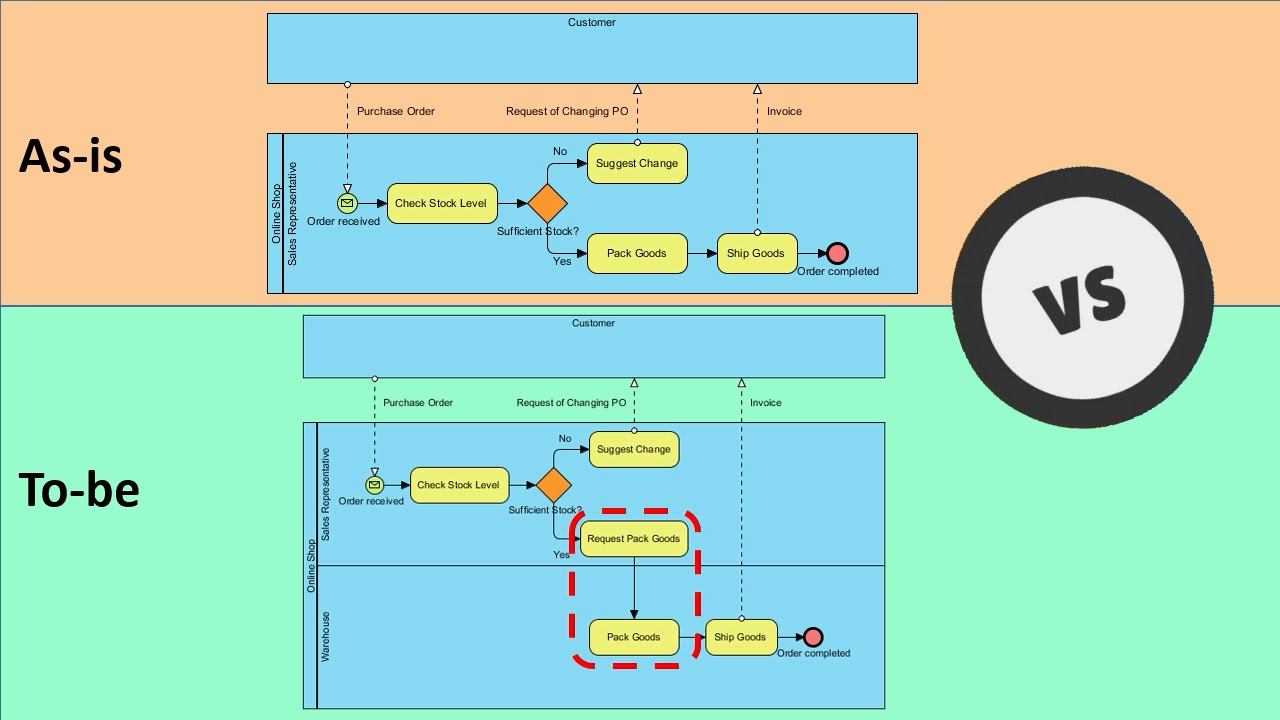
As-is and To-be Modeling
For process improvement projects, the As-is and To-be modeling feature is a game-changer. You can create baseline models of current processes, generate target models, and maintain traceability between the two states. This provides a clear roadmap for transformation initiatives.
Bringing Processes to Life: Animation and Simulation
Process Animation

One of the most compelling features I encountered is process animation. Static diagrams are useful, but watching your process flow in action provides insights that static images simply cannot convey.
The animation tool allows you to set up multiple animations for different scenarios within a business process diagram. You can:
-
Add animations for specific paths through the process
-
Handle gateway decisions by selecting outgoing flows
-
Play animations to visualize how the process works in motion
-
Export animations as web content (.html) for sharing with stakeholders who don’t have Visual Paradigm installed
When the animation plays, shapes that have been passed are highlighted in purple, and a dark ball moves along sequence flows to guide your eye through the process. This dynamic visualization makes it much easier to identify bottlenecks and validate logic.
Process Simulation
For those needing to validate processes before implementation, Visual Paradigm’s simulation capabilities are remarkably comprehensive.
Resource Allocation: You can specify the resources required to execute your business process, including human resources and devices/equipment. This enables accurate capacity planning.
Configurable Time Scale: Simulate across different time scales—real-time, minute scale, hour scale, or day scale—allowing you to observe processes at the pace that makes sense for analysis.
Cost Evaluation: Specify costs per task and sub-process in your preferred currency, with automatic evaluation of total process costs.
Analysis Charts: The simulation provides multiple visualization tools:
-
Completion Chart: Shows the status of inputs completion against time
-
Resource Usage Chart: Tracks consumption of resources by different activities
-
Queue Time Chart: Reveals how long flow objects spend waiting at various points
Collaboration and Team Features
Real-Time Editing
Visual Paradigm supports multiple users working on the same BPMN diagram simultaneously, facilitating input from various stakeholders. This has been essential for cross-functional projects where input from different teams is needed.
Commenting and Annotations
Team members can leave comments directly on diagrams, promoting clear communication and feedback. Combined with the ability to link elements to external resources like files, folders, or URLs, this creates a comprehensive documentation environment.
Validation and Error Checking
The built-in validation tools help ensure compliance with BPMN standards. I found this particularly useful for catching common pitfalls such as logical inconsistencies or misuse of symbols before finalizing models.
Interrupting vs. Non-Interrupting Events: A Deep Dive
One area where Visual Paradigm truly excels is in its handling of BPMN event semantics. The distinction between interrupting and non-interrupting events is crucial for accurate process modeling, and the tool makes this distinction clear and intuitive.
Interrupting Events
-
Behavior: When triggered, the activity they’re attached to is immediately canceled
-
Visual Representation: Continuous (solid) line frame
-
Specific Types: Error and Compensation events are exclusively interrupting when used to trigger event subprocesses
Non-Interrupting Events
-
Behavior: Does not stop the activity they’re attached to; the original task continues processing
-
Token Flow: Clones the token—one remains in the active task while a second token moves through the new process path
-
Visual Representation: Dashed line frame
-
Common Use Cases: Escalations or status inquiries where information needs to be processed without stopping primary work
The tool’s visual differentiation makes it immediately clear which type of event you’re working with, reducing errors in process design.
AI Ecosystem: Four Platforms, One Experience
Visual Paradigm’s AI capabilities extend across four integrated platforms, each serving different use cases:
VP Desktop
The flagship application for serious business analysts and architects. This is where the AI diagram generator truly shines, with full offline capabilities and deep integration with other modeling artifacts. The output from AI generation is a native diagram that can be further refined using the full professional modeling suite.
VP Online
A web-based tool that simplifies BPMN diagram creation. Perfect for quick sketches or for team members who don’t need the full desktop application. Accessible from any browser, it enables rapid collaboration.
Document Integration
AI-generated diagrams can be dynamically embedded in documents, keeping them synchronized with the source model. This is invaluable for maintaining consistent documentation.
Chat Interface
For the fastest prototyping, the chat interface allows you to describe processes in natural language and receive instant diagrams.
Real-World Applications
Cross-Functional Collaboration
One of the standout use cases I’ve experienced is cross-functional collaboration. By integrating BPMN with UML, ERD, and wireframes, Visual Paradigm enables different teams to work from a shared understanding. An architecture team can model system components while business analysts document processes, all within the same ecosystem.
Process Improvement Initiatives
The As-is and To-be modeling capabilities make Visual Paradigm ideal for process improvement projects. I’ve used this to document current workflows, identify inefficiencies, and design improved processes—all while maintaining traceability between the two states.
Stakeholder Communication
The animation and simulation features have transformed how I present process models to stakeholders. Instead of static diagrams that require careful explanation, I can now play animations that show exactly how processes work, making it much easier to build consensus around proposed changes.
Implementation Planning
The ability to link process elements to technical artifacts (UML classes, database entities, wireframes) creates a clear path from business requirements to technical implementation. This has significantly reduced the translation gap between business and IT teams.
Pricing and Editions
Visual Paradigm offers multiple editions to match different needs:
-
Standard Edition: Core BPMN features, RACI/CRUD charts, animation
-
Professional Edition: Advanced simulation, enhanced collaboration
-
Enterprise Edition: Full suite with enterprise architecture tools
It’s worth noting that As-is and To-be Process, RACI & CRUD charts, Process Animation, and Process Simulation are available in Standard, Professional, and Enterprise editions, making these powerful features accessible even at the entry level.
What I Wish Were Different
No tool is perfect, and Visual Paradigm has a few areas that could use improvement:
-
Learning Curve: While the AI features make getting started easier, the full platform is extremely powerful and can be overwhelming for newcomers. More guided tutorials would help ease this transition.
-
Performance with Large Models: Very large process models with extensive sub-process hierarchies can slow down performance, particularly with the animation and simulation features.
-
AI Interpretation Limits: While impressive, the AI generation sometimes misinterprets complex process descriptions and requires manual correction. The tool is best used as a starting point rather than a complete replacement for human analysis.
Conclusion: A Paradigm Shift in Process Modeling
After spending considerable time with Visual Paradigm’s BPMN tooling, I can confidently say it represents a significant evolution in business process modeling. The integration of AI-powered generation with professional-grade modeling capabilities creates a workflow that’s both efficient and powerful.
The Value Proposition:
-
Time Savings: The AI generator transforms hours of manual diagram construction into seconds of generation, letting you focus on analysis rather than drawing
-
Quality Assurance: Built-in validation and standards compliance ensure your diagrams are correct
-
Advanced Analysis: Simulation and animation capabilities provide insights that static diagrams cannot
-
Integration: Multi-standard support bridges the gap between business and IT
For business analysts who need to document and analyze processes quickly, the AI generation and animation features are transformative. For IT professionals who need to bridge the gap between process models and implementation, the integration with UML, ERD, and other technical artifacts is invaluable.
For organizations undertaking process improvement initiatives, the As-is and To-be modeling, simulation, and cost analysis capabilities provide the data needed to make informed decisions.
Is Visual Paradigm right for everyone? For casual users who only need occasional process diagrams, the simpler online version might suffice. But for professionals who regularly work with business processes—whether for documentation, improvement, or automation—the comprehensive feature set of the desktop edition represents an investment that pays dividends in productivity and insight.
The tool has genuinely changed how I approach process modeling. Starting with an AI-generated draft, refining with professional editing tools, validating with built-in checks, and finally animating or simulating to validate logic—this workflow is dramatically more efficient than the traditional manual approach. The future of process modeling is here, and it’s powered by AI.
Reference
- AI Business Process Diagram Generator Guide: Step-by-step guide on using AI to generate BPMN business process diagrams from text descriptions
- Chapter 6: Elevate Your BPMN Diagrams with Visual Paradigm: Comprehensive overview of BPMN modeling features including process drill-down, as-is and to-be modeling, and animation
- AI BPMN Conversation Diagram Generator: Guide to generating BPMN conversation diagrams using AI, with walkthrough for VP Desktop
- How to Animate a BPMN Business Process: Tutorial on using process animation tools to create dynamic process presentations
- Easy-to-Use BPMN Tools: Overview of BPMN tooling features including simulation, report generation, and glossary management
- AI Process Overview Diagram Generator: Guide to generating high-level process overview diagrams with AI assistance
- Mastering Business Process Modeling Guide: Comprehensive guide to BPMN concepts and AI-powered diagram generation
- Complete Guide to Business Process Design with Visual Paradigm: User experience journey covering all stages from initial process mapping to advanced simulation
- How to Draw BPMN 2.0 Business Process Diagram: Tutorial on creating BPMN diagrams, including use of Resource Catalog and intermediate events
- AI Diagram Generation Features: Overview of AI diagram generation capabilities across the Visual Paradigm platform
- BPMN Activity Types Explained: Detailed breakdown of BPMN activity types and their usage
- BPMN for Beginners: A Complete Guide: Foundational guide to BPMN concepts and notation
- From Narrative to Diagram: AI BPMN Generator: Explains how AI transforms natural language descriptions into BPMN diagrams
- Sequence and Message Flows: Documentation on sequence flow and message flow management in BPMN