
VP OpenDocs: Mastering Tabbed Folders to Transform Documentation Architecture
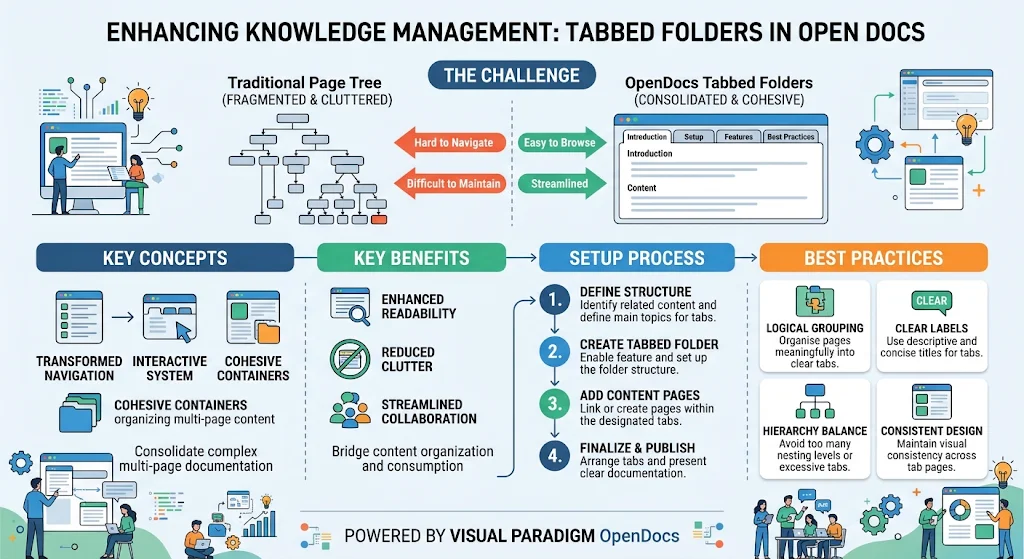
In the rapidly evolving landscape of technical documentation, the struggle between content volume and user experience is constant. As projects expand, documentation often devolves into a “page tree” nightmare—deeply nested, fragmented, and difficult to navigate. Visual Paradigm’s OpenDocs platform addresses this systemic architectural flaw with a powerful feature: Tabbed Folders.
This tutorial explores the technical and conceptual architecture behind Tabbed Folders, guiding you through the transition from traditional hierarchical structures to modern, tabbed navigation systems. We will analyze the key concepts, benefits, setup processes, and best practices to help you streamline your knowledge management workflow.
The Challenge: From Fragmentation to Cohesion
Traditionally, information architecture relies on a rigid page tree. While effective for small projects, this model creates significant friction as content scales. The primary issues include:
- Hard to Navigate: Users often get lost in deep nesting levels, requiring excessive back-and-forth clicking.
- Difficult to Maintain: Authors struggle to manage the state of hundreds of disconnected files.
- Fragmented Experience: Context is lost when jumping between disjointed pages.
OpenDocs Tabbed Folders solve this by transforming the traditional tree into an interactive, tabbed navigation system. This allows teams to consolidate complex, multi-page documentation into cohesive, easy-to-browse containers.
Key Concepts: The New Architecture
Understanding the shift to Tabbed Folders requires understanding three core architectural concepts that define this feature:
1. Transformed Navigation
Instead of a vertical list of links, the system presents a horizontal navigation bar. This mimics modern web application behaviors, allowing users to switch contexts instantly without losing their place in the broader documentation structure.
2. Interactive System
The system is not static; it responds to user interaction. By grouping related content, the architecture becomes dynamic, serving only the necessary information for the current task at hand.
3. Cohesive Containers
A Tabbed Folder acts as a logical container. It organizes multi-page content under a single parent node, ensuring that related documents (e.g., “Introduction,” “Setup,” “Features”) are physically grouped but logically accessible via tabs.
Key Benefits for Your Workflow
Implementing Tabbed Folders offers measurable benefits for both readers and authors:
- Enhanced Readability: By grouping content logically, users can scan the available topics quickly without being overwhelmed by a long sidebar.
- Reduced Clutter: Complex documentation is visually simplified. The “noise” of the file tree is replaced by a clean, concise interface.
- Streamlined Collaboration: Teams can work on specific sections (tabs) within a folder structure more effectively, knowing that the final presentation will be organized.
Step-by-Step Setup Process
To leverage this feature in your OpenDocs workflow, follow this logical sequence. The process involves defining your structure, enabling the feature, adding content, and finalizing the layout.
- Define Structure: Before adding content, identify your main topics. Determine which documents belong together. For example, if you are documenting a software release, your tabs might be “Release Notes,” “Installation Guide,” and “Troubleshooting.”
- Create Tabbed Folder: Enable the Tabbed Folder feature in your repository settings or by right-clicking a specific folder. This action transforms the folder node from a standard directory into a navigation container.
- Add Content Pages: Create or move your documentation pages into the designated folder. The system will automatically generate tabs for these pages.
- Finalize & Publish: Arrange the tabs in the desired order. Ensure the navigation flow makes sense (e.g., Introduction before Features). Once arranged, the structure is ready for publishing.
Best Practices for Design
To ensure your documentation remains maintainable and user-friendly, adhere to these guidelines:
Logical Grouping
Organize pages meaningfully. Avoid mixing unrelated topics in a single folder. If a folder feels cluttered, it is likely a sign that you need to split the content into multiple Tabbed Folders.
Clear Labels
Use descriptive and concise titles for your tabs. Avoid technical jargon or vague terms like “Page 1” or “Misc.” Instead, use action-oriented or topic-specific labels like “Setup Instructions” or “API Reference.”
Hierarchy Balance
Avoid excessive nesting. While Tabbed Folders reduce clutter, having too many levels of tabs (e.g., tabs inside tabs) can confuse users. Aim for a flat, accessible hierarchy where the most important information is one click away.
Consistent Design
Maintain visual consistency across tab pages. If you use a specific header style or color scheme for the “Introduction” tab, apply it consistently to the “Setup” and “Features” tabs to create a seamless reading experience.
Conclusion
By adopting the Tabbed Folders feature in Visual Paradigm OpenDocs, you bridge the gap between how content is organized and how it is consumed. This architectural shift moves your documentation from a fragmented tree to a cohesive, modern interface, significantly enhancing the user experience and reducing maintenance overhead.