Mastering Onboarding with VPasCode: A BPMN & AI Workflow Guide
In the complex landscape of business process management, few challenges are as critical as orchestrating interactions between different departments. The Employee Onboarding process serves as a prime example of a multi-departmental workflow involving Human Resources (HR), IT, and Operations teams. This tutorial explores how to model this sophisticated process using a visual, code-based approach, bridging the gap between abstract business requirements and executable technical diagrams.
Using VPasCode within the Visual Paradigm ecosystem, we can define the Employee Onboarding lifecycle. This method allows for the rapid prototyping of BPMN 2.0 compliant diagrams, ensuring that the logic flows seamlessly from recruiting to the employee’s first day.
Architecting the Workflow: A Multi-Pool Strategy
The foundation of a robust onboarding model is the correct definition of organizational boundaries. In our scenario, we are dealing with three distinct organizational units: HR:Recruiting, HR:Operations, and IT:Service Desk.
When modeling this in VPasCode, we utilize the |HR:Operations| or |IT:Service Desk| syntax to define Swimlanes (or Pools). This structure is essential for:
- Clarity: Visually separating who is responsible for what action.
- Communication: Defining clear handoff points between the Recruiting team and the IT team.
- Compliance: Ensuring that specific tasks, like “Provision Payroll,” are formally assigned to the correct role.
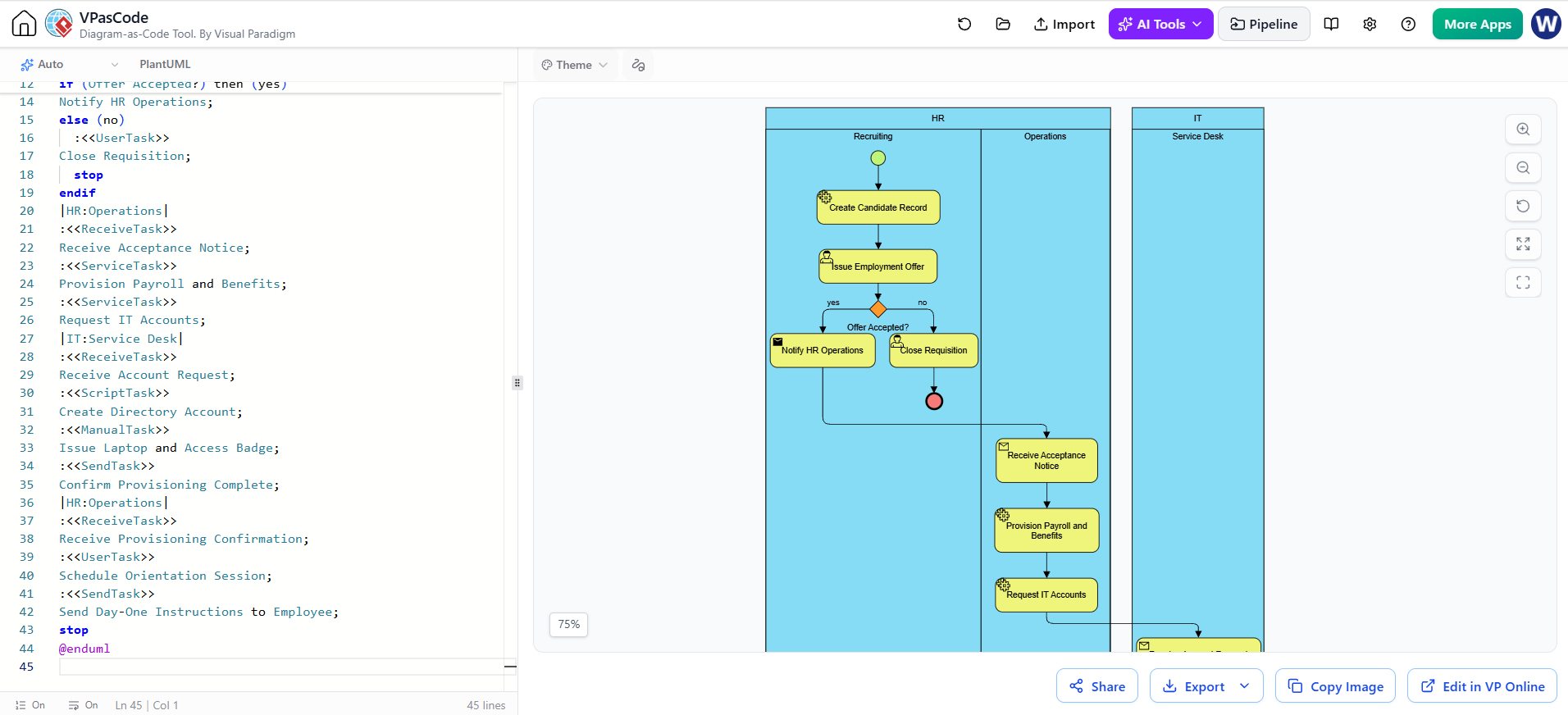
The diagram below illustrates how the process moves from the initial candidate record creation all the way to the issuance of IT assets.
Process Flow Analysis
The workflow begins in the Recruiting lane. It is a linear sequence of events until a critical decision point is reached. The process flow is as follows:
- Create Candidate Record: The process initiates with a ServiceTask, representing an automated backend action to log the new hire in the system.
- Issue Employment Offer: A UserTask where a recruiter manually generates and sends the offer.
- Decision Gateway (Offer Accepted?): This is the pivotal moment. The process splits based on the candidate’s response.
Handling Logic: The Decision Gateway
In process modeling, Gateways are the traffic controllers. In the code, we represent this using the if (Offer Accepted?) then syntax. This maps to a standard Exclusive Gateway (diamond shape) in BPMN.
The logic dictates two distinct paths:
- The “Yes” Path: If the offer is accepted, the process transitions to the HR:Operations pool. This represents a handoff from the recruiting phase to the operational onboarding phase.
- The “No” Path: If the offer is declined, the process moves to a UserTask labeled Close Requisition before terminating. This is crucial for data hygiene, ensuring that rejected candidates are officially archived.
Implementing the Logic in VPasCode
The power of VPasCode lies in its ability to render this logic directly from text. The code snippet below demonstrates how the decision tree is constructed programmatically:
if (Offer Accepted?) then (yes)
  :<> Notify HR Operations;
else (no)
  :<> Close Requisition;
  stop
endif
Notice the use of stop at the end of the else block. In the context of the diagram, this terminates the specific branch, preventing the flow from erroneously continuing into the provisioning steps.
Orchestrating Cross-Departmental Handoffs
Once the offer is accepted, the complexity increases as the process moves into the IT:Service Desk pool. This section of the diagram demonstrates the concept of Message Flows and Intermediate Events without necessarily using explicit message symbols in the code.
The transition from HR Operations to IT is handled via a ReceiveTask labeled Receive Account Request. This signifies that the IT team cannot start their work until they have physically or digitally received the signal (the request) from HR.
The Provisioning Sequence
Within the IT lane, the process becomes a series of dependency-based tasks:
- Create Directory Account: A ScriptTask implies automation (e.g., PowerShell or Python script) to create the user account in Active Directory.
- Issue Laptop and Access Badge: A ManualTask indicates that a physical interaction is required by an IT technician.
- Confirm Provisioning Complete: A SendTask signals the completion of the IT work, sending the status back to HR Operations.
Visualizing the Code-to-Diagram Translation
The following code block represents the IT provisioning section. Observe how the |IT:Service Desk| tag encapsulates the tasks belonging to that specific department:
|IT:Service Desk|
:<> Receive Account Request;
:<> Create Directory Account;
:<> Issue Laptop and Access Badge;
:<> Confirm Provisioning Complete;
This structure ensures that the final output diagram clearly delineates the boundary between the automated creation of accounts and the manual issuance of hardware.
The Final Handoff and Orientation
The process concludes with a return to the HR:Operations lane. Once HR receives the Receive Provisioning Confirmation (via a ReceiveTask), the final administrative steps can be taken.
The last steps are focused on the employee’s experience:
- Schedule Orientation Session: A UserTask to organize the welcome meeting.
- Send Day-One Instructions: A SendTask that communicates logistics to the new hire.
This sequence effectively closes the loop, ensuring that the employee is not just technically provisioned but also organizationally welcomed.
Conclusion
By translating the Employee Onboarding process into VPasCode, we gain a precise, editable, and version-controllable model of our business logic. This approach allows us to focus on the logic of the handoffs—the “if/else” conditions and the “receive/send” messages—rather than getting bogged down in the geometry of the drawing tool. The resulting diagram provides a clear roadmap for stakeholders, ensuring that HR, IT, and Operations are all aligned on the path to a successful onboarding experience.