
Taming Oversized BPMN: A Masterclass in Hierarchical Decomposition
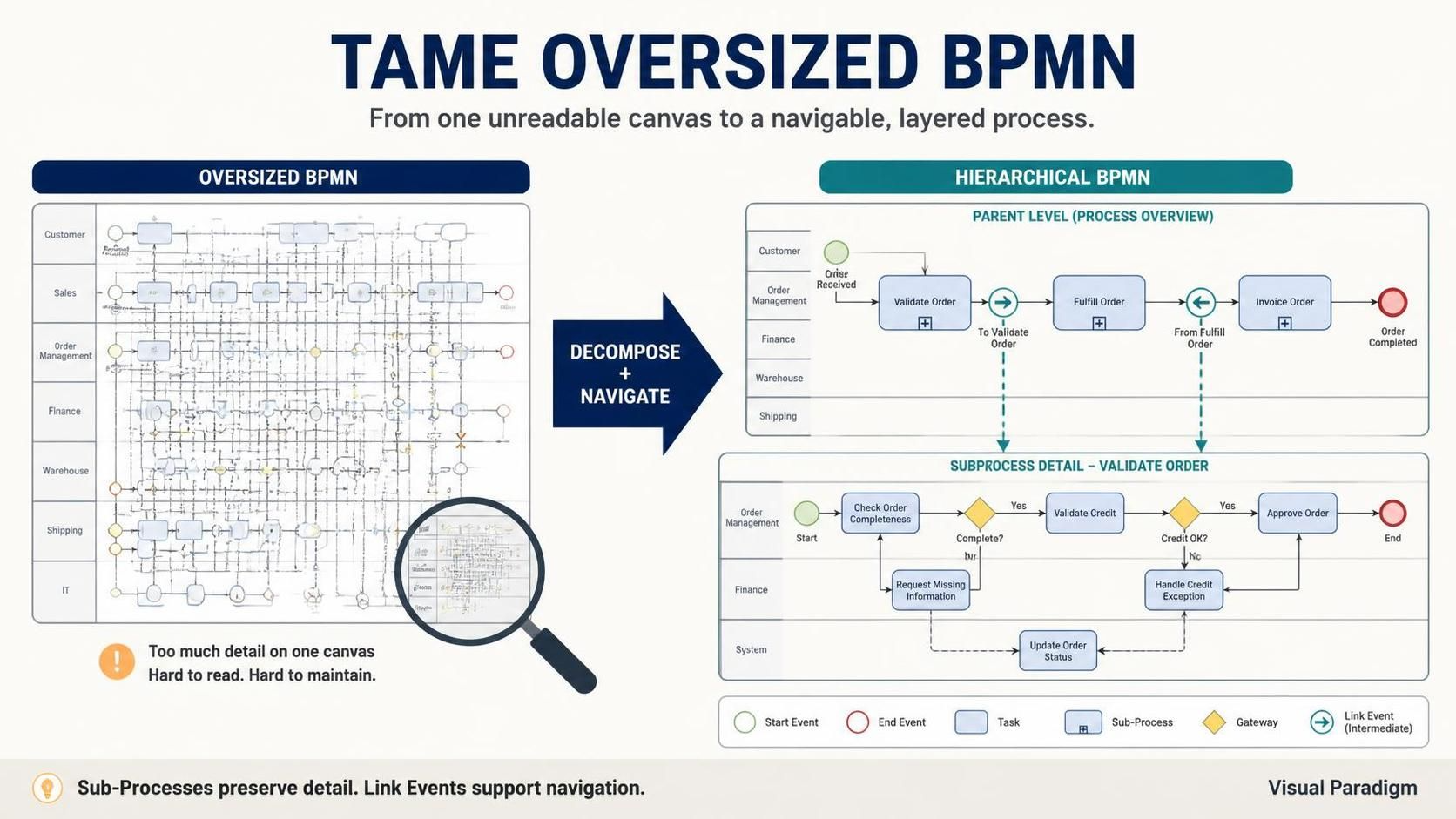
In the realm of business process modeling, few challenges are as daunting as the “Oversized BPMN” nightmare. This occurs when a complex enterprise workflow is forced onto a single, massive canvas. The result is a diagram so dense that zooming out renders it a blur of unreadable text, while zooming in to see specific details causes you to lose the critical context of the overall flow.
The solution is not to abandon detail, but to structure it intelligently. By leveraging Sub-Processes for hierarchical decomposition and Link Intermediate Events for seamless navigation, you can transform chaotic maps into manageable, multi-layered narratives. This tutorial explores how to implement this architecture effectively within Visual Paradigm.
The Problem: The Single Canvas Limit
When attempting to model a high-level enterprise process—such as an “Order-to-Cash” lifecycle—on one canvas, the diagram inevitably becomes a spaghetti of connectors. As shown in the visual comparison, the “Oversized BPMN” approach suffers from cognitive overload. Stakeholders cannot easily grasp the flow, and maintainers struggle to identify errors or update specific steps without accidentally breaking the entire diagram.
The Solution: Hierarchical Decomposition
To tame this complexity, we must adopt a “Parent-Child” relationship strategy. This involves breaking down a complex process into smaller, digestible chunks. Visual Paradigm supports this natively through its robust BPMN support.
1. The Parent Level (Process Overview)
The top layer of your model is the “Parent Level.” This diagram provides a high-level executive summary. It contains the critical milestones and major phases of the process. Crucially, instead of detailing every single step, we use Collapsed Sub-Processes.
- Visual Indicator: These appear as rounded rectangles with a small “plus” icon (+) or a distinct icon at the bottom.
- Function: They act as placeholders. When a stakeholder wants to understand the “Validate Order” phase, they do not look at a page of text; they click the box.
2. The Child Level (Subprocess Detail)
The “Child Level” is where the granular detail lives. This is a separate diagram that defines exactly what happens inside the Sub-Process.
- Scope: It includes specific tasks, decision gateways, and error handling logic.
- Navigation: In Visual Paradigm, you can create a link between the high-level box and the detailed diagram. When you double-click the “Validate Order” box on the parent diagram, the tool automatically opens the child diagram.
The Glue: Link Intermediate Events
While Sub-Processes handle the vertical depth (zooming in and out), Link Intermediate Events handle the horizontal flow (jumping between sections).
Imagine a scenario where “Validate Order” is a sub-process, but “Fulfill Order” is another. If you want to show a specific flow where the process jumps from the end of one major phase to a specific step in another, standard arrows can get messy. Link events allow you to:
- Drag a Link Event (the green circle with a green arrow) onto the diagram.
- Connect it to the target task (e.g., “Fulfill Order”).
- Create a corresponding Link Event at the source location.
- Visual Paradigm will render a clean arrow connecting the two, often with a label (e.g., “To Validate Order”).
This creates a “seamless” experience where the diagram reads like a storybook, allowing the eye to traverse complex logic without getting lost in the lines.
Step-by-Step: Modeling in Visual Paradigm
- Start with the Skeleton: Create a new BPMN diagram. Add your high-level tasks: Validate Order, Fulfill Order, and Invoice Order.
- Convert to Sub-Processes: Right-click a task like “Validate Order” and select “Convert to Sub-Process.” Choose Collapsed.
- Generate the Child Diagram: Visual Paradigm will prompt you to create a new diagram for the details. Open this new diagram and model the steps inside (e.g., Check Order Completeness, Validate Credit).
- Connect the Dots: Return to the parent diagram. If you need to jump to a specific state, insert a Link Intermediate Event to denote the transition.
- Review: Use the “Zoom to Fit” feature to ensure the parent diagram remains clean and readable.
Conclusion
By moving away from the “Oversized BPMN” approach and embracing hierarchical decomposition, you gain two powerful advantages: Holistic Oversight and Granular Detail. The parent diagram serves as a map for executives, while the child diagrams serve as blueprints for analysts. With the aid of Link Events and tools like Visual Paradigm, your process models become not just documents, but navigable, living systems.