
Mastering BPMN Exclusive Gateways: A Loan Application Workflow Analysis
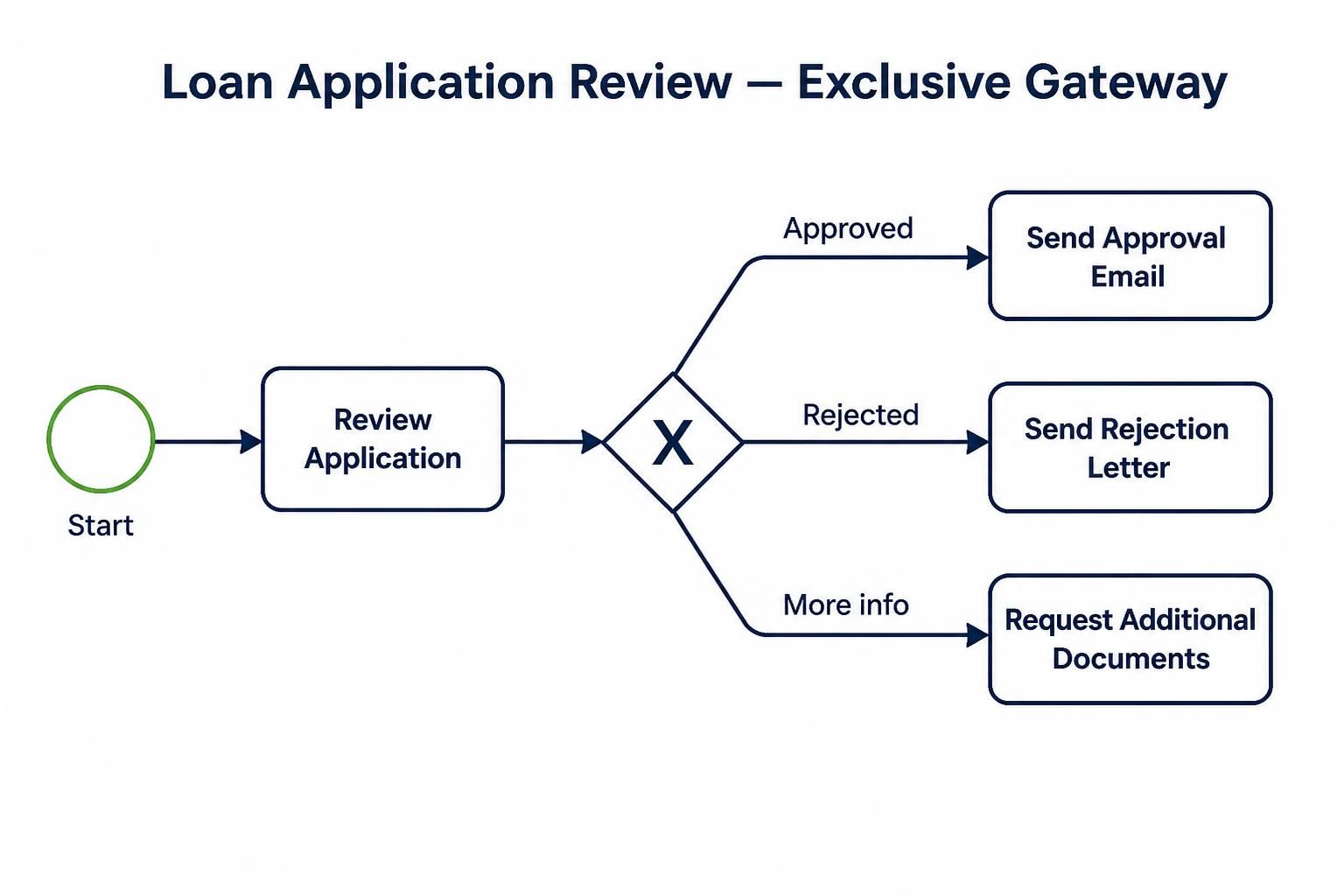
In the realm of Business Process Model and Notation (BPMN), clarity is paramount. Complex workflows often require decision points where a single process must choose between various mutually exclusive paths. The most common tool for this is the Exclusive Gateway, often referred to as an XOR Gateway. This tutorial explores how this concept is applied in a practical “Loan Application Review” scenario using Visual Paradigm, focusing on the decision logic and system architecture.
Understanding the Exclusive Gateway
An Exclusive Gateway acts as the “either/or” mechanism within a business process. Unlike parallel gateways (which split a flow into multiple simultaneous threads), an exclusive gateway evaluates conditions and directs the process flow down exactly one path. It is the digital equivalent of a traffic light that only allows cars to proceed in one specific direction at a time.
The visual representation is distinct: a diamond shape containing a large “X”. This symbol serves as a critical architectural marker for developers and business analysts, indicating that a logical branching point exists where only one outcome is valid.
Architectural Breakdown: The Loan Application Workflow
Let us analyze the system architecture presented in the diagram, moving from the initiation of the process to the branching logic.
1. Process Initiation and Review
The process begins at the Start Event (depicted as a green circle). This triggers the workflow, immediately passing control to the first task: [Review Application]. This task represents a significant human or automated effort where the loan applicant’s data is scrutinized. Once this task is complete, the process flow reaches the gateway.
2. The Decision Point (Gateway Divergence)
The core of this architecture lies at the Exclusive Gateway (the diamond with the “X”). Here, the system evaluates the outcome of the application review. The architecture dictates that the following conditions are mutually exclusive:
- Approved? The application meets all criteria.
- Rejected? The application fails specific criteria.
- More Info? The application is incomplete or requires clarification.
Because these are exclusive, the system cannot send an approval email and request more information simultaneously. It must evaluate the conditions sequentially and select the first one that evaluates to true.
3. Converging Outcomes
Once a condition is met, the flow diverges into one of three specific outcome branches:
- Approved: Leads to the task [Send Approval Email], notifying the user of success.
- Rejected: Leads to [Send Rejection Letter], formally notifying the user of denial.
- More Info: Leads to [Request Additional Documents], initiating a feedback loop to the applicant.
Technical Implementation in Visual Paradigm
When modeling this in Visual Paradigm, the Exclusive Gateway is a fundamental component of the BPMN 2.0 specification. It allows for the creation of robust, conditional logic without the need for complex scripting at the process level. The “X” marker is a standard requirement to distinguish it from Inclusive or Parallel gateways.
The logic flow follows a strict evaluation order:
- Enter Gateway.
- Evaluate Condition 1 (e.g., Approved).
- If True, execute path. If False, evaluate Condition 2.
- Repeat until a path is taken.
Conclusion
The Exclusive Gateway is a powerful architectural element that simplifies complex decision trees. By ensuring that only one path is taken at a time, it prevents logical errors and ensures that the business process remains deterministic. Whether in loan processing, customer onboarding, or order fulfillment, understanding the “XOR” logic is essential for effective BPMN modeling.