
Mastering VP AI Ecosystem: From Prompts to Enterprise UML Class Diagrams
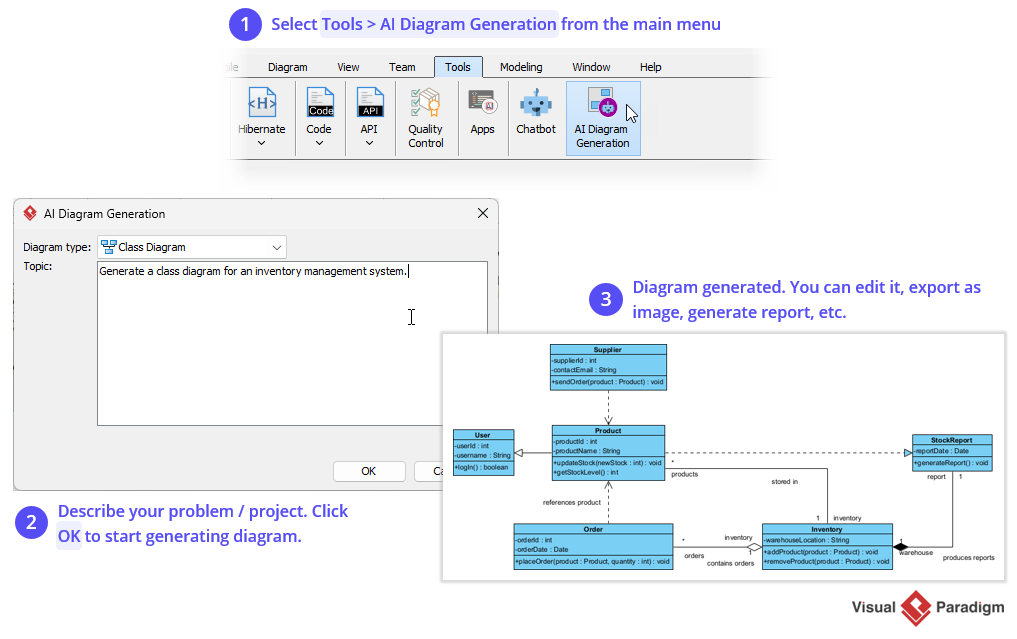
In the rapidly evolving landscape of software architecture, the gap between a developer’s mental model and a concrete technical diagram is often bridged by tedious manual drawing. Visual Paradigm has revolutionized this workflow with its AI Diagram Generation feature (Route 1). This tool transforms natural language prompts into structured UML Class Diagrams, allowing architects to focus on system design rather than the mechanics of drawing connectors.
This tutorial provides a deep dive into the architecture of AI-driven modeling, explaining how to leverage Visual Paradigm’s ecosystem to generate complex system structures from simple text descriptions.
The Architecture of AI Diagram Generation
The “AI Diagram Generation” tool in Visual Paradigm is not merely a text-to-image converter; it is a sophisticated semantic engine. It utilizes Natural Language Processing (NLP) to parse your requirements and map them to the Object-Oriented Modeling (OOM) standard.
The underlying architecture follows a three-stage pipeline:
- Intent Recognition: The system analyzes the input string to identify the target Diagram Type (e.g., Class Diagram, Sequence Diagram) and the Domain Entities (e.g., Users, Orders, Inventory).
- Ontology Mapping: The AI references a knowledge base of standard software patterns to infer relationships (e.g., an “Order” likely “contains” multiple “Products”).
- Structural Rendering: The engine outputs a valid UML XML representation, which the Visual Paradigm canvas renders as a visual model.
Step-by-Step: Executing Route 1
To utilize this powerful feature, follow the standard operating procedure within the Visual Paradigm interface.
Step 1: Accessing the AI Engine
The entry point for this workflow is located in the main toolbar. Navigate to the Tools menu and select the AI Diagram Generation icon. This action opens the dedicated generation dialog, separating the AI engine from the standard modeling canvas.
Step 2: Defining the Scope via Prompt Engineering
The core of this process is the Topic input field. Unlike standard code generation which requires strict syntax, AI diagram generation allows for natural language descriptions. However, precision is key.
Example Scenario: You are designing an Inventory Management System.
Effective Prompt:
Generate a class diagram for an inventory management system.
Advanced Prompt (for complex relationships):
Create a class diagram for an e-commerce system with Customers, Orders, Products, and Payments. Include a relationship where an Order contains multiple Products.
Step 3: Analysis and Generation
Upon clicking OK, the AI engine processes the prompt. It identifies the classes (User, Product, Supplier, etc.) and infers the attributes and methods based on industry-standard naming conventions.
Deconstructing the Generated Model
Once the diagram is generated, the system presents a structured model that you can inspect, refine, and export. Let’s analyze the typical output structure of an Inventory Management System generated by this tool.
Class Structure & Attributes
The AI constructs a hierarchy of classes. Each class box is divided into three compartments: Name, Attributes, and Methods.
- Product Class: The AI infers standard attributes like
productIdandproductName. It also deduces methods such asaddProduct(product: Product, quantity: int). - Supplier Class: Represents the external entity. Attributes like
contactEmailare automatically generated to ensure the model is data-rich. - Inventory Class: Often generated as a bridge or association class, containing specific stock logic like
getStockLevel().
Inferred Relationships
The most powerful aspect of this feature is the automatic inference of cardinality and association types. The AI does not just place boxes; it connects them using standard UML notation.
Consider the logic used to generate the relationship between Product and Supplier:
Relationship: Aggregation
Cardinality: 1..* (Many Products) to 1 (One Supplier)
Reasoning: A product typically has one primary supplier, but a supplier provides many products.
The generated diagram will visually display this with a diamond shape (aggregation) on the Supplier side, indicating that Product objects depend on Supplier for their definition but can exist independently in the database.
Refining the AI Output
The initial generation is a “draft” of your system architecture. While the AI is highly accurate, it relies on the “Best Fit” patterns. You should treat the AI output as a starting point for manual refinement.
Common Refinement Tasks:
- Adjust Cardinality: If the AI assumes a “One-to-One” relationship where a “One-to-Many” exists, simply drag the arrow ends and update the multiplicity (e.g., change ‘1’ to ‘*’).
- Add Specific Logic: The AI may miss specific business rules. For example, if a
StockReportmust be generated only by a specific method, add that method manually to theStockReportclass. - Layout Optimization: The AI uses an auto-layout algorithm. You can use the Auto Layout feature in the Diagram menu to reorganize the classes for better readability.
Conclusion
The AI Diagram Generation feature in Visual Paradigm significantly reduces the “Time-to-Design.” By converting natural language prompts into valid UML Class Diagrams, it allows Product Managers and Architects to iterate on system structures in minutes rather than hours. The generated models serve as a robust foundation for code generation, documentation, and stakeholder presentations.