
OpenDocs: Orchestrating Visual Paradigm with AI-Driven Architecture
In the complex world of software architecture and enterprise modeling, a common pitfall is the creation of “silos”—where design happens in one tool, requirements in another, and documentation in a third. Visual Paradigm has evolved into a unified platform, but with great power comes the need for organization. This is where OpenDocs takes center stage.
OpenDocs is not merely a place to write text; it is the central nervous system that connects the “what” (intent), the “why” (rationale), and the “how” (implementation). This tutorial explores the system architecture of the Visual Paradigm ecosystem and how OpenDocs acts as the definitive documentation and publishing workspace.
The Ecosystem Architecture
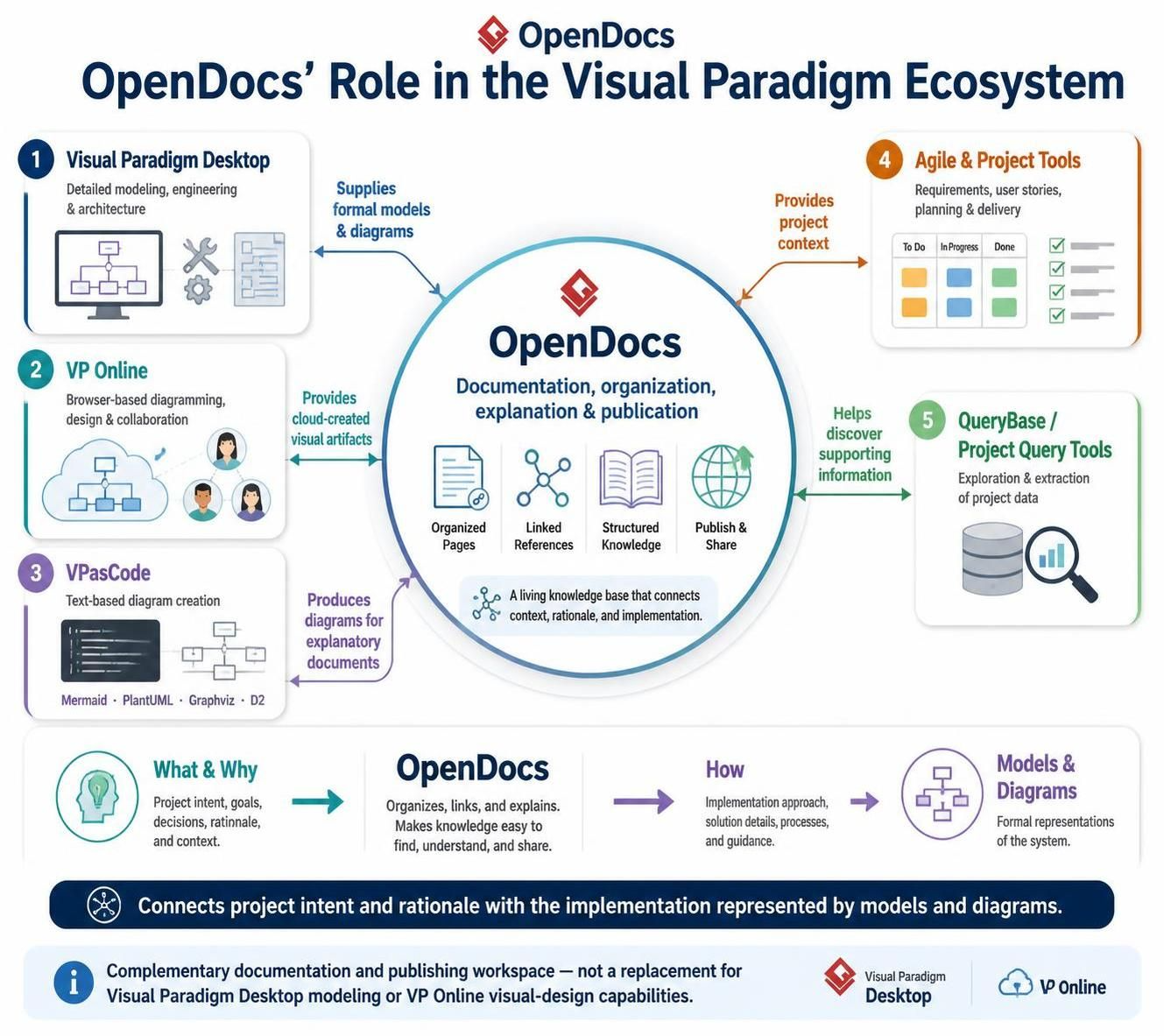
Visual Paradigm offers a suite of tools designed for specific stages of the software development lifecycle. OpenDocs sits at the core, integrating data from five primary sources. Understanding the role of each component is crucial for effective knowledge management.
1. The Source of Truth: Visual Paradigm Desktop
At the foundation of any system architecture is the detailed modeling work. Visual Paradigm Desktop is the heavy lifter, providing deep capabilities for:
- Detailed engineering and architecture modeling.
- Complex database design.
- Code engineering and reverse engineering.
OpenDocs does not replace this heavy modeling capability. Instead, it acts as the consumer of the output. It ingests the formal models and diagrams created here, ensuring that the visual representations of your system are accessible to stakeholders who do not need to open a full modeling workspace.
2. The Collaborative Hub: VP Online
In modern distributed teams, diagramming often happens in the cloud. VP Online facilitates browser-based diagramming and real-time collaboration. It allows teams to sketch ideas and design systems without the overhead of a desktop installation.
OpenDocs integrates with VP Online to provide cloud-created visual artifacts. This means that diagrams drawn by a remote team member can be instantly referenced in a centralized documentation page, bridging the gap between informal collaboration and formal documentation.
3. The Developer’s Choice: VPasCode
For developers who prefer writing code over clicking and dragging boxes, VPasCode offers a text-based approach to diagram creation. It supports modern, popular formats such as:
- Mermaid for flowcharts and sequence diagrams.
- PlantUML for structural and behavioral modeling.
- Graphviz and D2 for graph-based visualizations.
OpenDocs treats these text-based diagrams as first-class citizens. It allows users to produce diagrams for explanatory documents directly alongside their prose, ensuring that code-based diagrams are rendered beautifully within the documentation context.
4. The Contextual Layer: Agile and Project Tools
Software is built to solve problems, and the history of those problems lies in requirements and user stories. Agile and Project Tools manage the “lifecycle” of the work: To Do, In Progress, Done, and the stories driving them.
OpenDocs leverages this data to provide project context. By linking documentation pages to specific user stories or requirements, OpenDocs ensures that every architectural decision can be traced back to the business need that inspired it.
5. The Data Explorer: QueryBase
Sometimes, the information you need isn’t immediately visible in a diagram. QueryBase (or project-query tools) allows for the exploration and extraction of specific project data.
OpenDocs uses these tools to help discover information that supports documentation. If you need to generate a list of all classes in a specific package or find all requirements related to a specific module, QueryBase helps extract that data to populate your documentation dynamically.
The Unifying Philosophy: “What, Why, and How”
The most profound aspect of OpenDocs is its architectural philosophy regarding information flow. As illustrated in the ecosystem diagram, OpenDocs connects three distinct dimensions of knowledge:
- What & Why (The Intent): This includes project goals, decisions, rationale, and context. This is often found in Agile tools and high-level strategy documents.
- How (The Implementation): This includes the solution details, processes, and guidance. This is represented by the models and diagrams from Desktop and VP Online.
- OpenDocs (The Bridge): OpenDocs organizes, links, and explains. It makes knowledge easy to find, understand, and share.
By acting as a living knowledge base, OpenDocs ensures that the “What” and “Why” are never separated from the “How.” It transforms disconnected artifacts into a cohesive narrative.
System Flow Example:
1. Architect creates a Sequence Diagram in Visual Paradigm Desktop.
2. Developer creates a Mermaid flowchart in VPasCode.
3. PM tracks the feature in Agile Tools.

OpenDocs Role:
- Imports the Sequence Diagram (Desktop).
- Renders the Mermaid code (VPasCode).
- Links to the User Story (Agile Tools).
- Result: A single page explaining the Feature Logic, the Interaction Flow, and the Business Value.
Conclusion
In the Visual Paradigm ecosystem, tools like Desktop, Online, and VPasCode are the engines of creation. OpenDocs is the dashboard that displays the data they generate. By integrating formal models, cloud artifacts, text-based diagrams, and project context, OpenDocs connects project intent with implementation, ensuring that your documentation is as dynamic and robust as the software you build.