
Mastering Parallel Workflows with VPasCode and UML Activity Diagrams
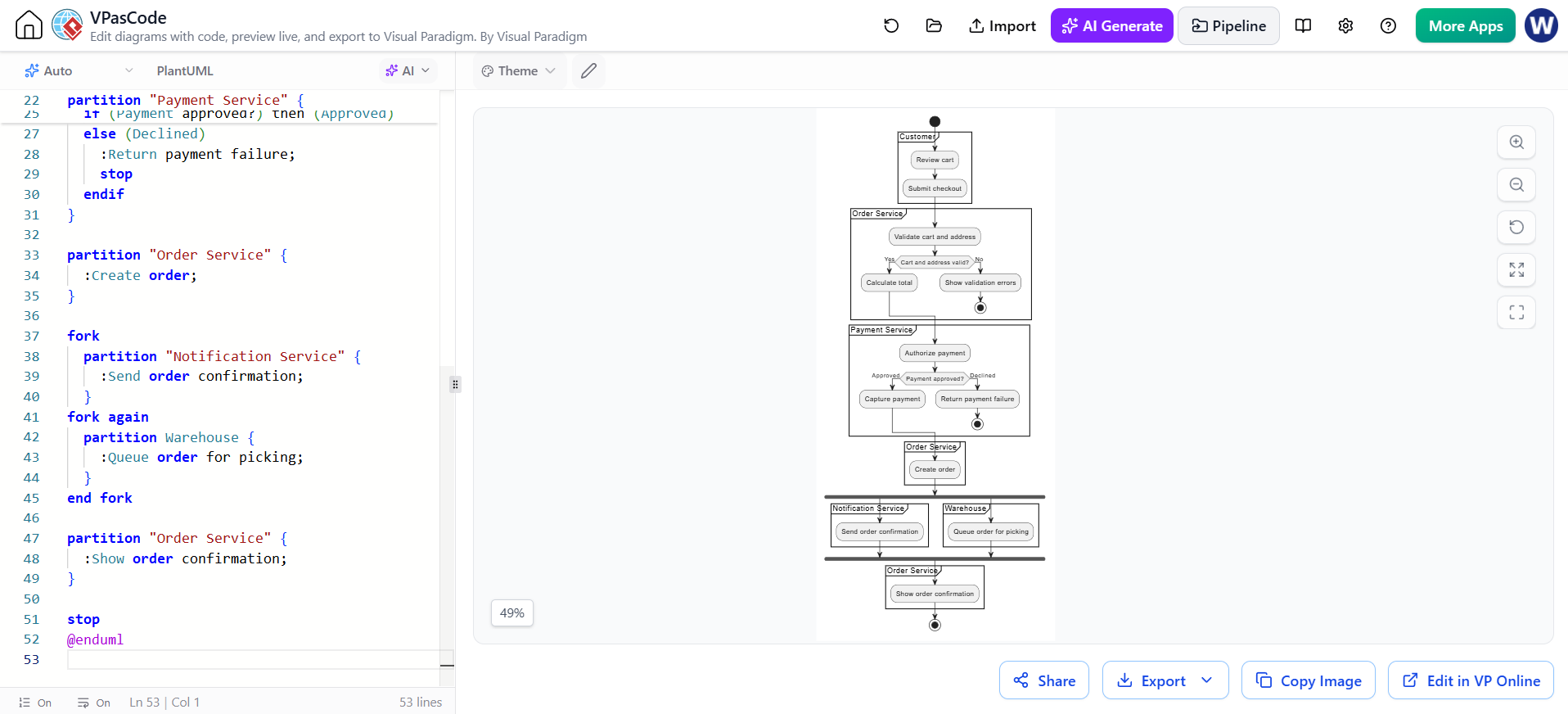
In the world of System Architecture and Business Process Modeling, few challenges are as critical as handling concurrent tasks efficiently. When designing complex systems like an e-commerce platform, you must ensure that while a warehouse is physically picking items, the customer is simultaneously receiving a digital confirmation of their purchase. This tutorial explores how to model this sophisticated flow using PlantUML Activity Diagrams within the VPasCode Editor provided by Visual Paradigm.
We will dissect a comprehensive “Online Checkout” example. This diagram demonstrates how to combine partitions (swimlanes) for service boundaries, decision logic for error handling, and forks for parallel execution.
The Architecture of an Online Checkout
The system is divided into four primary domains, each represented by a partition. This structure allows developers to visualize which service is responsible for specific actions.
1. The Customer Experience
The process begins in the Customer partition. Here, the flow is straightforward:
- Review Cart: The user inspects their items.
- Submit Checkout: The user initiates the transaction.
2. Validation Logic (Order Service)
Once submitted, the request moves to the Order Service. This partition handles the initial logic gates. The system must validate the data before proceeding. We use the if statement to represent this decision diamond:
- The Condition:
Cart and address valid? - The Success Path (Yes): If valid, the system calculates the total cost.
- The Failure Path (No): If invalid, the system shows validation errors and executes a
stopnode, effectively terminating this specific instance of the transaction.
3. Financial Processing (Payment Service)
Similar to validation, the Payment Service handles financial authorization. This is a critical failure point in real-world architectures. The diagram models a check:
- Authorize Payment: The system contacts the payment gateway.
- Decision:
Payment approved? - Approved: The system captures the funds.
- Declined: The system returns a payment failure and stops the process.
Implementing Parallelism with Forks
One of the most powerful features of the Activity Diagram is the ability to run tasks simultaneously. After the order is created, the system does not need to wait for one task to finish before starting the next. Instead, it splits the flow.
We use the fork keyword to create a synchronization barrier. This allows the system to execute two distinct paths at the same time:
- Notification Service: Sending the email confirmation to the user.
- Warehouse: Queuing the physical order for picking.
The fork again keyword indicates that the second branch of the parallel work is starting. Finally, the end fork keyword acts as a synchronization point, ensuring that the process does not proceed to the final “Show order confirmation” step until both the warehouse and the notification services have completed their respective tasks.
Step-by-Step Code Breakdown
Below is the raw PlantUML code used to generate this architecture. You can copy this directly into the VPasCode editor to see the result.
@startuml title Online Checkout
start
partition Customer {
  :Review cart;
  :Submit checkout;
}

partition "Order Service" {
  :Validate cart and address;
  if (Cart and address valid?) then (Yes)
    :Calculate total;
  else (No)
    :Show validation errors;
    stop
  endif
}

partition "Payment Service" {
  :Authorize payment;
  if (Payment approved?) then (Approved)
    :Capture payment;
  else (Declined)
    :Return payment failure;
    stop
  endif
}

partition "Order Service" {
  :Create order;
}

fork
  partition "Notification Service" {
    :Send order confirmation;
  }
fork again
  partition Warehouse {
    :Queue order for picking;
  }
end fork

partition "Order Service" {
  :Show order confirmation;
}
stop
@endumlWhy Use VPasCode for This?
Visual Paradigm’s VPasCode Editor bridges the gap between manual drawing and code-based generation. By writing the logic in text format, you gain:
- Version Control Friendly: Diagram code can be stored in Git alongside your application source code.
- Modifiability: Changing a partition name or adding a new parallel task is as simple as editing a line of text.
- Consistency: Automated rendering ensures that fonts, colors, and layout rules are applied uniformly across complex enterprise diagrams.
By mastering these syntax rules, you can transform complex architectural requirements into clear, executable visual models.