
Prompting AI for Flowcharts: A VPasCode Guide to Structured Process Modeling
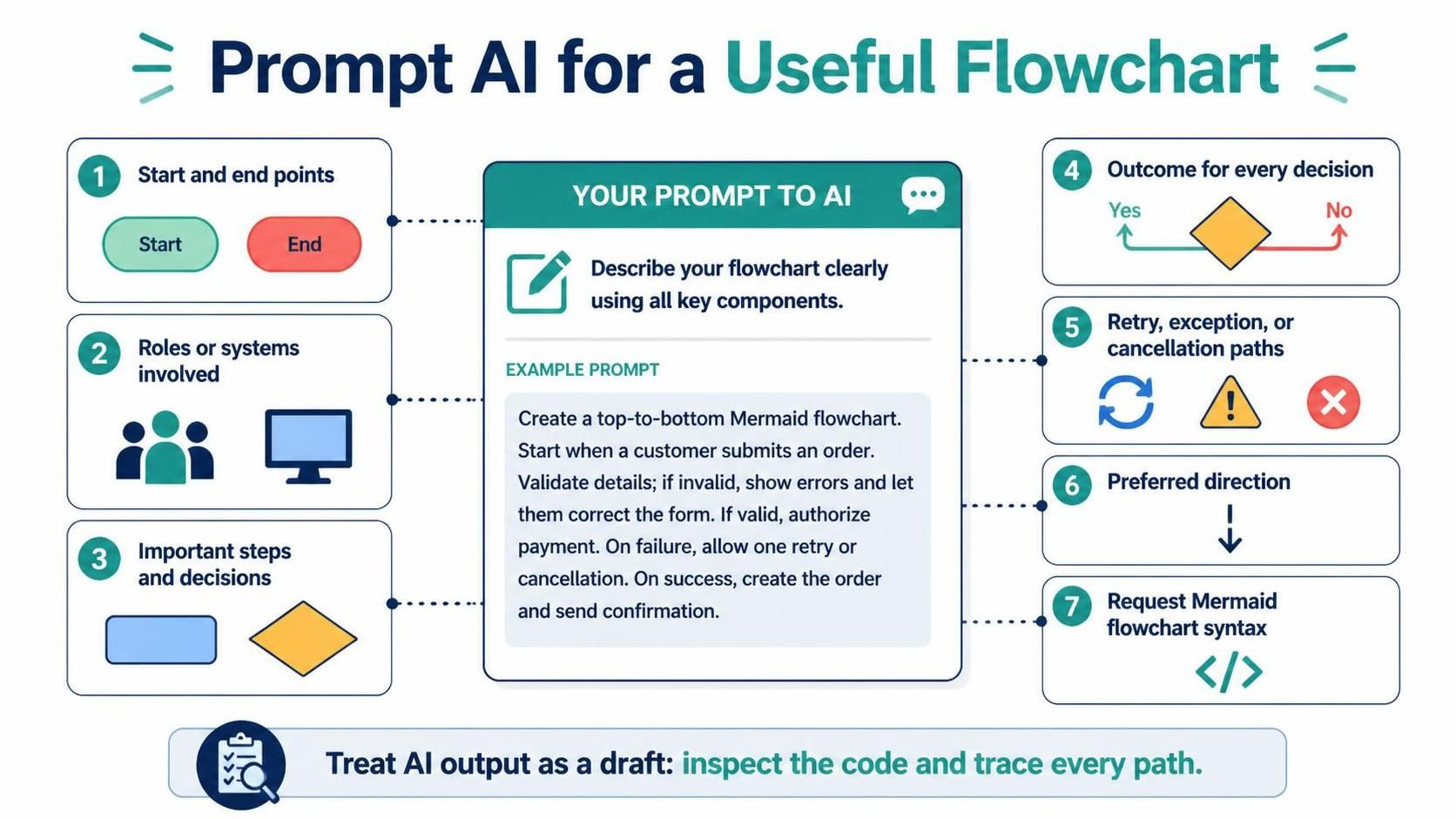
Generative AI has revolutionized how we create technical documentation, transforming complex process descriptions into visual diagrams instantly. However, the quality of the output is directly proportional to the specificity of the input. A flowchart is not merely a picture; it is a logic map that represents the deterministic and non-deterministic paths of a system. When prompting AI to generate a flowchart, the goal is to shift the focus from a general topic to a structured algorithm.
The Anatomy of a High-Quality Flowchart Prompt
To generate a functional diagram, the prompt must describe the process structure rather than just the subject matter. An effective prompt acts as a rigorous specification document for the AI. Based on industry best practices, a robust prompt must include the following seven critical components:
- Start and End Points: Clearly define the entry and exit states of the process.
- Roles and Systems: Identify the actors (e.g., users, external APIs, databases) involved.
- Steps and Decisions: List the sequential operations and the specific decision nodes where logic branches.
- Decision Outcomes: Explicitly state the result for every branch (e.g., “Yes” vs. “No”).
- Error Handling: Define paths for retries, exceptions, or cancellations.
- Layout Direction: Specify the visual flow, such as top-to-bottom (TD) or left-to-right (LR).
- Output Syntax: Request the specific code format, such as Mermaid flowchart syntax.
Contrasting Prompt Quality: Weak vs. Strong
Understanding the difference between a vague request and a technical specification is the key to successful AI modeling. Below is a comparison of a weak prompt against a highly structured, engineering-grade prompt.
The Weak Approach
A prompt like "Make an order flowchart" is too ambiguous. It forces the AI to hallucinate logic, potentially omitting critical validation steps or error handling paths that are essential for a real-world system.
The Strong Approach
A comprehensive prompt describes the algorithm. It instructs the AI to act as a developer and explicitly requests the code syntax. Consider this example prompt:
Create a top-to-bottom Mermaid flowchart for an online order checkout.
Start when the customer reviews the cart.
Collect shipping and payment details, validate them, and show errors if invalid.
If valid, authorize payment.
If payment fails, let the customer retry with another method or cancel.
If payment succeeds, create the order and send a confirmation.
Include explicit Yes/No labels on every decision branch.
From Draft to Logic: The Verification Process
AI models are probabilistic, not deterministic. While they are excellent at drafting diagrams, the generated output should always be treated as a draft codebase. The “human-in-the-loop” verification process is critical for ensuring the diagram accurately reflects the business requirements.
When reviewing the AI-generated diagram, perform the following audit:
- Trace the Logic: Follow every branch from start to finish. Does the “No” path actually lead back to a correction step?
- Check for Missing Paths: Ensure that exception paths (e.g., network timeouts, invalid data) are not ignored.
- Validate Syntax: If the code fails to render, check for unclosed brackets or mismatched arrow syntax.
Troubleshooting and Good Practices
When refining your flowcharts, you will encounter common technical hurdles. Here are strategies to resolve them:
1. Syntax Errors
Mermaid diagrams rely on strict syntax. If the rendering fails, check for:
- Mismatched identifiers (e.g.,
ID1vsid1). - Missing arrows or incorrect arrow types (
-->vs-->|Label|). - Special characters in labels that need to be escaped or quoted.
2. Unclear Branches
A decision node is useless without a label. Always explicitly label decision arrows using the syntax -- Yes --> and -- No -->. This eliminates ambiguity for both the reader and the rendering engine.
3. Layout Issues
If a diagram becomes a tangled web of lines, change the direction. Switch from the default Top-Down (TD) to Left-Right (LR) by adding flowchart LR to the start of the code. For very complex processes, split the diagram into multiple linked subgraphs.
4. Crowded Diagrams
Overcrowding occurs when implementation details (like specific database field names) are mixed with high-level logic. Simplify the labels. Use subgraph to group related steps, allowing you to treat a cluster of nodes as a single logical unit.
Long-Term Maintenance of Diagrams
Diagrams should not be static images; they are code. The best practice for technical documentation is to save the Mermaid source code alongside the project repository. This allows the diagram to be regenerated automatically, ensuring that the visual representation always matches the current system documentation.
A good flowchart allows a reader to follow every path without guessing. By combining AI-assisted drafting with rigorous human review, you create diagrams that are both syntactically valid and logically accurate.