
Mastering Return Messages in UML Sequence Diagrams with Visual Paradigm
When designing complex software systems, the flow of data and control is just as critical as the logic itself. In the realm of Unified Modeling Language (UML), Sequence Diagrams serve as the primary narrative for these interactions, depicting how objects communicate over time. A fundamental yet often misunderstood component of these diagrams is the Return Message. While developers frequently focus on the initial “call” to initiate a function, the return mechanism is what completes the transaction, allowing the system to proceed.
This tutorial will deconstruct the mechanics of return messages, specifically utilizing the Visual Paradigm tool to ensure your diagrams are both accurate and professional. We will explore how to model the transition from an asynchronous or synchronous action back to the control of the sender.
The Anatomy of a Return Message
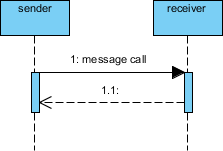
In the diagram provided, we observe a classic interaction between two entities: a sender and a receiver. The interaction is governed by a specific visual syntax defined by the UML standard.
1. The Synchronous Call (The Request)
The interaction begins with a solid line connecting the sender to the receiver, labeled “1: message call”. This represents a synchronous call. In technical terms, the sender waits for the receiver to process the request before continuing its own execution. The sender’s timeline is effectively paused until the receiver sends a response.
2. The Activation Bar
Notice the vertical blue rectangles on the dashed lifelines. These are known as activation bars (or execution occurrences). When the sender issues the call, the receiver’s activation bar begins. This indicates that the receiver is currently executing an operation or is “active.” This visual cue is crucial for understanding the duration of the processing.
3. The Return Arrow (The Response)
Once the receiver completes its task, it must communicate this back to the sender. This is depicted by a dashed line with an open arrowhead pointing back to the sender. In the example, this is labeled “1.1:”. This specific arrow type signifies:
- Return of Control: The receiver is finished and control is passed back to the sender.
- Return of Data: The receiver is sending the result of the computation back to the caller.
- Asynchronous Completion: Even if the initial call was synchronous, the return path is distinctively dashed to differentiate the request from the response.
Implementing Return Messages in Visual Paradigm
To create professional, standard-compliant diagrams, tooling is essential. Visual Paradigm (specifically the free tool version) offers a robust environment for UML modeling. When constructing a sequence diagram, you do not need to manually draw dashed lines to represent returns; the tool handles the logic.
Step-by-Step Implementation Guide
- Define the Participants: Start by dragging two Actor or Object symbols onto the canvas. Rename them to “sender” and “receiver” to match your system’s terminology.
- Initiate the Call: Use the “Message” tool to draw a solid arrow from the sender to the receiver. Label this “message call”.
- Generate the Return: In Visual Paradigm, you have two primary options to generate the return message:
- Automatic Generation: If you are modeling a method call (e.g.,
object.method()), the tool often automatically recognizes the scope and can generate the return arrow when you complete the message definition. - Manual Drawing: If you require a specific return message that isn’t a direct method return, select the “Return Message” tool. Draw a dashed line from the receiver’s activation bar back to the sender’s activation bar.
- Labeling: Ensure you label the return message. In complex diagrams, you might label it “return success” or “return null” to clarify the outcome of the operation.
Best Practices for Modeling Return Flows
When modeling systems, clarity is paramount. A return message is not just a line on a diagram; it represents the completion of a transaction. When using Visual Paradigm to architect your system, adhere to these conventions:
- Consistency in Arrowheads: Always use the open arrowhead for return messages. Do not use a solid arrowhead for returns, as this violates UML standards and implies another call rather than a return.
- Matching Indices: Notice the labels “1” and “1.1” in the diagram. This numbering convention indicates that the return message belongs to the first interaction. If you have a recursive call or a sub-process, you might see “1.1.1”. This hierarchical labeling is vital for debugging complex logic.
- Vertical Alignment: Ensure the return arrow originates from the bottom of the receiver’s activation bar and ends at the sender’s activation bar. This visual alignment reinforces the concept that control is returned to the exact point where the caller paused.
Conclusion
Understanding the distinction between the solid call arrow and the dashed return arrow is fundamental to reading and writing UML sequence diagrams. It allows architects and developers to visualize the “handshake” of data transfer. By leveraging the capabilities of Visual Paradigm, you can ensure these diagrams are not only technically accurate but also intuitively readable, serving as a blueprint for high-quality software architecture.