
Mastering BPMN Decision Logic: The Send Task Rejection Pattern
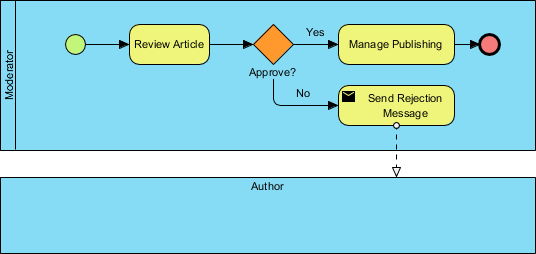
In the world of Business Process Model and Notation (BPMN), efficiency lies not just in defining steps, but in handling exceptions gracefully. The diagram below illustrates a critical pattern in workflow management: the Rejection and Notification Loop. This specific flow demonstrates how a system handles an “unsuccessful” outcome from a decision point without breaking the process flow.
Understanding the System Architecture
The diagram depicts a process owned by a Moderator responsible for vetting content before publication. The architecture is simple yet powerful, designed to ensure that no request is lost. If the content fails the review, the system doesn’t just stop; it actively communicates the failure back to the Author.
The Flow Breakdown
To understand this architecture, we must trace the path from the start event to the final outcome:
- Start Event: The process initiates when a moderation task is required. The green circle indicates the beginning of this specific workflow instance.
- Review Article (Task): This is a manual user task where the moderator evaluates the submitted content. It represents the core cognitive work of the process.
- Gateway (Decision): The orange diamond labeled “Approve?” is an Exclusive Gateway. It acts as the fork in the road, forcing the process to choose exactly one path based on the moderator’s decision.
- The “Yes” Path: If the article meets the criteria, the flow moves to “Manage Publishing,” leading to the termination of the process.
- The “No” Path: If the article is rejected, the flow diverts to the Send Rejection Message task.
Deep Dive: The Power of the Send Task
The most technically significant element in this diagram is the Send Task (indicated by the envelope icon) labeled “Send Rejection Message.” In many low-level systems, a rejection might simply be a database update or a log entry. However, in high-level BPMN modeling, we distinguish between internal actions and external communication.
A Send Task is specifically designed to represent the creation and delivery of a message to an external entity or a different pool. In this scenario, the “No” path does not just end; it triggers an asynchronous event. This implies that the Author receives a notification (likely via email or a system alert) that their submission was rejected, allowing them to take corrective action or abandon the request.
The dashed line connecting the Send Task to the Author’s pool signifies an asynchronous message flow. This is crucial for system decoupling—the Moderator’s workflow is not blocked waiting for the Author to acknowledge the rejection; the message is “sent and forgotten” from the perspective of the sending process.
Modeling Best Practices
When modeling this scenario in Visual Paradigm, precision is key. You must ensure that the connection between the Gateway and the Send Task is a standard sequence flow, indicating an immediate transition. However, the connection between the Send Task and the Author must be a message flow to correctly represent the asynchronous nature of the rejection.
Conclusion
This diagram serves as a perfect example of robust system design. By explicitly modeling the rejection path and utilizing the Send Task, the process ensures transparency and accountability. The Author is never left in the dark, and the system maintains a clear audit trail of why articles were rejected.