
Mastering BPMN with Visual Paradigm: A Structured Workflow for Enterprise Process Modeling
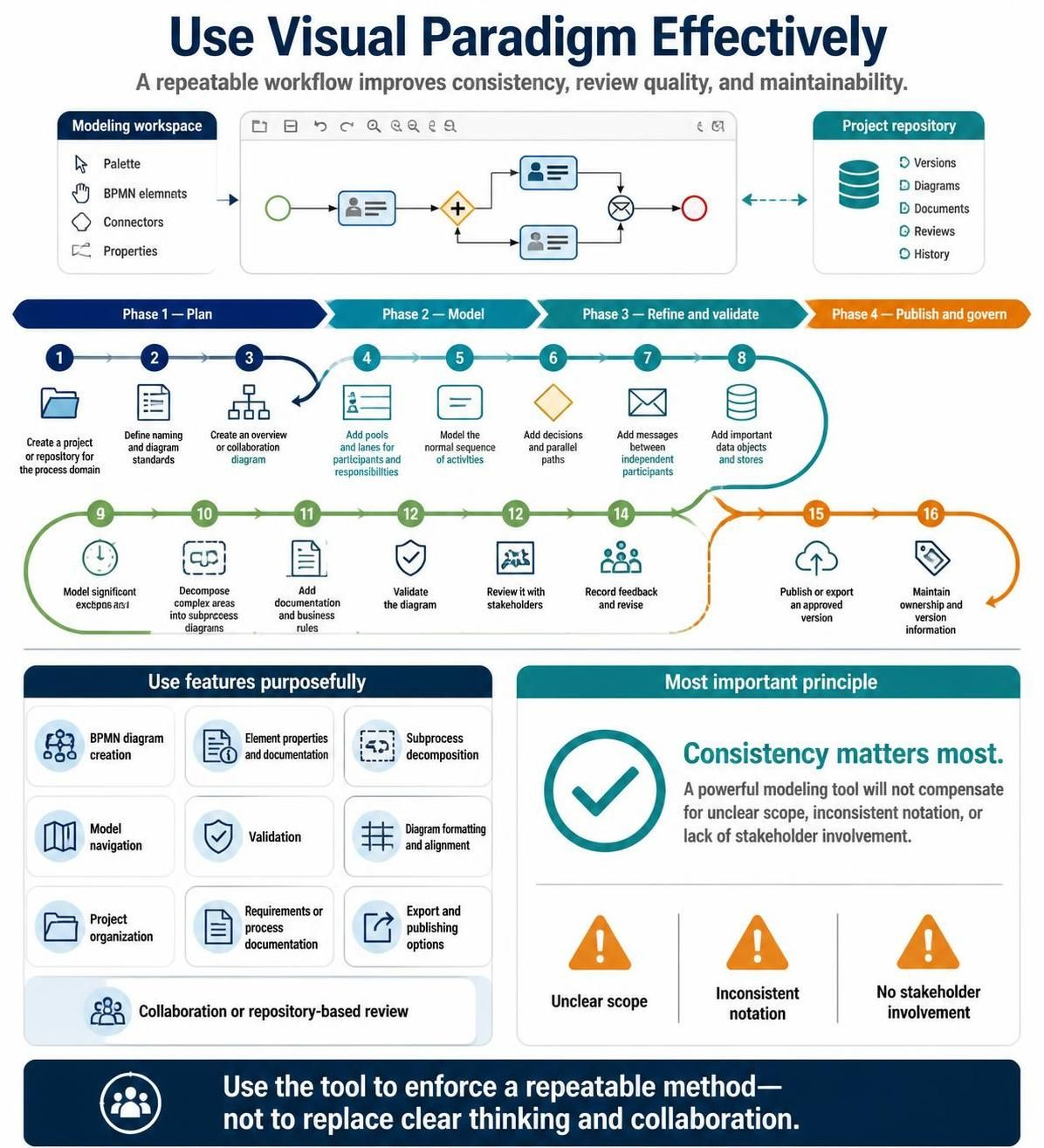
Effective business process modeling requires more than just a sophisticated software tool; it demands a disciplined approach to ensure that diagrams are accurate, maintainable, and understandable by all stakeholders. Visual Paradigm is a powerful enterprise modeling solution, but to leverage its full potential, users must adhere to a structured workflow. This tutorial explores the essential architecture of process modeling using Visual Paradigm, guiding you through the planning, creation, refinement, and governance phases.
The Modeling Architecture: Workspace and Repository
Before beginning the actual modeling, it is crucial to understand the foundational architecture of the Visual Paradigm environment. The tool relies on a symbiotic relationship between the Modeling Workspace and the Project Repository.
The Modeling Workspace
The workspace is your active canvas where the creative work happens. It provides the immediate tools necessary for construction and editing:
- Palette: The toolbar containing specific BPMN shapes and elements.
- Elements: The core building blocks of your diagrams, such as Pools, Lanes, Tasks, and Gateways.
- Connectors: The tools used to define the flow, sequence, and message paths between elements.
- Properties: The panel for configuring the attributes and behaviors of selected elements.
The Project Repository
While the workspace is for active creation, the repository is the backbone of governance. It ensures that your work is organized, versioned, and collaborative. Key components include:
- Versions: Tracking changes over time.
- Diagrams: Organizing the specific views and models.
- Documents: Storing associated text-based requirements or business rules.
- Reviews: Managing the feedback loop with stakeholders.
The Recommended 16-Step Workflow
To achieve consistency and high-quality output, Visual Paradigm recommends a four-phase workflow. Following these steps ensures that you do not miss critical details and that the final model is ready for execution or analysis.
Phase 1: Plan
Modeling begins before you draw the first shape. This phase focuses on setting the boundaries and standards for your project.
- Create a project or repository for the process domain: Initialize the environment to ensure all data is stored centrally and organized.
- Define naming and diagram standards: Establish a consistent vocabulary (e.g., naming conventions for tasks) to avoid confusion later.
- Create an overview or collaboration diagram: Sketch the high-level view to understand the scope and participants before diving into details.
Phase 2: Model
This is the core construction phase where the logic of the process is translated into BPMN notation.
- Add pools and lanes for participants and responsibilities: Define who is doing what. Pools represent organizations/parties, while lanes represent specific roles within them.
- Model the normal sequence of activities: Draw the happy path—the ideal flow from start to finish.
- Add decisions and parallel paths: Introduce gateways to handle logic (XOR, AND) and parallel execution.
- Add messages between independent participants: Connect different Pools to show communication flows.
- Add important data objects and stores: Identify the inputs and outputs (documents, data) that flow through the process.
Phase 3: Refine and Validate
A rough model is rarely sufficient. This phase involves deepening the complexity and ensuring the logic holds up under scrutiny.
- Model significant exceptions and timeouts: Plan for what happens when things go wrong or when an activity takes too long.
- Decompose complex areas into subprocess diagrams: If a task is too complex, break it down into a separate, detailed diagram to maintain readability.
- Add documentation and business rules: Attach text, rules, or constraints to specific elements to explain the “why” and “how.”
- Validate the diagram: Use the tool’s built-in validation engine to check for syntax errors or logical inconsistencies.
- Review it with stakeholders: Present the model to the business owners to verify accuracy.
- Record feedback and revise: Iterate on the model based on the review session.
Phase 4: Publish and Govern
The final phase is about distribution and long-term maintenance.
- Publish or export an approved version: Generate the final artifacts for execution, printing, or sharing.
- Maintain ownership and version information: Ensure that the repository tracks who owns the process and manages future updates.
Strategic Tooling: Features to Use Purposefully
Visual Paradigm offers a vast array of capabilities. However, power without direction leads to clutter. The following features should be utilized purposefully to enhance the quality of your models:
- BPMN Diagram Creation: The foundational capability for drawing.
- Element Properties and Documentation: Essential for adding business rules and detailed descriptions.
- Subprocess Decomposition: Critical for managing complexity in large systems.
- Model Navigation: Allows users to jump between high-level overviews and detailed subprocesses seamlessly.
- Validation: Ensures the diagram adheres to BPMN standards.
- Diagram Formatting and Alignment: Automated tools to keep the visual layout clean.
- Project Organization: Keeps the repository tidy.
- Export and Publishing Options: For delivering the final result.
- Collaboration or Repository-based Review: Facilitates team input.
The Most Important Principle: Consistency
While Visual Paradigm provides powerful tooling, the most critical factor in successful modeling is consistency. A powerful modeling tool will not compensate for unclear scope, inconsistent notation, or a lack of stakeholder involvement. The tool enforces a repeatable method, but it cannot replace clear thinking and collaboration.
Be wary of the common pitfalls that undermine process modeling:
- Unclear Scope: If the boundaries of the process are not defined, the model will be incomplete.
- Inconsistent Notation: Using different symbols for the same concept confuses the reader.
- No Stakeholder Involvement: Without feedback from the people who actually perform the work, the model is merely theoretical.
Conclusion
In conclusion, mastering Visual Paradigm requires moving beyond simple diagramming to adopting a rigorous, enterprise-grade workflow. By systematically following the recommended 16-step process—from initial planning and repository setup to the final governance of versions—you ensure that your BPMN models are not just visually appealing, but logically sound and actionable.
The Recommended tooling of Visual Paradigm BPMN Tool includes a comprehensive suite of capabilities such as advanced subprocess decomposition, robust validation engines, collaborative repository features, and flexible export options. However, the true value lies not in the software itself, but in the disciplined application of these features to enforce consistency, clarity, and stakeholder engagement throughout the lifecycle of your process models.