

Introduction
Business Process Model and Notation (BPMN) is the de facto standard for modeling business processes, providing a visual language that bridges the gap between business stakeholders and technical implementers. At the heart of effective BPMN diagrams are gateways—the decision points that control how process flows diverge and converge.
Many practitioners struggle with choosing the right gateway type, leading to ambiguous models, implementation errors, or inefficient processes. This comprehensive guide demystifies the three primary gateway types—Exclusive, Inclusive, and Parallel—providing clear criteria for selection, practical examples, and best practices using Visual Paradigm as your modeling tool.
Whether you’re a business analyst, product manager, or process architect, mastering gateway selection will elevate your process models from simple flowcharts to executable, unambiguous blueprints.
Key Concepts: Understanding Gateway Types
1. Exclusive Gateway (XOR)
Definition: An exclusive gateway represents a decision point where exactly one path is chosen based on conditions. It’s the “either/or” of BPMN.
Visual Symbol: Diamond with an “X” inside (or no marker in some tools).
When to Use:
-
Mutually exclusive conditions
-
Single-choice decisions
-
Branching logic where only one outcome is valid
Behavior:
-
Diverging: Evaluates conditions sequentially; takes the first true path
-
Converging: Waits for any incoming flow to arrive (no synchronization needed)
Example in Visual Paradigm:
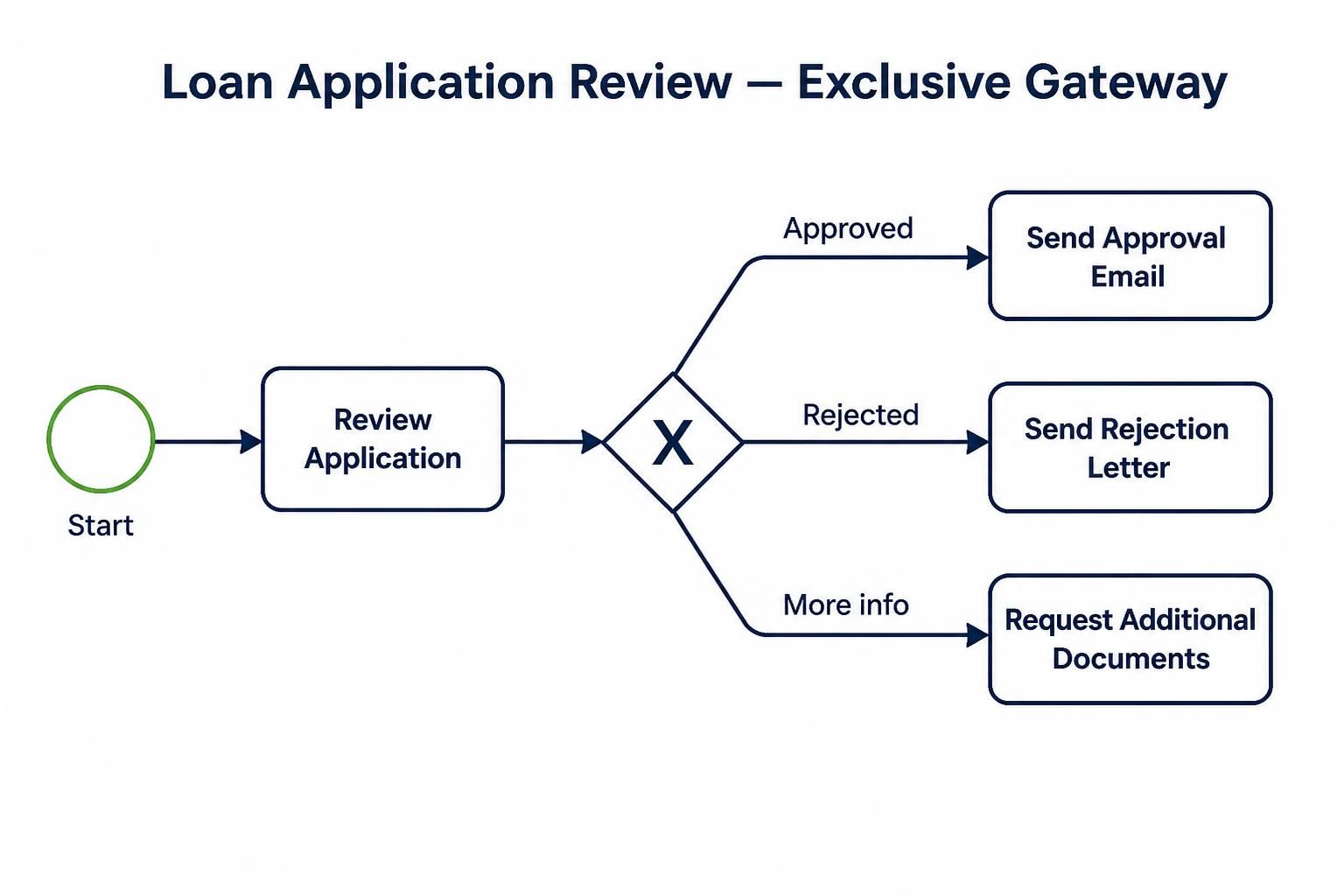
[Start] → [Review Application] → ◇(Exclusive)
                                    ├─ Approved? → [Send Approval Email]
                                    ├─ Rejected? → [Send Rejection Letter]
                                    └─ More Info? → [Request Additional Documents]
Real-World Scenario: Loan application review where an application can only be approved, rejected, or require more information—not multiple outcomes simultaneously.
2. Inclusive Gateway (OR)
Definition: An inclusive gateway allows one or more paths to be taken based on conditions. Multiple branches can activate simultaneously.
Visual Symbol: Diamond with an “O” inside.
When to Use:
-
Non-mutually exclusive conditions
-
Optional parallel activities
-
Scenarios where zero, one, or many paths may execute
Behavior:
-
Diverging: Evaluates all conditions; activates all true paths
-
Converging: Waits for all active incoming flows to complete before proceeding
Example
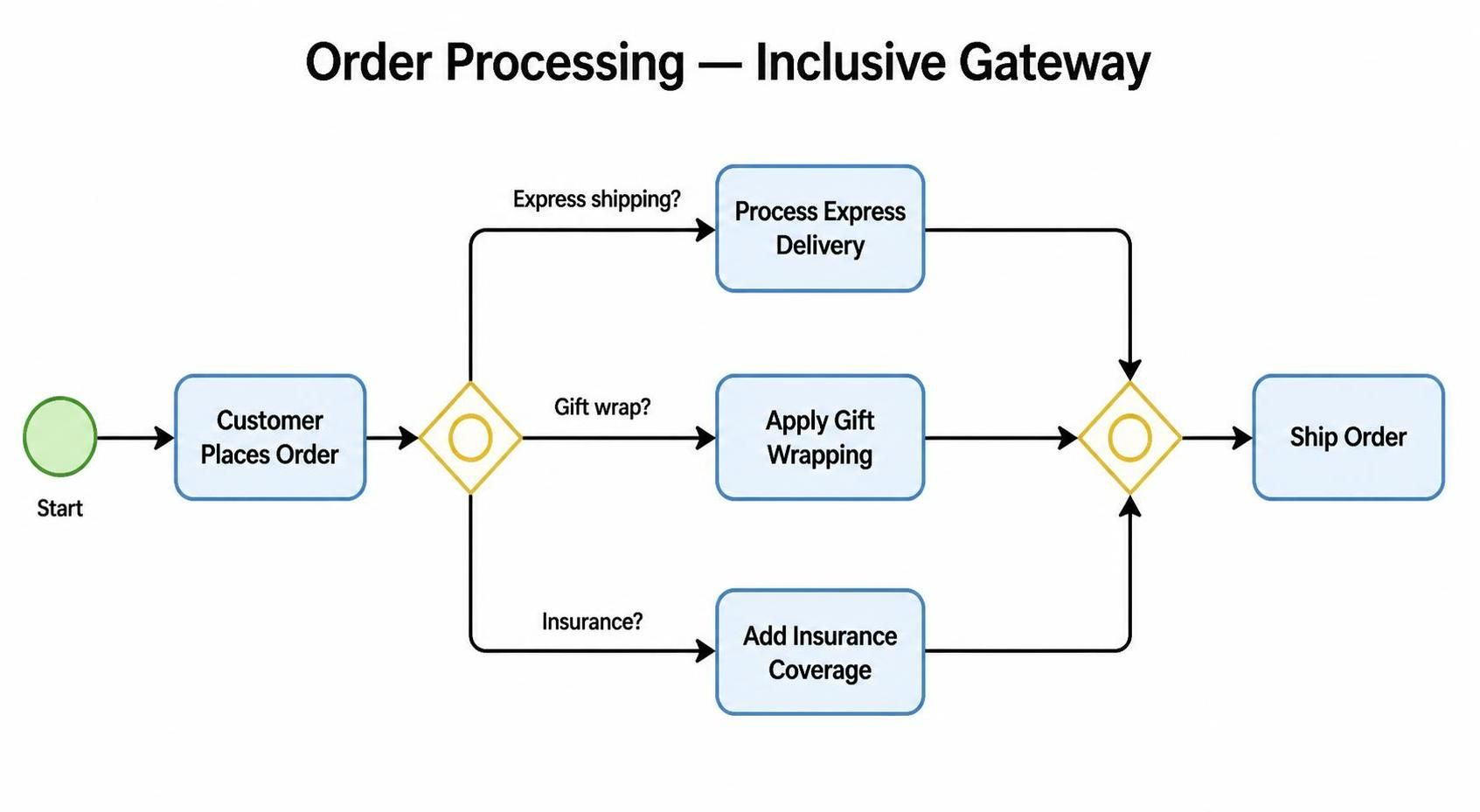
[Start] → [Customer Places Order] → ◇(Inclusive)
                                      ├─ Express Shipping? → [Process Express Delivery]
                                      ├─ Gift Wrap? → [Apply Gift Wrapping]
                                      └─ Insurance? → [Add Insurance Coverage]
                                   → ◇(Inclusive Converge) → [Ship Order]
Real-World Scenario: E-commerce checkout where a customer might select express shipping AND gift wrapping AND insurance—all optional and combinable.
Critical Note: The converging inclusive gateway must wait for all activated branches to complete. If no condition is true, the process may deadlock—always ensure at least one path is guaranteed or add a default flow.
3. Parallel Gateway (AND)
Definition: A parallel gateway splits the flow into all outgoing paths simultaneously without evaluating conditions. It’s used for true parallelism.
Visual Symbol: Diamond with a “+” inside.
When to Use:
-
Activities that must occur concurrently
-
No conditional logic required
-
Independent tasks that can run in parallel
Behavior:
-
Diverging: Activates all outgoing flows immediately
-
Converging: Waits for all incoming flows to complete before proceeding (synchronization)
Example
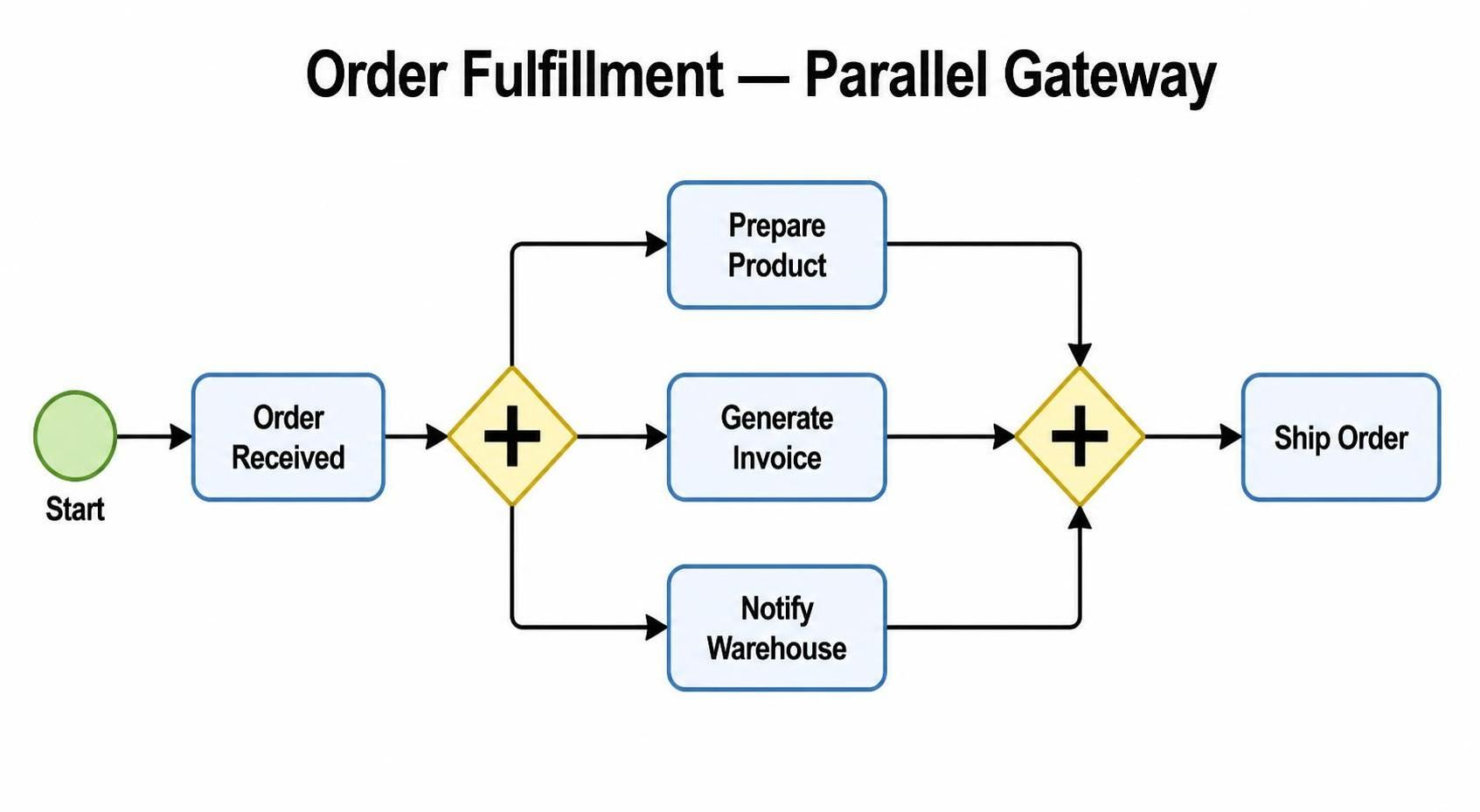
[Start] → [Order Received] → ◇(Parallel Split)
                               ├─ [Prepare Product] → ◇(Parallel Join)
                               ├─ [Generate Invoice] → ◇(Parallel Join)
                               └─ [Notify Warehouse] → ◇(Parallel Join)
                                                    → [Ship Order]
Real-World Scenario: After receiving an order, three independent teams work simultaneously: warehouse prepares the product, finance generates the invoice, and logistics notifies the carrier. All three must complete before shipping.
Decision Framework: How to Choose the Right Gateway
Use this decision tree when modeling:
Step 1: Are conditions involved?
-
Yes → Go to Step 2
-
No (all paths always execute) → Parallel Gateway
Step 2: Can multiple conditions be true simultaneously?
-
No (mutually exclusive) → Exclusive Gateway
-
Yes (non-exclusive) → Inclusive Gateway
Step 3: For converging gateways, do you need synchronization?
-
Exclusive converging: No sync needed (any path works)
-
Inclusive converging: Wait for all activated paths
-
Parallel converging: Wait for all paths
Practical Examples with Visual Paradigm
Example 1: Employee Onboarding (Mixed Gateways)
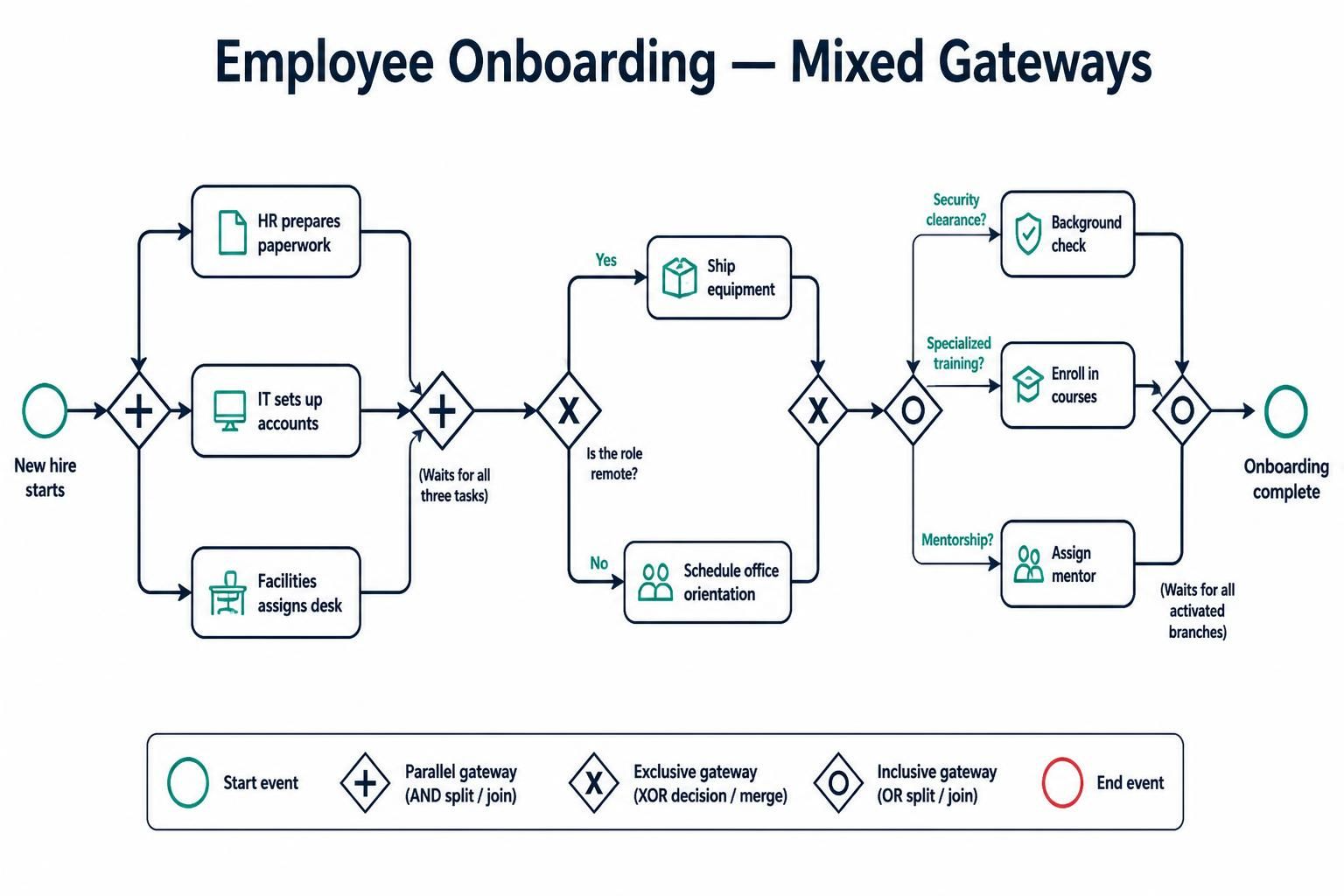
Process Flow:
-
New hire starts
-
Parallel Gateway: HR prepares paperwork IT sets up accounts Facilities assigns desk
-
Exclusive Gateway: Is the role remote?
-
Yes → Ship equipment
-
No → Schedule office orientation
-
-
Inclusive Gateway: Does the employee need:
-
Security clearance? → Background check
-
Specialized training? → Enroll in courses
-
Mentorship? → Assign mentor
-
-
Inclusive Converge: Wait for all selected activities
-
Onboarding complete
Visual Paradigm Tips:
-
Use swimlanes to show departmental responsibilities
-
Label each gateway clearly (e.g., “Remote Work Decision”)
-
Add annotations explaining complex inclusive conditions
Example 2: Insurance Claim Processing
Scenario: A claim may trigger multiple investigations simultaneously, but payout requires exclusive approval paths.
Model Structure:
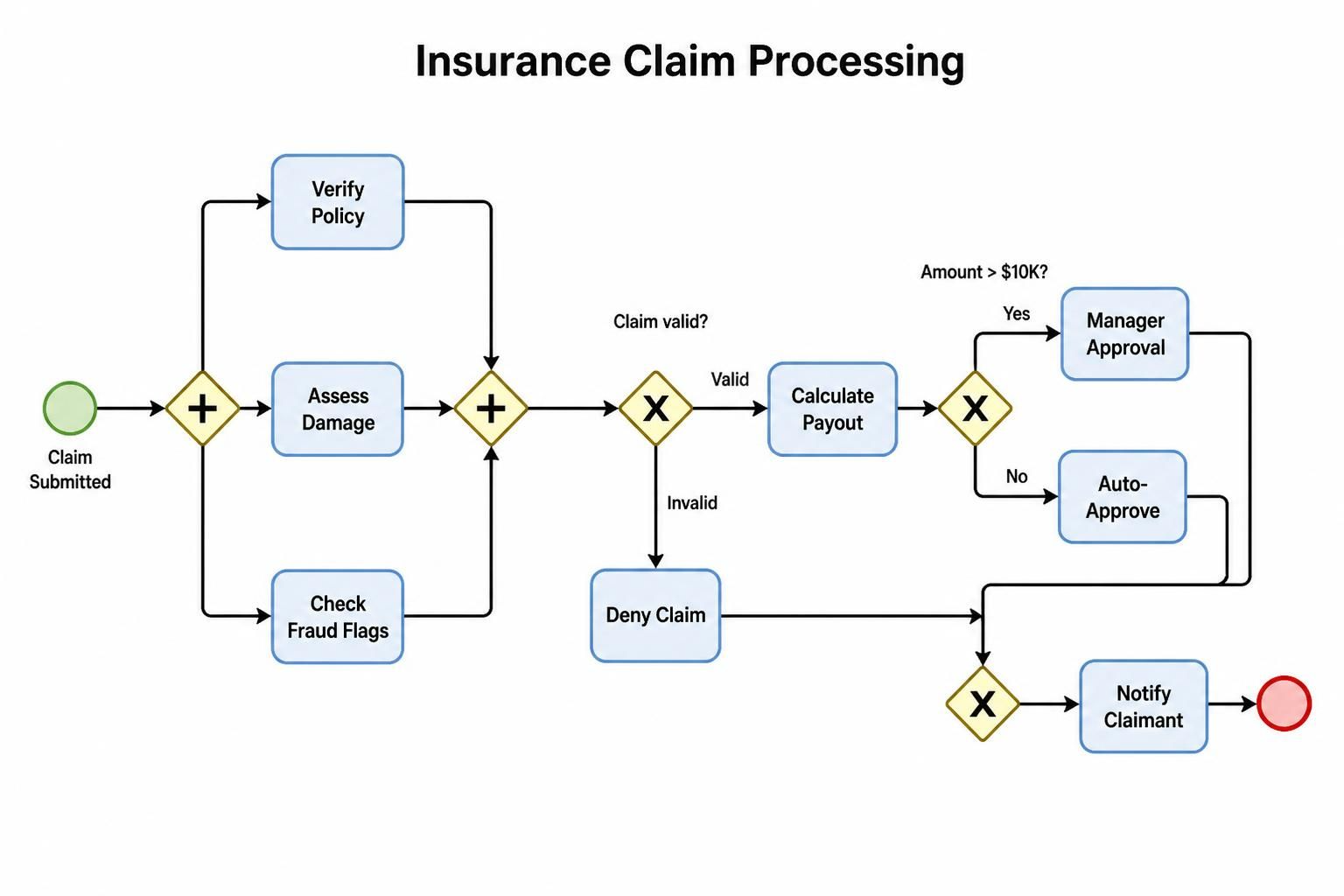
[Claim Submitted] → ◇(Parallel)
                      ├─ [Verify Policy] →
                      ├─ [Assess Damage] →
                      └─ [Check Fraud Flags] →
                   → ◇(Parallel Join)
                   → ◇(Exclusive: Claim Valid?)
                      ├─ Valid → [Calculate Payout] → ◇(Exclusive: Amount > $10K?)
                      │                                  ├─ Yes → [Manager Approval]
                      │                                  └─ No → [Auto-Approve]
                      └─ Invalid → [Deny Claim]
                   → [Notify Claimant]
Key Insight: Notice the nested exclusive gateways for hierarchical decision-making.
Common Mistakes and How to Avoid Them
❌ Mistake 1: Using Exclusive Gateway for Parallel Tasks
Problem: Modeling concurrent activities with exclusive gateways implies only one will execute.
Solution: Use Parallel Gateway when all paths must run.
❌ Mistake 2: Forgetting Synchronization with Inclusive Gateways
Problem: Not understanding that converging inclusive gateways wait for all activated branches, leading to deadlocks if conditions aren’t carefully designed.
Solution: Always ensure at least one path is guaranteed, or use a default flow.
❌ Mistake 3: Overusing Parallel Gateways
Problem: Creating unnecessary complexity by parallelizing tasks that could be sequential.
Solution: Ask: “Do these tasks truly need to happen at the same time?” If not, keep it simple.
❌ Mistake 4: Ambiguous Conditions
Problem: Overlapping or unclear conditions in exclusive/inclusive gateways.
Solution: Define mutually exclusive, exhaustive conditions. Document them in Visual Paradigm’s documentation panel.
Best Practices for Visual Paradigm Users
-
Consistent Naming Convention:
-
Label gateways descriptively: “Payment Method Selection” vs. just “Gateway”
-
Use Visual Paradigm’s label positioning features for clarity
-
-
Leverage Color Coding:
-
Use different colors for different gateway types (customizable in Visual Paradigm)
-
Highlight critical decision points
-
-
Documentation Integration:
-
Add notes to each gateway explaining the business logic
-
Use Visual Paradigm’s model documentation feature to generate readable specs
-
-
Validation Tools:
-
Run Visual Paradigm’s BPMN validation to catch structural errors
-
Check for unreachable paths or deadlocks
-
-
Simulation Mode:
-
Use Visual Paradigm’s process simulation to test gateway logic before implementation
-
Verify that inclusive gateways don’t create deadlocks
-
-
Version Control:
-
Track changes to gateway logic using Visual Paradigm’s versioning features
-
Document why gateway types were changed
-
Advanced Considerations
Event-Based Gateways
While not covered in depth here, BPMN also includes event-based gateways that branch based on events rather than conditions. These are useful for reactive processes.
Complex Gateways
For highly complex scenarios, BPMN supports complex gateways with custom behavior, but these should be used sparingly due to reduced readability.
Gateway Anti-Patterns
-
Gateway Sprawl: Too many gateways in sequence; consider simplifying the process
-
Hidden Logic: Business rules embedded in gateways without documentation
-
Unbalanced Flows: Uneven distribution of work after parallel splits
Conclusion
Choosing the right BPMN gateway is fundamental to creating clear, executable process models. Remember:
-
Exclusive Gateway (XOR): One path only—use for mutually exclusive decisions
-
Inclusive Gateway (OR): One or more paths—use for optional, combinable activities
-
Parallel Gateway (AND): All paths always—use for true concurrency
Visual Paradigm provides robust tools for modeling, validating, and simulating these gateways, ensuring your processes are both visually clear and logically sound. By applying the decision framework and best practices outlined in this guide, you’ll create BPMN diagrams that effectively communicate process logic to stakeholders and serve as reliable blueprints for automation.
Master these gateway types, and you’ll transform ambiguous workflows into precise, actionable models that drive operational excellence.
Quick Reference Table
| Gateway Type | Symbol | Diverging Behavior | Converging Behavior | Use Case |
|---|---|---|---|---|
| Exclusive | ✕ | First true condition | Any incoming flow | Single-choice decisions |
| Inclusive | ○ | All true conditions | All active flows | Optional parallel tasks |
| Parallel | + | All flows | All flows | True concurrency |