


Introduction
When I first started reviewing and designing business process models, one of the most frequent points of confusion I encountered among teams was the proper application of boundary events in BPMN 2.0. Specifically, the distinction between interrupting and non-interrupting events often tripped up even experienced modelers. From a user experience (UX) and system design perspective, choosing the wrong event type can lead to frustrated users, lost data, or missed critical alerts. In this guide, I want to share my practical insights and review how these two event types function, drawing on real-world scenarios to help you apply them effectively in your own process models.
The Core Difference: A Reviewer’s Perspective
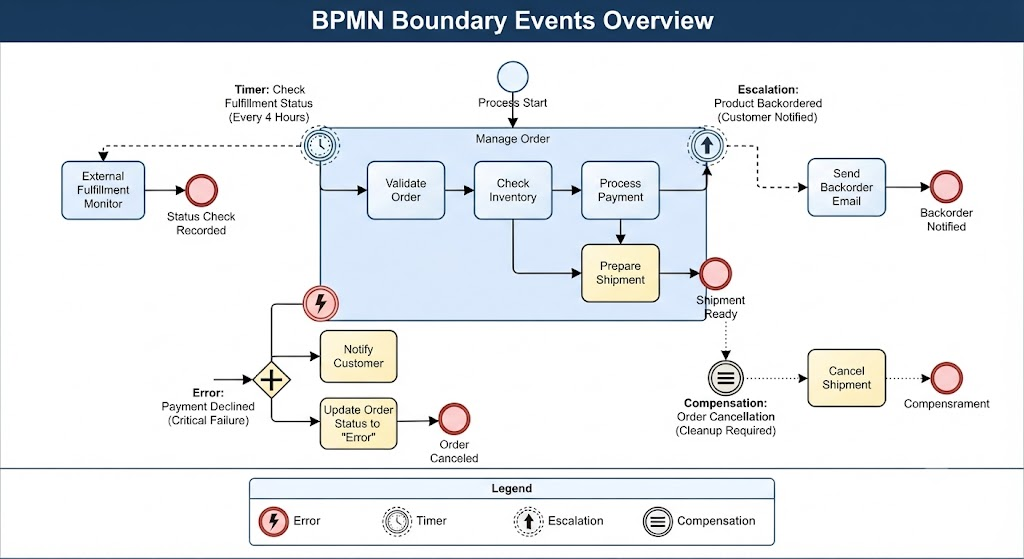
In my experience reviewing BPMN 2.0 diagrams, the primary difference between interrupting and non-interrupting events boils down to a single question: Does the attached activity continue to run after the event is triggered? These are typically used as attached events on the boundary of a task or sub-process to handle spontaneous occurrences.
Interrupting Events
When I evaluate a process for critical failure handling, I look for interrupting events.
-
Definition: When an interrupting event triggers, the execution of the current activity stops immediately.
-
Behavior: The process flow is diverted entirely to the path following the event.
-
UX Impact: From a user experience standpoint, this means the user’s current screen or task is abruptly halted. It should only be used when the situation demands absolute precedence.
-
Example: In an order fulfillment process I reviewed recently, an error event labeled “undeliverable” was attached to a procurement activity. If this error occurs, the procurement stops, and the process moves to handle the error, such as removing the item from a catalog.
Non-Interrupting Events
On the flip side, I often recommend non-interrupting events for scenarios where we need to monitor or assist without disrupting the user’s primary flow.
-
Definition: A non-interrupting event catches and handles an occurrence without aborting the activity it is attached to.
-
Behavior: Currently active threads are neither terminated nor affected. Instead, a new token is produced that follows the path of the event handling, while the original activity continues its execution in parallel.
-
Example: An escalation event labeled “late delivery” can be attached to the same procurement activity. If triggered, the procurement continues, but a new path is started to inform the customer of the delay.
-
Additional Use Case: In an E-Mail Voting example I analyzed, a non-interrupting Message Start Event was used within an event sub-process so that multiple votes could be collected over time without stopping the main voting period.
Case Study: Account Verification & Security
To illustrate the functional contrast between these two types of boundary events, let me walk you through a User Account Verification process I recently reviewed for a modern web application. This is a common scenario where getting the event logic right is crucial for both security and user satisfaction.
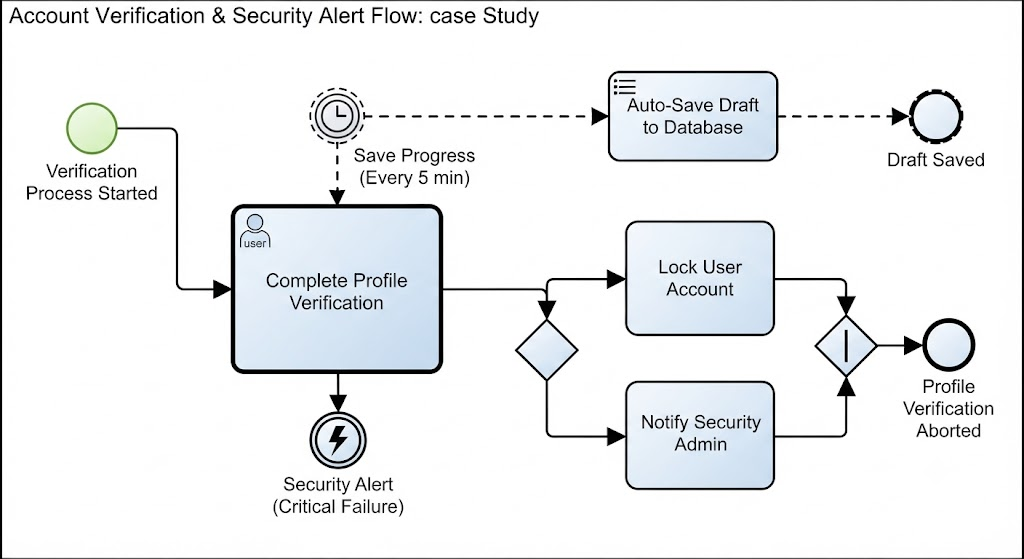
Imagine a task called “Complete Profile Verification” performed by the user. We needed to handle two different scenarios: one requiring immediate action and one simply needing to log information.
1. Interrupting Boundary Event: “Security Alert”
-
Trigger: A “Security Alert” Error Event attached to the “Complete Profile Verification” task.
-
Behavior: If the system detects a potential account compromise (e.g., login from a blacklisted IP address) while the user is filling out their profile, the interrupting event triggers.
-
Outcome & UX Impact: The “Complete Profile Verification” task is immediately aborted. The user is logged out, their session is destroyed, and the process flow is diverted to a “Lock Account and Notify Admin” path. The user is prevented from finishing the profile because the security risk takes absolute precedence. In my review, this was deemed the correct approach, as allowing the user to continue would pose a severe security risk.
2. Non-Interrupting Boundary Event: “Save Progress Reminder”
-
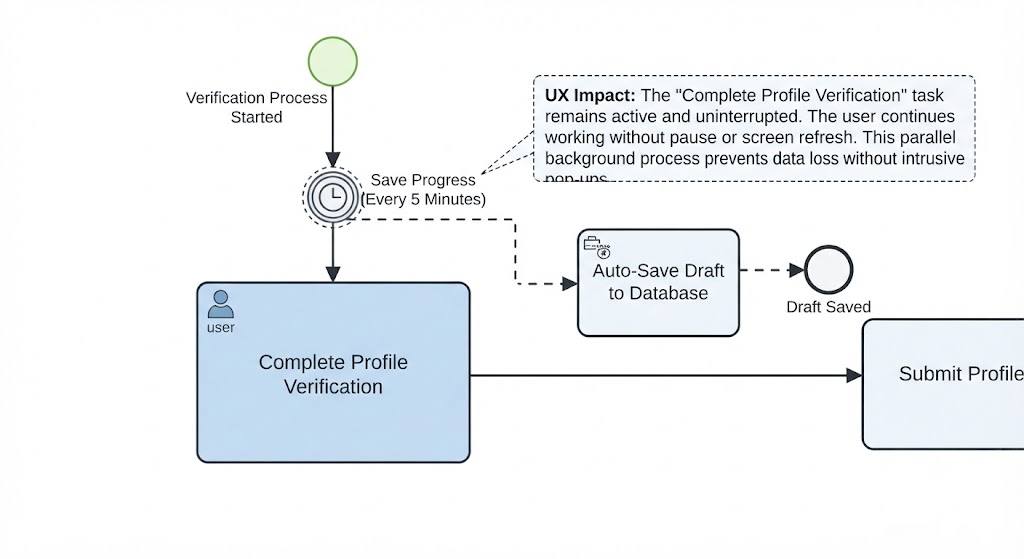
Trigger: A “Save Progress” Timer Event attached to the same “Complete Profile Verification” task, set to trigger every 5 minutes.
-
Behavior: While the user is still actively typing their details, the non-interrupting event triggers.
-
Outcome & UX Impact: A parallel token is generated, which triggers a background process to “Auto-Save Draft to Database.” Crucially, the “Complete Profile Verification” task remains active and uninterrupted; the user does not experience a pause or a screen refresh. The user continues their work, while the non-interrupting event performs a helpful side-effect. This greatly enhanced the user experience by preventing data loss without annoying the user with intrusive pop-ups.
Comparison Table
When I present these concepts to stakeholders, I always use a comparison table to make the distinctions crystal clear:
| Feature | Interrupting (Security Alert) | Non-Interrupting (Save Reminder) |
|---|---|---|
| Primary Task | Terminated immediately | Continues unaffected |
| Token Flow | Redirected to error path | Split (one continues, one branches off) |
| Process State | Abandoned/Aborted | Parallel execution |
| Goal | Exception handling/Recovery | Monitoring/Supportive side-tasks |
By using these events in tandem, you can ensure that critical errors stop work instantly to prevent damage, while minor auxiliary tasks (like logging or reminders) can run concurrently, significantly improving the user experience and process efficiency.
Conclusion
Ultimately, mastering the nuances between interrupting and non-interrupting boundary events has been a game-changer in my process modeling journey. When I review diagrams now, I look for that delicate balance: using interrupting events to enforce strict business rules and security boundaries, and leveraging non-interrupting events to create a seamless, supportive user experience. By thoughtfully applying these BPMN 2.0 patterns, you can design workflows that are not only technically robust but also highly intuitive and resilient for the end-user. I highly recommend revisiting your current process models with these distinctions in mind—you might be surprised at how much smoother your workflows can become.
References
-
BPMN 2.0 Boundary Events Explained: A quick overview of how boundary events attach to activities in BPMN.
-
Interrupting vs. Non-Interrupting Events: Detailed comparison of event behaviors and token flow.
-
Modeling Exception Handling in BPMN: Guide on using error and escalation events for process recovery.
-
Timer Events in Business Processes: How to implement time-based triggers and auto-saves in workflows.