


Introduction
In the modern supply chain landscape, the margin for error is razor-thin. Traditional inventory management—reliant on manual warehouse walkthroughs, clipboard checklists, or rigid, time-based audit schedules—is increasingly becoming a liability. These legacy methods frequently result in costly stockouts, delayed order fulfillment, or bloated warehouse overhead due to overstocking.
To remain competitive, businesses must transition from reactive monitoring to proactive, automated workflows. At the intersection of business process optimization and supply chain management lies a powerful tool: Business Process Model and Notation (BPMN). Specifically, the Conditional Start Event within BPMN serves as a digital catalyst, bridging the gap between real-time inventory data and automated purchasing actions.
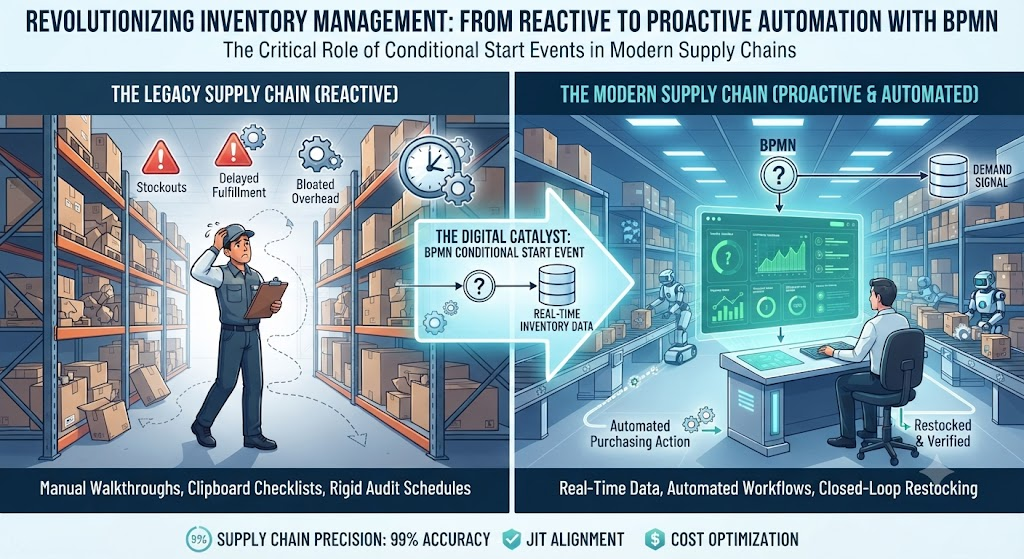
This comprehensive guide explores how Conditional Start Events revolutionize inventory management. By using the Stock Maintenance process as a practical blueprint, we will break down how to design, implement, and visualize an automated, closed-loop restocking system that ensures your procurement is always perfectly aligned with actual demand.
Understanding the Conditional Start Event
In BPMN, a Conditional Start Event is an automated trigger that instantiates (starts) a workflow only when a specific, predefined business condition evaluates to “true.”
Unlike a standard “None Start Event” (which requires manual initiation) or a “Timer Start Event” (which fires at a specific date/time), a Conditional Start Event acts as the digital nervous system of an organization. It continuously monitors data variables—such as database records, API feeds, or sensor inputs—and triggers the exact right process at the exact right moment, entirely eliminating the need for manual intervention.
The Stock Maintenance Process: A Step-by-Step Walkthrough
To understand the true value of this automation, we can map it directly to the Stock Maintenance process. When applied to inventory management, the Conditional Start Event orchestrates a seamless, four-phase workflow:
1. The Trigger Mechanism (The Start Event)
The foundation of this process is the trigger. The workflow remains dormant until a specific data condition is met. In this context, the condition is breached the moment the stock level of a specific item falls below a predefined minimum threshold (the reorder point). The system continuously monitors inventory levels, ensuring the trigger is pulled the exact second the threshold is crossed.
2. Monitoring and Decision Making (Tasks & Gateways)
Once triggered, the process moves to a “Monitor Inventory Levels & Detect Low Stock” task. The workflow then reaches an Exclusive Gateway (a decision point) that asks: Is the Stock Level < Minimum?
-
If No: The process loops back to the monitoring task, continuing to observe the inventory.
-
If Yes: The condition is confirmed, and the workflow proceeds to the next phase.
3. Automated Procurement (Call Activity)
With low stock confirmed, the system initiates a “Procurement: Call Purchase Requisition Workflow” Call Activity. This is a specialized BPMN task that invokes an external or separate sub-process. It seamlessly bridges the inventory management system with the purchasing department, automatically generating the necessary requisitions or purchase orders to restock the depleted inventory without requiring a warehouse manager to manually draft a request.
4. Receiving, Verification, and Completion (Closed-Loop)
The workflow is designed as a closed-loop system. Once goods arrive, they enter the “Receive & Log New Inventory” task. This is followed by a second Exclusive Gateway asking: Does the Stock Level Reach Target?
-
If No: (e.g., a partial shipment was received), the process loops back to receive and log the remaining inventory.
-
If Yes: The stock is fully restored. The workflow gracefully concludes with the “Inventory Restocked & Verified” End Event, signaling that the anomaly has been resolved and the system has returned to a healthy state.
Strategic Advantages of Automated Restocking
Deploying a Conditional Start Event for stock maintenance yields dramatic improvements in operational efficiency:
-
Elimination of Manual Intervention: By removing human operators from the routine checking and requisition drafting process, organizations eliminate human error, oversight, and the labor costs associated with manual inventory audits.
-
Dynamic Response vs. Rigid Schedules: Automated triggers avoid the pitfalls of weekly or monthly manual audits. The system is not bound to a calendar; it responds dynamically to sudden demand spikes, ensuring the company is never caught off guard between check-ins.
-
Just-in-Time (JIT) Alignment: Restocking occurs in direct, immediate response to actual, real-time consumption rates, supporting a lean inventory model that frees up working capital.
Best Practices for Implementation
To maximize the effectiveness of Conditional Start Events in your Stock Maintenance processes, consider the following best practices:
-
Implement Dynamic Thresholds: Ensure your minimum stock thresholds are not static. They should be regularly reviewed and algorithmically adjusted based on seasonal demand, supplier lead times, and historical consumption data.
-
Ensure Deep System Integration: Guarantee that your Warehouse Management System (WMS) and Enterprise Resource Planning (ERP) software are seamlessly integrated. The “stock level” variable must update in real-time for the conditional trigger to function accurately.
-
Build Robust Exception Handling: Design secondary conditional triggers or escalation paths for scenarios where procurement fails, suppliers delay shipments, or system integrations break down. This ensures the business is immediately alerted to critical supply chain disruptions.
Visualizing the Workflow: Decoding the BPMN Diagram
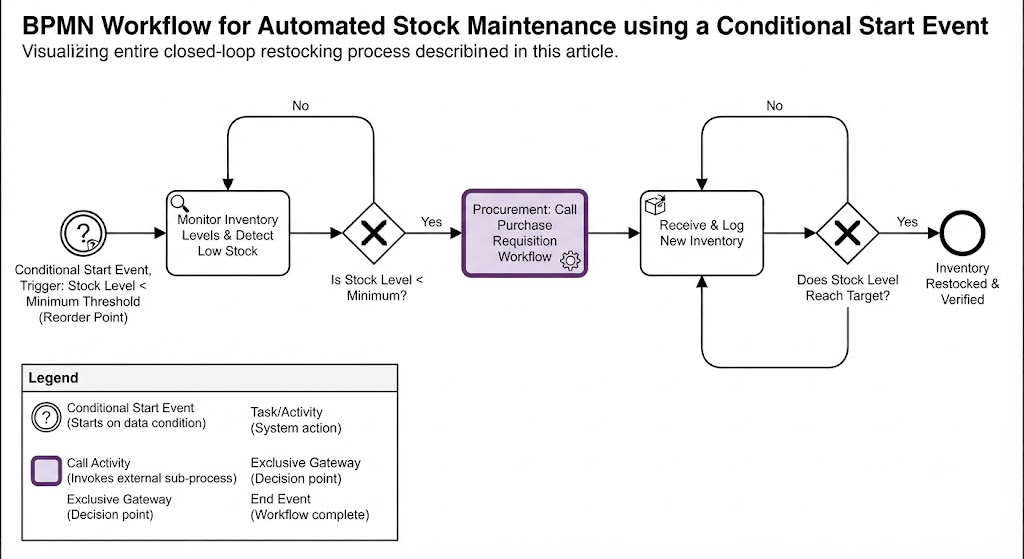
The provided BPMN diagram serves as a visual blueprint for the concepts discussed above. Here is how the diagram translates theoretical automation into a practical workflow:
Key Concepts Showcased
-
Conditional Start Event: Represented by the circle with a question mark, this is the automated trigger that only “fires” when the condition ($Stock < Minimum$) is met.
-
Real-time Monitoring: The initial loop between the “Monitor” task and the first Exclusive Gateway demonstrates continuous observation of inventory levels.
-
Call Activity: The purple “Procurement” box represents a specialized task that invokes an external workflow to handle complex sub-processes like purchasing.
-
Closed-Loop Automation: The second loop (between “Receive & Log” and the final Gateway) illustrates the system’s ability to verify outcomes and handle partial deliveries until the stock level is fully restored.
How the Diagram Visualizes the Process
-
Triggering Automation: The diagram begins on the far left with the Conditional Start Event, visually representing the “dormant” state of the workflow that springs to life only when the specific data condition is met.
-
Eliminating Manual Intervention: The direct transition from the monitoring gateway to the “Procurement” call activity emphasizes how the system automates the decision to restock, bypassing manual approval bottlenecks for standard low-stock scenarios.
-
End-to-End Integrity: The flow concludes only after reaching the thick-bordered “Inventory Restocked & Verified” end event. This illustrates the closed-loop nature of the system, ensuring the inventory anomaly is fully resolved before the process terminates.
Example BPMN Diagram
This Example provides a breakdown of the BPMN workflow diagram for automated stock maintenance, explaining the key symbols and how they function together to create a closed-loop system.
Understanding the BPMN Workflow
The diagram serves as a visual blueprint for transitioning from reactive, manual inventory management to a proactive, automated procurement process.
Key BPMN Components Used
-
Conditional Start Event: Represented by the circle containing a question mark, this is the digital “nervous system” of the workflow. It remains dormant until a specific condition—in this case, when the Stock Level < Minimum Threshold—evaluates to “true”.
-
Tasks/Activities: Represented by the rounded rectangles (e.g., “Monitor Inventory Levels & Detect Low Stock”), these are the automated actions the system performs.
-
Exclusive Gateways: These diamond-shaped symbols are decision points.
-
The first gateway checks if the stock is below the minimum; if “No,” it loops back to monitoring.
-
The second gateway checks if the target stock level has been reached during the receiving process.
-
-
Call Activity: The purple box, “Procurement: Call Purchase Requisition Workflow,” is a specialized task that invokes an external or separate sub-process to handle complex actions like generating purchase orders.
-
End Event: The thick-bordered circle, “Inventory Restocked & Verified,” signifies the successful, graceful conclusion of the workflow.
How the Workflow Functions
This diagram illustrates a closed-loop system that operates in four distinct phases:
-
Triggering: The process initiates automatically the moment the stock level falls below the reorder point, eliminating the need for manual warehouse audits.
-
Monitoring & Decision: The system continuously observes inventory levels. The first gateway acts as a filter, ensuring the procurement process is only triggered when a true low-stock condition is detected.
-
Automated Procurement: Upon confirming low stock, the “Call Activity” initiates the purchasing workflow, bridging the gap between inventory data and the procurement department without human intervention.
-
Verification (Closed-Loop): Once new inventory is received, the process verifies the new stock level. If a partial shipment occurs, the workflow loops back to “Receive & Log” until the target stock level is finally reached and the process concludes.
This visual model demonstrates how organizations can move beyond rigid, time-based schedules to a dynamic, demand-responsive inventory strategy.
Would you like to explore how to integrate specific ERP software triggers with this BPMN model?
Conclusion
The transition from manual, schedule-based inventory checks to automated, condition-driven workflows represents a fundamental leap in operational maturity. By leveraging the Conditional Start Event within the Stock Maintenance process, organizations can ensure that procurement is no longer a guessing game, but a precise, automated response to real-time demand.
Ultimately, this approach does much more than just prevent costly stockouts and reduce excess inventory; it fundamentally shifts the role of human capital. By automating the routine monitoring and requisitioning of stock, businesses free up their teams to focus on strategic, high-value tasks—such as supplier relationship management and demand forecasting. As global supply chains become increasingly complex and consumer expectations for rapid fulfillment continue to rise, mastering automated triggers like the Conditional Start Event is no longer just a competitive advantage. It is an absolute necessity for sustainable business growth, resilience, and success in the modern market.
References
- From Narrative to Diagram: How Visual Paradigm’s AI BPMN Generator Transforms Process Modeling Workflows: Explores how AI converts text narratives into BPMN diagrams.
- Mastering Business Process Modeling (BPMN 2.0) with Visual Paradigm’s AI-Powered Tools: A guide to mastering BPMN 2.0 using AI tools.
- Visual Paradigm BPMN Review: Bridging the Gap Between Business Logic and Technical Execution: An in-depth review of Visual Paradigm’s BPMN capabilities.
- AI BPMN Business Process Diagram Generator Update: Release notes for the AI BPMN generator update.
- Understanding the BPMN Notation: A Key to Effective Business Process Modeling: A foundational guide to understanding BPMN notation.
- Visual Paradigm BPMN Tutorial: A video tutorial demonstrating BPMN features.
- Beyond Code and AI: Why Visual Paradigm Remains Essential for Professional Software Architecture: Discusses the enduring value of Visual Paradigm in software architecture.
- BPMN Activity Types Explained: A detailed explanation of different BPMN activity types.
- How AI-Powered NLP is Revolutionizing Text-to-BPMN Generation for Enterprise Process Modeling: Details the NLP technology behind text-to-BPMN generation.
- Visual Paradigm Features: An overview of the core features of Visual Paradigm.
- BPMN Diagram and Tools: A dedicated look at BPMN diagramming tools and features.
- Visual Paradigm Official Website: The official homepage for Visual Paradigm.
- Click Start AI – Technical Support: Technical support documentation for getting started with AI features.
- Testing Visual Paradigm’s AI-Powered BPMN Diagram Generator for Real-World Process Mapping: A practical test of the AI generator for real-world mapping.