


In the complex landscape of modern software engineering, bridging the gap between abstract code and physical infrastructure is critical. A deployment diagram serves as the essential blueprint for this connection. It illustrates how software artifacts—like executables, databases, and web services—are physically distributed across hardware nodes such as servers, routers, and cloud instances. This visualization does more than just map out components; it defines the network topology and communication paths required for system operation.

Traditionally, creating professional-grade diagrams required manual placement of nodes and connectors, a tedious process often leading to inconsistencies. However, the emergence of AI deployment diagram tools has revolutionized this workflow. Organizations can now rely on intelligent deployment diagram generators to create accurate structural models in a fraction of the time, allowing teams to focus on high-level strategy rather than basic layout mechanics. Visual Paradigm stands out by offering three distinct avenues to leverage artificial intelligence for architectural modeling, catering to different stages of the development lifecycle from initial brainstorming to final documentation.
1. Visual Paradigm Desktop: Precision Architectural Modeling
For enterprise architects and seasoned modelers, the desktop application remains the powerhouse for detailed design. The integrated AI feature, accessible via the Tools > AI Diagram Generation menu, acts as a smart assistant for high-level architectural design.
How It Works
Instead of manually dragging and dropping shapes, users simply write a detailed natural language prompt. For example, entering something like “Create a microservices e-commerce platform hosted on AWS using Kubernetes” instantly triggers the deployment diagram generator to create a complete, editable structure.
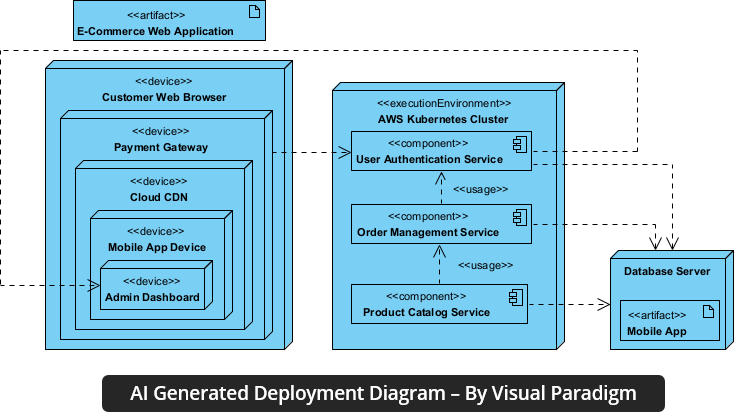
The AI logic handles the complexity automatically, identifying compute nodes, storage nodes, and network nodes based on your text input. Once generated, the resulting diagram is not static; it is a living model. You can immediately refine server configurations, add failover clusters, or define communication ports using the full suite of desktop modeling features, ensuring your final deployment diagram is technically accurate from the first iteration.
The Strategic Benefit
This approach provides a professional-grade starting point, saving hours of initial setup time. It is particularly useful when dealing with intricate hybrid cloud environments or on-premise data center layouts where precision is non-negotiable.
2. Visual Paradigm AI Chatbot: Conversational Prototyping
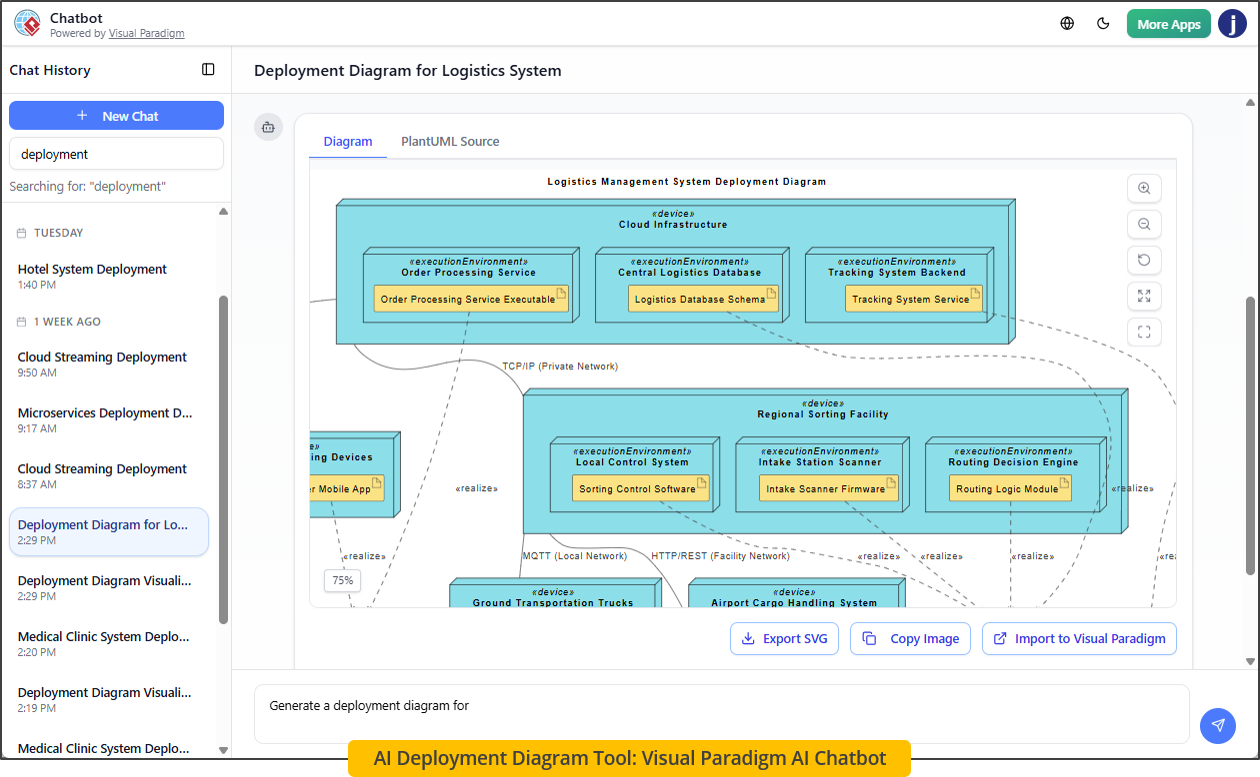
When requirements are fluid or the team is brainstorming new infrastructure strategies, the AI Chatbot offers a dynamic, human-like interaction for building diagrams. This tool is ideal for anyone looking for a responsive deployment diagram tool that feels like collaborating with an expert consultant.
Interactive Workflow
Imagine chatting with a senior solutions architect. You tell the bot, “Add an artifact….” As you describe these changes, the system processes the input and updates the canvas in real-time.
You do not need to manually connect arrows; simply describe the relationship, and the AI draws the connector for you. This capability supports rapid iteration, allowing you to test multiple architectural hypotheses without getting stuck on manual editing.
Why It Matters
This method lowers the barrier to entry, allowing junior developers or product owners to visualize complex topologies. It turns the abstract concept of “infrastructure planning” into an intuitive conversation, making the creation of a high-quality deployment diagram much faster and more collaborative.
3. OpenDocs: Synchronized Technical Documentation
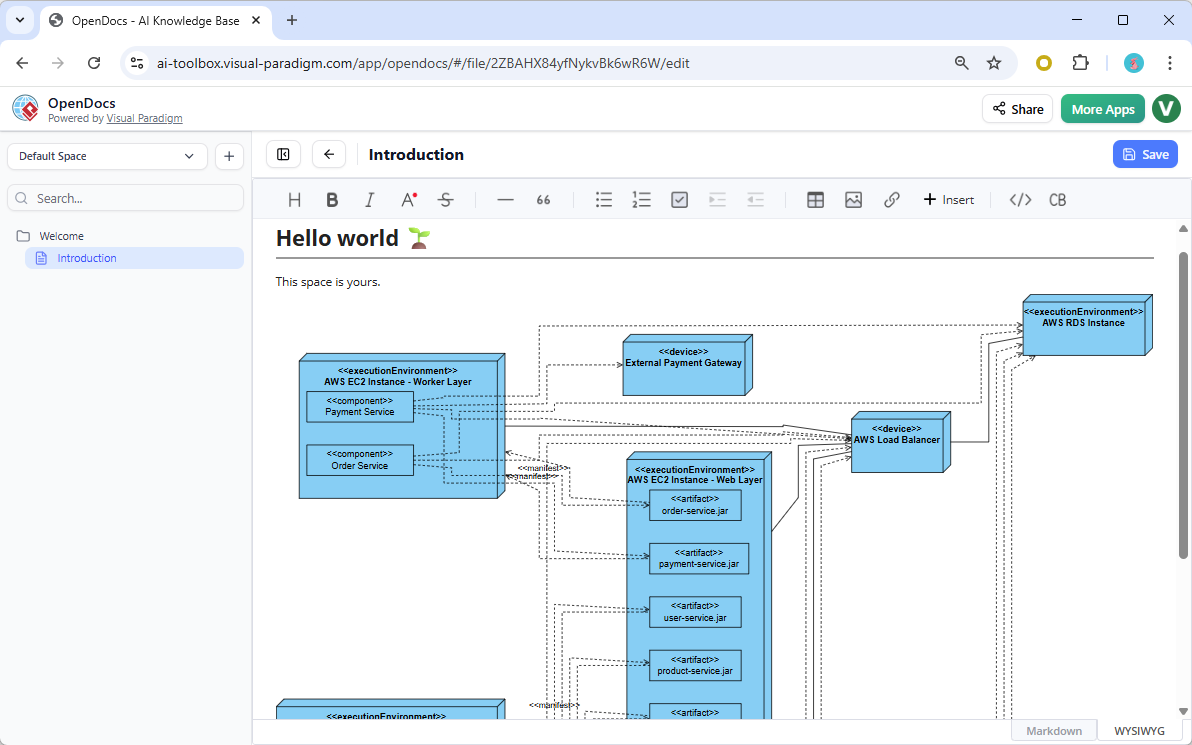
For DevOps engineers and technical writers, keeping architecture visuals synchronized with written documentation is a common pain point. OpenDocs solves this by embedding diagrams directly within rich-text documentation pages, ensuring a single source of truth.
Seamless Integration
With OpenDocs, you can write a text description of your system architecture (e.g., “The system consists of a central API Gateway and two regional database clusters”), and the AI UML deployment diagram tool automatically generates the corresponding visual diagram inside your document.
Living Architecture
Unlike static images that become outdated, diagrams in OpenDocs are linked to the source copy. If you modify the architecture, the documentation reflects the change automatically. This ensures that every stakeholder—whether a developer, manager, or client—sees the accurate current state of the physical architecture.
Comparative Overview
Choosing the right tool depends on your immediate goal. Here is a breakdown of the different modes available:
- Visual Paradigm Desktop AI: Best for deep, detailed structural modeling. Interaction is prompt-based (one-off). Once imported, the full desktop toolset is available.
- AI Chatbot: Best for rapid brainstorming and prototyping. Interaction is a continuous conversation where inputs directly update the diagram. Focus is on web-based standalone sketches.
- OpenDocs AI Support: Best for dynamic technical documentation. Interaction is text-to-diagram embedding where visuals are part of the document content.
💡 Ready to Generate Your Architecture
The flexibility of these tools allows you to select the workflow that matches your current phase. Need a detailed blueprint for a client? Use Desktop AI. Rapidly testing a new design idea? Try the Chatbot. Ensuring your docs stay up-to-date? Go with OpenDocs.
Here are some powerful prompts you can try immediately to generate your first diagrams:
- Cloud Native:
“Generate a deployment diagram for a serverless application using AWS Lambda, API Gateway, and DynamoDB with an S3 bucket for assets.” - On-Premise:
“Create a three-tier on-premise banking architecture with a firewall, a three-node app cluster, and a SQL database with failover.” - Hybrid Cloud:
“Model a hybrid setup where customer APIs run on Azure Kubernetes Service and sensitive data is stored in an on-premise network via secure tunnel.”
By leveraging these advanced deployment diagram generator tools, you not only save time but also reduce errors, ensuring your physical architecture is robust and clearly documented from the very first sketch.
References
- Harnessing Visual Paradigm’s AI for Diagram Generation: The Ultimate 2026 Guide:
Comprehensive 2026 guide to Visual Paradigm’s mature AI ecosystem for turning natural language into editable, traceable diagrams. Covers four core methods (direct text-to-diagram, conversational chatbot, guided AI Apps/Studios, embedded AI in docs), supports 30+ types (UML including Deployment, SysML, C4, ArchiMate, ERD/DFD, flowcharts, mind maps), best practices for prompts and iteration, integration across Desktop/Online/OpenDocs, and benefits like consistency, traceability to code/requirements, and rapid prototyping. Ideal for architects seeking full-lifecycle AI assistance. 📘 - Visual Paradigm AI Chatbot: Instantly Turn Ideas into Professional Diagrams (Official Blog):
Official October 2025 post introducing the AI Chatbot that generates UML, BPMN, ERD, flowcharts, mind maps, SWOT, and more from plain-text prompts (e.g., “Create a use case diagram for online shopping”). Features conversational editing (add/rename/connect elements via chat), contextual smarts for relationships/semantics, seamless integration with Visual Paradigm Online for browser-based creation/sharing/documentation, and major time savings by eliminating manual drawing—perfect for beginners and experts alike. 💡 - Visual Paradigm AI x UML Deployment Diagram – Instant Generation Demo:
Short video demo showing how Visual Paradigm’s AI Diagram tool generates clean, professional UML Deployment Diagrams from text descriptions of nodes, devices, servers, cloud instances, and communication channels—no manual layout needed. Highlights speed for documenting distributed systems, cloud/on-premise/enterprise architectures, with links to full guides and downloads. Great quick overview of AI-powered infrastructure visualization. 🎥 - Generate & Update UML Deployment Diagrams with AI – Visual Paradigm Chatbot Tutorial:
Step-by-step YouTube tutorial (Nov 2025) demonstrating the Visual Paradigm AI Chatbot to create UML Deployment Diagrams from prompts, then refine them conversationally (e.g., update nodes, add artifacts, adjust connections). Shows real-time generation, editing commands, and importing results into Visual Paradigm Desktop for advanced work—ideal for learning the full workflow from idea to polished diagram. 🛠️ - New in OpenDocs: AI-Powered UML Deployment Diagram Generator:
Official release notes for the AI feature in OpenDocs (web-based, no install) that instantly creates standards-compliant UML Deployment Diagrams from natural language (e.g., microservices on AWS, on-premise clusters, IoT setups). Embed dynamic diagrams in docs/pages, edit nodes/artifacts/paths/stereotypes, and centralize architecture knowledge—requires Professional/Combo edition; accelerates docs for cloud, hybrid, and enterprise infrastructure modeling. 🚀 - Create & Refine UML Deployment Diagrams Directly with Visual Paradigm AI Chatbot:
Dedicated landing/tool page for generating UML Deployment Diagrams via the AI Chatbot interface. Enter prompts describing infrastructure (servers, containers, networks, cloud/hybrid setups), get instant diagrams with nodes, artifacts, and paths; refine conversationally (add elements, change layouts, introduce protocols). Includes example prompts (e.g., warehouse inventory, POS, insurance systems) and real-time previews—fast entry point for visualizing physical architectures before full Visual Paradigm editing. 🌐