Designing secure systems requires more than just writing robust code; it demands a clear architectural vision. When developers and security engineers collaborate, they often struggle to translate abstract security requirements into concrete system structures. This is where Unified Modeling Language (UML) class diagrams become indispensable. They provide a standardized visual language to map out entities, relationships, and behaviors before implementation begins. By using UML class diagrams for security protocol design, teams can identify potential vulnerabilities early, enforce data integrity, and ensure that authentication and encryption mechanisms are logically sound.
This guide explores how to construct detailed class models that reflect security constraints. We will examine how to represent sensitive data, manage access control, and model cryptographic operations without exposing implementation details prematurely. The goal is to create a blueprint that serves both as a design document and a security audit trail.
🧩 Why Use UML for Security Architecture?
Security is often treated as an add-on feature rather than a foundational element. However, integrating security into the class structure ensures that protection is inherent to the system. UML diagrams offer several distinct advantages in this context:
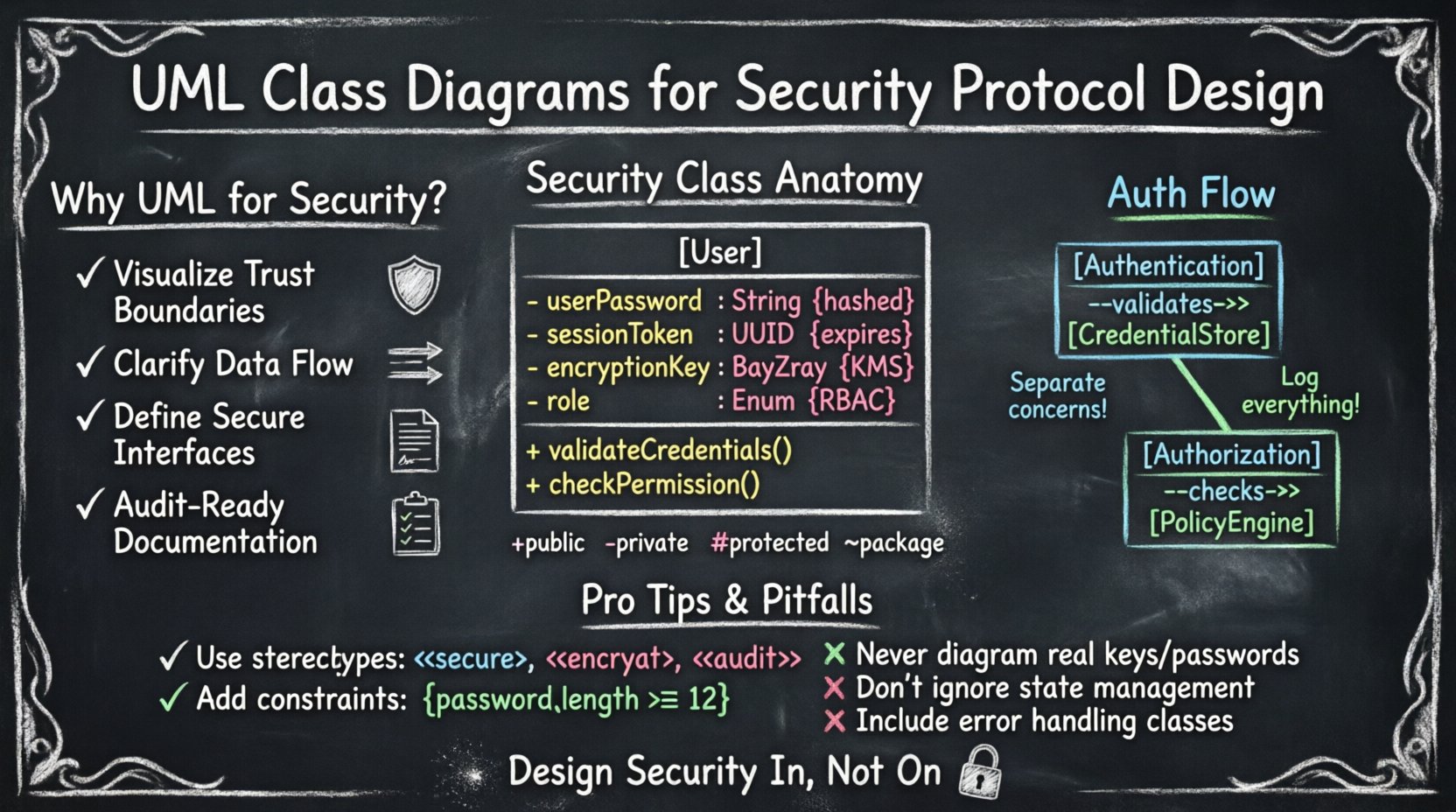
- Visualizing Trust Boundaries: Diagrams help distinguish between trusted internal components and untrusted external inputs. This separation is critical for defining where validation must occur.
- Clarifying Data Flow: Class relationships show how information moves between objects. Tracing this flow helps identify where sensitive data might be exposed or mishandled.
- Defining Interfaces: Security protocols often rely on strict interfaces. UML defines these contracts clearly, ensuring that only authorized methods are accessible.
- Documentation: A static diagram serves as a permanent record of the security design. This is vital for compliance audits and future maintenance.
🔑 Core Components of a Security Class
When modeling security protocols, standard classes need specific attributes and methods to handle sensitive operations. A typical security class might represent a user, a session, or a cryptographic key. Each component must be defined with precision to prevent ambiguity.
Attributes and Security Meaning
Attributes in a class diagram represent the state of an object. In a security context, the type and visibility of an attribute determine its risk level. Below is a table illustrating how common attributes map to security concepts.
| Attribute Name | UML Type | Security Implication |
|---|---|---|
userPassword |
String |
Must be hashed; never stored in plain text. |
sessionToken |
UUID |
Requires expiration time and secure storage. |
encryptionKey |
ByteArray |
Must be protected by a Key Management System. |
role |
Enum |
Controls access levels and authorization rules. |
lastLoginTime |
DateTime |
Useful for anomaly detection and lockout policies. |
Notice that the type of data matters as much as the name. Storing a DateTime for login attempts allows for logic regarding brute-force protection, while a ByteArray for keys implies binary handling requirements.
🔐 Modeling Authentication and Authorization
Authentication verifies identity, while authorization determines what an identity can do. These processes should be modeled as distinct classes to maintain separation of concerns. This separation prevents logic errors where an authenticated user might accidentally gain elevated privileges.
The Authentication Class
The Authentication class typically handles the verification of credentials. It should not store credentials itself but rather interact with a dedicated CredentialStore. This design ensures that sensitive data is isolated.
- Methods:
validateCredentials(),issueToken(),revokeSession(). - Dependencies:
CredentialStore,TokenManager. - Constraints: Input parameters must be validated for format and length to prevent injection attacks.
The Authorization Class
The Authorization class evaluates policies against user roles. It is often linked to an AccessControlList or a PolicyEngine.
- Methods:
checkPermission(),grantRole(),auditAccess(). - Dependencies:
User,Resource,PolicyRule. - Constraints: Decisions should be logged. This supports non-repudiation.
🔒 Handling Cryptographic Elements
Cryptography is complex. Mismanaging keys or initialization vectors can compromise an entire system. UML class diagrams allow you to visualize the lifecycle of cryptographic material. You can explicitly model the relationship between a Cipher object and a KeyStore.
Key Management Classes
A KeyManager class acts as a central point for retrieving and rotating keys. It should not expose the raw key material. Instead, it exposes methods that perform operations using the key internally.
- Encapsulation: The key should be a private attribute.
- Visibility: Methods like
encryptData()should be public, whilegetKeyMaterial()should be private or non-existent. - Lifecycle: Include attributes like
expirationDateto enforce key rotation policies.
Initialization Vectors and Nonces
Many protocols require unique values for each encryption operation. Modeling these as attributes helps ensure they are generated correctly.
| Class | Attribute | Constraint |
|---|---|---|
Session |
nonce |
Must be unique per session. |
Transaction |
iv |
Must be random and non-predictable. |
LogEntry |
timestamp |
Must be synchronized with server time. |
By explicitly listing these attributes, developers are reminded to implement the required logic. Omitting them from the diagram often leads to security flaws in the code.
🛡️ Visibility and Encapsulation
Visibility modifiers in UML (public, private, protected) are not just about code organization; they are security controls. They define the boundary of trust within the system.
| Modifier | UML Symbol | Security Usage |
|---|---|---|
| Public | + |
For interfaces that must be called by external systems. Use cautiously. |
| Private | - |
For sensitive data like keys, tokens, or internal state. |
| Protected | # |
For data accessible only by subclasses. Useful in inheritance hierarchies. |
| Package | ~ |
For data shared within a specific module or namespace. |
When designing security protocols, default to private visibility for all state. Only expose functionality through well-defined methods. This principle, known as information hiding, reduces the attack surface.
🔗 Relationships and Interactions
Classes do not exist in isolation. Their relationships define how security policies are enforced across the system. Understanding these connections is vital for maintaining integrity.
Composition vs. Inheritance
Composition implies strong ownership. If the parent object is destroyed, the child object ceases to exist. This is ideal for security contexts.
- Composition: Use when a
Sessionowns aToken. If the session ends, the token is invalid. - Inheritance: Use when defining common security behaviors. For example, a
SecureConnectionmight inherit fromNetworkConnection, adding encryption capabilities.
Association and Dependency
Association shows that one class uses another. Dependency is a weaker relationship, indicating temporary usage.
- Dependency: A
Loggerdepends on theSecurityEventclass. If the logger is removed, the event logic still holds. - Association: A
Userhas an association withRole. This relationship persists and defines access rights.
🏷️ Stereotypes and Constraints
Standard UML elements are generic. To make them specific to security, use stereotypes and constraints. These annotations add semantic meaning without cluttering the diagram.
Using Stereotypes
Stereotypes are keywords enclosed in guillemets (<< >>). They categorize classes or attributes.
<<secure>>: Marks a class that handles sensitive operations.<<encrypt>>: Indicates an attribute containing encrypted data.<<audit>>: Marks an attribute that must be logged for compliance.<<immutable>>: Indicates a value that cannot be changed after creation.
Using Constraints
Constraints are written in curly braces ({ }). They define rules that must be satisfied.
- {
pre: password.length >= 12}: Ensures minimum complexity. - {
post: token.isValid == true}: Ensures the token is valid upon creation. - {
constraint: session.timeout < 3600}: Limits session duration.
These constraints act as a contract between the designer and the developer. They serve as a checklist during code reviews.
⚠️ Common Modeling Pitfalls
Even experienced architects make mistakes when modeling security. Being aware of these pitfalls helps avoid them.
- Leaking Secrets: Never place actual key values or passwords in the diagram. Use generic placeholders like
KeyMaterial. - Over-Abstraction: Do not create classes that are too generic. A
Dataclass is too vague. UseUserDataorTransactionDatato define specific security requirements. - Ignoring State: Security often depends on state. A class that represents a payment must track its state (pending, completed, failed) to prevent double-spending or replay attacks.
- Missing Error Handling: Diagrams often show happy paths. Include classes for error handling, such as
SecurityExceptionorAccessDenied, to show how the system reacts to failures. - Static Analysis Blindness: Ensure that static methods do not inadvertently access instance variables that contain sensitive data. Mark static classes as
<<singleton>>if they hold global state.
📋 Best Practices for Protocol Documentation
A diagram is only useful if it is maintained and understood. Follow these practices to keep your security models effective.
- Version Control: Treat diagrams as code. Store them in version control systems to track changes over time.
- Regular Reviews: Include security architects in code review cycles. They should verify that the implementation matches the UML model.
- Clear Legend: Define a legend for your stereotypes and constraints. Different teams might interpret symbols differently.
- Layering: If the system is complex, split the diagram into layers. Have one diagram for authentication, another for data storage, and another for network communication.
- Consistency: Use consistent naming conventions. If you use
Userin one diagram, do not useAccountin another for the same concept.
🚀 Moving Forward
Integrating security into the design phase is a proactive measure that saves time and resources. UML class diagrams provide the structure needed to make these decisions explicit. By carefully defining attributes, methods, and relationships, you create a blueprint that guides secure development.
Remember that a diagram is a tool for communication. It bridges the gap between abstract security policies and concrete code. When you model with precision, you reduce ambiguity. When you reduce ambiguity, you reduce risk. This approach ensures that security is not an afterthought but a built-in characteristic of the system architecture.
Continue to refine your modeling skills. Incorporate new security patterns as they emerge. Stay vigilant about the information you expose in documentation. With discipline and attention to detail, UML becomes a powerful ally in the pursuit of secure software design.