Systems Engineering is a complex discipline. It involves managing requirements, defining behaviors, and ensuring that hardware, software, and human elements work together seamlessly. To manage this complexity, professionals use a standardized modeling language. That language is SysML.
Systems Modeling Language (SysML) is an extension of the Unified Modeling Language (UML). It was specifically designed to address the needs of systems engineering. Unlike general software development, systems engineering often deals with physical components, energy flows, and mechanical constraints. This guide will walk you through the building blocks of SysML without assuming prior knowledge. We will focus on understanding the structure, the diagrams, and the relationships that make a model functional.
🧩 What Is Systems Modeling Language?
SysML is a general-purpose modeling language used for Systems Engineering applications. It allows engineers to specify, analyze, design, and verify complex systems. The language is standardized by the Object Management Group (OMG).
When you build a model in SysML, you are creating a digital representation of a system. This representation helps teams communicate ideas clearly. It reduces ambiguity. It serves as a single source of truth for the project lifecycle.
Key Characteristics of SysML
- General Purpose: It is not limited to software. It covers mechanical, electrical, and software systems.
- Visual: It relies on diagrams to convey information intuitively.
- Executable: Models can sometimes be simulated to test behavior before physical build.
- Extensible: It allows for profiles and stereotypes to adapt to specific industry needs.
🏗️ The Foundation: Requirements and Use Cases
Before diving into complex structural diagrams, you must understand what the system needs to do. SysML places a strong emphasis on traceability. This means every design decision should link back to a requirement.
1. The Requirement Diagram
This diagram is the backbone of the system definition. It captures the goals, constraints, and expectations for the system.
- Requirement Element: Represents a specific need. It has attributes like ID, status, and verification method.
- Relationships: You can link requirements to one another. Common relationships include:
- Satisfies: A design element fulfills a requirement.
- Verifies: A test case proves a requirement is met.
- Refines: A requirement is broken down into more detail.
- Derives: A requirement is derived from another requirement.
Using this diagram ensures that no feature is built without a clear justification. It also prevents “gold plating” where features are added without necessity.
2. The Use Case Diagram
Use Case diagrams describe the functional interactions between the system and its actors. Actors can be humans, other systems, or external processes.
- Actor: The external entity interacting with the system.
- Use Case: A specific function or goal the system performs.
- Association: The link between an actor and a use case.
- Include/Extend: These relationships manage optional or mandatory behaviors.
This diagram is essential for understanding the scope of work. It answers the question: “Who uses the system and for what purpose?”
🔗 Structural Modeling: Blocks and Components
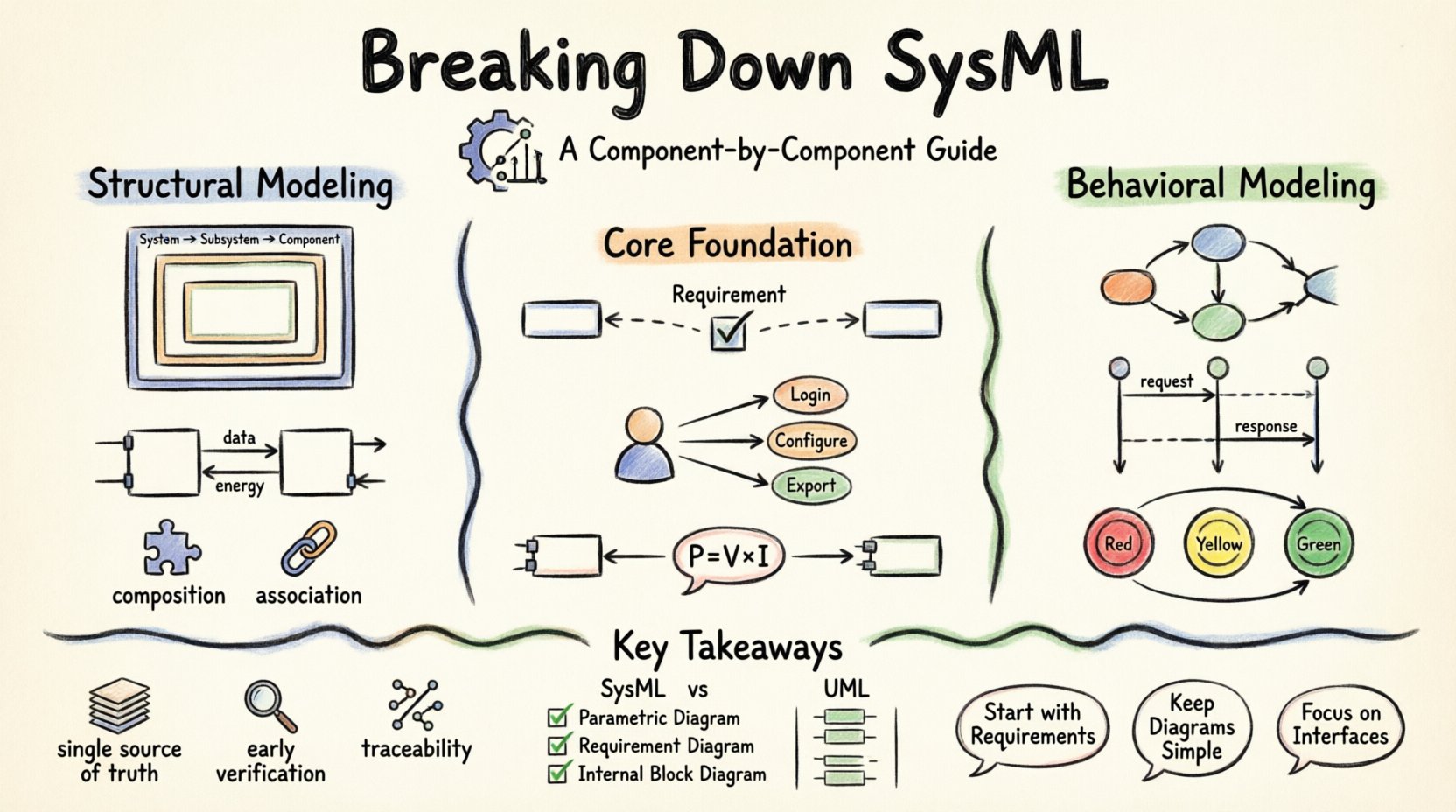
Structural modeling defines what the system is made of. It breaks the system down into manageable parts. In SysML, the primary structural element is the Block.
3. The Block Definition Diagram (BDD)
The BDD is the high-level map of the system structure. It shows how major components relate to one another.
- Block: Represents a physical or logical component. It can contain properties (attributes) and operations (methods).
- Composition: Indicates a “part of” relationship. If the whole is destroyed, the parts are destroyed.
- Association: Indicates a relationship without ownership. Links can be navigable in one or both directions.
- Generalization: Represents inheritance. A specific type of block is a subtype of a general block.
When drawing a BDD, start with the top-level system. Break it down into subsystems. Then break those down into components. This hierarchical approach keeps the model organized.
4. The Internal Block Diagram (IBD)
While the BDD shows the parts, the IBD shows how they connect internally. It is like a wiring diagram for a logical system.
- Part Properties: Instances of blocks inside a larger block.
- Ports: The interfaces where connections are made. A port defines the type of interaction allowed.
- Flow Properties: The data, energy, or material passing through the connectors.
- Connectors: The lines linking ports together.
IBDs are critical for defining interfaces. They ensure that the output of one component matches the input of the next. This prevents integration issues later in the project.
Comparison of Structural Diagrams
| Diagram Type | Primary Focus | Key Elements | Best Used For |
|---|---|---|---|
| Block Definition Diagram | Classification & Structure | Blocks, Associations, Composition | Defining the system hierarchy and relationships |
| Internal Block Diagram | Internal Connectivity | Parts, Ports, Connectors, Flow Properties | Defining internal data and signal flows |
⚙️ Behavioral Modeling: How the System Works
Structure tells you what the system is. Behavior tells you what the system does. SysML offers several diagrams to capture different aspects of behavior.
5. The Activity Diagram
Activity diagrams model the flow of control and data within a system. They are similar to flowcharts but include more modeling capabilities.
- Nodes: Represent steps in the process.
- Edges: Represent the flow between steps.
- Object Flow: Shows the movement of data or material.
- Forks & Joins: Allow for parallel processing.
- Swimlanes: Divide activities by owner or subsystem.
Use this diagram for complex workflows. It helps identify bottlenecks and ensures all paths are covered.
6. The Sequence Diagram
Sequence diagrams show interactions over time. They are excellent for detailing the order of operations between objects.
- Lifelines: Represent the participants in the interaction.
- Messages: Represent the calls or signals sent between participants.
- Activation Bars: Show when an object is performing an action.
- Combined Fragments: Handle logic like loops, options, and parallel regions.
This diagram is vital for defining interfaces. It clarifies exactly when signals are sent and received.
7. The State Machine Diagram
State machines model the life cycle of a component. They describe how a system responds to events based on its current state.
- States: Conditions during which an object satisfies some invariant.
- Transitions: The movement from one state to another.
- Events: The trigger that causes a transition.
- Actions: Activities performed during a state or transition.
Think of a traffic light. It has states (Red, Yellow, Green). It has transitions (Timer expires). This diagram captures that logic perfectly.
📐 Parametric Modeling: Constraints and Math
Systems engineering often involves calculations. Physics, thermodynamics, and performance metrics must be verified. SysML handles this with the Parametric Diagram.
8. The Parametric Diagram
This diagram defines constraints and equations. It links mathematical relationships to the structural model.
- Constraint Blocks: Define mathematical formulas.
- Constraints: Instances of constraint blocks applied to properties.
- Binding Connectors: Link properties to constraint variables.
For example, you can define a constraint for “Power = Voltage * Current”. You can then bind the voltage and current properties from your Block Definition Diagram to this constraint. This allows for automated verification of performance requirements.
🔗 Relationships and Connectivity
Connecting all these diagrams requires a deep understanding of relationships. SysML extends UML relationships to support systems engineering needs.
Key Relationship Types
- Dependency: One element depends on another. Changes in one may affect the other.
- Association: A structural link. Can be navigable.
- Generalization: Inheritance. Specialization.
- Realization: An interface implementation.
- Flow: A specific type of association for exchanging material, energy, or data.
🛠️ Implementing a SysML Model
Building a model is an iterative process. You do not draw everything at once. You evolve the model as requirements evolve.
Step-by-Step Approach
- Define Requirements: Start with the Requirement Diagram. Capture what the stakeholders need.
- Define Structure: Create the Block Definition Diagram. Break the system into subsystems.
- Define Behavior: Use Use Case and Activity diagrams to describe functionality.
- Refine Internal Logic: Draw Internal Block Diagrams to define interfaces.
- Validate Performance: Use Parametric Diagrams to check constraints.
- Traceability: Ensure every block traces back to a requirement.
📊 SysML vs. UML
It is common to confuse SysML with UML. While they share syntax, their purpose differs.
| Feature | UML | SysML |
|---|---|---|
| Primary Domain | Software Engineering | Systems Engineering |
| Parametric Diagram | Not Supported | Supported |
| Requirement Diagram | Not Supported | Supported |
| Internal Block Diagram | Not Supported | Supported |
| Extension | Base Language | Profile on UML |
SysML is essentially UML with additional diagrams tailored for systems. It retains the core syntax of UML so that software engineers can transition easily.
🌐 Model-Based Systems Engineering (MBSE)
SysML is the language of MBSE. MBSE replaces document-based systems engineering with model-based approaches.
Traditional engineering relies on text documents. These documents can become outdated. They are hard to search. They are prone to human error. Models provide a dynamic view of the system.
Benefits of MBSE include:
- Single Source of Truth: Everyone looks at the same model.
- Early Verification: Errors can be found before physical prototyping.
- Impact Analysis: Changes can be simulated to see effects.
- Traceability: Full history of decisions and requirements.
⚠️ Common Pitfalls to Avoid
Even experienced engineers make mistakes when starting with SysML. Here are common issues to watch out for.
- Over-Modeling: Creating too much detail too soon. Start high-level.
- Ignoring Traceability: Building models that do not link to requirements. This defeats the purpose.
- Mixing Diagrams: Using the wrong diagram for the information. Keep structure separate from behavior.
- Poor Naming: Using vague names for blocks and ports. Be specific and consistent.
- Ignoring Standards: Not following the SysML standard conventions.
📝 Best Practices for Beginners
To get the most out of SysML, follow these guidelines.
- Start with Requirements: Never start a design without a requirement to satisfy.
- Keep Diagrams Simple: If a diagram is too crowded, split it into multiple views.
- Use Packages: Organize your model into packages to manage complexity.
- Review Regularly: Models degrade over time. Review them with your team.
- Focus on Interfaces: Clearly define ports and flows. Interfaces are where integration happens.
🔄 The Lifecycle of a SysML Model
A SysML model is not static. It evolves with the project.
- Concept Phase: High-level requirements and conceptual blocks.
- Development Phase: Detailed structural and behavioral modeling.
- Verification Phase: Using models to validate against requirements.
- Production Phase: The model serves as documentation for manufacturing.
- Operations Phase: The model guides maintenance and upgrades.
This lifecycle ensures that the digital twin remains accurate throughout the physical life of the system.
🎯 Summary of Core Concepts
SysML is a powerful tool for managing complexity. It bridges the gap between requirements and design. By understanding the core diagrams, you can create robust models.
- Requirements: Define what is needed.
- Blocks: Define what it is.
- Behavior: Define what it does.
- Constraints: Define physical limits.
- Connections: Define how parts interact.
Mastering these components takes time. It requires practice. But the result is a system that is well-designed, well-documented, and well-understood.
❓ Frequently Asked Questions
Is SysML only for software?
No. It is specifically designed for systems engineering, which includes hardware, software, and human elements.
Do I need to know UML first?
It helps, but it is not strictly required. SysML covers the basics needed for modeling.
Can I simulate a SysML model?
Yes, with appropriate tools and extensions, you can simulate behavior and performance.
What is the difference between a block and an instance?
A block is the definition (like a class). An instance is a specific object created from that definition.
How do I handle changes in requirements?
Use the traceability links. Update the requirement, and the model will show which blocks are affected.
🏁 Final Thoughts
Systems Engineering is about making complex things work. SysML provides the vocabulary to describe that complexity. It transforms vague ideas into precise definitions. It turns abstract requirements into concrete designs.
By breaking down the language into its components, you can approach modeling with confidence. Start small. Focus on traceability. Keep your diagrams clear. As you gain experience, the model will grow to reflect the sophistication of the system you are building.
The journey from requirements to realization is long. SysML helps you navigate it. It ensures that every decision is documented. It ensures that every connection is verified. It is an investment in quality and clarity.