In modern software architecture, the way we perceive system structure dictates the longevity and maintainability of the codebase. Moving away from monolithic thinking toward a component-based approach is essential for building scalable solutions. This guide explores the interactive mindset required to design systems where every part serves a distinct, reusable purpose. By treating software as a collection of interconnected building blocks, teams can reduce redundancy and improve development velocity.
Visualizing software through component diagrams provides a clear roadmap for architects and developers. It transforms abstract requirements into tangible structures that communicate intent. This approach focuses on modularity, encapsulation, and clear interfaces. When implemented correctly, it fosters an environment where teams can collaborate without stepping on each other’s code.
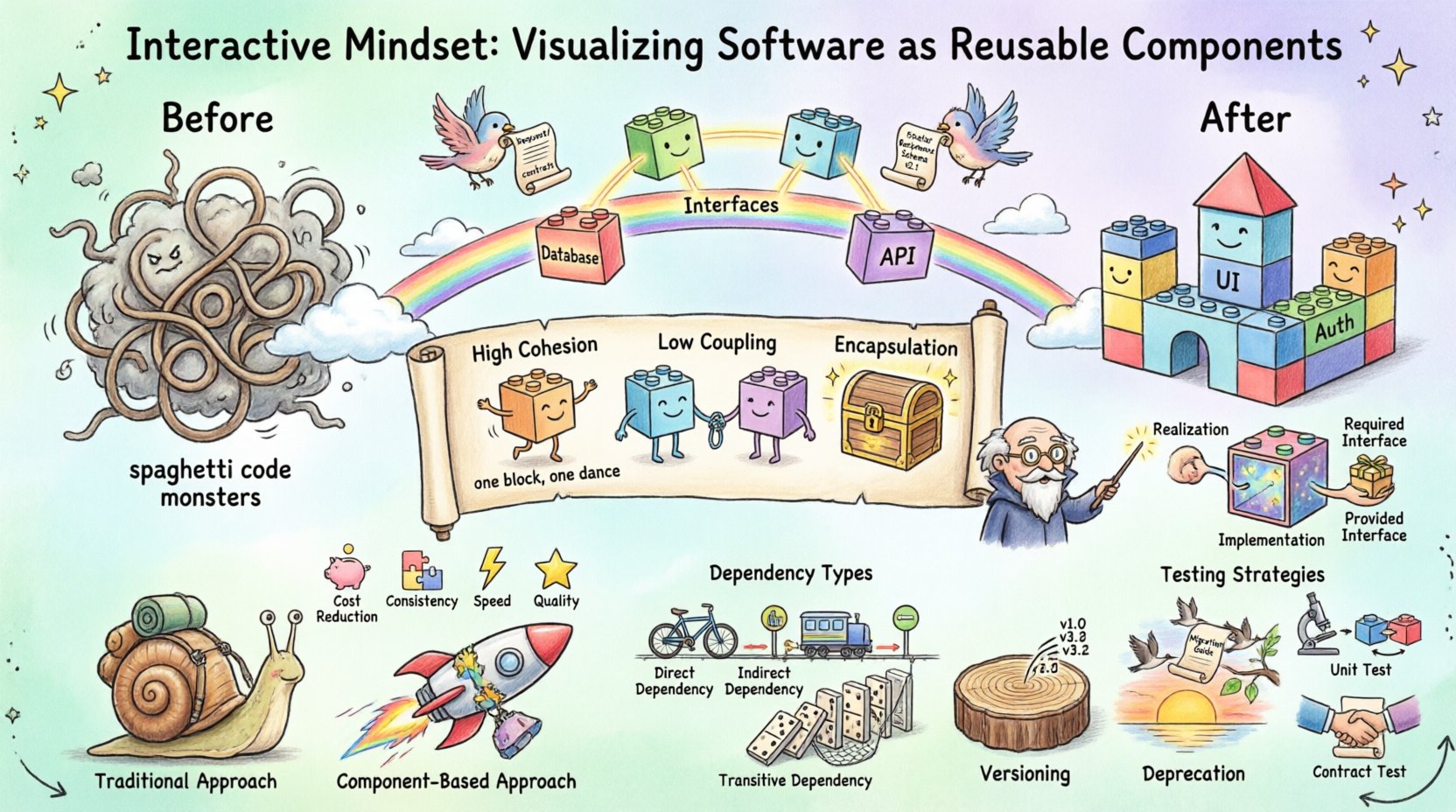
📐 Understanding the Component Diagram
A component diagram is a specialized type of diagram used in software engineering to describe the organization and design of the system. It represents the system as a set of components connected by their relationships. Unlike class diagrams, which focus on data structures and methods, component diagrams zoom out to show the physical or logical deployment of software modules.
- Components: These represent the logical units of the system. They encapsulate implementation details and expose interfaces.
- Interfaces: Defined as the contracts between components. They specify what a component can do without revealing how it does it.
- Dependencies: Arrows or lines that indicate how components rely on one another to function correctly.
- Ports: Specific points of interaction where connections are made.
When you visualize software this way, you create a shared language. Stakeholders can look at the diagram and understand the flow of data and control. It reduces ambiguity. Instead of guessing how modules interact, the diagram makes the connections explicit. This clarity is vital for software architecture planning.
Consider the difference between a tangled web of files and a structured map. A tangled web leads to high maintenance costs and frequent bugs. A structured map guides developers toward the correct path. Component diagrams serve as that map. They allow you to see the forest before planting the trees.
🔁 The Shift to Reusability
Reusability is not just about writing code once and using it twice. It is about designing systems that can adapt to future requirements without breaking existing functionality. When you adopt a reusable mindset, you prioritize generalization over specialization in the early stages of development.
Why Reusability Matters
Building software from reusable components offers several strategic advantages. It allows organizations to deploy features faster. Instead of starting from scratch, teams assemble pre-tested modules. This reduces the time spent on debugging common issues.
- Cost Reduction: Less code means fewer lines to test and maintain.
- Consistency: Shared components ensure uniform behavior across the application.
- Speed: New features can be integrated by connecting existing blocks.
- Quality: Reused components have often been battle-tested in previous projects.
However, reusability requires discipline. A component that is too specific becomes useless quickly. A component that is too generic becomes difficult to use. Finding the balance is the core challenge of modular design.
🛠️ Principles of Design
To create effective components, specific design principles must be followed. These principles ensure that the resulting architecture remains flexible and robust over time.
1. High Cohesion
Cohesion refers to how closely related the responsibilities of a single component are. A highly cohesive component does one thing and does it well. If a component handles database connections, user authentication, and UI rendering, it has low cohesion. It is difficult to test and modify.
- Separate concerns into distinct components.
- Ensure all functions within a module support a single primary goal.
- Avoid spreading logic across unrelated modules.
2. Low Coupling
Coupling describes the degree of interdependence between software modules. Low coupling means components interact minimally. Changes in one component should not force changes in others. This independence is crucial for system scalability.
- Use interfaces to communicate instead of direct method calls.
- Avoid hard dependencies on specific implementations.
- Inject dependencies rather than creating them internally.
3. Encapsulation
Encapsulation hides the internal state of a component. External systems should not be able to modify the internal data directly. They must go through defined methods or interfaces. This protects the integrity of the data and prevents unintended side effects.
- Mark internal variables as private.
- Provide public accessors only where necessary.
- Validate all input data before processing.
🏗️ The Anatomy of a Component
Every component in a diagram consists of specific parts that define its behavior and interactions. Understanding this anatomy helps in creating accurate visualizations.
| Element | Function | Example |
|---|---|---|
| Required Interface | Services the component needs to function. | Database Connection |
| Provided Interface | Services the component offers to others. | Search API |
| Implementation | The actual code logic inside. | Java Class File |
| Realization | Relationship showing one component implements another. | Interface Implementation |
Visualizing these elements correctly ensures that the diagram conveys the true nature of the system. It prevents developers from assuming connections that do not exist. Clarity in visualization reduces the cognitive load during code reviews.
🔗 Managing Dependencies
Dependencies are the lifeblood of any software system, but they can also become its weakness. In a component-based architecture, managing how components rely on one another is critical. Unmanaged dependencies lead to a “spaghetti code” structure that is difficult to refactor.
Types of Dependencies
- Direct: Component A calls Component B directly. This creates a tight link.
- Indirect: Component A calls Component B via an Interface. This decouples the implementation.
- Transitive: Component A relies on B, and B relies on C. This can create long chains of reliance.
The goal is to minimize direct dependencies. Use interfaces as buffers. This allows you to swap out implementations without affecting the caller. For example, if you need to change a logging mechanism, the component that uses the logger should not know which logging system is actually running.
Dependency Injection
Dependency Injection is a pattern used to manage these relationships. Instead of a component creating its own dependencies, they are provided to it from the outside. This makes testing easier because you can inject mock objects.
- Constructor Injection: Dependencies are passed when the object is created.
- Setter Injection: Dependencies are assigned after creation.
- Interface Injection: Dependencies are provided through a specific interface.
Adopting this pattern supports the interactive mindset. It treats components as independent entities that can be plugged into different systems.
📊 Benefits Analysis
The table below summarizes the impact of adopting a component visualization strategy on project outcomes.
| Area | Traditional Approach | Component-Based Approach |
|---|---|---|
| Development Speed | Slow, repetitive coding | Fast, assembly-based development |
| Maintenance | High effort, high risk | Targeted fixes, lower risk |
| Testing | System-wide testing required | Isolated unit testing possible |
| Scalability | Difficult to scale individual parts | Scale components independently |
These benefits are not automatic. They require discipline during the design phase. Teams must resist the urge to hardcode logic into components for quick fixes. The long-term savings in maintenance and development time far outweigh the initial design effort.
🔄 Lifecycle Management
Components are not static. They evolve as requirements change. Managing the lifecycle of a component ensures that it remains useful and compatible with the rest of the system.
Versioning
Version control is essential for components. When a component changes, its version number should update. This allows other systems to know if they need to adapt. Semantic versioning is a common standard for this purpose.
- Major Version: Indicates breaking changes.
- Minor Version: Indicates new features that are backward compatible.
- Patch Version: Indicates bug fixes.
Deprecation
Eventually, a component may become obsolete. Deprecation allows the team to signal that a component should no longer be used without removing it immediately. This gives other teams time to migrate to newer alternatives.
- Document the deprecation timeline clearly.
- Provide migration guides for users of the component.
- Keep the component functional until the end of the lifecycle.
🧪 Testing Strategies
Testing reusable components requires a different approach than testing a monolithic application. You must verify that the component works in isolation and when integrated.
Unit Testing
Unit tests focus on the internal logic of the component. They ensure that every function behaves as expected. Since components are small, these tests are fast to run.
- Test edge cases and boundary conditions.
- Ensure input validation works correctly.
- Verify output formats match the contract.
Integration Testing
Integration tests verify that the component works correctly with other parts of the system. This is where the component diagram becomes valuable. It helps identify which connections need to be tested.
- Test data flow between components.
- Verify error handling across boundaries.
- Check performance under load.
Contract Testing
Contract testing ensures that the interface between components remains consistent. If the provider changes the interface, the consumer will know immediately if they are incompatible.
📝 Documentation Standards
Documentation is the glue that holds the component ecosystem together. Without it, reusable components become black boxes that no one dares to touch.
What to Document
- Functionality: What does the component do?
- Interfaces: What inputs and outputs are expected?
- Dependencies: What external systems does it need?
- Usage Examples: How do I use this in my project?
- Limitations: What should I avoid doing?
Visual Aids
Text is good, but visuals are better. Use the component diagram to show where the component fits. Annotate the diagram with links to detailed documentation. This makes it easy for developers to find the information they need without digging through manuals.
🚀 Implementation Strategy
Transitioning to a component-based architecture is a journey, not a destination. It requires a phased approach to avoid disrupting current operations.
- Assess Current State: Identify existing modules and their relationships.
- Define Standards: Establish rules for naming, structure, and interfaces.
- Pilot Project: Choose a small feature to refactor using the new mindset.
- Create Diagrams: Visualize the pilot project to validate the design.
- Iterate: Apply learnings to larger parts of the system.
- Train Teams: Ensure all developers understand the new approach.
Patience is key. Do not attempt to refactor the entire system at once. Focus on high-value areas first. As the team becomes comfortable with the new patterns, expand the scope.
🌱 Future-Proofing Your Architecture
The goal of this approach is to create systems that can evolve. Technology changes rapidly. New languages, frameworks, and tools emerge constantly. A well-structured component architecture allows you to swap out outdated technologies without rebuilding the whole application.
By focusing on interfaces and loose coupling, you insulate the core logic from the underlying implementation details. This insulation is the key to longevity. When the database technology changes, you only update the data component. The rest of the system remains untouched.
Similarly, if the user interface framework changes, you can replace the UI component while keeping the business logic intact. This modularity ensures that your software investment retains value over time.
🎯 Final Thoughts on Scalability
Building software is an exercise in managing complexity. The interactive mindset, supported by clear component diagrams, offers a path through that complexity. It shifts the focus from writing code to designing systems.
When you visualize software as reusable components, you create a foundation for growth. You enable teams to move faster, test more thoroughly, and maintain systems with greater confidence. The effort required upfront pays dividends in the long run.
Start by drawing your current system. Identify the boundaries. Refine the interfaces. Gradually, the structure will emerge. With discipline and attention to detail, you can build software that stands the test of time.