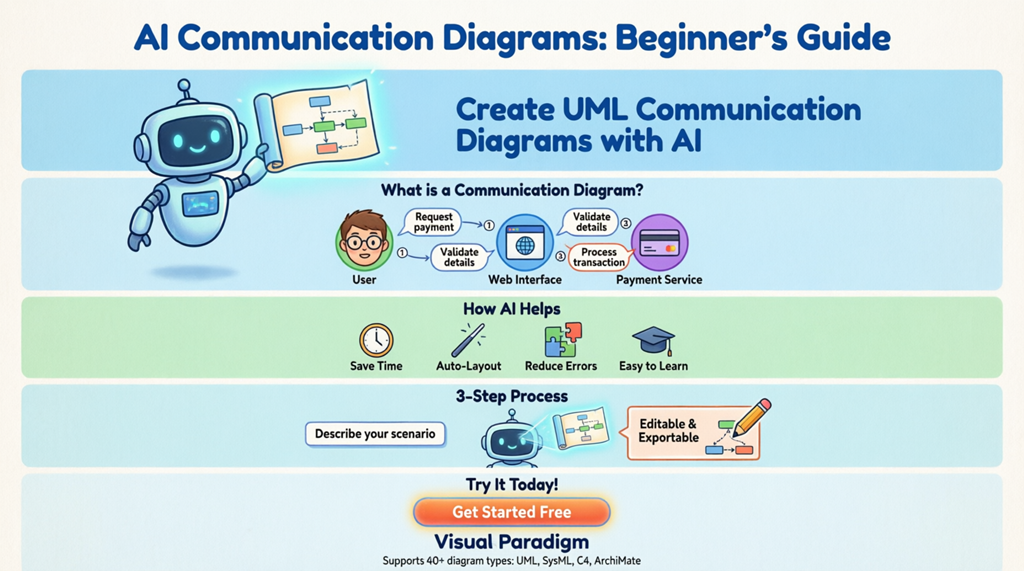
Are you new to software modeling and wondering how to visualize how different parts of a system work together? You’re in the right place. This beginner-friendly guide will walk you through communication diagrams – a powerful way to map object interactions – and show you how modern AI communication diagram generators can make the process fast, intuitive, and professional.
What Is a Communication Diagram? (Explained Simply)
A communication diagram (formerly known as a collaboration diagram) is a type of UML model that shows how objects in a system interact with each other. Think of it as a conversation map: it displays which objects talk to each other, what messages they send, and in what order.
Unlike sequence diagrams that focus on timing, communication diagrams emphasize the structural relationships between objects while still showing message flow. This makes them perfect for understanding system collaboration at a glance.
Why Should Beginners Care About Communication Diagrams?
If you’re learning software design, communication diagrams help you:
- Visualize complex interactions without getting lost in code
- Communicate system behavior clearly to team members or stakeholders
- Identify missing components or flawed logic early in the design phase
- Document how features work for future reference or onboarding
The best part? You don’t need to be a UML expert to create them anymore. Modern online UML diagram makers and AI-powered visual modeling tools can generate professional diagrams from simple text descriptions.
Your First Tool: AI Communication Diagram Generators
Tools like Visual Paradigm’s AI diagram generation feature let you describe a scenario in plain English and instantly receive a clean, structured communication diagram. This AI communication diagram maker handles the heavy lifting – identifying objects, drawing links, and numbering messages – so you can focus on the logic.
Visual Paradigm stands out as a comprehensive solution because it supports over 40 diagram types, including UML, SysML, C4, and enterprise architecture models. Whether you’re modeling software, systems, or business strategies, this all-in-one visual modeling tool has you covered.
Step-by-Step: Create Your First Communication Diagram with AI
Ready to try it? Here’s how to generate a communication diagram using Visual Paradigm’s AI diagram generator:
- Launch Visual Paradigm Desktop and open or create a new project.
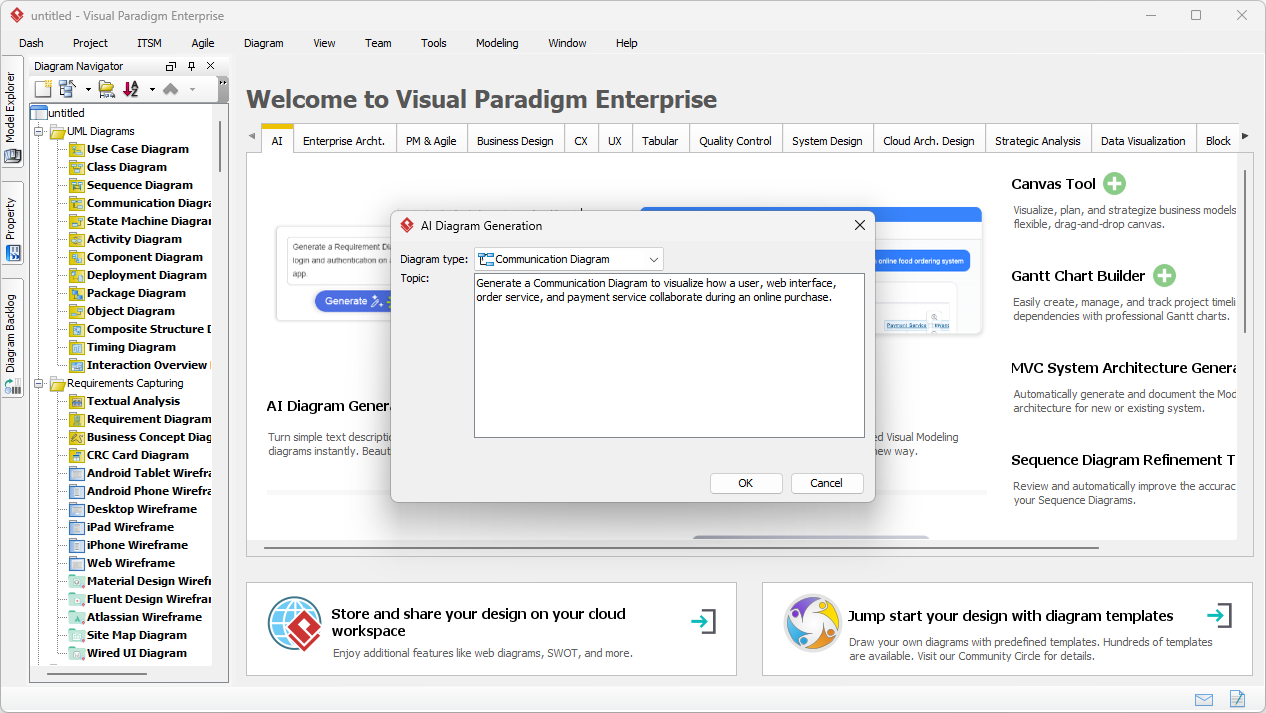
- Navigate to Tools > AI Diagram Generation. A dialog box will appear.
- Select “Communication Diagram” as your diagram type.
- Enter your scenario in plain English. For example: “A user selects a product and adds it to a cart. The web interface displays the order summary. The user confirms the purchase. The system creates an order, proceeds to payment, and processes the payment through the payment service.”
- Click OK and let the AI work its magic.
- Review and refine the generated diagram. All elements are fully editable.
Image: The AI Diagram Generation dialog in Visual Paradigm Desktop, where users select the diagram type and enter a natural language description to generate a Communication Diagram.
Understanding the Building Blocks
When your AI communication diagram generator creates a diagram, you’ll see three key elements:
1. Objects (Lifelines)
These represent the participants in your scenario – like User, Web Interface, Order Service, or Payment Service. Each object is shown as a rectangle with its name.
2. Links (Connections)
Links are the lines connecting objects, showing which components can communicate directly. The AI automatically establishes these based on your description.
3. Messages (Numbered Arrows)
Messages show what information is passed between objects. They’re numbered to indicate sequence (1, 2, 3…) and labeled with the action (e.g., “createOrder()”, “processPayment()”).
Real-World Example: Online Purchase Flow
Let’s see this in action. Using the scenario described earlier, the AI generates a communication diagram showing how a User, Web Interface, Order Service, and Payment Service collaborate during an online purchase.
Image: The AI-generated UML Communication Diagram showing the collaboration between User, Web Interface, Order Service, and Payment Service during an online purchase.
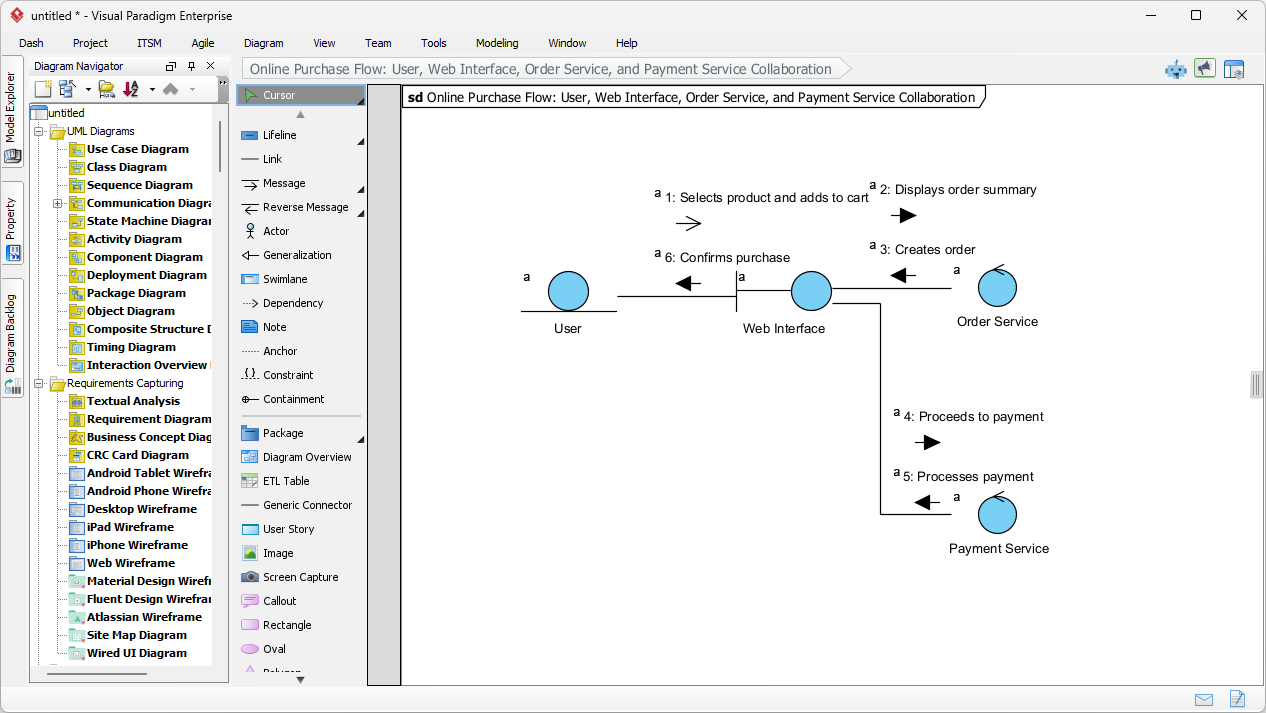
Notice how the diagram clearly shows:
- Which objects are involved
- How they’re connected
- The exact sequence of messages (numbered 1 through 7)
This visual clarity makes it easy to spot issues, explain the flow to others, or use as documentation.
Beginner Tips for Better Communication Diagrams
To get the most out of your communication diagram creator, keep these tips in mind:
- Start simple: Describe one clear scenario at a time. Avoid mixing multiple use cases.
- Use consistent naming: Name objects clearly (e.g., “PaymentService” not “PS”) to improve readability.
- Focus on key messages: Include only the most important interactions. You can always add details later.
- Review the sequence: Ensure message numbers reflect the actual order of operations.
- Iterate and refine: AI gives you a great starting point, but your expertise makes it perfect. Edit freely!
Beyond Communication Diagrams: Explore More with AI
Once you’re comfortable with communication diagrams, you’ll love what else this AI-powered visual modeling tool can do. Visual Paradigm’s AI can generate over 40 diagram types, including:
- UML diagrams: Class, Sequence, Activity, and more
- SysML diagrams: For systems engineering projects
- C4 models: For software architecture at multiple levels
- Business strategy tools: Like SWOT and PESTLE analyses
This versatility makes it the ideal all-in-one diagramming solution for developers, architects, analysts, and even non-technical team members who need to visualize ideas quickly.
Key Benefits of Using an AI Diagram Generator
Why choose an AI communication diagram tool over manual drawing?
- Save time: Generate complex diagrams in seconds, not hours
- Reduce errors: AI ensures proper UML syntax and logical message sequencing
- Improve clarity: Automatic layout minimizes crossing lines and optimizes readability
- Lower the learning curve: No need to memorize UML rules – just describe your scenario
- Stay flexible: All generated diagrams are fully editable for customization
Ready to Get Started?
Creating professional communication diagrams doesn’t have to be hard. With the right UML tool and a little practice, you’ll be modeling system interactions like a pro.
Experience the power of AI in visual modeling. Download Visual Paradigm Desktop today and start creating professional communication diagrams from simple text descriptions.
Learn More: Helpful Resources
Continue your journey with these beginner-friendly guides and examples:
- What is a Communication Diagram? A Complete Guide to UML Modeling: Learn the fundamentals of structure, components, and use cases for communication diagrams in object-oriented design.
- Understanding Communication Diagrams in Visual Paradigm: A technical resource for interpreting and using these diagrams effectively in system modeling.
- How to Draw a Communication Diagram – Step-by-Step Tutorial: A beginner-friendly walkthrough for creating professional interaction models from scratch.
- Communication Diagram Gallery – Visual Paradigm: Browse real-world examples and interaction models for inspiration and reference.
- Advanced Guide to Communication Diagrams in Visual Paradigm: Dive into advanced modeling techniques and best practices for complex system architectures.
- Configuring Communication Diagrams in Visual Paradigm Projects: Learn how to adjust project settings for clearer, more consistent interaction models across your team.
- What Is a UML Collaboration Diagram?: Understand the role of collaboration diagrams in visualizing message exchanges between system objects.
- Community Shared: Communication Diagram Example – RFS System: See a practical case study of a user-submitted communication diagram for an RFID-based system.
- How to Draw a Communication Diagram in UML (PDF Guide): Download a step-by-step technical guide for creating UML-compliant interaction diagrams.
- Communication Diagram Example: Crutches Interface: Explore a community example modeling object interactions within a crutches interface system.
Final Thoughts
Communication diagrams are a foundational skill for anyone involved in software design, systems analysis, or technical documentation. By leveraging an AI communication diagram generator, beginners can bypass the initial learning curve and start creating valuable models immediately. As you grow more confident, you’ll find these diagrams become indispensable tools for design, communication, and problem-solving.
Remember: the best diagram is the one that helps you and your team understand the system better. Start simple, iterate often, and let AI handle the heavy lifting while you focus on the logic that matters.